My Optimum
- 2.36K
- 4.1
- Installs
- 500.00K
- Price
- Free

Screenshots
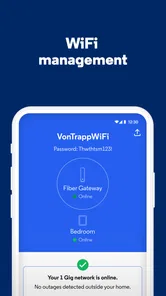
Analysis by Reviewed
When internet service becomes a household issue, the problem is rarely just “is the WiFi working?” Someone wants to check the network, another person needs help, and the account holder may be the only one who knows where to find billing information. I tested My Optimum with that shared-use situation in mind, and I found it most useful as a practical control point for everyday Optimum tasks rather than as a general-purpose productivity tool.
The app comes from CSC Holdings, LLC. and is available free of charge for Everyone. Its focus is narrow but clear: helping customers view information about their WiFi, handle payments, and look for support when something goes wrong. That focus is important because it sets the right expectation. This is not a replacement for a full router-management suite, a family organizer, or a messaging app. It is the mobile doorway to selected account and service tasks.
My overall impression is positive, especially for the person who normally becomes the household’s unofficial internet administrator. The app can reduce the need to search through old emails, open a browser, or call support for a simple account question. At the same time, shared access requires common sense. A convenience app connected to a home internet account should not automatically be treated as a device that every family member can use without boundaries.
How My Optimum fits a shared household
A realistic example is a weekday evening when the connection feels slow just as someone starts a video call, another person is trying to finish homework, and the bill is due soon. In that moment, the value of My Optimum is not entertainment or customization. It is having one place to check relevant WiFi information, deal with payment needs, and move toward help without switching between several unrelated channels.
I like this kind of focused design because it matches the way people actually think about provider accounts. When the internet has a problem, I do not want to browse a large collection of unrelated tools. I want to identify whether the issue belongs to the home connection, the account, or a support process. A provider-specific app can make that path feel more direct than a generic browser search.
It is particularly suitable for a household where one person manages the Optimum relationship and other people simply use the connection. The account holder can keep the app on their own phone and use it when needed, while everyone else can report symptoms in ordinary language: the WiFi drops in one room, a page will not load, or a payment question needs attention. That keeps account responsibility with the person who already handles it.
There is also a useful distinction between using the WiFi and managing the service behind it. A teenager, guest, or roommate may need the first but not the second. My Optimum is better viewed as an account-management tool than as a shared household dashboard. That difference helps avoid handing sensitive account activity to someone merely because they live in the same home.
More From Our News Desk

Weather by Xiaomi Review: Clear at a Glance, Less Clear Up Close

X Under Pressure: Can It Recover When Posting Goes Wrong?

Clash of Clans Is Won Between the Battles

Android Auto Makes the Case for Quieter Car Software

MobiOffice: Transforming Mobile Productivity with Seamless Integration

EA SPORTS FC™ Mobile Soccer: Redefining Mobile Sports Gaming
The app has earned a 4.1 average from around 15 thousand ratings, with roughly 2.4 thousand written reviews. Those figures suggest a generally favorable reception while also reminding me that provider apps are judged by real service situations. If the underlying connection or account issue is complicated, an app cannot make the problem disappear. Its job is to make the next step easier.
What I would use it for first
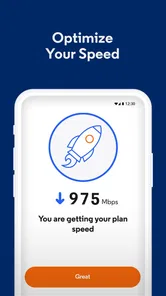
My first use would be checking the WiFi-related information available through the account before changing anything on the phone or router. This is a small but important habit. People often restart devices repeatedly, forget which network they are using, or blame a single phone when several devices are affected. Starting with the provider’s view can help separate a local device problem from a broader service concern.
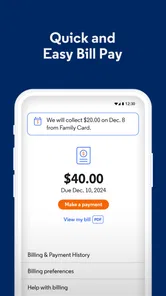
I would also use it for payment tasks when I am away from a computer. That is where a dedicated app can be more convenient than remembering a website address or navigating through a general account portal. The benefit is strongest for routine actions: checking what needs attention, completing a payment, and returning to normal life without opening a laptop.
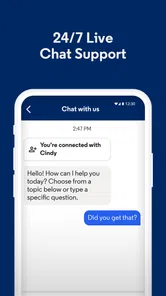
Support access is another practical reason to keep it installed. When a problem happens, the most useful support path depends on the account and service context. A provider app already tied to that context can be more efficient than explaining everything from the beginning through a generic search engine. I would still expect more involved problems to require patience and possibly direct interaction with support.
Setting boundaries before several people use the account
My main advice is simple: do not treat a shared home as proof that every person should have unrestricted access to the provider account. Before installing My Optimum on a second phone, decide who should handle payments and account changes. The app’s convenience is a strength, but convenience becomes a weakness when the wrong person is given access to responsibilities they do not normally manage.
For most households, the cleanest arrangement is for the primary account holder to use the app. Other residents can tell that person what they are seeing on their devices. This avoids confusion over who paid a bill, who contacted support, or who changed something while trying to solve a temporary WiFi problem.
A shared device presents a different challenge. If a tablet is used by children and adults, leaving an account-management app open can expose information that was never intended for casual browsing. I would finish the task, return to the normal app screen, and avoid storing the device in a place where anyone can pick it up and continue the session. That is not a special My Optimum feature; it is a sensible boundary for any service-account application.
There is a trade-off here. Keeping the app only with one person protects clarity, but it may slow down help when that person is traveling or unavailable. Giving access to multiple adults can improve convenience, yet it increases the chance of duplicate actions and misunderstandings. I prefer one clearly responsible adult unless the household has a reason to coordinate more broadly.
Another useful boundary is separating diagnosis from authorization. A family member can report that the connection is unreliable in a particular room without being the person who makes payment decisions. A roommate can describe an outage without being given access to the account holder’s financial tasks. Thinking in those two layers makes shared use much less awkward.
Why the account holder should establish the routine
Provider apps are easiest to use when the household already knows who owns the next step. If the WiFi fails, one person checks the app. If the bill needs attention, the same person handles it. If support is necessary, that person gathers the basic details before contacting anyone. My Optimum can support this routine, but it cannot create household agreement by itself.
I would keep a short mental checklist: identify whether one device or several are affected, note when the problem began, check the account through the app, and only then decide whether to seek help. This prevents the common mistake of opening support immediately without knowing whether the issue is limited to one phone, one room, or the wider service.
That workflow is one of the app’s less obvious strengths. Its value is not only in individual buttons; it is in giving the account holder a consistent starting place. Over time, that can make recurring household confusion less disruptive, even if the app itself remains fairly focused.
Coordinating WiFi, payments, and support without confusion
Coordination works best when people describe the problem precisely. “The internet is bad” is difficult to act on. “Two phones and the television lost connection, while the laptop in the same room still works” is much more useful. Before opening My Optimum, I would ask who is affected, which room they are in, and whether the problem is constant or occasional. Those details can make the app’s WiFi and help-related functions more useful.
For payment coordination, I would avoid having two household members independently open the app and attempt the same task. A quick message such as “I am handling the bill now” prevents duplicate effort and uncertainty. This is especially important when one person assumes the other has already completed the payment.
The app is also helpful as a shared reference point, but only if everyone understands what it can and cannot represent. A provider-facing view may help with account or service questions, while an individual device can still have its own settings, software issue, or weak signal position. I would not use a normal-looking account screen as proof that every device in the home is configured correctly.
One practical tip is to record the exact wording of an error before moving between screens. People often restart a phone or close an app and then forget what they saw. If My Optimum leads you toward support, that original detail can be more valuable than a vague description. It also prevents the household from repeating the same troubleshooting steps without learning anything new.
Another tip is to use the app at a calm time, not only during a crisis. I would open it when the connection is working and become familiar with where WiFi information, payment actions, and help options appear. That small preparation matters because a confusing interface feels much worse when several people are waiting for internet access.
At the same time, I would not expect My Optimum to replace every alternative. A browser may be better on a large screen when reviewing account information carefully. Router-specific tools may offer deeper local-network controls, while the phone’s own WiFi settings are more appropriate for forgetting a network or checking a device connection. The app’s advantage is provider context, not universal technical control.
Where the focused approach helps and where it stops
The narrow scope keeps the app understandable for ordinary account tasks. Someone who only needs to view WiFi information, pay, or get help does not need a complicated network-monitoring interface. That simplicity is valuable for a parent helping a relative, a roommate managing a shared bill, or an account holder who does not enjoy technical troubleshooting.
The limitation is that a focused provider app may not answer every question that appears during a home-network problem. It may point you toward the right support route without explaining why one room has a weaker signal or why a particular device refuses to connect. For those cases, device settings, router documentation, or a more advanced network utility may be the better tool.
I also would not install it solely because everyone in the house uses Optimum. If you are not responsible for the account, have no payment role, and rarely need support, the app may add little to your daily routine. In that situation, asking the account holder for help when necessary is simpler than creating another shared login habit.
Age, trust, and everyday responsibility
The Everyone age classification makes the app approachable in a mixed-age household, but an age label should not be confused with permission to manage an adult account. A child may be perfectly capable of reporting that the WiFi is unavailable. That does not mean the child should be responsible for payment activity or account decisions.
For younger users, I would frame My Optimum as an adult-managed service tool. They can explain what happened on their device, identify whether others are affected, and help locate the phone of the person who manages the account. This gives them a useful role without turning a technical problem into a financial or administrative responsibility.
Teenagers and older children may reasonably want more independence, especially if they are studying or working from home. Even then, I would agree on boundaries first. Decide whether they are only checking WiFi information, whether they may contact help, and who handles anything involving payment. Clear expectations are more effective than assuming everyone understands the difference between viewing information and changing an account.
Trust matters among adults too. A roommate arrangement can make shared service management practical, but it can also create disputes if nobody knows who is authorized to act. I would keep payment responsibility with the person named on the account or the person the household has explicitly chosen. The app can make access convenient; it cannot settle disagreements about ownership.
Privacy is part of this decision. Even without discussing specific screens or permissions, any account app deserves the same care as other personal services. I would avoid casually passing a logged-in phone around, especially in a home where guests visit or children borrow devices. The best shared-use setup is usually coordinated rather than completely open.
For older relatives, the app may be useful if they already handle the household’s Optimum service and prefer a phone to a computer. I would help them establish a repeatable path: open the app, look for the relevant WiFi or account task, and use help when the issue goes beyond a simple check. The goal is not to make them memorize technical language, but to give them a dependable first step.
The difference between convenience and control
My Optimum is convenient because it brings several provider-related needs together. That does not make it a complete control center for every person and every device in the home. I would be cautious about promising children or guests that opening the app will solve their connection problem. Sometimes the right answer is still to check the device, move closer to the router, or wait for the account holder to investigate.
This distinction also affects expectations during support. An app can help organize the request, but a complicated service issue may still take time. If a household needs detailed network diagnostics, device-by-device monitoring, or advanced parental management, I would look beyond this app rather than become frustrated that it does not behave like a specialist tool.
My household verdict after using the app
My Optimum makes the most sense for the person who carries responsibility for an Optimum household account. It gives that person a practical mobile route for viewing WiFi information, handling payments, and seeking help. In a shared home, that can remove a surprising amount of friction, especially when everyone else is asking the same person what is happening with the connection.
I appreciate that it is free and aimed at ordinary service tasks rather than technical enthusiasts. The current version is 2.7.0.6, and the app supports operating systems from version 10 onward. That makes the installation decision straightforward for compatible phones, although I would still keep the phone’s software and the app itself maintained so the experience does not become unnecessarily unreliable.
Its reach is substantial, with over 500 thousand installs, but I would judge it by fit rather than popularity. If you are an Optimum customer who pays the bill or regularly contacts support, I think it is worth trying. If you only need occasional WiFi access and never touch the account, it may not earn a permanent place on your phone.
The most useful way to adopt it is deliberately: let one responsible person manage the account, teach other household members how to report connection symptoms, and use the app as the first provider-specific checkpoint. Keep device troubleshooting and advanced network control in their proper tools. That separation makes the app more effective and prevents it from being blamed for problems outside its purpose.
My final recommendation is therefore positive but specific. My Optimum is a sensible household utility, not an all-purpose network command center. It is best for coordinated access, clear responsibility, and quick handling of routine account needs. Families should pair its convenience with sensible boundaries, while technically minded users should remember that deeper diagnostics may require something else. Used with those expectations, it can make the unglamorous business of keeping home internet running noticeably easier.
My Optimum Frequently Asked Questions
How much storage and mobile data should I allow for My Optimum?
My Optimum is designed for use on a smartphone or tablet, and the app can be used to view WiFi information, pay, and get help with Optimum services. The space it needs can vary with the device and updates, so check the download size shown in your app store and leave room for future updates. If you use it away from WiFi, your mobile plan may apply data charges.
Is My Optimum suitable for someone who is not an Optimum customer?
My Optimum is mainly intended for people who have Optimum services and want to manage their account or get help. Someone without an account may still be able to install the app, but many of its practical features depend on signing in with Optimum credentials. If you are considering Optimum service, the app is not a substitute for checking service options or setting up an account.
Which devices can run My Optimum?
My Optimum is available for Android and iOS devices, so customers can manage their Optimum account from a compatible smartphone or tablet. On Android, the app requires Android 10 or later. Before downloading, check your device’s operating-system version and make sure you have enough space for the installation and any future updates.
Who makes My Optimum, and is it intended for everyone?
My Optimum is developed by CSC Holdings, LLC. It is a productivity app for Optimum customers who want to view WiFi information, pay bills, and get help with their services. The app has an Everyone age rating, though some features are most useful to people who already have an Optimum account and can sign in.
What is My Optimum, and what can I use it for?
My Optimum is the official mobile app for Optimum customers, designed to help manage internet, television, phone, and mobile services from an Android or iOS device. After signing in, users can review account details, check bills, make payments, monitor service information, manage certain settings, and access support without needing to visit the Optimum website.
Pros
- View and pay your Optimum bill directly from the app.
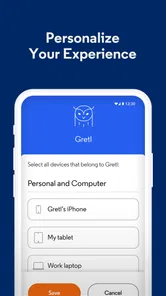
- Manage Wi‑Fi settings and connected devices in one place.
- Quickly access customer support and troubleshooting tools.
- Find nearby Optimum stores and service locations with ease.
- Monitor account services without needing to use a desktop browser.
Cons
- Some features may require an active Optimum account and eligible services.
- Performance can vary depending on your internet connection and device.
- Users may need to sign in again after updates or extended inactivity.
- Certain account changes may still require contacting customer support.
- The app may request permissions that some users prefer to limit.











