

My Memorial Hermann™
- 278.00
- 4.3
- Installs
- 100.00K
- Price
- Free

Screenshots
Analysis by Reviewed
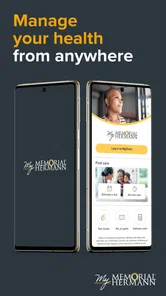
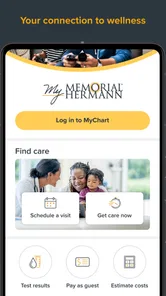
Managing healthcare from a phone sounds simple until you need to find a test result, contact a care team, or remember where an appointment is scheduled. My Memorial Hermann™ is built for that practical side of healthcare. It brings the My Memorial Hermann experience and MyChart into one mobile destination, with the goal of making routine health administration less scattered.
I approached it less like a typical lifestyle app and more like a digital front door to a health system. That distinction matters. This is not a symptom checker, a fitness tracker, or a replacement for urgent medical care. It is a medical app from Memorial Hermann Health System, intended for people who already use that organization’s services and want a more convenient way to handle their health information and interactions.
My overall impression is positive, but conditional: the app is most useful when you are already part of the Memorial Hermann system. If your doctors, records, and appointments are elsewhere, its value drops quickly. I also think healthcare apps deserve a higher level of caution than ordinary apps, so I paid particular attention to account access, user choices, and the moments when sensitive information is displayed or shared.
What the app is really useful for
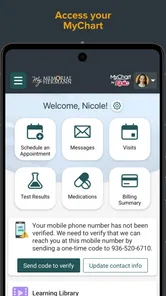
The central appeal is convenience. Instead of relying on phone calls, paper instructions, separate reminders, and a desktop browser, you can use one mobile app as a starting point for common healthcare tasks. The store summary describes My Memorial Hermann and MyChart as a fast way to manage your health, and in practical terms that means reducing the small bits of friction that often surround appointments and medical records.
That convenience is especially noticeable in an everyday situation. Imagine leaving a visit with several details to remember: the next appointment, a result that may be posted later, a question for the care team, and instructions you want to review once you are home. A mobile health portal is useful here because it gives you a place to return to rather than forcing you to reconstruct everything from memory or search through old messages.
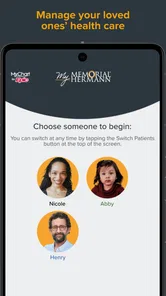
I would also see it helping caregivers who coordinate ordinary healthcare tasks for a family member, provided they have the appropriate account access. The important point is that access should be intentional. A shared phone, a remembered password, or an unlocked screen is not the same thing as permission to view someone else’s health information.
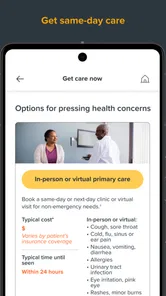
The app’s medical category is a good fit because its purpose is administrative and informational healthcare support. It should not be treated as an emergency channel. If a situation is urgent, waiting for a portal message or trying to solve the problem through an app is the wrong workflow. The safer habit is to use the appropriate emergency or clinical service first, then use the app for follow-up and organization.
More From Our News Desk

 Instagram
Instagram’s Power Comes From Its Place in Your Phone
A close look at how Instagram turns Meta’s reach, recommendation systems and everyday camera habits into durable platform power—and what that costs users.

 Gmail
GmailGmail in a Busy Inbox: Who Benefits Most?
From first account to crowded workday, Gmail earns its place through dependable search and flexible sorting—but its best fit depends on how much inbox maintenance you can tolerate.

 Prime Video
Switching to Prime Video: What Changes in Your Viewing Routine
Prime Video can make a compelling second home for streaming, but switching means learning a different catalog, rental layer, and route from browsing to playback.

 Universal TV Remote Control
Universal TV Remote Control Works Best as a Reliable Backup
A phone remote earns its place through quick setup and reliable habits. Here is how to get more from Universal TV Remote Control—and where its limits show.

 Weather - By Xiaomi
Weather by Xiaomi Review: Clear at a Glance, Less Clear Up Close
Xiaomi’s weather app makes everyday forecasts quick to scan, but its calm surface can leave useful details and recovery paths harder to find than they should be.

 X
XX Under Pressure: Can It Recover When Posting Goes Wrong?
A resilience-focused review of X, examining setup, mistaken posts, interruptions, weak connections, and the gaps that matter when recovery needs to be dependable.
Latest News



A familiar portal with a more convenient entry point
MyChart is already familiar to many patients, and the mobile format mainly changes how easily you can reach that experience. Compared with calling a clinic for every small question, a portal can be more convenient when the matter is non-urgent and can wait for a response. Compared with opening a desktop website, a phone app is easier to check while traveling or between appointments.
That does not make it better than every alternative. A phone call is still preferable when a scheduling issue is complicated, when you need immediate clarification, or when the person handling the request needs to ask several questions. A desktop browser may be more comfortable for reviewing a long medical history or carefully reading multiple documents. I see the app as a useful companion, not a universal replacement for staff, clinicians, or a full-sized screen.
The current version is 11.7.2, and the app requires at least iOS 11. That makes it accessible to a broad range of supported iPhones, although compatibility is only one part of the experience. Healthcare apps can also depend on account setup, network access, and whether your care is actually connected to the health system. Installing the app is easy; getting meaningful value from it depends on those surrounding conditions.
Trust starts with the account, not the icon
Healthcare information is different from ordinary app content. A shopping app can be inconvenient if it forgets a preference; a health portal can expose information that is deeply personal if an account is left open or credentials are mishandled. For that reason, I would not judge this app only by how quickly it opens or how cleanly it presents a menu.
The first trust question is whether you understand which account you are using and who should be able to access it. Before relying on the app, I would make sure the sign-in details are unique, avoid saving them on a device that other people freely use, and review the phone’s own lock settings. These are not glamorous features, but they are part of responsible use of any patient portal.
I also recommend checking the account and notification choices during setup rather than tapping through them automatically. A notification that merely says you have a new message is very different from one that displays sensitive medical text on a lock screen. The safer choice depends on your living situation, your phone habits, and whether other people can see the screen.
That is where user control matters more than promotional language. I prefer an app that lets people make visible choices about notifications, sign-in behavior, and account access instead of encouraging them to treat convenience as the only priority. My Memorial Hermann™ should be evaluated through those choices and through the controls presented to the patient, not through assumptions about what a healthcare app must do behind the scenes.
Handling sensitive moments carefully
The most sensitive moments are not necessarily dramatic. They can be ordinary actions such as opening a result in a public place, receiving a notification while a family member is nearby, or leaving the app open after checking an appointment. Medical information can be private even when the task feels routine.
I would build a simple habit around the app: check messages in a private setting, close the session when finished, and avoid discussing a result based only on a notification preview. A portal can help you access information, but it does not remove the need for clinical interpretation. If a result is confusing or worrying, the right next step is to contact the relevant care team rather than drawing a conclusion from a number or short message.
Another practical tip is to separate convenience from urgency. A message sent through a portal is appropriate for a non-urgent question, but it should not become a substitute for immediate help. This is one of the most important trade-offs with any asynchronous health tool: it gives you a record of communication, but it may not give you an instant response.
Travel creates another useful test. If you are away from home and need to check an appointment or look back at information, a mobile portal can be easier than calling from an unfamiliar location. At the same time, public Wi-Fi, borrowed devices, and shared screens create additional privacy concerns. I would use my own secured phone whenever possible and avoid accessing sensitive information on equipment I do not control.
What user agency looks like in practice
User agency is not just the ability to open a record. It includes knowing what action you are taking, why you are taking it, and whether you can change your mind or adjust the way the app communicates with you. Before sending a message, I would reread the recipient and the wording, especially if more than one clinic or care team appears in the account.
I would also keep expectations realistic. A portal message creates a written trail, which is useful for remembering what was asked and when. It can be less effective than a conversation when the issue is complicated, emotionally difficult, or time-sensitive. The strongest workflow is often a combination: use the app to organize the question and preserve details, then use a phone call or visit when the situation needs immediate discussion.
For families, access deserves extra care. If another person helps manage appointments, that arrangement should be handled through the account’s proper access process rather than by casually handing over a password. This protects both people: the patient retains clearer control, and the helper is less likely to see information they were not meant to view.
I would also review the app after major changes in your healthcare routine. A new doctor, a different clinic, or a change in who helps with your care can affect how you use the portal. Removing old shortcuts, adjusting notifications, and checking who can access the phone are small maintenance tasks, but they prevent a convenient tool from becoming an overlooked privacy risk.
Where the experience may feel limited
The biggest limitation is its dependence on Memorial Hermann. This is not a broad, independent health organizer that becomes equally valuable regardless of where you receive care. If your appointments and records are spread across unrelated providers, you may still need several portals, phone numbers, and websites. In that situation, this app can be useful for one part of your healthcare but cannot solve the fragmentation by itself.
It is also not ideal for people who dislike managing accounts on a phone. Healthcare portals can require careful sign-in behavior and attention to messages, and a small screen is not always the best place to review detailed information. Someone who prefers speaking with staff may find the app less reassuring, particularly when an issue requires explanation rather than a simple administrative action.
Another limitation is emotional rather than technical. Seeing a new result arrive can create anxiety, especially when the context is not immediately clear. The app may improve access, but faster access is not always the same as better understanding. I would use it to stay informed while remembering that interpretation belongs in a conversation with a qualified healthcare professional when needed.
The free price is welcome, and the Everyone age rating makes the app broadly approachable as a consumer download. Those labels do not mean every healthcare task is suitable for every user, however. Children, older adults, and people receiving help from caregivers may need an agreed-upon process for account access and notifications. The app can support that process, but it cannot decide it for you.
Who should use it, and who should look elsewhere
I would recommend My Memorial Hermann™ to patients who receive care through Memorial Hermann Health System, want mobile access to the MyChart experience, and are comfortable handling private information on a smartphone. It is particularly well suited to people who want a quick way to stay organized between visits and reduce unnecessary calls for routine matters.
I would be more cautious about recommending it to someone whose healthcare is divided among several unrelated systems. It may still be worth installing for Memorial Hermann appointments, but expectations should be modest. If your main need is a single cross-provider overview, a different health-management approach may fit better, assuming it offers the controls and privacy practices you are comfortable with.
I would also steer away from using it as the primary tool for urgent concerns, complex medical decisions, or situations where you need immediate human reassurance. In those cases, direct clinical contact is the better option. The app works best when the task is identifiable, non-urgent, and connected to your Memorial Hermann care.
My measured verdict
Memorial Hermann Health System has created a practical mobile gateway for patients who want their healthcare administration closer at hand. Its strongest quality is not novelty; it is the reduction of everyday friction around accessing and managing care. With a 4.3 average from over 500 ratings and more than 100 thousand installs, it has a meaningful user base, while the free price removes a common barrier to trying it.
Those figures do not replace personal judgment, especially with a medical app. I would make the decision based on whether Memorial Hermann is part of your healthcare routine and whether you are willing to manage account security and notification privacy carefully. The app is a sensible convenience layer, but it is not a complete healthcare solution and should never be confused with emergency support.
My final view is cautiously favorable. I would install it if my care were connected to Memorial Hermann and use it for organized, non-urgent tasks, while keeping phone-based clinical support available for anything time-sensitive or unclear. The best reason to use it is controlled access to your own care information—not the promise that an app can replace the healthcare relationship around it.
My Memorial Hermann™ Frequently Asked Questions
What devices and operating systems support My Memorial Hermann™?
My Memorial Hermann™ is a medical app for mobile devices, and the current version requires iOS 11 or later. Before downloading, check that your device is running a compatible operating system and has enough available space for the app. Keeping your device’s software and the app up to date can also help you use its patient-portal features smoothly.
Who can use My Memorial Hermann™?
My Memorial Hermann™ is designed for patients who receive care through Memorial Hermann Health System. Its health-management tools are most useful when you have a patient account that can be linked to the organization’s online services. A caregiver or family member may need the appropriate account access to help manage another person’s care; use the organization’s official process for setting that up.
What is My Memorial Hermann™ used for?
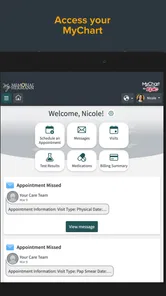
My Memorial Hermann™ is a mobile healthcare app for patients of Memorial Hermann. After signing in, users can typically manage appointments, review parts of their medical information, communicate with care teams, check test results when available, view billing details, and access other connected health services. The exact tools shown may depend on your location, provider, insurance information, and whether your account is fully activated.
How do I sign in or create an account in My Memorial Hermann™?
To use the app, you generally need an eligible Memorial Hermann patient account and must sign in with the credentials associated with the organization’s online patient portal. New users may be asked to verify their identity using personal information, an activation code, or details provided by Memorial Hermann. If registration or login fails, use the recovery options in the app or contact official patient support rather than creating duplicate accounts.
Can I schedule appointments and communicate with my doctor through the app?
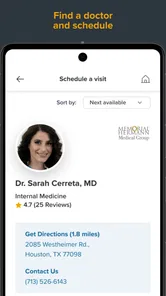
The app may allow you to request, schedule, reschedule, or review certain appointments, although availability varies by department and provider. It can also provide secure messaging for participating care teams, which is useful for non-urgent questions and follow-up communication. Do not use messaging for emergencies or time-sensitive symptoms; call emergency services or contact the appropriate medical service immediately when urgent care is needed.
Pros
- Secure access to appointments
- test results
- prescriptions
- and health records.
- Easy appointment scheduling with Memorial Hermann providers and facilities.
- Supports virtual visits for convenient care from home.
- Prescription tools help users request refills and review medication details.
- Health reminders and notifications can help users stay organized.
Cons
- Features may be limited if you receive care outside the Memorial Hermann network.
- Some services require location access or additional account verification.
- App performance may vary during maintenance or high-traffic periods.
- Not all records or external provider information may appear immediately.
- Telehealth availability can depend on insurance
- provider
- and appointment type.











