

My Health at Vanderbilt
- 1.26K
- 4.7
- Installs
- 100.00K
- Price
- Free

Screenshots
Analysis by Reviewed
My Health at Vanderbilt is the kind of medical app I value most when it turns a stressful administrative task into something I can handle from my phone. Developed by Vanderbilt University Medical Center, it is designed to put a person’s health record within reach rather than leaving every question to a phone call or a paper folder. I found its main appeal less about novelty and more about access: when a health detail matters, having a central place to check can make the next decision easier.
This is a free medical app for Everyone, and it has been available since May 18, 2016. Its current version is 11.7.2, with a minimum operating-system requirement of 11. That combination makes it a practical choice for people who already receive care through Vanderbilt and want a mobile route into their health information. It is not a replacement for urgent medical help, diagnosis, or a conversation with a clinician, but it can make ordinary care management less scattered.
Putting a Vanderbilt health record within reach
The capability that defines My Health at Vanderbilt is secure access to a personal health record. In daily use, that changes the starting point of a healthcare task. Instead of searching through old messages, calling an office to ask what was documented, or trying to remember details from a previous visit, I can begin by checking the information connected to my care.
That matters most when the question is simple but time-sensitive. I may need to review something before an appointment, confirm what I already know, or give a family member a clearer account of my care. The app’s value comes from reducing the distance between the question and the record. It does not make healthcare effortless, but it can remove one layer of avoidable friction.
I also like the distinction between having health information available and merely having a collection of general medical articles. Many medical apps focus on symptoms, reminders, or wellness advice. This one is centered on the user’s relationship with Vanderbilt University Medical Center. That makes it more personal and potentially more useful for someone whose care is already connected to that institution, while making it much less relevant to someone looking for a broad health encyclopedia.
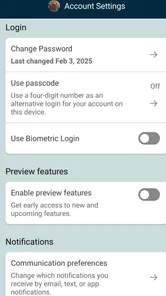
The secure aspect is important here. A health record is not casual information, so convenience should not come from treating it like an ordinary notes app. I would still use a strong device passcode, keep the phone’s operating system current, and avoid opening private medical information on a shared device. The app can provide access, but good personal security habits remain part of using it responsibly.
What the central record changes in everyday care
The biggest practical improvement is continuity. Healthcare often feels fragmented because information is spread across appointment conversations, printed instructions, pharmacy packaging, email, and memory. A record-focused app gives me a better chance of returning to the same source when I need to prepare, check, or explain something.
More From Our News Desk

 Instagram
Instagram’s Power Comes From Its Place in Your Phone
A close look at how Instagram turns Meta’s reach, recommendation systems and everyday camera habits into durable platform power—and what that costs users.

 Gmail
GmailGmail in a Busy Inbox: Who Benefits Most?
From first account to crowded workday, Gmail earns its place through dependable search and flexible sorting—but its best fit depends on how much inbox maintenance you can tolerate.

 Prime Video
Switching to Prime Video: What Changes in Your Viewing Routine
Prime Video can make a compelling second home for streaming, but switching means learning a different catalog, rental layer, and route from browsing to playback.

 Universal TV Remote Control
Universal TV Remote Control Works Best as a Reliable Backup
A phone remote earns its place through quick setup and reliable habits. Here is how to get more from Universal TV Remote Control—and where its limits show.

 Weather - By Xiaomi
Weather by Xiaomi Review: Clear at a Glance, Less Clear Up Close
Xiaomi’s weather app makes everyday forecasts quick to scan, but its calm surface can leave useful details and recovery paths harder to find than they should be.

 X
XX Under Pressure: Can It Recover When Posting Goes Wrong?
A resilience-focused review of X, examining setup, mistaken posts, interruptions, weak connections, and the gaps that matter when recovery needs to be dependable.
Latest News



For example, imagine I have an appointment coming up after several months without a visit. Rather than relying on memory alone, I can open the app beforehand and use the available record as a prompt for my questions. I might notice a detail I want clarified, remember a concern I had forgotten, or prepare a more accurate account of what happened since the last visit. The app does not conduct the appointment for me; it helps me arrive better prepared.
That preparation is a non-obvious strength. Many people open a healthcare app only when a problem appears, but the better workflow is to check it before the appointment, while the details are still fresh, and again afterward when instructions need reviewing. Used that way, the app becomes a small personal reference point rather than a tool opened only during a crisis.
It can also help when another person is involved in care. A parent, partner, or trusted relative may need a clearer understanding of what has happened. I would be careful about privacy and would not casually hand over an unlocked phone, but having the relevant record available can make a conversation more precise. That is especially useful when stress makes it difficult to recall medical details accurately.
How I would use it before and after an appointment
Before an appointment, I would open My Health at Vanderbilt with a specific purpose instead of browsing aimlessly. I would note the questions I want answered, compare my memory with the information in the record, and identify anything that seems unclear. This approach prevents a common problem with digital records: having access to information but not knowing what to do with it.
After the appointment, I would return to the app when I am calm enough to review what is available. I would treat the record as a reference for follow-up, not as a substitute for asking the care team to explain something confusing. If a detail looks unfamiliar or seems inconsistent with what I remember, that is a reason to seek clarification rather than make an assumption.
This workflow is particularly helpful for people who see more than one clinician within the same medical system. It gives them a consistent place to begin, even though it does not remove every boundary between departments, visits, or outside providers. If care happens elsewhere, I would still keep separate notes and documents for that care instead of assuming one institution’s app will represent an entire medical history.
Another useful habit is to avoid treating the phone screen as the final authority during an urgent situation. If I have severe symptoms or an emergency, I would seek immediate medical help rather than spending time navigating a record. My Health at Vanderbilt is most effective for planned care, information review, and preparation—not for replacing emergency services.
The best scenario: preparing for care without scrambling
The strongest scenario is a person who receives care through Vanderbilt and wants a dependable way to stay oriented between appointments. Consider someone who has an upcoming visit, several questions, and a tendency to forget details once they enter the exam room. Opening the app in advance can turn vague worry into a short, useful list of topics to discuss.
In that situation, the app’s effect is modest but real. It does not promise an answer to every medical question. Instead, it helps the user start with the information already associated with their care. That can improve the quality of the conversation because the patient is less dependent on memory and less likely to spend the first part of the visit reconstructing basic context.
I would also recommend it to someone managing care over time rather than dealing with a single isolated visit. Ongoing care often involves repeated questions, changing circumstances, and the need to revisit earlier information. A central mobile record is more useful in that pattern than it is for a person who rarely interacts with Vanderbilt and has no reason to check a health account between visits.
Families may find the same workflow helpful, but privacy needs to be handled deliberately. A caregiver should not assume that convenience gives them permission to access another person’s record. I would use the app for my own account and follow the appropriate arrangements for any authorized support. The important point is that the app can support coordination without turning a private health record into a shared household document by default.
Where the experience has limits
The first trade-off is institutional focus. My Health at Vanderbilt makes sense when Vanderbilt is central to my care. If most of my appointments, records, and prescriptions are handled by unrelated providers, a broader health-record solution or each provider’s own system may be more practical. Installing it does not automatically solve the problem of fragmented healthcare across different organizations.
There is also a difference between access and understanding. A record can contain information that is accurate but difficult for a nonprofessional to interpret. I would not use a lab result, diagnosis entry, or clinical note as a reason to change treatment on my own. The app can help me see what to ask; it cannot replace the judgment and context of a qualified clinician.
Another source of friction is that digital access depends on the surrounding account and device experience. A forgotten sign-in detail, an aging phone, or an unreliable connection can make an otherwise useful tool feel inconvenient at the wrong moment. For that reason, I would not wait until the morning of an appointment to discover whether I can access my account. A quick check beforehand is a simple but valuable precaution.
The app may also feel excessive to someone who wants only general wellness guidance. If the goal is exercise planning, nutrition ideas, symptom education, or medication reminders unrelated to Vanderbilt care, a specialized health app may offer a more direct experience. My Health at Vanderbilt is strongest when the user wants institution-linked health information, not when they are searching for a broad collection of lifestyle tools.
Finally, I would keep expectations realistic about what an app can do. A mobile record can make information easier to reach, but it cannot guarantee that every healthcare question is resolved immediately. Some situations still require a call, a visit, a clinician’s explanation, or a different service altogether. That is not a flaw unique to this app; it is an important boundary for any digital medical tool.
Who gains the most from using it
The clearest audience is a Vanderbilt patient who wants to be more prepared and less dependent on paper records. It is also a good fit for people who prefer checking information privately on a phone rather than making a call for every routine question. The free price removes an obvious barrier, and the Everyone age rating makes it broadly approachable for ordinary household use, with privacy still requiring adult judgment.
I think it is especially worthwhile for people who have recurring appointments, complicated medical histories, or a habit of forgetting what was discussed. Those users gain more from a central record because they return to it repeatedly. The benefit is not just saving a few minutes; it is having a consistent reference when preparing questions and tracking the thread of care.
People who should look elsewhere are those whose healthcare is mostly outside Vanderbilt, those seeking a full personal health-management suite, and those expecting an app to interpret medical information for them. A general health platform may be better for lifestyle tracking, while a provider’s direct contact route may be better for an urgent question. Choosing the right tool depends on whether the main need is record access or something broader.
The app’s reception suggests that many users find this kind of access worthwhile: it holds a 4.7 average from around 2.5 thousand ratings, with over 100 thousand installs and about 1.3 thousand written reviews. Those figures do not tell me whether every person will have a smooth experience, but they do indicate that the basic idea has reached a meaningful audience.
For my part, I would judge it by one question: does it make my Vanderbilt care easier to understand and prepare for? When the answer is yes, the app earns a place on my phone. Its strongest benefit is not entertainment or an impressive collection of extras. It is the practical ability to bring a relevant health record closer at the moment I need to get organized.
My Health at Vanderbilt is therefore best viewed as a focused access tool, not a universal medical assistant. Vanderbilt University Medical Center’s app does its most useful work when I use it before a planned interaction, review information carefully, and bring questions to the appropriate care team. If that matches your situation, I would recommend trying it as a companion to your care—not as a replacement for professional advice, emergency help, or your own careful judgment.
My Health at Vanderbilt Frequently Asked Questions
Who is My Health at Vanderbilt intended for?
My Health at Vanderbilt is intended for patients who receive care through Vanderbilt University Medical Center and want to access portal services on a mobile device. It may also be useful to people who help manage a patient’s care when appropriate account access is available. The app’s features depend on the patient’s services, account status, age, and type of care, so the experience can differ from one user to another.
What is My Health at Vanderbilt?
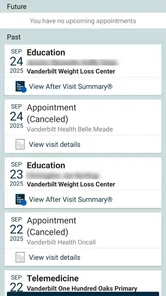
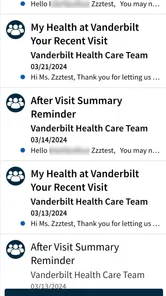
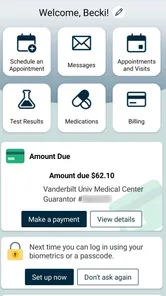
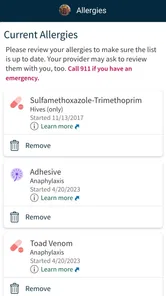
My Health at Vanderbilt is Vanderbilt University Medical Center’s patient portal and mobile app. After signing in, patients can review parts of their medical record, check test results, view upcoming appointments, request or manage visits, communicate with care teams, and handle certain billing or prescription tasks. Available features may vary depending on your Vanderbilt services, age, account status, and the type of care you receive.
How do I sign up for or access a My Health at Vanderbilt account?
You generally need to be a Vanderbilt University Medical Center patient and create or activate an account using the registration details provided by the organization. The app may allow sign-in with an existing portal account, while some users may be able to complete identity verification online. Keep your username, password, and verification information private, and use the official app listing or Vanderbilt website rather than downloading an unofficial copy.
What can I do with the My Health at Vanderbilt app?
The app is designed to make common healthcare tasks easier from a phone or tablet. Depending on your account and location, you may be able to view appointments, receive reminders, review available clinical information and laboratory results, send secure messages, request prescription renewals, access bills, and manage portions of your personal information. It is a convenience tool, not a replacement for urgent medical care.
Does My Health at Vanderbilt replace contacting a doctor or seeking urgent care?
No. The app can help with routine portal tasks, such as reviewing available information or sending a message to a care team, but it is not a substitute for a clinician’s advice or urgent medical attention. Messages and other portal features may not be suitable for time-sensitive concerns. For emergencies or urgent symptoms, contact emergency services or seek immediate care rather than waiting for an app response.
Pros
- Secure access to Vanderbilt Health records
- appointments
- and test results.
- Makes prescription details and refill requests easier to manage.
- Supports direct communication with care teams through in-app messaging.
- Helps users find Vanderbilt clinics
- providers
- and available services.
- Useful health reminders can help patients stay organized between visits.
Cons
- Some features may only be available to established Vanderbilt Health patients.
- Certain test results can take time to appear after they are finalized.
- Messaging response times may vary depending on the department or provider.
- The app is less useful for people receiving care outside the Vanderbilt network.
- A stable internet connection is needed for most account and record features.











