My Epic: Skiing & Snowboarding
- 3.05K
- 3.8
- Installs
- 500.00K
- Price
- Free

Screenshots



Analysis by Reviewed
I treat a resort app as most useful when it helps me make small decisions without taking over the day. My Epic: Skiing & Snowboarding is a free sports app from The Vail Corporation, and its purpose is to bring mountain-related tools together on a phone. I’d see it as a companion for planning and coordinating a ski day, rather than a replacement for checking signs, asking staff, or using my own judgement on the slopes.
Your Personal Mountain Companion
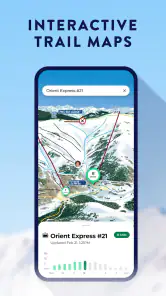
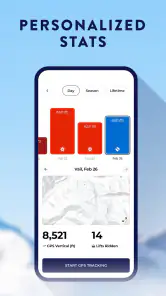
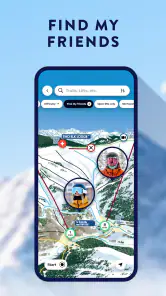
First up, let’s talk about what initially caught my eye—the comprehensive mountain navigation features. My Epic: Skiing & Snowboarding is like your personal GPS on the slopes. You can easily track your runs, map out your day, and even keep tabs on your pals if they decide to veer off to the black diamond runs without you. The interface is super user-friendly, which means even if you’re not tech-savvy, you’ll be shredding through the app features like a pro.
A practical rhythm for a day on the hill
I’d start by opening the app before leaving the lodge, when I have a warm place to look at the mountain information and decide what I want to check during the day. Once outside, I’d use it in short visits rather than keep the screen open while moving: glance at a run or lift detail while stopped, agree on a meeting point with friends, then put the phone away. That habit matters more than any clever shortcut, because attention belongs on the trail.
For a group, the useful routine is to settle expectations early. If people split up, agree when and where to regroup instead of assuming everyone will watch a phone. Run tracking and friend location can help with coordination, but they work best as supporting tools; they are not a substitute for a clear plan when a group member loses signal, runs out of battery, or simply wants to ski without checking a screen.
That routine also makes the app easier to evaluate. I’d begin with one or two jobs—checking mountain information and coordinating a meetup, for instance—rather than trying every available tool on the first run. After a day or two, it becomes clearer whether tracking and sharing add something useful or just create more things to manage. The best setup is the one that fits the way I already ski, not the one that keeps me looking at my phone.
Real-Time Updates and Alerts
One of the coolest features has got to be the real-time updates. Picture this: you’re about to hit the gondola, and bam, the app notifies you of a sudden weather change. It’s like having your personal weather forecaster. Plus, the lift status alerts are a total game-changer. No more getting to the lift only to find out it’s closed. This feature alone keeps your day running smoothly, ensuring you get the most out of your time on the mountain.
I’d use updates as a planning aid, not a guarantee that conditions will stay the same between checking the app and reaching a lift. A simple workflow is to check before choosing the next area, then confirm locally if something looks uncertain. That helps avoid crossing the mountain based on an old glance, and it leaves room to change plans when weather or operating conditions shift.
More From Our News Desk

Clash of Clans Is Won Between the Battles

Android Auto Makes the Case for Quieter Car Software

MobiOffice: Transforming Mobile Productivity with Seamless Integration

EA SPORTS FC™ Mobile Soccer: Redefining Mobile Sports Gaming

How Microsoft OneDrive Became a Mobile Productivity Giant

How Google Translate Breaks Language Barriers Effortlessly
For a visitor unfamiliar with a resort, this can be more useful as a decision prompt than as turn-by-turn direction. I’d check a lift update before committing the group to a long traverse, then ask staff or check the posted signs if there’s any doubt. That small pause can save time and frustration, but it also recognizes that mountain conditions and operations can change while I’m on the way.
Settings and habits worth checking
Before a first outing, I’d take a few minutes indoors to look through the available settings and decide which alerts I actually want. Keeping only useful notifications turned on can make important changes easier to notice, while a busy stream of alerts is easy to ignore. I’d also check how the app behaves with location access and battery use, then make sure the phone is charged before heading out. These are ordinary preparation steps, but they make a bigger difference on a cold, long day than repeatedly changing settings with gloves on.
If I’m meeting friends, I’d confirm that everyone knows how the app’s social and location tools fit into the plan rather than assuming that installing it automatically connects the group. If one person prefers not to share location, a fixed meeting spot and check-in time are better than pressuring them to use a feature. That makes the app useful without letting it dictate how the group spends the day.
I’d also make a habit of checking the phone’s basic readiness before heading outdoors: charge it indoors, secure it somewhere accessible, and decide when I’ll check it rather than pulling it out every few minutes. A phone tucked away is less likely to distract me or get exposed unnecessarily, while a predictable check-in routine helps friends know when to expect an update. These habits don’t depend on special settings, and they make the app’s tools more practical.
Social Connectivity and Sharing
Let’s not forget the social aspect. My Epic really nails it by letting you connect with friends, share your epic moments, and even brag a little about your top speeds or longest runs. The social feed is packed with cool features that let you post photos and updates, making your friends wish they were hitting the slopes with you.
Compared with a general mapping app, a mountain-focused tool can put resort activity and ski-day details closer together, which is handy when the question is “what should we do next?” rather than simply “where am I?” A phone’s built-in map or a paper trail map may still be the better fallback when you want a simple overview without social features, or when you’d rather conserve battery. I’d treat sharing as optional: it adds fun for friends who enjoy comparing a day, but it is not essential to finding your way around.
That distinction matters when a group includes different kinds of skiers. One person may enjoy tracking runs and comparing the day afterward; another may prefer to meet at lunch and leave the phone untouched. I’d keep the shared plan independent of everyone’s willingness to post or track. That way, the app can make coordination easier for those who want it without turning a relaxed outing into a scoreboard or a set of check-ins.
Room for Improvement
Of course, no app is perfect, right? While My Epic: Skiing & Snowboarding offers a bunch of killer features, it could use a bit more in the tutorial department. It’s mostly intuitive, but a few guided tips for beginners could make a world of difference. Also, the app can sometimes drain your battery faster than you can say “powder day,” so you’ll want to keep an eye on that if you’re planning a long day out.
That battery trade-off is especially relevant if you rely on your phone for photos, lift information, messages, and navigation at once. I’d check the battery before leaving, avoid leaving the app active unnecessarily, and carry a backup charging option if I already know my phone struggles to last a full day. I would not depend on a phone as my only safety plan: mountain signage, resort guidance, and sensible decisions still matter, especially when visibility or conditions change.
There is also a practical learning curve in deciding which information deserves attention. A notification can be timely and still not change what I should do next, while a quick glance at a map or lift detail can be valuable when I’m choosing between areas. I’d avoid treating every alert as urgent. The app works best when I use it to answer a specific question, then return my attention to the people and terrain around me.
The app is aimed at everyone, and it has an average rating of 3.8 from around 10,000 ratings, with roughly 3,000 written reviews and over 500,000 installs. It runs on OS version 8.1 or later, and its current release is version 16.00.0. Those figures suggest an established audience, but they don’t tell me whether its particular workflow suits every skier. I’d expect the most value if I visit mountains where its resort tools are relevant; someone who wants only a basic map, avoids phone use outdoors, or skis independently without tracking or social features may be happier with a simpler option.
A realistic day shows the balance: I check conditions and lift information over breakfast, use the app to coordinate a meeting point, then put my phone away while riding. At lunch I review the plan, adjust if a lift status has changed, and share a run if I feel like it. This is a better fit than constantly consulting a screen, and it also gives the battery a chance to last longer. The app is free and rated for everyone, so it is easy to try; I’d still judge it by whether its mountain information is useful for the places I actually ski.
If I’m deciding whether to install it before a trip, I’d ask one straightforward question: will I use resort-specific information or group coordination often enough to justify another app on my phone? If the answer is yes, trying it before travel gives me time to learn the layout and check how it behaves on my device. If I mainly need a broad trail overview, a paper map or the resort’s posted information may be simpler. Each option serves a different purpose, and I wouldn’t assume one needs to replace the others.
Who will get the most from it
I’d recommend it most to people who ski or snowboard with friends, like keeping a record of their day, or want resort-related information close at hand. It can also help a less experienced visitor feel more organized, provided they take time to explore it before reaching the slopes. On the other hand, if you prefer a quiet, screen-free day or already have a trusted routine built around resort maps and meeting spots, you may not need another app running in the background.
One practical question is whether it can replace a resort map or direct staff advice. I wouldn’t treat it that way: it can help me decide what to check next, but signs and resort instructions take priority. Another is whether it makes sense for a solo day. Run tracking and updates may still be useful, but its social and group-coordination value naturally matters less when I’m skiing alone. In either case, the best approach is to use the tools that genuinely help and ignore the rest.
It is also worth being realistic about the kind of group it suits. Friends who naturally take breaks together can use a shared meeting plan and occasional location checks without much effort. A large group that constantly changes direction may find that a fixed rendezvous and a clear time are more reliable than trying to coordinate every move through phones. For families or mixed-ability parties, I’d agree on a simple fallback plan before splitting up, especially if some people are less comfortable navigating the mountain.
For a new visitor, I’d explore the app while indoors and keep the first on-mountain use modest: check a detail while stopped, then compare it with signs and what staff say. That makes the tool a confidence aid rather than a substitute for learning the resort. Experienced skiers may use it more selectively, checking only when a changing lift status affects their route or when a friend group needs to reconnect. The app can fit both habits, but neither requires constant screen time.
Making the choice fit your ski day
Compared with resort maps and general-purpose map apps, the appeal here is having mountain-oriented information and ski-day activity gathered in one place. The trade-off is that a dedicated app is most compelling when its tools match the resort and the way I spend my day. A paper map asks for no battery and is easy to glance at, while a general map can be familiar and useful beyond the slopes. I’d use those alternatives when simplicity, battery conservation, or a broader geographic view matters more than resort-focused convenience.
My practical recommendation is to decide in advance what you want the app to do for you. If it is there to help you check a lift, track a run, or coordinate a meetup, keep those tasks in mind and ignore features that don’t improve the outing. If you cannot name a specific use, you may be better off sticking with the signs, a trail map, and a meeting point. That is not a criticism; it is simply a better fit for a low-tech day.
All in all, if you’re someone who loves skiing or snowboarding and you’re looking for an app that complements your winter adventures, then this is definitely worth downloading. It’s loaded with features that make your day on the slopes safer, more organized, and a whole lot more fun. So grab your gear, fire up the app, and get ready to make the most of those snowy mountains!
My own verdict is more measured: I’d try it for the convenience of having mountain information, run records, and friend-oriented tools in one place, while keeping a simple backup plan and watching battery use. It is not automatically the right choice for every resort visit, and I wouldn’t let notifications or social features distract from the conditions around me. For a skier who wants a connected, organized day, that balance makes it worth a look; for someone who wants nothing but a quiet day outside, the phone can stay in a pocket.
My Epic: Skiing & Snowboarding Frequently Asked Questions
Is My Epic: Skiing & Snowboarding suitable for someone who is new to ski resort apps?
My Epic is a sports app for skiing and snowboarding, with a focus on helping users make the most of a mountain visit. Its store summary describes it as an app that “unlocks the mountain and elevates your experience.” If you are new to resort apps, its stated focus may make it worth exploring, while the features you use will depend on what matters most during your trip.
What is My Epic: Skiing & Snowboarding app?
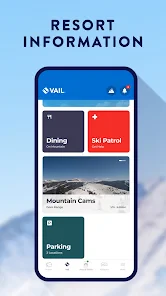
My Epic: Skiing & Snowboarding is a mobile application designed for skiing and snowboarding enthusiasts. It provides users with real-time updates on weather conditions, trail maps, and resort information. The app also allows users to track their skiing and snowboarding activities, including speed, distance, and elevation, making it a comprehensive tool for both beginners and seasoned adventurers.
Is My Epic: Skiing & Snowboarding app free to use?
The My Epic: Skiing & Snowboarding app is available for free download on both Android and iOS platforms. However, while many features are accessible without charge, some premium features may require in-app purchases or a subscription. These premium options often include advanced tracking capabilities and access to exclusive content and updates from partnered ski resorts.
What devices are compatible with My Epic: Skiing & Snowboarding app?
My Epic: Skiing & Snowboarding is compatible with a wide range of devices. It can be installed on both Android and iOS smartphones and tablets. However, users should ensure their device meets the minimum operating system requirements, typically Android version 8.0 or higher and iOS 12.0 or later, to ensure optimal performance and access to the latest features.
How accurate is the tracking feature in My Epic: Skiing & Snowboarding app?
The tracking feature in My Epic: Skiing & Snowboarding app is designed to be highly accurate, utilizing GPS technology to track your skiing or snowboarding activities. It records speed, distance, and elevation changes in real time. However, the accuracy can vary depending on GPS signal strength and device capabilities. For the best results, ensure your device has a clear view of the sky and is updated with the latest software.
Pros
- Realistic graphics enhance user experience.
- Extensive range of levels and challenges.
- Smooth controls for seamless gameplay.
- Regular updates with new features.
- Engaging multiplayer mode for competition.
Cons
- Requires constant internet connection.
- High battery consumption during play.
- In-app purchases can be expensive.
- Limited customization for characters.
- Occasional bugs in older devices.
- Category
- Sports
- Version
- 16.00.0





