Muviz Edge: AOD & Edge Lights
- 1.53K
- 4.7
- Installs
- 10.00M
- Price
- Free

Screenshots
Analysis by Reviewed
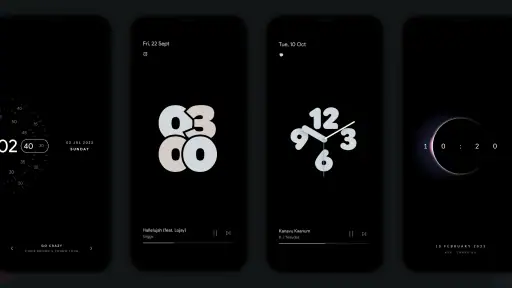
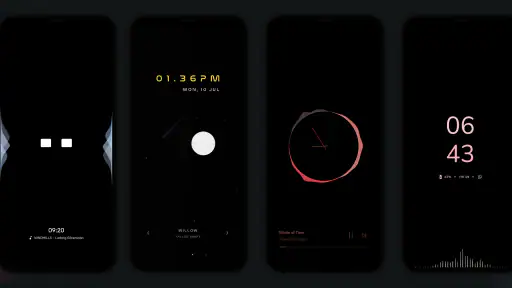
When I first opened Muviz Edge: AOD & Edge Lights, I wanted a quick way to make my phone feel more personal without replacing its usual home screen. The app is made for that kind of visual change: it adds edge-light effects, an always-on display option, and a music visualizer. I’d think of it less as a new way to manage a phone and more as a layer of decoration and glanceable activity for people who enjoy seeing their device do something when it is idle.
What to expect from the effect
Picture this: you’re in a dimly lit room, your phone’s screen is off, and suddenly, the edges of your phone light up in vibrant colors. Sounds mesmerizing, right? That’s exactly what Muviz Edge does. This app takes the simple concept of edge lighting and transforms it into a dazzling visual experience. Whether you’re getting notifications, playing music, or just want your phone to look snazzy on the table, this app has got you covered.
There is a useful distinction between choosing a look and deciding when you want to see it. I’d start with a restrained color and a moderate glow rather than immediately making the edges bright and busy. The effect is easier to judge in the room where you normally leave your phone, and a style that looks dramatic in a dark bedroom may feel distracting on a desk in daylight. Treat the display as an accent, not a replacement for checking the screen when you need details.
Setting it up without overthinking it
You might think setting up such flashy features would be a hassle, but that’s far from the truth. The app is incredibly user-friendly, guiding you through every step of the customization process. Even if you’re not tech-savvy, you’ll find it a breeze to set up and personalize your edge lights. Plus, the app’s interface is clean and intuitive, making navigation a walk in the park.
For a first run, I’d change only one thing at a time: pick a color, choose a pattern, then adjust the glow’s thickness or speed if the result feels too faint or too prominent. That makes it much easier to tell which setting improved the look. A practical first success is simply placing the phone screen-down or leaving it idle nearby and checking whether the chosen lighting feels noticeable without pulling your attention away from what you’re doing.
One point worth keeping in mind is that an always-on visual treatment is not automatically useful for everyone. If you prefer a completely dark phone at night, or you keep your device face-up beside you while working, the extra light may be more interruption than benefit. I’d try the look in the places you actually use the phone before settling on a permanent style.
Light Up Your Phone’s Life
Customization, music, and everyday use
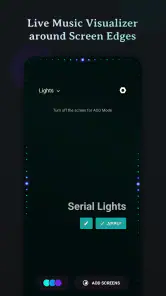
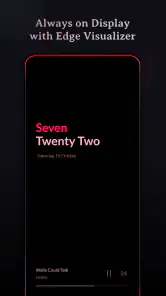
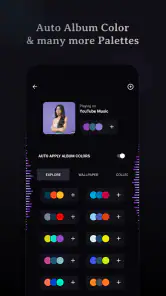
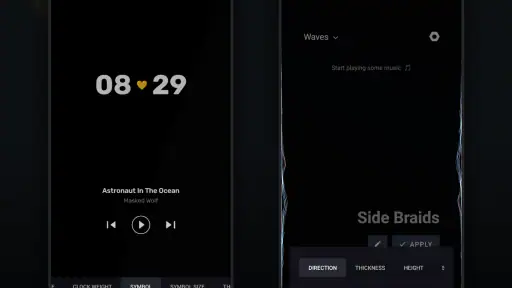
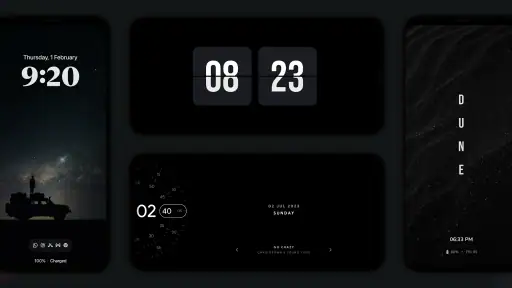
What makes this app stand out from the crowd is its customization options. You can tweak everything from the colors and patterns of the lights to the speed and thickness of the glow. It’s like having a personal light show right in your pocket! And let’s not forget about the Always On Display (AOD) feature that keeps the edge lights on even when your screen is off. This is not only visually appealing but also functional, ensuring you never miss a notification.
More From Our News Desk

Clash of Clans Is Won Between the Battles

Android Auto Makes the Case for Quieter Car Software

MobiOffice: Transforming Mobile Productivity with Seamless Integration

EA SPORTS FC™ Mobile Soccer: Redefining Mobile Sports Gaming

How Microsoft OneDrive Became a Mobile Productivity Giant

How Google Translate Breaks Language Barriers Effortlessly
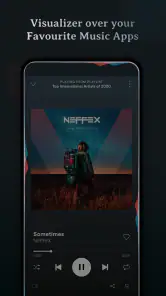
One feature that particularly impressed me is the music visualizer. Imagine your phone lighting up in sync with your music! It adds a whole new dimension to your listening experience, making it not just audible but also visual. It’s a party for your eyes and ears!
The visualizer is most enjoyable when the phone is somewhere you can see it, such as on a kitchen counter while you play music through another device. It is a small detail, but it changes the phone from a silent rectangle into part of the room’s atmosphere. For focused listening, commuting, or keeping the phone in a pocket, though, the visual side has little practical value; I’d use it as an occasional flourish rather than expect it to improve the sound.
Who will enjoy it—and who may not
If you enjoy personalizing your phone and like a visible accent that reacts to activity, this is an easy app to experiment with. It is especially appealing if you already find ordinary notification indicators too plain and want a more expressive look when the phone is resting nearby. Someone who prioritizes a minimal interface, avoids decorative effects, or wants a straightforward utility rather than visual customization may be happier with the phone’s built-in display and notification options.
Compared with the usual alternatives in personalization, which often focus on wallpapers, icons, or themes, this app’s appeal is that the change happens around the screen and can respond to music. That makes it more dynamic than a static background, but also more situational: you notice it most when the phone is idle and visible. I wouldn’t choose it expecting a broad redesign of the whole interface.
There is also a practical difference between this kind of visual customization and changing a wallpaper or icon pack. Those choices are visible whenever I unlock the phone, while edge lighting matters most when the device is resting nearby. If you want a change that you’ll notice throughout the day, a home-screen theme may be a better fit. If you like the idea of a subtle visual cue appearing around the screen rather than adding more icons or changing your background, this app has a more focused purpose.
What to know before making it part of your routine
When an edge effect seems too subtle, adjusting its thickness or speed is a better first move than switching through many colors at random. If it feels too attention-grabbing, try simplifying the pattern before abandoning the feature altogether. This small, deliberate tuning is more useful than chasing a perfect preset, because the best result depends on your room lighting, phone placement, and personal tolerance for visual motion.
It is worth separating “I can see it” from “it tells me what I need to know.” A glow can draw my eye toward the phone, but it does not replace reading the notification on screen. If you are waiting for a message that needs a quick response, keep your usual sound, vibration, or notification settings in mind; the edge effect is best treated as an extra visual hint. That expectation makes the feature more satisfying and avoids relying on decoration as an alert system.
Muviz Edge is a free personalization app from Sparkine Labs, with optional in-app purchases priced from $0.99 to $4.99 per item. It has a 4.7 average from around 137,000 ratings and over 10 million installs, which suggests that many people enjoy this kind of phone styling. Its content rating is Everyone, and the current version is 2.0.7.0. It was released on November 28, 2019, and requires Android 9 or later.
Because the core app is free, I’d begin by testing the basic experience rather than paying for anything before I know how often I use it. The optional purchases are something to consider only if the app’s available choices leave you wanting more; they are not a reason to install it if you mainly want a practical notification tool. For someone who simply wants to see whether edge lighting suits their routine, trying the free experience first is the sensible path.
For a first-time user, the most useful question is not whether every visual option looks impressive, but whether one restrained setup fits a real habit. I’d choose a color that contrasts with the room, leave the phone where I normally notice it, and see whether the effect helps me glance over without constantly checking the display. If I find myself looking at the phone more often just to watch the animation, that is a sign to reduce the movement or use the effect less often.
In everyday use, imagine leaving your phone on a table while you cook: a subtle edge animation can make incoming activity easier to notice at a glance, while the music visualizer adds a bit of atmosphere if a playlist is playing. If you need a highly discreet phone, or want every alert to be conveyed clearly without looking at the device, I’d stick with standard notification settings instead. The edge effect is an attractive cue, not a substitute for reading a notification.
Why You Should Give It a Shot
In today’s world, where personalization is key, Muviz Edge: AOD & Edge Lights offers a simple yet effective way to make your phone stand out. Whether you’re looking to enhance your phone’s aesthetic appeal or want a functional edge lighting system for notifications, this app delivers on all fronts. And let’s be honest, who doesn’t love a bit of extra flair on their gadgets?
For me, the best reason to give it a try is that the idea is easy to judge in your own surroundings. You do not have to redesign your home screen or change how you use your phone: try a modest edge effect, leave the device visible for a while, and decide whether it adds enough character to keep. If it feels distracting, you can simply prefer the cleaner look of the phone’s ordinary display instead.
To wrap it up, if you’re looking to add some sparkle and personality to your phone, give this app a try. It’s a perfect blend of functionality and style, making it a must-have for anyone who wants to keep their smartphone experience fresh and exciting.
Muviz Edge: AOD & Edge Lights Frequently Asked Questions
Is Muviz Edge available for Android and iOS?
Muviz Edge is an Android app, so check that your device runs a compatible version of Android before downloading it. Its features are designed around Android’s display and notification settings, which can affect how the edge lighting and always-on display work on your phone. If you use an iPhone, this Android app is not the right download for your device.
Who develops Muviz Edge, and what kind of app is it?
Muviz Edge is a personalization app from Sparkine Labs, the creators of Muviz. It combines always-on display features with edge lighting and a music visualizer, giving you ways to change how your phone screen looks and responds. Its focus is visual customization rather than replacing your phone’s built-in music player or notification system.
Does Muviz Edge need special permissions to show edge lights and notifications?
Edge lighting and notification effects may depend on granting the app the permissions Android requests for those features. Review each permission prompt and allow only what you are comfortable with; this helps you understand how the app interacts with notifications and your screen before customizing it. The app is a personalization tool, so its visible effects depend on the settings you enable and the permissions you approve.
Can I use Muviz Edge while listening to music from different apps?
Muviz Edge is described as an edge music visualizer, and its lighting can respond to music playback. The exact experience can depend on your device, the audio source, and the settings you choose. If you mainly want music-reactive effects, check the app’s available visualizer controls after installation and try them with the music apps you commonly use.
What is Muviz Edge: AOD & Edge Lights and how does it enhance my smartphone experience?
Muviz Edge: AOD & Edge Lights is a personalization app that adds vibrant edge lighting effects to your smartphone's screen, particularly around the edges. It enhances the always-on display (AOD) by providing customizable, colorful animations that respond to music, notifications, or charging. This app not only improves your phone's aesthetics but also offers practical features such as battery-saving options and compatibility with various screen types, including AMOLED and LCD.
Pros
- Visually stunning edge lighting effects.
- Customizable settings enhance user experience.
- Supports multiple music apps seamlessly.
- Low battery consumption mode available.
- Easy to navigate user interface.
Cons
- Limited free version features.
- Occasional app crashes reported.
- May not work on older devices.
- In-app ads can be intrusive.
- Lacks integration with some music players.
- Category
- Personalization
- Version
- 2.0.7.0












