

MoveTo
- 118.00
- 4.7
- Installs
- 100.00K
- Price
- Free

Screenshots
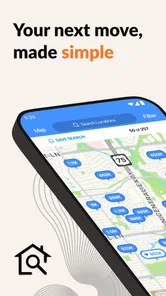

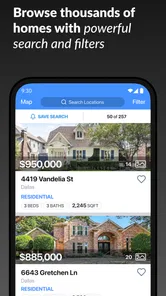
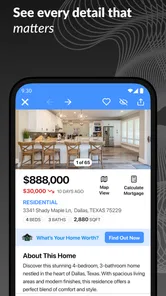
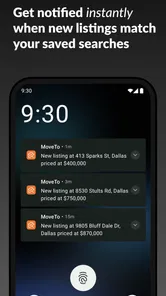
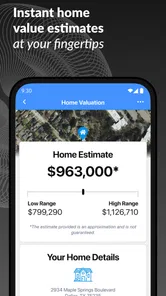
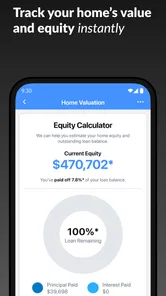
Analysis by Reviewed
Moving home is already a demanding process, so an app that puts the relationship with an estate agent in one place can be genuinely useful. After spending time with MoveTo, I found its main appeal is not that it tries to replace every property tool, but that it gives the agent and the client a more personal digital space for the journey. That focus makes it easier to understand what the app is for: this is a free House & Home app from Real Geeks, LLC, designed around communication and a guided home-search experience.
I would recommend it most to people who are already working with an agent who uses the service. In that situation, it can feel more direct than juggling text messages, email threads, saved browser tabs and separate property searches. If you are simply browsing homes independently, however, its usefulness is likely to be limited because the experience is tied to that agent relationship rather than being a universal property marketplace.
How the app feels to read and navigate
The first thing I noticed is the emphasis on a personalized journey rather than a broad collection of unrelated housing tools. That gives the app a clearer purpose than many property apps, where listings, mortgage content, calculators and advertisements compete for attention. The MoveTo concept is easier to grasp: open the app, stay connected with your agent and keep the home-buying or moving process in one familiar place.
That focused approach can help when your attention is divided. Searching for a home often happens between work, family responsibilities and appointments, so a simpler destination is valuable. I found it easier to think of the app as a continuing conversation with an agent instead of another feed that demands constant browsing. For someone who prefers a guided process, that distinction matters.
Readability is also affected by the amount of information involved in a property journey. Even when an app is visually tidy, housing decisions can involve addresses, viewing arrangements, preferences and follow-up questions. My practical advice is to use the app as the place where you return to the relationship, but not assume it will eliminate the need to keep your own notes. A short checklist outside the app can prevent important questions from getting lost when several homes begin to blur together.
The app is available for devices running iOS 12 or later, which makes it approachable for people who are not using the newest phone or tablet. That is a useful point for households sharing devices or relying on an older handset. At the same time, anyone with a device below that requirement should check compatibility before planning around it, because an otherwise suitable communication tool is no help if it cannot be installed.
MoveTo has a 4.7 average from around 1.2 thousand ratings, and its presence on devices with more than 100 thousand installs suggests that the basic idea has found an audience. I would not treat those figures as a guarantee that every agent-client setup will feel identical, though. The quality of the experience depends heavily on how actively the agent uses the platform and how well the process is explained at the beginning.
More From Our News Desk

 Instagram
Instagram’s Power Comes From Its Place in Your Phone
A close look at how Instagram turns Meta’s reach, recommendation systems and everyday camera habits into durable platform power—and what that costs users.

 Gmail
GmailGmail in a Busy Inbox: Who Benefits Most?
From first account to crowded workday, Gmail earns its place through dependable search and flexible sorting—but its best fit depends on how much inbox maintenance you can tolerate.

 Prime Video
Switching to Prime Video: What Changes in Your Viewing Routine
Prime Video can make a compelling second home for streaming, but switching means learning a different catalog, rental layer, and route from browsing to playback.

 Universal TV Remote Control
Universal TV Remote Control Works Best as a Reliable Backup
A phone remote earns its place through quick setup and reliable habits. Here is how to get more from Universal TV Remote Control—and where its limits show.

 Weather - By Xiaomi
Weather by Xiaomi Review: Clear at a Glance, Less Clear Up Close
Xiaomi’s weather app makes everyday forecasts quick to scan, but its calm surface can leave useful details and recovery paths harder to find than they should be.

 X
XX Under Pressure: Can It Recover When Posting Goes Wrong?
A resilience-focused review of X, examining setup, mistaken posts, interruptions, weak connections, and the gaps that matter when recovery needs to be dependable.
Latest News



Why a guided space can be easier than scattered messages
One of the less obvious strengths here is continuity. A normal text conversation can be quick, but it is easy for a property question to disappear beneath unrelated messages. Email is more formal, yet long threads can become difficult to scan on a phone. A personalized app sits between those options: it can feel more organized than casual messaging while remaining more immediate than a chain of emails.
This is especially helpful when several people are involved in a move. A couple, a family member helping with viewings or someone coordinating a relocation may all need the same general context. I would still agree on who is responsible for responding, because a shared home search can create confusion if everyone assumes somebody else has seen a message. The app can support communication, but it cannot solve unclear household roles.
Another useful habit is to open the app before contacting the agent through another channel. That simple routine reduces duplicated questions and makes the personalized journey more meaningful. If the app is treated only as an occasional notification screen while every real conversation happens elsewhere, its main advantage quickly disappears.
Supporting different abilities and everyday situations
I find that accessibility is less about one perfect screen and more about whether the home-search routine can adapt to different people and changing days. In this section, I focus on practical ways to make an agent-connected app easier to use without assuming every household has the same device, comfort level or communication needs. That matters because the next step is deciding whether this kind of support fits your own situation.
Motor comfort and the realities of phone use
People use home-search apps in less-than-ideal conditions: standing on a train, holding a child, carrying shopping or trying to operate a phone with one hand. A focused app can be less tiring than a crowded property portal, but convenience still depends on the individual device, operating-system settings and the amount of interaction required. I would test the basic actions early rather than waiting until an urgent viewing question needs an answer.
For users with limited dexterity, the best workflow is to reduce repeated navigation. Keep the app in an easy-to-reach place, use the phone’s built-in text-size and touch accommodations where needed, and handle non-urgent questions together instead of opening the app repeatedly for small updates. These are not special MoveTo features; they are practical ways to make a phone-based relationship easier to manage.
A person who finds small touch targets difficult may prefer using a larger phone or tablet when reviewing the home journey. Someone who experiences hand fatigue may benefit from dictating a message through the device’s standard accessibility tools, if those tools are comfortable for them. The important point is that MoveTo works as part of the operating system’s wider setup, so the right device configuration may make a bigger difference than the app alone.
Sensory needs and information overload
House hunting can be emotionally noisy even before an app is involved. New properties, changing plans and messages from an agent can create a steady stream of decisions. I appreciated that the app’s central idea is narrower than a general property portal, because reducing unrelated content can make it easier to concentrate on the next step.
Still, people who are sensitive to notifications should decide how they want to handle alerts before the search becomes busy. A useful approach is to allow only the notifications that help with time-sensitive communication and review everything else at a chosen time. If an alert interrupts work or rest, the app may become a source of stress rather than support, regardless of how clear the underlying journey is.
For users with visual needs, the phone’s own display settings, contrast options and screen reader behavior are worth testing with the app’s most important screens. I would not assume that an app’s clean appearance automatically means every element will work equally well with every assistive setup. The sensible test is practical: can you identify a new message, understand what action is expected and reach the response area without assistance?
People with hearing-related needs may prefer written communication because it leaves a record that can be revisited. That is one reason the app can be useful in a moving process: written details are easier to review than a hurried conversation while walking through a property. I would still confirm important arrangements in a way that suits everyone involved, particularly when a viewing time or address has changed.
Using it during a realistic moving day
Imagine that I am leaving work, travelling across town and trying to keep up with a changing schedule. I may not have the concentration to search several websites, compare old email threads and remember which agent said what. In that situation, a personalized home journey is valuable because it gives me one place to reconnect with the professional handling the search.
My preferred routine would be to check the app at a calm moment, note the questions I need answered, and send one clear message rather than several fragments. Before a viewing, I would confirm the practical details that matter to me, such as timing, access arrangements and any personal requirements. Afterward, I would record my immediate impression while it is fresh, instead of trusting memory after seeing several similar homes.
This workflow also helps people who process information slowly or need more time to make decisions. They can review the conversation when ready rather than feeling pressured to respond instantly. It is not a substitute for an agent who communicates patiently, but the digital record can make the process less dependent on remembering a spoken exchange.
Where it is a better choice than familiar alternatives
Compared with a large property portal, MoveTo is more relationship-led. A portal is usually better when I want the widest possible discovery experience, broad filters or the freedom to compare homes from many sources without committing to one agent. MoveTo is more appealing once I want a continuing connection with a particular professional and a less distracting place to manage that journey.
Compared with email, the app can feel more purpose-built for moving. Email remains the safer fallback for people who prefer searchable correspondence, desktop access or a long-term archive outside a single app. I would choose email when several formal documents or multiple parties need to be copied, and use MoveTo for the more personal day-to-day flow when the agent supports it.
Compared with text messaging, the trade-off is immediacy versus separation. Text is familiar to almost everyone and may be faster for a one-line update. An app can keep the home-search relationship distinct from personal messages, which is useful for people who want clearer boundaries. The best option depends on whether the agent actually responds consistently there; an unused channel is not an advantage.
Remaining barriers before you commit
The biggest limitation is the dependency on the agent relationship. Someone downloading the app alone may not get the full value promised by the personalized concept. If your agent does not use it as an active part of the process, you could end up maintaining another app without gaining better communication. I would ask the agent how they expect clients to use it before making it central to a move.
There is also a learning curve for households that already have a comfortable system. Even a straightforward app creates one more place to check, and people who are not confident with smartphones may need help getting started. A family member can assist with installation and settings, but the person who will actually use the app should still understand the basic routine rather than relying entirely on someone else.
Users who need a highly specialized accessibility experience should test the app personally before depending on it for urgent arrangements. Built-in phone tools may improve readability, touch control and spoken interaction, but those tools do not guarantee that every screen will behave exactly as expected. For an important move, I would keep a second communication method available until the workflow has proved reliable.
Privacy and communication boundaries also deserve ordinary common sense. A home search can involve personal schedules and sensitive preferences, so I would avoid sending information that does not need to be shared and would clarify which channel should be used for urgent matters. The app can organize a relationship, but it should not encourage anyone to assume that every message is seen instantly.
Finally, people who want a completely independent search experience may find the app too narrow. If I am only comparing neighborhoods, browsing casually or looking at homes from several unrelated agents, a broad property service is likely more efficient. MoveTo makes more sense when the human connection is already established and the goal is to make that connection easier to follow.
My inclusive verdict
MoveTo is a focused House & Home app that I would describe as a companion to an agent-led search rather than a replacement for every housing tool. Its strongest quality is the attempt to turn a complicated, scattered process into a more personal journey. For people who value written continuity, fewer distractions and a clear relationship with one agent, that can make a real difference.
Its accessibility value comes from that focus and from working on relatively older supported operating systems, not from any claim that it solves every access need. People with motor, visual, hearing or sensory considerations should combine the app with the phone settings and communication habits that work for them, then test the important actions before relying on it. That honest trial is more useful than assuming a simple interface suits everyone.
Real Geeks, LLC has kept the product free, and its Everyone age rating makes it broadly approachable for households planning a move. The current version is 11.0.4, so keeping the app updated is sensible when it is part of an active search. I would choose it when my agent clearly supports it and is willing to make it a dependable communication channel.
My recommendation is conditional but positive: use MoveTo if you want a more organized, agent-connected home journey and your agent genuinely works inside it. Skip it in favor of a broader property platform or your established email routine if you are searching independently, need extensive desktop-first tools or require accessibility behavior that you have not yet tested. In the right relationship, it can remove friction; in the wrong setup, it is simply another place to look.
MoveTo Frequently Asked Questions
Is MoveTo intended for people buying or selling a home?
MoveTo is a House & Home app from Real Geeks, LLC, with a personalized home journey experience that connects users with their agent. Its focus is the home-search journey rather than planning public transport trips. If you are considering a download, make sure this is the MoveTo app you want, since the name may also be associated with other kinds of services.
What is MoveTo and what can I use it for?
MoveTo is a mobility-focused application designed to help users plan and manage trips from a mobile device. Depending on the city and available services, it may provide route planning, transport information, vehicle or ride availability, booking options, and trip details. Before downloading, check whether MoveTo supports your location, because features and transportation partners can vary by region.
Who develops MoveTo, and is it free to download?
MoveTo is developed by Real Geeks, LLC, and the app is free to download. Its personalized home journey experience is designed to connect you with your agent. The free download does not mean every service or transaction connected with an agent is necessarily free, so review any costs or terms that apply to your own home journey before you proceed.
Is MoveTo available for both Android and iOS devices?
MoveTo may be offered for Android and iOS, but compatibility depends on the specific version of your operating system and the app’s current distribution in your country. Users should download it only from the official Google Play Store or Apple App Store. Reviewing the store listing is important, as it shows supported devices, recent updates, permissions, and any regional availability restrictions.
Does MoveTo require an account, location access, or other permissions?
Most mobility applications require an account to save preferences, manage bookings, contact support, or access payment-related features. MoveTo may also request location permission to identify your position, calculate nearby options, or provide more accurate routes. You can usually control these permissions in your device settings, although denying location access may limit navigation, pickup, or real-time transport features.
Pros
- Simple interface makes route planning quick for new users.
- Useful for comparing travel options in one place.
- Clear trip details help with everyday commuting decisions.
- Can reduce planning time for unfamiliar journeys.
- Helpful for users who prefer organized travel information.
Cons
- Route accuracy may vary when provider data is outdated.
- Some features may depend on location and internet access.
- Travel options can differ significantly by region.
- Estimated times may change with traffic or service delays.
- The app may offer limited value in areas with few transport providers.







