Moultrie Mobile
- 4.09K
- 4.5
- Installs
- 500.00K
- Price
- Free

Screenshots

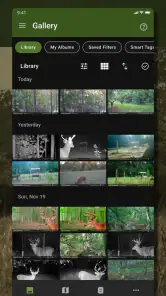
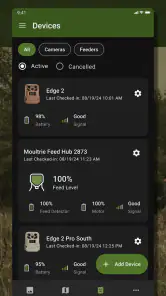
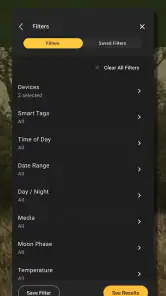
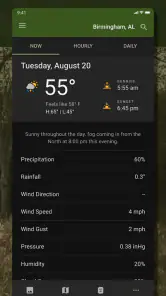
Analysis by Reviewed
I think the most useful way to judge Moultrie Mobile is to ask whether it makes checking trail-camera images easier in your particular routine. It is a free sports app from PRADCO Outdoor Brands, built around viewing, managing, and sharing images from Moultrie cameras. That focus makes it a practical companion for people who already rely on compatible camera equipment, rather than a general wildlife-identification or hunting-planning tool.
Start with a repeatable camera-check routine
My preferred approach is to treat each check as a small, consistent task: open the app, review the newest images, sort out anything worth keeping, and share useful shots with the people involved in the property or hunt. A routine like this is more helpful than browsing randomly because it makes changes between visits easier to notice. The phone-based workflow can also spare you a trip just to retrieve a memory card, though it still depends on having a camera setup that sends images through the service.
A realistic example is checking images over breakfast before deciding whether a walk to a stand is worthwhile. I would look for repeated activity in the same area, not make a decision from one exciting photo. A camera image is a snapshot, not a guarantee that an animal will be there later. Keeping that distinction in mind helps the app inform a plan without letting a notification dictate it.
Build useful context, not just a pile of pictures
The best value in remote camera images often comes from comparing observations over time. I would make a habit of reviewing captures in a consistent sequence and noting the location or camera they came from before deciding what matters. Even without trying to draw a grand conclusion from every frame, that small bit of discipline helps separate a one-off appearance from a pattern worth discussing. If you are sharing with a partner, a short note about why a particular image matters is more useful than forwarding it without context.
This is especially practical for people who look after more than one part of a property or check cameras with someone else. One person might be deciding whether to inspect a location, while another is keeping an eye on equipment. Rather than treating every image as a prompt to act, I would use the app as a record to inform the next sensible step: compare what has changed, decide whether the information is timely, and make an in-person check when the decision depends on conditions on the ground.
Seamless Integration with Your Trail Cameras
First off, let's talk about how Moultrie Mobile effortlessly syncs with your trail cameras. If you're anything like me, fumbling with SD cards is not your idea of fun. The app lets you view all your camera footage directly from your phone, which means no more trips back and forth to check your cameras. Everything is uploaded to the cloud, so you can kick back, relax, and browse through your photos from the comfort of your couch.
User-Friendly Interface
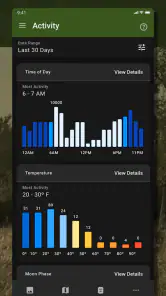
Now, I’m not a tech wizard by any means, but the user interface of this app is as smooth as butter. It’s intuitive and easy to navigate, making it perfect for everyone, whether you’re a tech-savvy hunter or someone who still struggles with the TV remote. Plus, organizing your photos is a breeze with their simple tagging and sorting system, so you can easily track patterns and make the most out of your hunting trips.
More From Our News Desk

Clash of Clans Is Won Between the Battles

Android Auto Makes the Case for Quieter Car Software

MobiOffice: Transforming Mobile Productivity with Seamless Integration

EA SPORTS FC™ Mobile Soccer: Redefining Mobile Sports Gaming

How Microsoft OneDrive Became a Mobile Productivity Giant

How Google Translate Breaks Language Barriers Effortlessly
Settings that deserve a quick check
Before relying on a camera for a time-sensitive decision, I would verify that it is connected as expected and that image delivery is behaving the way I need. Conditions at a remote site can make a phone-based routine less immediate than checking a camera in person, so I would avoid assuming that a quiet feed means there has been no activity. If several people share images, agree on a simple naming or tagging habit; consistent labels make later comparisons more useful than a pile of memorable but unorganized pictures.
Sharing is most valuable when it has a purpose: sending a particular image to a hunting partner, for example, is clearer than forwarding every capture. That keeps the useful evidence easy to find and avoids turning a shared stream into noise. If you mainly want to store pictures privately, the app can still serve as a viewing and management tool, but the collaborative benefit matters most when others are part of the same camera routine.
Small checks that prevent avoidable confusion
One useful habit is to distinguish a problem with image delivery from a genuine lack of activity. If a feed looks unexpectedly quiet, I would first check whether the camera is still operating as intended and whether the timing makes sense before changing plans. This is not an elaborate troubleshooting routine; it is simply a reminder that a phone view is only as useful as the camera and connection behind it. For a decision with real consequences, I would treat the app as one source of information, not as proof that a site is empty.
I would also decide in advance what deserves a share. A clear image that answers a specific question can help a partner quickly; a long stream of unrelated captures can make the important one harder to spot. That is a small but meaningful trade-off in a tool built around remote access: the convenience of sending images is most effective when you add enough context to make them useful, while keeping routine viewing manageable for everyone involved.
Real-Time Alerts and Updates
One of the coolest features has to be the real-time alerts. Imagine getting a notification on your phone the moment a deer steps into your camera’s view. It’s like a hunter’s dream come true! Not only does this help you stay on top of your game tracking, but it also means you can plan your hunts more effectively.
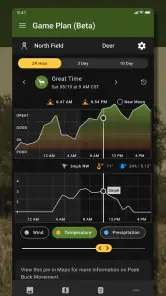
There’s also weather updates embedded right into the app, which is super handy. We all know how much weather can impact a hunting trip, and having that information at your fingertips means you can make informed decisions without needing to switch between different apps.
Faster habits, with sensible limits
When I am checking several cameras, I would use the same order each time and deal with noteworthy images as I go, rather than reopening the same feed repeatedly. That small habit reduces missed context: a sequence of images can tell a different story from one isolated frame. It is also worth sharing only the clearest or most relevant captures when another person needs to make a decision, instead of asking them to sift through everything.
Compared with a standard trail camera that requires a physical card check, remote viewing is the main convenience here. A basic camera-and-card setup may suit someone who visits the land often, wants to avoid ongoing service costs, or simply prefers to handle images on-site. Moultrie Mobile makes more sense when reducing those trips is worth having a phone-centered workflow. It is not a substitute for checking equipment and conditions in person when reliability matters.
Choose a workflow that suits the property
For a single camera near a place I visit often, a card reader and an occasional walk may be all I need. That approach is direct, avoids relying on remote delivery, and suits people who prefer to review everything at the camera. The app becomes more compelling when a camera is inconvenient to reach or when I want to check images between visits. The choice is less about which method is universally better and more about whether the time and effort saved justify keeping a connected, phone-based routine.
There is also a middle ground: use remote viewing to decide whether a visit is worthwhile, but still check the site and equipment in person when needed. That avoids treating an app notification as a replacement for field judgement. For a land manager coordinating with another person, selective sharing can make the remote workflow easier to act on; for someone who enjoys walking out to each camera and has no need to share, the traditional method may feel simpler rather than inferior.
Subscription Plans
Okay, let’s chat about the subscription plans. While the app itself is free to download, accessing the full range of features does require a subscription. But honestly, for the avid hunter, it’s a small price to pay for the convenience and edge it gives you in the field. Plus, they offer various plans to fit different budgets, so there’s something for everyone.
I would decide whether that ongoing commitment fits before building a routine around remote image access. The app is best suited to Moultrie camera owners who check images regularly, manage activity across a property, or need to share selected captures. Someone who only uses a camera occasionally, or who does not want a subscription-based service, may be happier with a conventional memory-card workflow. It is also a focused tool, so people looking for a broad field guide or a complete hunting planner should choose something designed for those jobs.
Questions worth settling before you commit
The first practical question is whether you already use a compatible Moultrie camera and genuinely want to see its images remotely. If not, this is unlikely to be useful as a standalone photo or wildlife app. If you do, the next question is how often you expect to check captures. Regular use makes the convenience easier to appreciate; occasional use may not justify adding another service to your routine.
People also tend to wonder whether a phone view means they can stop visiting a camera. I would not work that way. Remote images can help decide when a visit is useful, but they cannot replace checking the equipment, the site, and any conditions that matter in person. Nor would I assume that an alert alone proves the best moment to act. Use it to notice activity, then weigh that information against the rest of the situation.
For shared use, it helps to agree on a simple convention before a busy season: who is watching which cameras, what kind of image should be sent to others, and how to label a capture so it has meaning later. That prevents duplicate effort and keeps messages focused. It is a low-tech habit, but it can make the app feel far more organized without expecting the software to solve every coordination problem automatically.
Who will get the most from it?
The app has a 4.5 average from around 9,300 ratings, and it has been installed over 500,000 times. It is rated for Everyone, runs on iOS 12 or later, and its current version is 5.30.0. Those details make it approachable for a wide audience, but the deciding factor is still whether you use Moultrie cameras and value remote access enough to make the workflow worthwhile.
My overall view is that this is a useful specialist companion, not an all-purpose outdoor app. Moultrie Mobile can make camera checks more convenient and image sharing more organized, provided the equipment and service fit your needs. I would recommend it to regular trail-camera users who want to review captures without making every check a field trip; for occasional users or people who prefer a simple card reader, the traditional approach may be the better choice.
My verdict on making it a habit
I would recommend the app to someone who already has Moultrie cameras in regular use, has a reason to check images between visits, and is comfortable with a service-based approach. It is less convincing for a person who wants a general outdoor companion, uses a camera only now and then, or strongly prefers collecting images directly from a card. Knowing that distinction before setting up a routine is more helpful than expecting remote access to suit every camera owner.
For experienced users, the strongest approach is not a complicated trick but a repeatable one: review feeds in the same order, compare sequences rather than reacting to a single frame, keep shared captures selective, and verify a quiet feed before drawing conclusions. That turns a convenient viewer into a more dependable part of a camera-check routine. Used with those limits in mind, it can save unnecessary trips while leaving the important decisions where they belong—with the person who knows the property and can check it in person.
Moultrie Mobile Frequently Asked Questions
Is Moultrie Mobile free to download, and are there costs to consider?
Moultrie Mobile is free to download, so you can install the app without paying for the download itself. The app is used with Moultrie cellular trail cameras, and camera connectivity may involve a separate service plan. Before relying on it, consider the ongoing costs of using a cellular camera and choose an option that suits how often you expect to receive images.
What devices can run Moultrie Mobile?
Moultrie Mobile is available for Android and iOS devices, making it accessible to many smartphone users. On iOS, your device needs to run version 12 or later. Before downloading, check that your phone’s operating system meets that requirement and that you have enough space for the app. The app is designed to provide access to your game-camera images from a mobile device.
What is Moultrie Mobile and how does it work?
Moultrie Mobile is a wildlife management app that allows users to remotely manage their game cameras. By utilizing cloud-based technology, the app enables users to view photos and videos captured by their trail cameras in real time. Users can set up notifications, adjust camera settings remotely, and access their content from any location, which makes scouting and wildlife monitoring more efficient and convenient.
Is Moultrie Mobile compatible with all trail cameras?
Moultrie Mobile is specifically designed to work with Moultrie cellular trail cameras. If you own a Moultrie camera, you can connect it to the app using a cellular network. However, if you have a different brand of trail camera, you will need to check compatibility, as Moultrie Mobile may not support non-Moultrie devices. Always verify compatibility before making a purchase.
What are the subscription options for Moultrie Mobile?
Moultrie Mobile offers several subscription plans designed to fit various user needs. Plans typically include different levels of data usage, ranging from basic to unlimited. Subscriptions are flexible, allowing users to choose monthly or annual billing. It's important to choose a plan that fits your data needs, especially if you intend to monitor high-resolution images or videos frequently.
Pros
- User-friendly interface for easy navigation.
- Real-time updates and notifications.
- High-quality image and video capture.
- Cloud storage for easy access to data.
- Wide range of compatible devices.
Cons
- Subscription required for full features.
- Limited free version capabilities.
- Occasional connectivity issues.
- High battery consumption on some devices.
- Data usage can be substantial.
- Category
- Sports
- Version
- 5.30.0





