

ModsTune – AI Car Designer
- 104.00
- 4.5
- Installs
- 100.00K
- Price
- Free
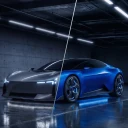
Screenshots
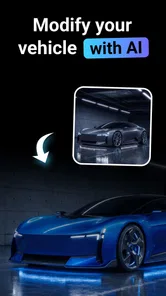
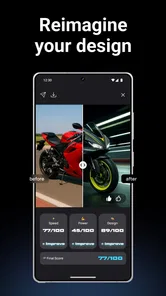
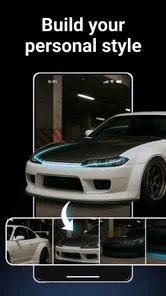
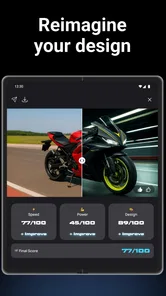
Analysis by Reviewed
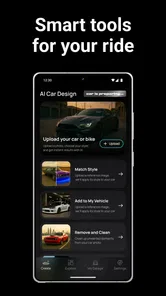
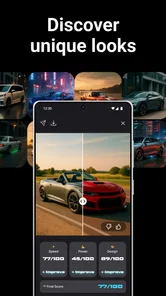
I approached ModsTune – AI Car Designer as a visual customization app rather than a full vehicle simulator. Its appeal is straightforward: it gives people a place to explore different ideas for cars and motorcycles without needing design software or a technical background. After spending time with it, I found the most useful way to think about it is as a quick concept tool for anyone who enjoys imagining how a vehicle could look with a different style, finish, or overall attitude.
The app sits in the Art & Design category, and that description fits better than calling it a game. There is no need to learn racing controls or manage a garage. The focus is on making visual choices, comparing possibilities, and deciding which direction feels right. That makes it interesting for casual enthusiasts, people planning a real customization project, and users who simply want a creative way to experiment with cars and motorcycles.
It is free to install, with optional in-app purchases priced from $9.99 to $29.99 per item. The content rating is Everyone, so the presentation is accessible to a broad audience. Mara Apps Development is behind the app, and the current release is version 1.0.2. It supports devices running Android 7.0 or later, which keeps the compatibility range fairly wide for Android users.
How I use ModsTune from a blank idea to a usable concept
I start with a single visual question, then use the first pass to establish a baseline before trying more dramatic choices. That keeps a vague idea from turning into a jumble of unrelated tweaks. Once I have a direction, I can judge whether each change supports it—and the next section looks at small setup habits that make those comparisons easier.
Start with a clear visual question
The easiest mistake is to open a customization app without knowing what I want to investigate. I get better results when I begin with one simple question: do I want the vehicle to look sportier, cleaner, tougher, more luxurious, or more unusual? That small decision gives the session a direction and stops the process from becoming a random pile of changes.
For example, if I am imagining a daily car, I might begin with a restrained appearance and then test one stronger element at a time. If I am thinking about a show-style motorcycle, I can start from the opposite direction and explore a more dramatic visual identity. The important habit is to establish a baseline before making several changes. Without that baseline, it becomes difficult to tell which adjustment actually improved the concept.
I also recommend taking a moment to look at the original design before changing anything. The standard appearance provides a useful reference for proportions, balance, and the relationship between the main visual areas. When I return to that starting point, I can judge whether a new idea is genuinely better or merely more noticeable.
More From Our News Desk

 Gmail
GmailGmail in a Busy Inbox: Who Benefits Most?
From first account to crowded workday, Gmail earns its place through dependable search and flexible sorting—but its best fit depends on how much inbox maintenance you can tolerate.

 Prime Video
Switching to Prime Video: What Changes in Your Viewing Routine
Prime Video can make a compelling second home for streaming, but switching means learning a different catalog, rental layer, and route from browsing to playback.

 Universal TV Remote Control
Universal TV Remote Control Works Best as a Reliable Backup
A phone remote earns its place through quick setup and reliable habits. Here is how to get more from Universal TV Remote Control—and where its limits show.

 Weather - By Xiaomi
Weather by Xiaomi Review: Clear at a Glance, Less Clear Up Close
Xiaomi’s weather app makes everyday forecasts quick to scan, but its calm surface can leave useful details and recovery paths harder to find than they should be.

 X
XX Under Pressure: Can It Recover When Posting Goes Wrong?
A resilience-focused review of X, examining setup, mistaken posts, interruptions, weak connections, and the gaps that matter when recovery needs to be dependable.

 Clash of Clans
Clash of Clans Is Won Between the Battles
Its raids are quick; its community is a long-term project of coordination, teaching, rivalry, and shared responsibility—with all the friction that entails.
Latest News



Build in layers instead of chasing a finished look immediately
My preferred workflow is gradual. I first decide on the broad direction, then refine the details that support it. A darker, aggressive theme may need consistent choices across the body, wheels, and other visible elements. A clean urban look may work better with fewer contrasting decisions. The app is more enjoyable when I treat each version as a design study rather than trying to create a perfect result in one pass.
This approach is especially helpful with motorcycles, where a small visual change can affect the character of the whole machine. A choice that looks exciting on its own may feel out of place once viewed alongside the rest of the design. I therefore check the complete vehicle after each meaningful adjustment instead of judging every element in isolation.
One practical use case is planning a conversation with a real customization shop. I would not treat an app concept as a technical specification, but it can help me communicate taste. Showing a coherent direction is much more useful than saying I want something “sporty” or “different.” It gives the discussion a visual starting point while leaving the actual feasibility, materials, and installation details to a professional.
Use repeatable checkpoints
I found it useful to pause at three points: after choosing the general style, after making the main customization decisions, and before considering the design complete. At each checkpoint, I ask whether the vehicle still has a clear identity. If the answer is no, I remove the most distracting change rather than adding another one.
This is a small habit, but it prevents a common problem in visual editors: confusing more activity with more creativity. ModsTune works best when I make deliberate comparisons. I can test a bold idea, return to the baseline, and then try a quieter alternative. That repeatable process gives the app more value than simply tapping through options as quickly as possible.
What the app is best at in everyday use
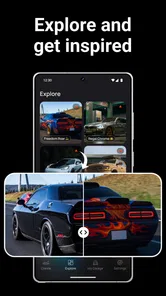
Its strongest everyday role is quick visual exploration. Suppose I am deciding whether a familiar vehicle should have a subtle makeover or a much more dramatic personality. I can use a short session to compare those moods before spending time on more detailed planning elsewhere. The same applies when browsing inspiration: instead of saving unrelated pictures, I can use the app to turn a vague preference into a more focused concept.
It is also suitable for sharing ideas informally with friends. A group discussion about a car or motorcycle can become more concrete when everyone is reacting to an actual visual direction. I would still keep expectations realistic, because a concept image does not replace information about fitment, road legality, cost, maintenance, or safety. Its value is in the conversation and the creative decision-making that comes before those practical checks.
Settings and habits that make sessions less frustrating
A little preparation helps me tell a design problem from a cramped or distracting session. I like to choose one purpose for the session, keep a clear reference for each direction, and pause before deciding that a purchase is necessary. Those habits are useful, but experienced users can also save time by comparing alternatives in a more deliberate order.
Check the device before committing to a long session
Because this is a visual design app, the quality of the experience depends heavily on the phone or tablet display and general responsiveness. I prefer using a larger screen when I want to compare several details, while a phone is perfectly convenient for quick experiments. Before starting a serious design session, I close unrelated tasks and make sure the device has enough battery. That is not an app feature, but it makes a noticeable difference when I am repeatedly switching between variations.
The minimum operating system is Android 7.0, so older compatible devices may technically run the app while offering a less comfortable experience than newer hardware. I would especially avoid judging the app during a rushed session on a small, slow device. Visual customization depends on seeing differences clearly, and a cramped screen can make subtle choices feel harder than they need to be.
Review purchase prompts with a specific goal in mind
The app is free to install, but in-app purchases range from $9.99 to $29.99 per item. I would approach those options carefully rather than assuming that paying automatically improves every project. A sensible method is to use the free experience first, identify the type of customization work I actually enjoy, and only then decide whether an optional purchase supports that workflow.
This matters because casual users and dedicated concept builders have different thresholds. Someone who opens the app once for inspiration may find the free access sufficient. A person who returns often and wants a broader creative routine may see more value in expanding the available possibilities. Either way, I would avoid buying impulsively before understanding how much time I am likely to spend with the app.
Keep a visual reference for each direction
When testing several styles, I find it helpful to remember the purpose of each version. One can represent a daily-driver concept, another a performance-inspired direction, and another a more distinctive show look. Without those labels in my own notes or memory, the designs start blending together and I lose track of why I made each choice.
This is also a useful way to avoid over-customization. If a version is meant to be practical and understated, I judge it by that standard rather than comparing it unfairly with a deliberately dramatic concept. The app becomes much easier to evaluate when every variation has a role.
Use the app as a visual filter, not a technical authority
I would not use ModsTune to decide whether a real modification will fit a specific model, pass inspection, preserve handling, or work with existing components. Those questions require manufacturer information and qualified advice. The app helps me decide what I like visually; it does not turn a visual idea into an engineering plan.
That distinction is important for new users. The attractive part of customization is often the final appearance, but real-world changes can affect visibility, clearance, weight, lighting, and reliability. I treat the app as the first stage of a longer process: imagine, compare, discuss, verify, and only then consider a real purchase or installation.
Faster patterns for experienced users
When I already know the kind of look I want, I can move faster by separating major choices from refinements and testing strong contrasts before settling on a compromise. I also treat resetting as a shortcut rather than a setback: rebuilding around a narrower idea is often clearer than trying to rescue a crowded concept. The next section considers what that efficient workflow still cannot solve.
Change one family of decisions at a time
When I want to work quickly, I avoid changing everything at once. I focus first on the main visual character, then on supporting details, and finally on small refinements. This makes it easier to undo a weak direction because I know which group of decisions caused the problem.
For instance, I might establish a bold theme and then check whether the rest of the vehicle supports it. If the result feels too busy, I can simplify the supporting choices without abandoning the entire concept. This is faster than restarting after a long sequence of unrelated changes.
Compare extremes before settling in the middle
A useful shortcut is to create a clearly conservative version and a clearly aggressive version before aiming for a balanced result. The extremes reveal what I actually value. Maybe the restrained version feels too ordinary, or the dramatic version loses the vehicle’s original character. The middle choice then becomes an informed compromise instead of a guess.
This method works particularly well when I am unsure about color or overall styling. It also helps when showing ideas to someone else, because the contrast makes preferences easier to discuss. A person may not know how to describe the exact look they want, but they can often say which of two directions feels closer.
Return to the baseline when a concept becomes noisy
Experienced use is not only about moving forward. It is also about knowing when to reset. If I have added several changes and the result feels confused, I go back to the original design and rebuild with a narrower goal. That is usually quicker than trying to repair every small decision.
I also use this reset habit when experimenting for someone else. A friend may ask for a “cool” design, but that word can mean many things. Starting from the baseline and testing one clear direction at a time produces a more useful conversation than presenting one overloaded result.
Separate inspiration from commitment
Not every appealing concept deserves to become a real-world plan. I can enjoy an exaggerated design in ModsTune while recognizing that it may not suit my budget, daily routine, or local requirements. Keeping that separation makes the app more enjoyable and protects me from treating a quick visual experiment as a purchase decision.
This is one of the app’s less obvious strengths: it lowers the cost of changing my mind. A real modification can be expensive and difficult to reverse, while a digital concept can be discarded immediately. I can therefore explore ideas that I would never seriously install, which is useful for discovering preferences.
Where the experience reaches its limits
A convincing visual direction is not the same as a workable real-world modification, and that distinction matters most when a concept starts to feel ready for action. I use the app to clarify taste and start better conversations, then rely on specialist tools or qualified advice for technical decisions. With that boundary in mind, I can judge where the app fits—and where another option is a better use of my time.
It is not a replacement for a professional design suite
Users expecting detailed three-dimensional modeling, exact measurements, technical drawings, or production-ready files should look elsewhere. ModsTune is better suited to visual direction than precision design. That is not a flaw if the goal is quick exploration, but it becomes a real limitation for anyone who needs accurate planning.
A desktop graphics program may offer more control over layers, perspective, textures, and presentation. A specialized vehicle-design tool may be more appropriate for engineering-oriented work. I would choose ModsTune when speed and accessibility matter more than exact control, not when I need a complete professional workflow.
Visual confidence can exceed practical certainty
A polished-looking concept can make an idea feel more achievable than it really is. This is where I think users need the most discipline. The app can help me decide that I like a certain visual treatment, but it cannot answer whether the required parts exist, whether they work together, or whether the result is sensible for everyday use.
For a real project, I would take the concept to a knowledgeable installer and ask about compatibility, cost, maintenance, and legal requirements. I would also check the original vehicle’s documentation before making assumptions. The app starts that process; it does not finish it.
Not every user will need it
I would skip this app if I only want a racing game, a vehicle catalog, or a way to buy verified parts. It is also not the right choice for someone who dislikes visual experimentation and wants a single, technically accurate recommendation. The experience depends on enjoying comparison and creative trial and error.
On the other hand, people who frequently save vehicle inspiration, sketch ideas, or debate future modifications may find it more useful than a simple image gallery. The interactive element gives me a way to test a preference instead of merely looking at someone else’s finished build.
What the current release suggests
Version 1.0.2 feels like a product I would evaluate according to its core purpose rather than expecting a mature professional ecosystem around it. The important question is whether its central customization workflow helps me explore ideas quickly. For casual and intermediate users, that can be enough. More demanding users should decide based on whether the available creative control matches the level of detail they require.
The app has already attracted a 4.5 average from around 2.4 thousand ratings, with more than 50 thousand installs. Those figures suggest that the basic idea is connecting with a meaningful audience, although popularity alone does not determine whether it suits my particular workflow. I would still spend time with the free experience before deciding how deeply it belongs in my regular toolkit.
My verdict after building a repeatable routine
I like ModsTune most when I use it with restraint. The best results do not come from making the largest number of changes; they come from setting a direction, comparing alternatives, and removing anything that weakens the overall identity. That makes the app more thoughtful than its short summary might suggest. It can be a quick creativity tool, but it rewards a patient eye.
For a friend who wants to imagine a new look for a car or motorcycle, I would recommend starting free, creating a baseline, and testing three clearly different styles before spending money. I would also keep the strongest concept separate from the practical checklist required for a real modification. That workflow gives the app a clear job and prevents unrealistic expectations.
My main recommendation is to use it as a decision-making sketchbook, not as a technical blueprint. It is accessible, focused, and useful for turning vague styling ideas into something easier to compare. The optional purchases may make sense for regular users, but they are not something I would rush into without first establishing a repeatable habit.
In the end, this is a good fit for visual thinkers who enjoy cars, motorcycles, and design experiments. It is less suitable for professional modeling, exact fitment, or users looking for gameplay. If I want a fast way to explore a vehicle’s personality and communicate a starting idea to someone else, I can see myself returning to it. If I need engineering certainty, I would move from the app to specialized tools and qualified advice.
That balance is what makes the experience worthwhile. ModsTune does not need to solve every part of vehicle customization to be useful. Its strongest contribution is giving me a low-risk place to ask, “What if?” and then compare the answer with a little more clarity.
ModsTune – AI Car Designer Frequently Asked Questions
Who develops ModsTune, and what kind of app is it?
ModsTune – AI Car Designer is an Art & Design app from Mara Apps Development, focused on customizing cars and motorcycles with AI-generated visual concepts. It may suit vehicle enthusiasts who want to explore styling ideas, as well as anyone curious about imagining a different look for a vehicle. The app is rated for Everyone, so its listed age rating is suitable for a general audience.
What is ModsTune – AI Car Designer?
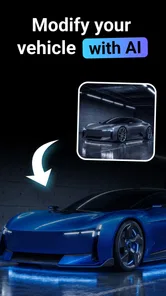
ModsTune – AI Car Designer is an AI-powered customization app that lets you visualize modified vehicles through generated concepts and styling ideas. You can experiment with different looks, body kits, colors, wheels, finishes, and other design details without physically changing a car. It is mainly intended for inspiration, entertainment, and planning possible modifications rather than replacing professional automotive design software.
How does the AI car design feature work?
The app generally works by using an uploaded vehicle image or a selected car concept as the starting point, after which you describe the style or modifications you want to see. The AI processes the request and creates a visual interpretation. Results can vary depending on the photo quality, wording, vehicle angle, and complexity of the requested changes, so some generated details may look imaginative rather than mechanically accurate.
Can ModsTune create realistic modifications for my own car?
ModsTune can provide useful visual inspiration for a personal vehicle, especially when you use a clear, well-lit image taken from a suitable angle. However, generated designs should not be treated as exact previews of a finished build. Proportions, fitment, lighting, body lines, and mechanical components may be altered by the AI, so consult a qualified shop before purchasing parts or assuming that a modification will fit your specific make and model.
Is ModsTune – AI Car Designer free to use?
ModsTune is free to download, but it also offers in-app purchases ranging from $9.99 to $29.99 per item. Availability of features may depend on the version of the app, platform, region, and the developer’s current pricing model. Some functions may be accessible without payment, while advanced generations, higher-quality results, additional styles, or unlimited usage could require in-app purchases or a subscription. Before downloading or starting a trial, review the store listing and subscription terms carefully, including renewal conditions and cancellation instructions.
Pros
- Generates creative car concepts from simple text prompts
- Useful for exploring custom paint
- body kits
- and styling ideas
- Fast results make it easy to compare multiple design directions
- Can inspire real-world modifications before visiting a workshop
- Appealing visual tool for car enthusiasts and design beginners
Cons
- AI results may include unrealistic parts or impractical vehicle proportions
- Some designs can look repetitive without detailed prompts
- Advanced customization may be limited compared with professional CAD tools
- Generated images may not accurately represent installation or fitment
- Results and features may depend on internet access or app credits











