MiXplorer Silver File Manager
- 514.00
- 4.2
- Installs
- 50.00K
- Price
- $5.99

Screenshots


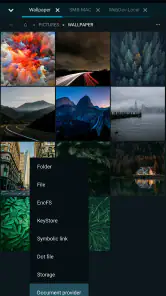

Analysis by Reviewed
I judge a file manager by what happens when a routine task goes slightly wrong: a folder is buried, a transfer is interrupted, or I need to compare two locations without losing track of either. MiXplorer Silver File Manager is aimed at people who want more control than a basic browse-and-copy tool provides. It is a paid productivity app from Hootan Parsa, priced at $5.99, and its 4.2 average from around 3.8 thousand ratings suggests that many users find the extra depth worthwhile. My main reservation is that depth can make the first few sessions feel less effortless than using a simpler manager.
Where the first snags tend to appear
MiXplorer Silver is not difficult because its purpose is obscure; the friction comes from having many controls in one place. If you expect every action to be obvious at a glance, the range of settings and customization may slow you down. I would start with one everyday job—finding a download, moving a document, or opening a folder—and learn the relevant controls before changing the interface extensively. That gives you a useful baseline instead of leaving you unsure whether a later problem came from a setting you changed.
It is also worth separating browsing from transferring. Seeing a file in a location does not guarantee that a move to another destination has completed. For important work, I check the destination afterward and open the file there before deleting or clearing the original. That small habit is more valuable than trying to make the app’s many options do everything at once.
A calmer way to set it up
The app supports a minimum Android version of 5.0, and its content rating is Everyone. It has been available since December 19, 2018, and the current version is 6.68.4-Silver. With more than 50 thousand installs, it remains a relatively specialized choice rather than the default manager most people encounter on every phone. I would first confirm that your device meets the Android requirement, then keep the initial setup simple: use the default layout long enough to learn where your usual folders and actions are.
MiXplorer Silver is particularly suited to people who work across several folders, like to tailor their tools, or regularly handle files beyond basic photo sorting. Its tabbed browsing can help keep two locations in view, while split view is useful when the screen is large enough to show both sides comfortably. On a compact phone, though, switching between tabs may be easier than trying to inspect a cramped split screen. The practical choice depends on the task and display, not on using every feature just because it exists.
Making file work easier to recover
Recovering a workflow without guesswork
If an operation seems to have gone nowhere, I retrace it in stages: check the source folder, check the intended destination, and confirm whether the file opens from the new location. For a batch of files, I would test the process with one unimportant item first. This is a simple way to learn how a workflow behaves on your device before trusting it with a large or valuable set of files.
For a realistic example, imagine gathering a work document from one folder, a reference image from another, and a few downloads into a single project folder before leaving home. Tabs make it easier to keep those locations available, and a final destination check helps catch a missed item. If you repeat that routine often, exploring the app’s automation options may be worthwhile; if it is a one-off task, doing it manually is likely clearer and easier to verify.
More From Our News Desk

Clash of Clans Is Won Between the Battles

Android Auto Makes the Case for Quieter Car Software

MobiOffice: Transforming Mobile Productivity with Seamless Integration

EA SPORTS FC™ Mobile Soccer: Redefining Mobile Sports Gaming

How Microsoft OneDrive Became a Mobile Productivity Giant

How Google Translate Breaks Language Barriers Effortlessly
When the trouble may be elsewhere
A file manager cannot make every storage or transfer issue disappear. If a file is missing, I first check whether I am looking in the right folder and whether the source still contains it. If opening or moving it fails, I also consider whether the destination is available and whether the file itself is usable. These checks help distinguish a navigation mistake from a problem outside the manager, and they prevent unnecessary changes to app settings.
Compared with the basic file app that comes with a phone, MiXplorer Silver offers a deeper set of controls and more room to shape a workflow. That is a real advantage for someone who regularly moves between locations or wants built-in viewing and organization tools. The trade-off is a steeper learning curve: a simpler manager is better if you only occasionally locate a download or move a photo and do not want to spend time adjusting how you work.
What to expect from the extra depth
The app includes a media player and image viewer, which can save a switch to another app when you only need to check a file quickly. I would still use a dedicated player or editor when I need a specialized tool; having a viewer built in is convenient, but it does not make a file manager the right choice for every media task. Likewise, customization is most useful when it solves a repeated annoyance. Changing several settings before you understand the default behavior can make troubleshooting harder, so I would adjust one thing at a time.
One useful decision before paying is to ask how often you actually manage files. The $5.99 price makes more sense to me if tabs, split view, broad format handling, or automation will save time repeatedly—not simply because the app has a long settings menu. If your needs are limited to occasional browsing, the manager already on your phone may be enough. If you want a more hands-on workspace and are willing to learn it, MiXplorer Silver has a clearer case.
A practical verdict
MiXplorer Silver is a capable choice for Android users who want to take an active role in organizing and moving files, rather than relying on a bare-bones browser. Its Everyone rating and Android 5.0 minimum make its basic audience broad, but its strongest appeal is to curious or experienced users who will put the deeper controls to work. I would not recommend it as the simplest option for someone who wants zero setup or only needs to find a recent download.
For my own use, the best approach is to begin with a small, familiar task, keep the layout steady, and verify important transfers at their destination. That avoids turning flexibility into needless setup work. The app’s 514 reviews sit alongside its 4.2 average, but the more useful question is whether you will benefit from managing files in tabs, tailoring the interface, and building repeatable routines. If the answer is yes, this paid manager is worth a closer look; if not, a simpler alternative will probably feel more comfortable day to day.
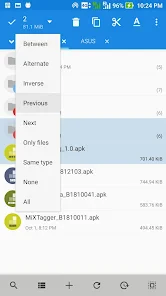
Upon launching MiXplorer Silver File Manager, you're greeted with a clean and intuitive interface. It's one of those apps that makes navigation feel like a breeze. Whether you're a tech novice or a seasoned pro, you'll find it easy to maneuver through your files. The app's design is minimalistic, yet it packs a punch with its extensive functionality.
A Feature-Rich Experience
One of the standout features of MiXplorer is its extensive support for a wide range of file formats. I mean, from the typical documents and images to more obscure file types, this app handles them all without breaking a sweat. It's like having a one-stop-shop for all your file management needs.
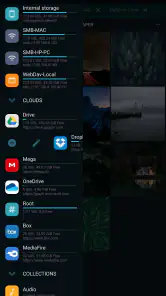
Another thing that blew me away is the app's robust cloud storage support. It seamlessly integrates with a plethora of cloud services like Google Drive, Dropbox, and OneDrive. So, whether you're backing up your precious photos or accessing work documents on the go, MiXplorer has got you covered.
Customization Galore
If you're someone who loves to personalize your apps, MiXplorer won't disappoint. The level of customization here is insane! From themes and icons to intricate settings that let you tweak almost every aspect of the app, it's all about making the app truly yours. Plus, the tabbed browsing feature? Absolute game-changer. It lets you open multiple folders at once, making multitasking a dream come true.
Performance and Usability
Performance-wise, this app is as smooth as butter. No lags, no crashes, just pure efficiency. It efficiently manages resources and ensures that your device runs optimally while using the app. And let's not forget about the built-in media player and image viewer - handy features that save you from jumping between different apps.
Usability is where MiXplorer shines. It offers a split-view mode, which is perfect for larger screens, making file transfers between folders as easy as drag and drop. Plus, the app supports automation through its task automation feature, which is perfect for tech enthusiasts who love to streamline their workflows.
Final Thoughts
In a world full of file manager apps, MiXplorer Silver File Manager stands out as a comprehensive, reliable, and incredibly powerful tool. Whether you're managing files for personal use or handling complex tasks for work, this app delivers on all fronts. It's not just a file manager; it's an experience. So, if you're ready to take your file management to the next level, MiXplorer is definitely worth checking out. Trust me, you won't regret it!
MiXplorer Silver File Manager Frequently Asked Questions
What does MiXplorer Silver cost, and what Android devices can run it?
MiXplorer Silver is a paid productivity app priced at $5.99. It is intended for Android and requires Android 5.0 or later, so check your device’s operating system before downloading. The app is developed by Hootan Parsa, and its current version is 6.68.4-Silver. Its premium positioning may suit people looking for an all-in-one file manager with tools for more hands-on file management.
What is MiXplorer Silver File Manager and what are its key features?
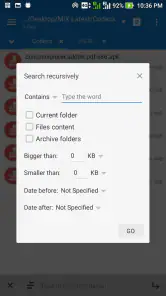
MiXplorer Silver File Manager is a comprehensive file management app designed for Android devices. It offers a user-friendly interface with a plethora of features including a dual-pane mode for easy navigation, support for various file formats, cloud storage integration, and advanced search options. Additionally, it provides robust customization tools, allowing users to tailor their experience to their specific needs. With its wide range of functionalities, MiXplorer is ideal for both casual users and tech-savvy individuals looking to efficiently manage their files.
Is MiXplorer Silver File Manager safe to use?
Yes, MiXplorer Silver File Manager is considered safe to use. It is developed by a reputable team known for creating reliable software. The app does not contain malicious software or adware, ensuring a secure environment for managing your files. Furthermore, it respects user privacy by not collecting unnecessary personal data. Users can confidently use MiXplorer to manage their files without worrying about security breaches or privacy issues.
Can MiXplorer Silver File Manager integrate with cloud services?
MiXplorer Silver File Manager offers excellent cloud integration capabilities. It supports a wide range of cloud storage services, including Google Drive, Dropbox, MEGA, and more. This allows users to easily access and manage their cloud-stored files directly from the app. The seamless integration ensures that users can perform operations such as uploading, downloading, and syncing files across their devices without any hassle, making it a perfect tool for those who rely heavily on cloud storage.
What are the customization options available in MiXplorer Silver File Manager?
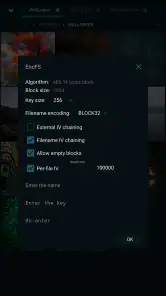
MiXplorer Silver File Manager boasts extensive customization options, allowing users to personalize their file management experience. Users can change the app's theme, adjust the layout, and select different color schemes to suit their preferences. Additionally, the app supports the use of custom scripts and add-ons, enabling advanced users to extend its functionality further. These customization features make MiXplorer not only versatile but also adaptable to individual user needs.
Pros
- Highly customizable interface
- Supports a wide range of file formats
- Efficient file management tools
- No ads
- providing a clean experience
- Robust cloud storage integration
Cons
- Not free
- requires purchase
- Steep learning curve for new users
- Occasional bugs in updates
- Limited support compared to competitors
- Complex settings may overwhelm users
- Category
- Productivity
- Version
- 6.68.4-Silver











