Minutes: AI Meeting Note Taker
- 58.00
- 4.1
- Installs
- 100.00K
- Price
- Free

Screenshots
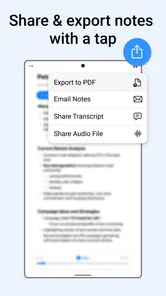
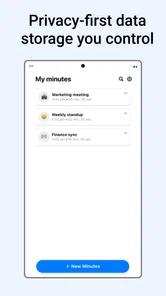
Analysis by Reviewed
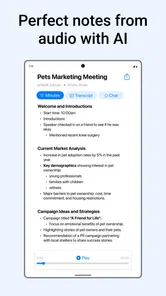
I installed Minutes: AI Meeting Note Taker expecting a straightforward voice recorder, but its real appeal is the possibility of turning spoken conversations into something I can use later. That makes it a productivity app rather than just an audio utility. The store summary focuses on transcribing and recording voice audio, and that description is accurate, but it does not fully explain where the app fits into a daily routine.
My first impression was positive because the basic idea is easy to understand: record a conversation, create a written version, and avoid relying entirely on memory or hurried handwritten notes. The app is free to install, with optional in-app purchases ranging from $14.99 to $99.99 per item. That makes it simple to try without committing immediately, although anyone planning to use it heavily should think about whether the paid options will make sense over time.
Minutes AI is developed by Minutes AI and belongs to the productivity category. It has an average rating of 4.1 from around 3,000 ratings, with over 100,000 installs. Those figures suggest that it has found a real audience, but they also set a reasonable expectation: this is a useful tool with a particular purpose, not a flawless replacement for every note-taking method.
What it feels like during the first week
The first week is where the app makes its strongest case. Voice is faster than typing, especially when an idea arrives while I am walking, cooking, commuting, or preparing for another task. Instead of trying to reconstruct a thought later, I can capture it while it is still complete. For meetings, the same principle applies: a recording can preserve details that would otherwise disappear between one agenda item and the next.
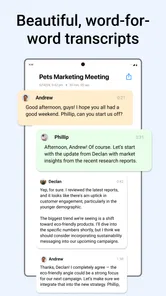
The most useful change is not simply having an audio file. Audio recordings are often difficult to revisit. I may remember that an important point was discussed, but not when it appeared or who explained it. A transcript gives the recording a practical layer: I can scan the conversation, recognize the wording of a decision, and return to the relevant part without listening from the beginning every time.
I found the app most convincing for conversations that produce follow-up work. A planning discussion, an interview, a study session, or a call with several decisions can generate small obligations that are easy to lose. Using Minutes AI encourages me to treat spoken information as a source that can be reviewed later rather than as something I must remember perfectly in the moment.
A realistic example is a weekly project meeting. I might begin with a short list of topics, record the discussion, and later review the transcript while turning the conversation into tasks. The benefit is not that the app magically manages the project. The benefit is that I have a more reliable reference when deciding what was actually agreed, what remains uncertain, and what deserves a follow-up message.
More From Our News Desk

Weather by Xiaomi Review: Clear at a Glance, Less Clear Up Close

X Under Pressure: Can It Recover When Posting Goes Wrong?

Clash of Clans Is Won Between the Battles

Android Auto Makes the Case for Quieter Car Software

MobiOffice: Transforming Mobile Productivity with Seamless Integration

EA SPORTS FC™ Mobile Soccer: Redefining Mobile Sports Gaming
That distinction matters. Minutes AI can help me capture and revisit information, but I still need to interpret it. A transcript is not the same thing as a clean project plan. I would not treat every sentence as a final decision, and I would still check names, terminology, numbers, and commitments before sharing notes with someone else.
The best early workflow is capture first, organize second
One mistake is trying to make the recording perfect from the beginning. I get better results from using it as a capture layer. I start the recording when the useful conversation begins, avoid interrupting myself to write everything down, and then review the text afterward. During that review, I separate decisions from background discussion and turn vague intentions into specific reminders.
This two-stage approach is more valuable than trying to use voice transcription as an automatic secretary. It reduces the pressure to listen, type, remember, and participate at the same time. The trade-off is that the review still takes effort. Minutes AI saves the first part of note-taking, but it does not eliminate the need for judgment.
For personal voice notes, I would use a short spoken structure: state the topic, explain the idea, and finish with the next action. This makes the resulting transcript easier to scan. A rambling recording may still be captured, but it will be less useful later. The app rewards clear speaking habits, which is one of its less obvious limitations.
Where the novelty starts to fade
During the first few days, transcription feels impressive because it changes a familiar recording into something searchable in spirit and easier to review. After that novelty fades, the important question becomes whether I actually return to the notes. If I record everything but never revisit it, the app becomes a storage habit rather than a productivity habit.
I would not recommend recording every casual conversation automatically. That creates too much material and makes the review stage feel like another inbox. The better use is selective: meetings with decisions, spoken ideas that would take too long to type, study explanations, or conversations where the exact wording may matter later.
There is also a social side to recording. I would tell other participants before starting, especially in a professional, educational, or personal setting. A recording tool should support trust rather than quietly undermine it. Even when the app makes capture easy, responsible use still depends on the people involved and the setting.
Does it earn a place after the first month?
After the initial excitement, Minutes AI has recurring value when it becomes part of a repeatable review cycle. The strongest pattern is simple: record only useful conversations, review the transcript soon afterward, and extract the few points that need action. If I follow that cycle, the app can reduce the chance that important details disappear into memory.
The month-to-month benefit is therefore less about recording volume and more about retrieval. A person who regularly attends meetings may appreciate having a consistent archive of discussions. A student could use it to revisit spoken explanations. Someone developing ideas may prefer talking through a concept before editing it into written form. In each case, the app is most helpful when speech is the natural starting point.
It is less compelling for people who already take excellent written notes and rarely need to revisit conversations. If I can summarize a meeting accurately while it happens, a transcript may add unnecessary material. The app also will not solve a poorly structured meeting. If nobody defines decisions or responsibilities, a longer record of the discussion does not automatically create clarity.
How it compares with ordinary alternatives
A standard voice recorder is simpler and may be enough when I only need the original audio. It avoids the extra step of working with a transcript, but listening back can be slow. Minutes AI is more useful when the written version helps me scan and process information, not merely preserve it.
Typed notes are usually cleaner and more selective. They also require attention during the conversation, which can make it harder to participate fully. Minutes AI shifts that work later. This is a meaningful advantage in discussions where I need to listen carefully, but it also creates a maintenance obligation because the transcript must be reviewed.
Manual summaries remain better when I need a concise record for another person. A human-written summary can remove repetition, resolve ambiguity, and highlight decisions. I see Minutes AI as a source for that summary rather than a guaranteed finished document. For a formal record, I would always edit the result before treating it as final.
Compared with a general note-taking app, its appeal is narrower but clearer. A typical notes app is better for organizing typed material, checklists, and polished reference pages. Minutes AI is better at getting spoken content into a form I can work with afterward. Choosing between them depends on where my information begins: on the keyboard or in conversation.
What ongoing maintenance really involves
The maintenance burden is moderate rather than invisible. I need to decide when recording is worthwhile, give the session enough context, review the transcript, correct important details, and convert useful points into another system if they require action. If I skip those steps, the app can accumulate recordings without producing much value.
My preferred routine would be to review a meeting shortly after it ends, while the context is still fresh. I would mark the decisions, list open questions, and write down who needs to do what. I would not keep every transcript forever by default; I would retain the conversations that are genuinely useful and discard material that has no continuing purpose, following whatever storage and privacy choices fit my situation.
This is also where the paid model deserves attention. The app itself is free, but in-app purchases are available from $14.99 to $99.99 per item. Before paying, I would first test whether transcription becomes part of my routine. Occasional users may be satisfied with the free entry point, while frequent users should evaluate the value of the available purchase against how many meetings they actually review.
Sources of fatigue and friction
The biggest source of fatigue is not starting a recording; it is processing the result. A transcript can feel like progress even when it has only moved the work from the meeting to later. If I already have an overloaded task list, adding a new stream of text may make me feel organized without helping me decide what matters.
Accuracy also needs practical caution. Spoken language includes interruptions, unfinished sentences, names, specialist terms, and references that make sense only in context. I would check any passage involving a deadline, amount, address, technical instruction, or sensitive decision. A transcription mistake in casual brainstorming may be harmless; the same mistake in a work commitment can cause confusion.
Long recordings can create another problem: too much review material. I get more lasting value from focused sessions than from capturing an entire day. Starting and stopping deliberately is a small habit, but it prevents the app from becoming a digital pile of conversations I never revisit.
There is a cognitive cost as well. Knowing that a recording exists can make me less disciplined about listening carefully. I try to use the app as backup, not as permission to disengage. I still keep a tiny written marker for urgent decisions or questions that need immediate clarification.
Who should use it, and who should skip it?
I would recommend Minutes AI to people whose work or study naturally happens through conversation. It is especially suitable for users who think aloud, attend recurring meetings, conduct interviews, or need to preserve explanations that are difficult to type in real time. It can also help anyone who often says, “I know this was discussed, but I cannot remember the details.”
I would be more cautious recommending it to someone who wants instant, polished minutes with no editing. The app can support that process, but I would not make it the sole authority for important records. People who dislike reviewing transcripts, rarely revisit notes, or prefer handwritten summaries may find the extra layer more tiring than useful.
It may also be the wrong choice when a conversation is highly sensitive and participants are not comfortable with recording. In that situation, a manual summary or brief written note is the better option. Productivity should not come at the cost of consent or confidence between people.
Device fit and practical expectations
The app is available for Android devices running version 7.0 or later, and its content rating is Everyone. That broad compatibility makes it approachable for many users, including people who are not using a recent phone. The current version is 1.4.0, so I would still keep expectations realistic: the experience may continue to evolve, and I would check that my device handles my intended recording routine comfortably before depending on it for important work.
I would also plan around the environment. A quiet room and a phone placed sensibly near the speakers should produce a more useful result than a noisy space with several people talking at once. This is not a reason to reject the app; it is a reminder that transcription quality begins with the recording itself. Clear audio, short topic changes, and explicit names make later review easier.
My long-term verdict
Minutes AI earns lasting space on my phone only when I use it selectively. Its first-week appeal is immediate because speaking is often faster than typing, and a transcript is easier to revisit than a raw recording. Its long-term value comes from a disciplined loop: capture an important conversation, review it, verify the details, and turn the useful parts into action.
I like that it addresses a real gap between audio recording and written notes. It is not merely a recorder, but it is also not a complete meeting-management system. That middle position is its strength and its boundary. I would use it to preserve the substance of a discussion, then rely on my own judgment to create the concise record or task list I actually need.
The app is free to start, has attracted over 100,000 installs, and carries a 4.1 average from around 3,000 ratings, which makes it a reasonable candidate for a personal trial. The optional purchases mean I would test my habits before spending money. If I consistently review recordings and benefit from recovering details, the cost may be justified. If I only collect audio and forget about it, no purchase will fix the underlying workflow.
My final recommendation is straightforward: try Minutes AI if your important information often begins as speech, especially in recurring meetings or spoken idea sessions. Give it a defined role rather than recording everything. Skip it if you want effortless, perfectly edited minutes or if you already have a note-taking system that works without friction.
The lasting value is not the novelty of seeing speech become text; it is the habit of turning remembered conversations into verified decisions and useful next steps. Used that way, Minutes AI can become a practical part of a monthly routine instead of another productivity app that feels exciting for a week and then disappears from daily life.
Minutes: AI Meeting Note Taker Frequently Asked Questions
What devices and operating systems can run Minutes: AI Meeting Note Taker?
Minutes: AI Meeting Note Taker is a productivity app available for Android and iOS users. On Android, it requires version 7.0 or later, so check your device’s software version before downloading. Once installed, make sure the app has the microphone and other permissions needed for the features you plan to use. The developer is Minutes AI.
What is Minutes: AI Meeting Note Taker and what does it do?
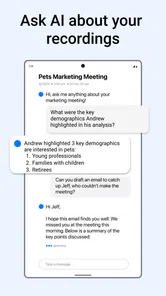
Minutes: AI Meeting Note Taker is designed to help users capture, organize, and review information from meetings, calls, interviews, lectures, and other conversations. Depending on the supported features and permissions, it can record or process meeting audio, create transcriptions, summarize key points, identify decisions, and organize action items. It is especially useful for people who want searchable notes without manually writing everything down.
Does Minutes: AI Meeting Note Taker record meetings automatically?
The app may support recording or importing meeting audio, but its exact behavior depends on the device, operating system, account settings, and the version you install. Users should check whether recording must be started manually, whether background recording is available, and which audio sources are supported. Always inform other participants before recording and follow local consent, privacy, and workplace regulations.
How accurate are the transcriptions and AI-generated summaries?
Minutes can save considerable time, but its transcription and summaries should not be treated as completely error-free. Accuracy may change with background noise, multiple people speaking, accents, technical vocabulary, poor microphones, or conversations held in unsupported languages. After each meeting, review names, figures, deadlines, decisions, and assigned tasks before sharing the notes or relying on them for important work.
Is my meeting data private and secure in Minutes?
Before using Minutes for confidential conversations, review its privacy policy, permissions, storage practices, and terms of service. AI meeting tools may send recordings or transcripts to cloud servers for processing, depending on how the service operates. Check whether data is encrypted, how long content is retained, whether recordings can be deleted, and whether information may be used to improve the service.
Pros
- Creates concise meeting summaries from recorded conversations.
- Helps identify action items and key decisions quickly.
- Searchable notes make it easier to find details later.
- Useful for remote teams
- interviews
- and everyday discussions.
- Reduces the time spent writing notes manually.
Cons
- Transcription accuracy may drop with accents or background noise.
- Requires permission to access recordings and microphone features.
- AI summaries may miss context or misunderstand technical terms.
- Some advanced features may require a paid subscription.
- Uploading sensitive meetings can raise privacy and security concerns.











