

Microphone Blocker - Anti Spy
- 685.00
- 4.5
- Installs
- 500.00K
- Price
- Free

Screenshots



Analysis by Reviewed
I treat microphone security as a practical question, not a reason to assume that every app is listening. The useful question is whether I can make microphone access harder to use when I do not need it, and whether a control fits into my ordinary routine. Microphone Blocker - Anti Spy is aimed at that narrow concern: it gives people who want a microphone block a way to manage access rather than asking them to rely only on caution.
What a microphone block can and cannot do
A blocking tool is most relevant when I am not making calls, recording audio, or using voice features. In those moments, limiting microphone access can be a sensible extra precaution. It is not a substitute for reviewing app permissions or keeping the operating system current, and it should not be treated as proof that a phone has been compromised or is completely protected. I would use it as one layer of control, not as a promise of total privacy.
That distinction matters in daily life. If I am about to join a voice call, I need to remember that a block may interfere with the microphone-dependent feature I want to use. A quick check before the call, followed by restoring the block afterward, is a more realistic habit than leaving it enabled and wondering why an app cannot hear me. People who depend on voice input throughout the day may find that extra step irritating.
Who may find it useful
This kind of tool is best suited to someone who wants a visible, deliberate way to restrict microphone use during quiet periods, such as while reading, travelling, or leaving a phone on a desk during a private conversation. It may also appeal to a person who finds system settings confusing and prefers a dedicated control. If you rarely use audio features, the trade-off may feel worthwhile; if you use voice messages, calls, dictation, or recording constantly, your phone’s built-in permission controls may be less disruptive.
Compared with changing permissions app by app, a central microphone control can be simpler to understand, but it also creates a broader switch: a legitimate app that needs audio can be affected along with one you distrust. I would still check individual permissions for apps that do not need a microphone at all. A block is most helpful when paired with that occasional review, rather than used as a reason to stop paying attention.
Details worth checking before relying on it
Microphone Blocker - Anti Spy is a free Android app from BytePioneers s. r. o. in the Libraries & Demo area. It has a 4.5 average from around 9,600 ratings and more than 500,000 installs. The app is rated for Everyone, and its current version is 1.84, with Android 6.0 as the minimum system requirement. Those figures suggest that it has attracted a sizeable audience, but popularity alone is not a security audit.
The app includes in-app purchases, with items priced from $3.99 to $89.99. I would check the purchase screen carefully before choosing anything, especially if I only want the basic microphone-control function. The important trust questions are practical ones: what access Android asks the app to use, what choices the interface presents, and whether those choices are clear enough for me to understand. I would review the permission prompts on my own device rather than assuming that a privacy-focused purpose automatically means minimal access or a particular data practice.
More From Our News Desk

 Gmail
GmailGmail in a Busy Inbox: Who Benefits Most?
From first account to crowded workday, Gmail earns its place through dependable search and flexible sorting—but its best fit depends on how much inbox maintenance you can tolerate.

 Prime Video
Switching to Prime Video: What Changes in Your Viewing Routine
Prime Video can make a compelling second home for streaming, but switching means learning a different catalog, rental layer, and route from browsing to playback.

 Universal TV Remote Control
Universal TV Remote Control Works Best as a Reliable Backup
A phone remote earns its place through quick setup and reliable habits. Here is how to get more from Universal TV Remote Control—and where its limits show.

 Weather - By Xiaomi
Weather by Xiaomi Review: Clear at a Glance, Less Clear Up Close
Xiaomi’s weather app makes everyday forecasts quick to scan, but its calm surface can leave useful details and recovery paths harder to find than they should be.

 X
XX Under Pressure: Can It Recover When Posting Goes Wrong?
A resilience-focused review of X, examining setup, mistaken posts, interruptions, weak connections, and the gaps that matter when recovery needs to be dependable.

 Clash of Clans
Clash of Clans Is Won Between the Battles
Its raids are quick; its community is a long-term project of coordination, teaching, rivalry, and shared responsibility—with all the friction that entails.
Latest News



A realistic routine and its friction
Imagine leaving your phone on a table while you discuss something personal with a friend. A microphone block may help you feel more in control during that conversation, but only if it is actually enabled and the control works as expected on your device. Before relying on it, I would test the setting with a harmless voice recording or a call, confirm what happens when blocking is on, and then check how quickly I can restore microphone use. That small test is more useful than assuming the label tells the whole story.
There is also a convenience trade-off: a protection step that interrupts an urgent call or voice note can encourage people to disable it and forget to turn it back on. I would choose a routine I can maintain, perhaps enabling the block when I know I will not need audio and switching it off before a planned call. If the app’s controls do not behave predictably on your particular Android device, the system’s own app-permission settings are the safer fallback because they let you manage access at the operating-system level.
Guarding Your Privacy
In a world where digital privacy is becoming increasingly important, Microphone Block: Mic Anti Spy acts as a vigilant guard for your smartphone. Once you install it, the app works quietly in the background, ensuring that no sneaky apps can tap into your microphone without your consent. It's almost like having a bouncer for your microphone, keeping unwanted guests out.
How Does It Work?
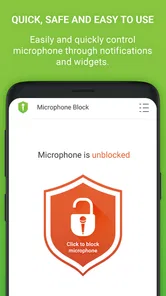
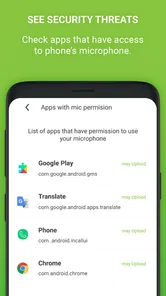
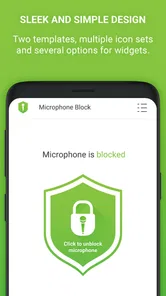
Using the app is as simple as pie. Upon launching Microphone Block: Mic Anti Spy, you’ll be greeted by a user-friendly interface that even the least tech-savvy person can navigate with ease. You have the power to enable or disable microphone access with just a tap. What’s even cooler is that the app allows you to see which apps have tried accessing your mic, giving you complete transparency over your device’s security.
- Simple toggle to block/unblock microphone access.
- View the list of apps that attempted to use your microphone.
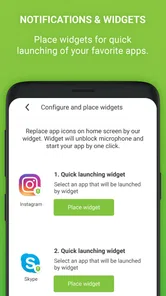
- Receive notifications when an app tries to access your mic.
The Performance
One might wonder, does having an app constantly monitoring your microphone affect the phone’s performance? Fortunately, Microphone Block: Mic Anti Spy is lightweight and doesn’t hog your device’s resources. I barely noticed any difference in my phone’s battery life or speed after installing it. It's like having a security guard who doesn’t eat up your food supply!
Peace of Mind
Ultimately, the best thing about this app is the peace of mind it brings. Knowing that your private conversations are not being overheard gives you one less thing to worry about. In today’s digital age, where privacy invasions are just a click away, having an app like Microphone Block: Mic Anti Spy is a small but significant step towards safeguarding your personal space.
So, if you’re someone who values their privacy and wants to ensure that their phone isn’t spying on them, give Microphone Block: Mic Anti Spy a try. It’s easy to use, effective, and doesn’t cost a dime. Plus, it gives you that extra layer of privacy protection that’s hard to come by these days. Go ahead, take control of your microphone and keep those prying ears at bay!
Making the control fit a real day
The most useful way to judge a microphone blocker is not by leaving it switched on and hoping for the best, but by checking how it fits around the moments when audio matters. For example, if I am heading into a meeting where I will mostly take notes, I might keep the block in place while the phone is sitting unused. If the meeting changes into a call, I need a simple, dependable way to allow microphone access before joining. That small change in routine is the app’s central trade-off: extra control in quiet periods in exchange for remembering to restore access when I need it.
I would also test the behaviour with more than one legitimate audio task. A voice message, a call, and a recording are useful checks because a phone’s microphone is not used in only one way. Trying them before relying on the app helps me learn what a block affects and avoids discovering the consequence during an important conversation. After testing, I would leave myself a reminder or create a habit tied to a predictable event, such as disabling the block before a scheduled call and re-enabling it once the call ends.
Reading alerts without jumping to conclusions
If an app reports that another app tried to access the microphone, I would treat that as a prompt to investigate, not as proof of spying. Some ordinary functions need audio, and an access attempt can be expected when I open a voice recorder, start a call, or use speech input. The useful next step is to compare the alert with what I was doing at that moment, then visit Android’s permission controls to see whether that app genuinely needs microphone access for the way I use it.
This is where a dedicated blocker and the phone’s own controls serve different purposes. A broad block is convenient when I want a general pause on microphone use; individual permissions are more precise when I want one app to keep working while another loses access. If I see an unfamiliar access attempt, I would avoid making a decision based on the app name alone. I would check the app’s purpose and my own settings, then revoke access if the microphone is unnecessary. The alert can make that review easier to remember, but it cannot make the judgement for me.
Choosing between a blocker and built-in settings
Android’s permission settings are the sensible alternative for someone who wants a set-and-forget arrangement for particular apps. They take more effort to review, but they let me make selective choices instead of repeatedly switching a general control. That approach is better for a person who relies on a voice assistant, accessibility tools, dictation, or frequent calls and wants those functions to remain available while restricting only selected apps.
A dedicated microphone control makes more sense if I want a quick, temporary change and am comfortable accepting that it may affect every microphone-dependent task. Neither approach replaces the other: app-by-app permissions help reduce unnecessary access over time, while a broad block can be a convenient extra step in a specific situation. I would not install a blocker expecting it to identify malicious software, explain every access event, or repair a compromised device. Its value is narrower and more practical: it gives me another way to interrupt microphone use when I choose to.
Questions I would settle during setup
Before I make the app part of my routine, I would check what Android asks me to approve and read each prompt before accepting it. I would also look at the interface to understand what the main control changes, whether I can tell its current state at a glance, and what happens when I try an ordinary call with blocking enabled. These checks are more useful than relying on a privacy-oriented name, because the actual permissions and choices visible on my phone are what guide my decision.
I would also decide whether I need any optional purchase before paying for anything. The app is free to install, but in-app items are offered across a wide price range, so I would inspect what each purchase is for and whether it relates to the function I actually want. If I only need basic microphone restriction, I would not assume that buying an item is necessary; I would first test the available controls and make a purchase only if its purpose is clear to me.
For a shared or family phone, I would explain the control to anyone who regularly uses voice features. A block that one person enables can look like a broken microphone to someone else, especially if they do not know where to check. Since the app is rated for Everyone, it may be suitable for a broad audience, but that does not remove the need to show another user how to restore audio access or how to find Android’s permission controls. Clear household expectations prevent a privacy measure from becoming an avoidable source of confusion.
Who should pass, and my cautious verdict
I would skip this kind of app if I need uninterrupted microphone access throughout the day, dislike toggling settings, or expect a tool to prove that no app has ever listened. People who use calls, voice notes, dictation, recording, or audio-based accessibility features constantly may be better served by carefully managing individual app permissions. That keeps essential tools available without making every audio task depend on remembering a general switch.
For someone who wants a deliberate microphone pause and is willing to test it on their own device, this app can be a useful addition to a modest privacy routine. I like the idea of pairing a broad control with occasional permission reviews, while keeping expectations grounded: a blocker is not a security audit, and an alert is not a verdict. I would judge it by whether its visible controls are understandable, its behaviour is predictable in my everyday tests, and the extra step feels manageable. If those conditions hold, it offers practical agency; if not, Android’s built-in controls are a clearer choice.
Microphone Blocker - Anti Spy Frequently Asked Questions
What should I check before installing Microphone Block - Anti Spy?
Microphone Block - Anti Spy is a free app from BytePioneers s. r. o., with optional in-app purchases. It is rated for Everyone and is listed in the Libraries & Demo category. Before downloading, consider whether you need to block microphone access, since enabling the feature can stop apps that rely on your microphone from recording or communicating audio until you turn it back on.
What is Microphone Block: Mic Anti Spy and how does it work?
Microphone Block: Mic Anti Spy is an app designed to protect your privacy by disabling your device's microphone, preventing unauthorized apps from listening to your surroundings. It works by blocking the microphone on your device, ensuring that no app can access it without your permission. Users can turn the microphone on or off with a single tap, providing peace of mind in terms of privacy.
Is Microphone Block: Mic Anti Spy safe to use on my device?
Yes, Microphone Block: Mic Anti Spy is safe to use. It is a privacy-focused app designed to protect your microphone from unauthorized access. The app does not collect any personal data and operates solely on your device without requiring an internet connection. It is a trusted solution for those looking to secure their audio privacy.
Does Microphone Block: Mic Anti Spy affect the performance of other apps?
Microphone Block: Mic Anti Spy is designed to block the microphone, so it will prevent apps from accessing the microphone when it is enabled. However, it does not interfere with the overall performance of other apps on your device. Users can easily toggle the microphone blocking feature on or off to use apps that require microphone access.
Can I use Microphone Block: Mic Anti Spy on both Android and iOS devices?
Microphone Block: Mic Anti Spy is available for both Android and iOS devices. It can be downloaded from the Google Play Store for Android users and the Apple App Store for iOS users. The app provides consistent functionality across both platforms, helping users protect their privacy regardless of their device type.
Pros
- Easy to use interface
- Blocks microphone access for all apps
- Low battery consumption
- No ads
- Supports schedule blocking
Cons
- Limited to microphone blocking only
- No advanced settings
- No custom app exceptions
- Paid for some features
- Limited support for older devices










