

Camera Blocker: Anti Spy Guard
- 1.40K
- 4.4
- Installs
- 1.00M
- Price
- Free

Screenshots
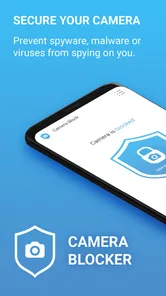
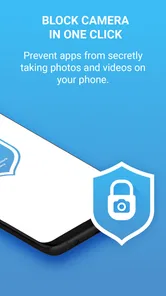
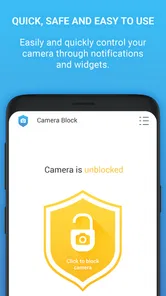
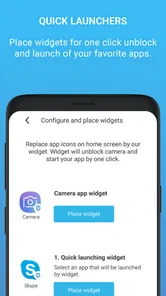
Analysis by Reviewed
I find camera privacy easiest to manage when a phone is shared, handed around, or used in a busy household. A camera-blocking utility can add a useful layer of control, but it works best when everyone understands what it does: it is a boundary around camera access, not a substitute for talking about device use or checking which apps are installed. That distinction matters if a family member borrows your phone for a call, a recipe, or a quick photo.
A practical fit for shared phones
Imagine leaving your phone on the kitchen counter while someone else uses it to look up a recipe. You may want the camera unavailable during that stretch, then restore access when you need to scan a document or take a picture. Camera Blocker: Anti Spy Guard is aimed at that kind of straightforward privacy concern: it is a free app in the Libraries & Demo category, developed by BytePioneers s. r. o., and its core purpose is to help block camera use. It has an average rating of 4.5 from around 17 thousand ratings, with over a million installs, which suggests that this focused task has broad appeal.
The shared-phone example also shows why I would treat camera blocking as a deliberate setting rather than something to leave unexplained. A person borrowing the phone may reasonably expect the camera to work, especially if they need to scan a label or join a video call. A quick heads-up avoids confusion and lets them ask for access instead of repeatedly trying to open the camera. For a household, that small bit of coordination is more useful than assuming everyone will know why the camera is unavailable.
Set a boundary before you hand over the phone
My useful habit with any camera-blocking tool is to decide when I want the camera available before lending out a device. If I need the camera for a video call or a QR scan, I would check that access is restored first; if I am lending the phone for something unrelated, keeping it blocked is a sensible precaution. This small routine avoids the confusing moment when someone tries to use a camera and assumes the phone is broken. It also keeps the choice with the device owner rather than turning the app into an unspoken restriction on someone else.
A helpful way to make that routine stick is to connect the setting to a specific handoff. Before passing the phone across the table, I would say whether camera access is currently unavailable and when I plan to restore it. When I take the phone back, I would check access before starting a task that depends on the camera. That is a better workflow than trying to remember later why a scan or photo will not start, particularly when the household phone gets passed between people several times in a day.
The app is listed as Everyone-rated, while the actual household rule still needs to fit the person using the device. With younger users, I would explain that camera access is being limited for privacy, not use the block as a replacement for age-appropriate supervision. On a shared family phone, it is also worth agreeing who can change the setting, especially if one person depends on the camera for schoolwork or accessibility-related tasks.
That boundary matters even more when a device has more than one regular user. A parent may want to restrict the camera during ordinary browsing, while a child may need it later for a school activity. I would avoid making the setting a surprise or presenting it as a judgement about the other person. A clear, practical explanation—camera access is being paused, and the owner can make it available when needed—keeps the decision understandable without implying that the app manages family accounts or supervises users.
More From Our News Desk

 Gmail
GmailGmail in a Busy Inbox: Who Benefits Most?
From first account to crowded workday, Gmail earns its place through dependable search and flexible sorting—but its best fit depends on how much inbox maintenance you can tolerate.

 Prime Video
Switching to Prime Video: What Changes in Your Viewing Routine
Prime Video can make a compelling second home for streaming, but switching means learning a different catalog, rental layer, and route from browsing to playback.

 Universal TV Remote Control
Universal TV Remote Control Works Best as a Reliable Backup
A phone remote earns its place through quick setup and reliable habits. Here is how to get more from Universal TV Remote Control—and where its limits show.

 Weather - By Xiaomi
Weather by Xiaomi Review: Clear at a Glance, Less Clear Up Close
Xiaomi’s weather app makes everyday forecasts quick to scan, but its calm surface can leave useful details and recovery paths harder to find than they should be.

 X
XX Under Pressure: Can It Recover When Posting Goes Wrong?
A resilience-focused review of X, examining setup, mistaken posts, interruptions, weak connections, and the gaps that matter when recovery needs to be dependable.

 Clash of Clans
Clash of Clans Is Won Between the Battles
Its raids are quick; its community is a long-term project of coordination, teaching, rivalry, and shared responsibility—with all the friction that entails.
Latest News



Keeping It Private
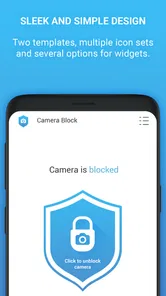
First off, the app is super easy to set up, and it doesn’t require a tech wizard to get it going. Once you install it, Camera Block: Guard & Anti spy gives you peace of mind by blocking unauthorized access to your camera. This means no more worrying about apps sneaking a peek without your consent.
I would still do a simple check after setting it up: try the camera during a moment when it is convenient, then block it and confirm that the change matches what I expect. This is not a complicated security test; it is a way to learn how the control behaves on the phone before relying on it during a busy moment. If someone else shares the device, showing them the basic routine can prevent repeated attempts to use the camera and the mistaken impression that the phone has developed a fault.
Features That Stand Out
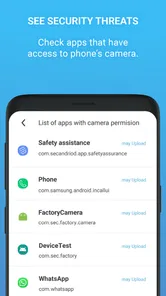
One of the coolest features is its ability to notify you when an app is trying to access your camera. It's almost like having a personal bodyguard for your phone. Plus, it offers a detailed log of all camera access attempts, so you can easily see which apps are trying to snoop around. The user interface? Super intuitive. Even if you’re not the most tech-savvy person, navigating through its features is a breeze.
For me, notifications and a log are most useful as prompts for a closer look, not as a verdict. If an app tries to use the camera while I am actively taking a picture or making a call, that could be ordinary behavior. If an attempt appears at a time I cannot explain, I would check which app it relates to and whether I still want that app on the phone. The practical value is the extra visibility: it gives me a reason to review camera use instead of relying only on memory.
There is a small attention cost to that visibility. A person who finds notifications distracting may prefer to check camera permissions only when a concern arises, rather than monitor activity routinely. Likewise, a log is useful only if I am willing to interpret it in context. I would not assume that every entry signals a threat, or that an empty-looking history proves the phone is completely safe. The best use is measured: notice something unexpected, investigate the app, and make a decision based on the wider situation.
Why You’ll Love It
What really impressed me was its low battery usage. I’ve tried similar apps before, and they’d drain my battery faster than a marathon runner. But with this app, I barely noticed any difference. It’s efficient and does its job without hogging resources.
That matters most for a phone that is already doing several jobs for the household: calls, messages, navigation, school tasks, and occasional photos. A privacy tool is easier to keep in a routine if it does not feel like another demand on the device. Still, I would judge battery behavior on my own phone over normal use rather than assume every model and usage pattern will feel identical. If the app’s effect seems different after installation, checking the phone’s battery settings alongside other recently installed apps is a sensible first step.
Choosing the right kind of protection
Compared with relying only on the phone’s own camera permissions, a dedicated blocker gives privacy-minded users a more visible way to think about camera access. Those built-in controls may be preferable if you want to manage access app by app; a blocker makes more sense when your goal is to prevent camera use broadly for a period. I would not treat alerts or a log as proof that a phone is free of spyware, though. They can help you notice access attempts, but they do not replace keeping the operating system and apps maintained or removing software you do not trust.
The choice comes down to what I am trying to manage. Built-in permission controls are a better fit when I want one trusted app to use the camera while another should not. A blocker is more appealing when I want a simple pause on camera use across ordinary phone activity, such as leaving a device unattended or handing it to someone for a task that does not need a camera. Neither approach removes the need to think about the apps installed on the phone; they address different parts of the same privacy routine.
There is also a practical trade-off: blocking the camera can interrupt legitimate tasks, and restoring access may be needed at an inconvenient moment. Before relying on it, I would test the routine with an ordinary task such as opening the camera app or joining a video call, then make sure other household users know how to ask for access. The app is a poor fit for someone who frequently needs instant camera access and does not want an extra step, or for anyone expecting a complete security suite rather than a focused camera-control tool.
A realistic example is a shared phone left on a counter while one person follows a recipe and another is expecting a video call. If the camera is blocked for the first task, the second person may have to wait while access is restored. I would plan around that possibility rather than promise uninterrupted convenience: keep camera-dependent tasks in mind, let other users know the setting, and avoid turning the block on when someone needs the camera immediately. That makes the tool more useful as a planned privacy measure than as an invisible background safeguard.
Another point to keep in mind is platform fit. The app’s current version is 2.15 and its minimum Android requirement is 6.0, so I would check that an older Android phone meets that baseline before planning to use it. The listing also mentions in-app purchases ranging from $2.99 to $89.99 per item, so although the app is free to install, I would review any purchase prompt carefully and decide whether the free use already meets my needs.
Because the purchase options span a wide range, I would not tap through a prompt just to clear it or assume that installing the app means every option is included at no cost. I would first try the basic camera-control routine I actually want, then consider a purchase only if a clearly described extra is relevant to me. Someone who wants a narrowly focused tool and is comfortable checking purchase details may find the free install worth exploring; someone who expects every feature to be free should take a moment to review the choices before proceeding.
For a household, coordination is more useful than assuming the block will suit everyone automatically. I would agree on a simple rule—who controls camera access and when it should be available—then revisit it if a child’s school task, a shared video call, or a practical need changes. That keeps a privacy measure from becoming a source of unnecessary friction between people sharing one device.
The same rule should account for the person who owns the phone and the person borrowing it. If the owner makes every camera decision without telling anyone, the control can feel arbitrary; if every borrower can change settings without discussion, the owner may lose the boundary they wanted. A brief agreement about how to request access is enough for many shared situations. It is not a substitute for separate accounts or parental tools, and I would not choose it expecting those household-management functions.
Another big plus is the app's compatibility. Whether you're on Android or iOS, you can rest assured that Camera Block: Guard & Anti spy has got you covered. It's versatile, reliable, and does exactly what it promises.
For readers deciding whether to try it, the audience is fairly specific: people who want camera access paused as a privacy habit, especially when their phone is shared or left within reach of others. It is less suitable for someone who takes photos constantly, needs camera access to be effortless, or wants one app to handle broader phone security. If built-in app-by-app permissions already solve the problem, those controls may be simpler. If the concern is an unknown app or a wider security issue, I would investigate that directly rather than relying on camera blocking alone.
Final Thoughts
In an age where digital privacy is more important than ever, having an app like this is almost essential. It’s like a security blanket for your phone, ensuring that the only person who gets to use your camera is you. If you’re someone like me who values privacy and wants to keep those nosy apps in check, then I’d say give Camera Block: Guard & Anti spy a shot. Your peace of mind will thank you!
My more measured recommendation is to treat it as one practical control, not a guarantee that no unwanted access is possible. The app has been available since September 19, 2013, and its current version is 2.15; it is free to install and rated for Everyone. Those details make it easy to consider, but the right decision depends on your phone, your comfort with managing camera access, and whether people sharing the device can follow the same routine.
For a household, I would try it only after agreeing on who may change the camera setting and how someone can request access when a real need comes up. If that conversation sounds simple and the camera is not needed constantly, the app offers a focused way to reinforce a privacy boundary. If coordination would create more hassle than reassurance, or if camera access must always be immediate, the phone’s built-in permission settings may be the calmer choice.
Camera Blocker: Anti Spy Guard Frequently Asked Questions
Does Camera Block: Anti Spy Guard work on iOS as well as Android?
Camera Block: Anti Spy Guard is an Android app, so it is intended for compatible Android phones rather than iPhones or iPads. If you use an Apple device, check the relevant app store for a camera-privacy app made for that platform. On Android, confirm your operating system meets the app’s minimum requirement before downloading.
What should I check before relying on a camera-blocking app for privacy?
Before relying on Camera Block: Anti Spy Guard, make sure you understand how it controls camera access on your particular phone and whether you can still use the camera when you need it. Review the app’s settings and any permission prompts during setup. A camera-blocking tool can be one part of a broader privacy routine, alongside keeping your operating system and other apps up to date.
Who develops Camera Block: Guard & Anti spy, and what kind of app is it?
Camera Block: Guard & Anti spy is a camera-privacy app from BytePioneers s. r. o. It is listed in the Libraries & Demo category and is intended for people who want an extra way to prevent a phone camera from being used secretly by spyware. The app is free to download, with optional in-app purchases, so it is worth checking the purchase details before choosing any paid features.
Which phones can run Camera Block: Guard & Anti spy?
The app requires Android 6.0 or later, so check your phone’s operating system before downloading. If your device meets that requirement, you can consider it as a camera-blocking option, although actual behavior can depend on the device and its system settings. The app is rated for Everyone, making its content suitable for a broad audience.
What is Camera Block: Guard & Anti spy, and how does it work?
Camera Block: Guard & Anti spy is an app designed to protect your privacy by blocking unauthorized access to your device's camera. It works by disabling the camera when not in use, preventing malicious apps from spying on you. The app offers a user-friendly interface, allowing you to easily control which apps can access your camera, ensuring robust privacy protection.
Pros
- Blocks all camera access efficiently.
- Enhances privacy with ease.
- Simple
- user-friendly interface.
- No root required for functionality.
- Lightweight app with minimal resource use.
Cons
- May interfere with legitimate apps.
- No advanced features for tech-savvy.
- Limited customer support.
- Occasional false positives.
- Paid version for full features.










