

MICHAEL JAMES SMITH TV
- 36.00
- 4.9
- Installs
- 10.00K
- Price
- Free

Screenshots

Analysis by Reviewed
I came to MICHAEL JAMES SMITH TV looking for a more guided way to practise painting, rather than another app filled with disconnected images and quick tips. It is an art and design app from PalettePro Ltd, built around on-demand painting lessons associated with Michael James Smith. That focus makes it feel closer to a personal lesson library than to a general drawing tool.
My first impression was that the app is aimed at people who want instruction they can follow at their own pace. The free download makes it easy to try, and the Everyone age rating keeps it approachable for a broad audience. At the same time, the in-app purchase range, from around 34 dollars to around 325 dollars per item, means I would not treat it as a casual purchase without first deciding how seriously I want to use the lessons.
From a blank canvas to a finished painting
I use this section to focus on the practical change from watching a demonstration to making my own marks, because that handoff is where a lesson either becomes useful or stays passive viewing. I’ll look at how preparation, pauses and small notes can help carry an idea across separate sessions, then consider what the lesson format contributes to that process.
Starting with the right expectation
The most important thing to understand is what this app is not. I would not open it expecting a full digital painting studio with brushes, layers, colour effects and export tools. Its value is in learning from painting instruction. That distinction matters because people often search the Art & Design category for both creative tools and educational material, while these serve very different needs.
If I already have paints, brushes, a palette and a surface ready, the app can become the guidance part of my setup. It does not replace the physical materials or the need to make decisions with my own hands. Instead, it gives the activity structure: I can watch, pause, attempt a stage, compare my work with the lesson and continue.
That makes it especially suitable for a beginner who feels lost after opening a blank canvas. It can also suit an intermediate painter who wants a more disciplined routine. Someone looking for quick inspiration, a social gallery or a tool for editing photographs would probably be better served by a different kind of app.
How I would use a lesson step by step
I would begin by choosing a lesson that matches the time and materials I have available. This is a small but useful habit: before pressing play, I would put the required supplies beside me and decide whether I am practising a complete painting or only one part of the process. A lesson is much easier to follow when I am not stopping every few minutes to search for a brush or mix something from scratch.
More From Our News Desk

 Gmail
GmailGmail in a Busy Inbox: Who Benefits Most?
From first account to crowded workday, Gmail earns its place through dependable search and flexible sorting—but its best fit depends on how much inbox maintenance you can tolerate.

 Prime Video
Switching to Prime Video: What Changes in Your Viewing Routine
Prime Video can make a compelling second home for streaming, but switching means learning a different catalog, rental layer, and route from browsing to playback.

 Universal TV Remote Control
Universal TV Remote Control Works Best as a Reliable Backup
A phone remote earns its place through quick setup and reliable habits. Here is how to get more from Universal TV Remote Control—and where its limits show.

 Weather - By Xiaomi
Weather by Xiaomi Review: Clear at a Glance, Less Clear Up Close
Xiaomi’s weather app makes everyday forecasts quick to scan, but its calm surface can leave useful details and recovery paths harder to find than they should be.

 X
XX Under Pressure: Can It Recover When Posting Goes Wrong?
A resilience-focused review of X, examining setup, mistaken posts, interruptions, weak connections, and the gaps that matter when recovery needs to be dependable.

 Clash of Clans
Clash of Clans Is Won Between the Battles
Its raids are quick; its community is a long-term project of coordination, teaching, rivalry, and shared responsibility—with all the friction that entails.
Latest News



Next, I would watch enough to understand the intended sequence before making marks. With painting instruction, this prevents a common mistake: copying the latest visible stroke without understanding why it was placed there. I find it more useful to notice the order of broad shapes, value decisions and smaller details, then return to the relevant point while working.
The pause-and-practise approach is where an on-demand format becomes genuinely useful. I can stop after a stage, attempt it on my own surface and then resume when I need another look. That is more practical than trying to remember an entire demonstration from beginning to end. It also lets me spend extra time on the section that causes trouble instead of moving at the same speed as everyone else.
For a realistic evening session, I might set aside an hour after work. I would watch the opening portion, block in the large forms, pause the lesson and step back from my canvas. Rather than immediately correcting every uneven edge, I would compare the overall balance first. If the composition is wrong, polishing a small detail only wastes time. The app’s greatest benefit in this situation is not simply showing a finished image; it helps turn an unstructured hobby session into a sequence of manageable decisions.
The handoff between screen and studio
The handoff from the app to real materials is also where the user has to do some thinking. A screen can show a colour relationship clearly, but it cannot mix the paint for me or tell me exactly how my particular brush will behave. I need to translate what I see into my own palette, lighting conditions and working surface.
I would keep a small practice area beside the main painting and test mixtures there before committing them. This is one of the easiest ways to reduce frustration. If a colour looks different on my screen than it does under the room light, the test area gives me a chance to adjust without damaging the main subject. It also turns the lesson into an exercise in observation rather than simple copying.
Another useful handoff is note-taking. I would write down the stage where I stopped, the mixture that worked, and the problem I want to revisit. That makes the next session faster and helps me identify whether I am struggling with the lesson itself or with a basic skill such as edge control, proportion or value. The app can provide direction, but the notes create continuity between separate painting sessions.
For someone sharing a home, the on-demand format has a practical advantage over a scheduled class: I can work quietly and stop whenever needed. The trade-off is that there is no obvious pressure from a teacher or group in the room. If I tend to postpone practice, the flexibility may become an excuse. I would set a fixed weekly appointment with myself rather than relying on motivation.
What the lesson format does well
The strongest part of the experience is the reduction of decision fatigue. Beginners often face too many questions at once: where to start, how much detail to add, when to stop and what to correct first. A guided painting lesson narrows those choices. I can concentrate on the current stage instead of inventing a complete method from nothing.
It is also useful for separating observation from execution. I can watch a passage once to understand the goal, then replay it while focusing on hand movement or paint handling. On a second attempt, I can ignore the small details and judge whether my larger shapes are in the right place. That two-pass workflow is more productive than repeatedly restarting a complete painting whenever one section goes wrong.
A further strength is repeatability. If I learn from a live demonstration, I may miss a crucial transition while cleaning a brush or preparing materials. An on-demand lesson lets me return to the same point. For a learner who needs repetition, that can be more valuable than a fast overview of many unrelated techniques.
The app’s public response is encouraging: it holds a 4.9 average from over 200 ratings, with more than 30 written reviews and over 10 thousand installs. Those figures suggest that the focused teaching concept resonates with its audience, although they should not be mistaken for proof that every lesson or every learning style will be a perfect match.
Where it compares with familiar alternatives
Compared with free video platforms, a dedicated lesson app can feel more purposeful because I am entering it with the expectation of structured painting instruction. Free videos may offer greater variety, but they also bring inconsistent teaching styles, distracting recommendations and uneven explanations. If I already know exactly what I want to learn, a general video service may be the faster option. If I need a coherent path, this app has the clearer role.
Compared with a traditional in-person class, the app wins on scheduling. I do not need to travel or keep pace with a room full of students. It loses on immediate correction. A teacher beside me can spot a proportion problem or a poor brush angle before I spend an hour building on it. I would choose the app for independent practice and a physical class when personal feedback is the main goal.
Compared with a general drawing app, this is a completely different purchase. A drawing app gives me tools to create directly on a phone or tablet, while this app is centred on learning through painting lessons. If my goal is digital illustration, photo annotation or quick concept sketches, I would skip it. If my goal is to develop a painting process away from the screen, its specialised focus makes more sense.
Cost, device fit and commitment
The app itself is free to start, which lowers the barrier for testing the lesson style. I would still approach the paid items carefully. The upper end of the purchase range is substantial, so I would first confirm that the teaching pace, subject matter and workflow fit my habits before making a larger commitment. A free entry point is useful, but it does not automatically make every optional purchase good value for every painter.
It supports devices running Android 8.0 or later, so compatibility is worth checking before planning a full course around it. I would also use the largest comfortable screen available. A phone can be convenient for a short review of a step, but a larger display is easier when I need to study edges, colour relationships or the position of a small detail while my hands are occupied.
The current version is 10.200.1, and the app was released on February 11, 2020. Those details help place it as an established app rather than a brand-new experiment, but they do not change the practical test I would use: open a lesson, follow a short section and see whether the instruction fits the way I learn.
Where the workflow breaks down
The flow breaks when I expect the screen to solve problems that require physical feedback. A lesson may show an effective result, but it cannot account for every difference in paint consistency, brush wear, room lighting or surface texture. If I copy each visible mark mechanically, I can end up with a stiff painting. The better approach is to use the lesson as a guide, then make independent adjustments when my materials behave differently.
It can also break when I choose a lesson that is too ambitious for the time available. Starting a detailed painting late at night and stopping halfway may leave me unsure how to preserve the work for the next session. I would avoid beginning a major project unless I can complete a meaningful stage, and I would photograph or note the state of the canvas before packing away.
Another limitation is the absence of the social accountability many learners need. I can pause a lesson, but I can also abandon it. People who improve through critique, conversation and shared deadlines may prefer a community course or a teacher-led setting. This app is better for a self-directed learner who is willing to assess their own work honestly.
The purchase structure may be another point of friction. Because optional items can reach a high price, I would not buy impulsively after enjoying a single demonstration. I would first complete enough free material to judge whether I am actually practising, not merely watching. The distinction is important: collecting lessons is not the same as building skill.
Who I would recommend it to
I would recommend MICHAEL JAMES SMITH TV to a beginner who wants a clear starting point for painting and prefers learning at home. It is also a sensible option for an intermediate artist who wants to revisit fundamentals, establish a repeatable routine or work through demonstrations without the pressure of a fixed class schedule.
I would be more cautious for a child using the app without an adult helping with materials and expectations. The Everyone rating makes the app broadly accessible, but painting supplies and safe workspace habits still need ordinary supervision. I would also hesitate to recommend it to someone who wants instant, finished results. The app can organise practice, but it cannot remove the slow parts of learning to see and paint accurately.
For a digital artist, photographer or graphic designer searching for creative software, I would point elsewhere. The same is true for anyone who mainly wants a large catalogue of unrelated tutorials. This app’s usefulness comes from its specific painting focus, so that focus becomes a weakness when the user’s goal is broader.
My practical way to get value from it
I would treat each lesson as a small project with three stages: preview, practice and review. During the preview, I would identify the major decisions rather than trying to memorise every action. During practice, I would pause often enough to work independently. During review, I would compare the result with the lesson while asking one concrete question, such as whether my values are too similar or whether my edges are equally sharp everywhere.
I would avoid judging the painting only by its final resemblance. A more useful measure is whether I can explain what I did differently from the previous attempt. If I can identify a better starting shape, a cleaner transition or a more controlled correction, the lesson has produced progress even if the finished image is not impressive.
I would also resist buying more content before completing what I already started. The app is most valuable when it changes my behaviour from browsing to practising. One finished exercise, followed by a short written reflection, is worth more to me than a large collection of untouched lessons.
My final assessment
MICHAEL JAMES SMITH TV is a focused painting-learning app rather than an all-purpose art toolbox. I like it because the on-demand format gives a hesitant painter a route from a blank surface to a deliberate working process. Its best use is as a calm, repeatable companion to physical painting, especially for people who need structure but cannot attend scheduled classes.
My recommendation comes with a clear condition: use the free starting point to test the teaching approach, prepare your materials before each session and judge progress by practice rather than by the number of lessons viewed. The paid range deserves careful consideration, and the lack of direct, personal correction means it cannot replace every kind of instruction.
For the right person, though, the app makes painting feel less intimidating. I would choose it when I want guided learning, flexible timing and a dedicated place to return to demonstrations. I would skip it when I need digital drawing tools, live critique or a broad creative community. That is a narrow purpose, but it is also why the app stands out: its real strength is turning painting practice into a step-by-step routine I can actually fit into everyday life.
MICHAEL JAMES SMITH TV Frequently Asked Questions
Who develops MICHAEL JAMES SMITH TV, and what kind of app is it?
MICHAEL JAMES SMITH TV is an Art & Design app developed by PalettePro Ltd. Its store summary describes it as “Painting Lessons on Demand,” so it is aimed at people interested in learning about painting through app-based content. If you are considering a download, think about whether that subject and format match what you want from a creative learning app.
What is MICHAEL JAMES SMITH TV?
MICHAEL JAMES SMITH TV is a streaming-focused app centered on content associated with Michael James Smith. Depending on the available catalog and your location, it may provide access to videos, programs, interviews, updates, or other related media. Before downloading, users should check the current app description, screenshots, supported regions, and content availability because the selection can change over time.
Is MICHAEL JAMES SMITH TV free to download and use?
The application is free to download, but that does not necessarily mean every feature or video is available without restrictions. In-app purchases range from $33.99 to $324.99 per item, so check the purchase details before committing to paid content. I recommend reviewing the app’s purchase information before signing up, especially if you want to avoid unexpected charges.
Which devices support MICHAEL JAMES SMITH TV?
MICHAEL JAMES SMITH TV is intended for mobile users, but compatibility depends on the version offered for Android or iOS and the operating system installed on your device. The Android version requires Android 8.0 or later. Older phones or tablets may install the app but still experience slower performance, limited features, or playback problems.
Does MICHAEL JAMES SMITH TV require an internet connection?
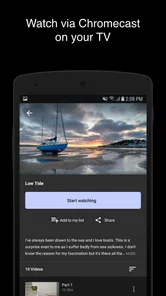
Yes, users should generally expect an internet connection to browse the service, load media, and stream videos. A stable Wi-Fi connection is preferable for longer viewing sessions because mobile streaming can consume significant data and may suffer from buffering in areas with weak coverage. If offline viewing is supported, the app should clearly explain whether downloads are available and how long they remain accessible.
Pros
- Easy access to Michael James Smith’s latest videos and tutorials.
- Useful for learning painting techniques at your own pace.
- Video content is convenient to watch on mobile devices.
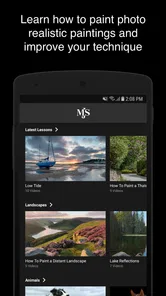
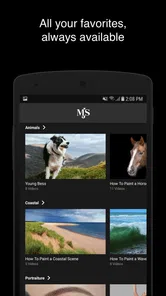
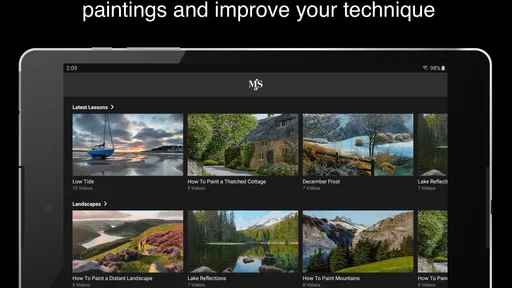
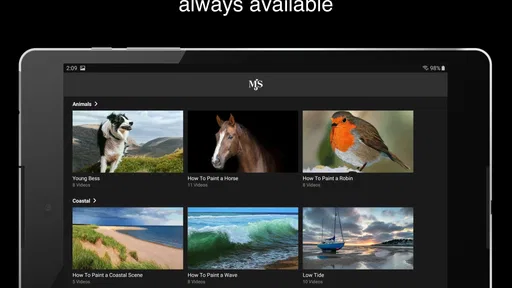
- Clean layout makes browsing lessons straightforward.
- May help beginners follow structured watercolor practice.
Cons
- Requires an internet connection for most video content.
- The app may offer limited features beyond video access.
- Some lessons may be better suited to experienced painters.
- Video quality can depend on your device and connection speed.
- Content updates may not arrive on a regular schedule.











