

mFAX - Fax from Phone
- 102.00
- 4.6
- Installs
- 10.00K
- Price
- Free
Screenshots
Analysis by Reviewed
I usually think of faxing as one of those office tasks that belongs beside dusty machines, paper jams, and a search for a working telephone line. mFAX - Fax from Phone changes that feeling by putting the main job on a phone: preparing a document and sending it as a fax without needing a physical fax machine. I found that its value is less about replacing every document-sharing method and more about being a practical escape route when a recipient specifically insists on fax.
This is a free Business app from octagon lab, with optional in-app purchases ranging from around six dollars to around sixty-five dollars per item. It is rated for Everyone, runs on Android 8.0 or later, and its current version is 1.2.15. The app has built a 4.6 average from around nine hundred ratings, while its install count has passed ten thousand. Those figures suggest a focused utility rather than a mainstream office suite, which matches my experience: it is designed to solve a narrow problem quickly.
Sending a fax from a phone is the whole point
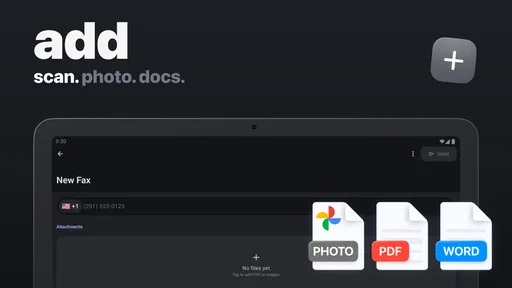
The central capability is straightforward: mFAX lets me work with common digital documents and send them by fax from my phone. Its support for PDF, DOC, and JPG files matters because those are the formats I am most likely to receive in an email, download from cloud storage, or create with a mobile scanner. Instead of printing a file and feeding it through a machine, I can keep the document digital until the transmission step.
That sounds like a small convenience, but it changes the situations in which faxing is realistic. If I am away from an office, working from home, or dealing with a form that exists only on my phone, I do not need to locate a shared fax machine. The app is most useful when the recipient accepts fax but does not offer a modern alternative that I can use immediately.
I also like the distinction between “fax from a phone” and “send a document.” Email, messaging apps, and cloud links are usually easier, faster, and more familiar. They do not help when an organization has a fax-based process, though. mFAX is aimed at that awkward gap: the document is already digital, but the destination still expects a fax.
The real benefit is access, not novelty. A phone-based fax app does not make faxing a better communication standard. It makes an inconvenient standard available when I have no machine nearby. That is an important expectation to set before installing it, because people who never need to fax will find the app much less useful than someone who occasionally has to send paperwork to a clinic, office, insurer, landlord, or public service department.
What I would prepare before opening the app
The smoothest experience starts before I launch mFAX. I would first check that the file is complete, readable, and saved in a format the app handles, such as PDF, DOC, or JPG. This avoids wasting time trying to send an unfinished document or discovering that a page is sideways, cropped, or too dark after it has already been selected.
More From Our News Desk

 Gmail
GmailGmail in a Busy Inbox: Who Benefits Most?
From first account to crowded workday, Gmail earns its place through dependable search and flexible sorting—but its best fit depends on how much inbox maintenance you can tolerate.

 Prime Video
Switching to Prime Video: What Changes in Your Viewing Routine
Prime Video can make a compelling second home for streaming, but switching means learning a different catalog, rental layer, and route from browsing to playback.

 Universal TV Remote Control
Universal TV Remote Control Works Best as a Reliable Backup
A phone remote earns its place through quick setup and reliable habits. Here is how to get more from Universal TV Remote Control—and where its limits show.

 Weather - By Xiaomi
Weather by Xiaomi Review: Clear at a Glance, Less Clear Up Close
Xiaomi’s weather app makes everyday forecasts quick to scan, but its calm surface can leave useful details and recovery paths harder to find than they should be.

 X
XX Under Pressure: Can It Recover When Posting Goes Wrong?
A resilience-focused review of X, examining setup, mistaken posts, interruptions, weak connections, and the gaps that matter when recovery needs to be dependable.

 Clash of Clans
Clash of Clans Is Won Between the Battles
Its raids are quick; its community is a long-term project of coordination, teaching, rivalry, and shared responsibility—with all the friction that entails.
Latest News



For photographed pages, lighting and framing matter more than the fax app itself. A clean JPG of a form is more useful than a blurry image captured in a hurry. If I have several pages, combining them into a properly ordered PDF beforehand can make the sending step easier to review. This is one of the less obvious practical lessons: mobile faxing removes the machine, but it does not remove the need to prepare documents carefully.
I would also keep the recipient’s fax number and any cover information ready. A phone is convenient, but its small screen makes it easier to mistype a number or overlook a missing page. Copying the number from a trusted message, checking it character by character, and reviewing the selected file before sending are simple habits that reduce avoidable mistakes.
How the workflow feels in everyday use
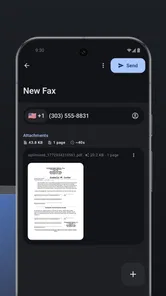
In practice, I approach mFAX as a short document workflow rather than as a place to manage all my office files. I select the document I need, check that the correct version is attached, enter the destination, and review the details before sending. The appeal is that the process begins with a file already on my phone instead of forcing me to print it first.
That file-first approach is especially helpful for PDFs downloaded from email. I do not have to move through a laptop just to produce a paper copy. The same applies to a JPG of a signed page or a DOC file prepared in a mobile word processor. The app’s usefulness comes from fitting into the way documents already arrive on a phone.
I would not treat the send button as the end of my responsibility. For anything important, I would retain the original file and note when I sent it. If the recipient needs proof of delivery, I would follow the recipient’s own instructions rather than assuming that starting a fax transmission automatically settles the matter. A fax app can simplify the sending method, but it cannot decide whether the recipient received, accepted, or correctly processed the document.
There is also a cost decision built into the experience. The app itself is free to install, but optional purchases are available. That makes it easy to try the workflow, while frequent use may require thinking about how much faxing is worth paying for. I would check the purchase details shown in the app before committing, especially if I only need one urgent transmission and do not expect to fax regularly.
A realistic situation where it earns its place
Imagine receiving a form by email while away from home. The organization handling the form does not accept an email attachment and asks for a fax. I have the document on my phone, perhaps after signing it with a mobile tool or photographing the completed page. Driving to a print shop, finding a fax machine, and handling paper would turn a five-minute digital task into a separate errand.
This is where I would recommend mFAX. I could prepare the completed file, select it in the app, enter the requested fax destination, and send it from the same device. The important advantage is not that the app makes the organization’s process modern; it is that I can respond to that process without being physically near office equipment.
Another useful case is a small business owner who receives a document while visiting a customer or working from a shared space. Carrying a dedicated fax machine is unrealistic, and relying on a public machine may expose sensitive paperwork or create delays. A phone-based option gives that person more control over when the document is sent and avoids printing a file merely to transmit it.
There is a trade-off even in this best-case scenario. I would still want a stable connection, a readable file, and enough time to correct an error if the recipient reports a problem. For a deadline measured in minutes, I would avoid waiting until the last possible moment. Convenience is strongest when it replaces an unnecessary trip, not when it is used as an excuse to skip a final document check.
Where it is better than the usual alternatives
The traditional fax machine still has an advantage in places that send and receive faxes constantly. An office with established equipment may have a familiar filing routine, a dedicated number, and staff who can verify transmissions immediately. In that environment, mFAX may add an extra step rather than remove one.
Online fax services can also be a better fit for people who fax frequently. A browser-based service or business platform may be easier to manage when many employees need shared records, recurring workflows, or centralized administration. mFAX is more attractive when the need is occasional and personal: one document, one phone, one immediate task.
Email is usually preferable when the recipient accepts it. It is familiar, easy to archive, and often better suited to conversation around the document. Secure file-sharing tools may be preferable when permissions, collaboration, or version control matter. I would choose mFAX specifically because the destination requires fax or because fax is the only practical channel available in that moment.
Printing and visiting a public fax location remain fallback options, but they cost time and may create privacy concerns. A phone workflow can be quieter and more convenient, especially for paperwork that should not be left on a shared printer. Still, a physical location may be the better choice if I need staff assistance, a paper receipt, or a service that handles a large batch of pages.
Small workflow choices that make a big difference
My first tip is to use PDF whenever the document contains multiple pages or needs to preserve its layout. JPG can be perfectly suitable for a single photographed page, but a PDF is generally easier to review as a complete packet. A DOC file is convenient when that is the format I already have, yet I would inspect it carefully because document appearance can vary between apps and devices.
My second tip is to create a private “ready to fax” folder on the phone. I would keep only final copies there, with clear filenames that identify the recipient and purpose without exposing unnecessary personal information. This reduces the chance of selecting an outdated draft when I am working quickly.
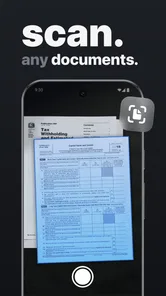
My third tip is to photograph paperwork against a flat, contrasting background and check every corner of the page. A phone camera can capture a surprisingly usable document, but shadows, curled edges, and glare can make a faxed page difficult to read. The recipient may see a degraded version of the image, so a file that looks barely acceptable on the phone is not one I would send for an important transaction.
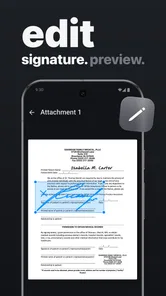
A fourth useful habit is to separate document preparation from transmission. I would finish editing, signing, rotating, and ordering pages before opening the fax workflow. This keeps the sending step focused and makes it less likely that I will accidentally transmit a draft. It also helps me decide whether mFAX is genuinely the right channel rather than defaulting to it simply because the app is open.
Costs, limits, and moments when I would skip it
The most important limitation is the narrow purpose. mFAX is not a replacement for a full document editor, scanner suite, email client, or business records system. If I need to revise a contract extensively, compare versions with colleagues, or maintain a searchable archive, I would use a more specialized tool first and bring the finished file into mFAX only if faxing is required.
The free entry point is useful, but the presence of in-app purchases means I would not assume that unlimited faxing is included simply because installation costs nothing. Someone who sends a fax once in a while may find the purchase model reasonable, while a heavy user should compare the ongoing cost with a dedicated online fax service. That comparison is especially important for a business that sends documents every day.
I would also skip it when the recipient accepts a safer or more efficient digital method. Sending a sensitive document by fax may satisfy an old process, but it is not automatically the best privacy choice. The right decision depends on the recipient’s instructions, the sensitivity of the paperwork, and how the receiving organization handles incoming faxes.
Another reason to choose a different option is a need for guaranteed operational support. If the document is legally urgent, financially significant, or impossible to resend, I would prefer a workflow that gives me a clear confirmation process and a backup plan. mFAX can remove the need for a machine, but no mobile app should be treated as a substitute for checking the destination and keeping evidence of what was sent.
Who will get the most from it
I think mFAX is best for people who fax occasionally and do most of their document work on a phone. Freelancers, mobile workers, tenants handling paperwork, caregivers helping with forms, and small businesses without office equipment can all benefit from having a fax option available when a recipient demands one.
It is also a sensible emergency tool for a household that rarely faxes but does not want to search for a machine during an important deadline. The app takes up a different role from a daily productivity platform: it is something I would rather have installed before an urgent request arrives than try to discover while rushing.
Frequent fax departments, teams that need shared history, and users who require advanced document management should look beyond it. They may be better served by a business-oriented fax service or existing office infrastructure. Likewise, anyone who never encounters fax requirements has little reason to add a specialized app to their phone.
Because it is rated for Everyone and supports Android 8.0 or later, the compatibility barrier is relatively modest for Android users with an eligible device. The developer, octagon lab, has kept the product focused on its core business task rather than turning it into a broad office suite. That focus is a strength when I want a direct route from a phone file to a fax, but it also explains why the app should not be judged as a complete document-management solution.
My recommendation after using the focused workflow
I recommend mFAX when the problem is specific: I have a PDF, DOC, or JPG on my phone, and the recipient requires a fax. In that situation, removing the physical machine is genuinely useful. The app can save a trip, reduce dependence on a shared office, and let me respond to paperwork while I am away from my desk.
I would approach it with realistic expectations. I would prepare the document carefully, verify the fax destination, review the purchase terms before sending regularly, and preserve my original file. I would also compare it with email, secure sharing, a browser-based fax service, or a physical fax location whenever those choices better match the urgency, privacy needs, or volume of the task.
Overall, this is a practical Business app rather than an app I would use every day. Its strongest quality is convenience at exactly the moment faxing becomes inconvenient. If that moment happens to you even occasionally, the free installation makes it worth considering. If fax is part of your daily operation, I would investigate a more structured service before relying on a phone-only workflow.
mFAX - Fax from Phone Frequently Asked Questions
Can I use mFAX on my phone, and what does it need to run?
mFAX is a mobile app for sending faxes from a phone, so it can be useful when you need to handle paperwork away from a fax machine. It is available for Android and iOS, and the Android version requires Android 8.0 or later. The app is listed as free to install, with in-app purchases available, so check your device compatibility and the purchase details before getting started.
Who makes mFAX, and is it a well-established app?
mFAX - Fax from Phone is a Business app developed by octagon lab. It has a 4.6 average from around 900 ratings, with about 100 written reviews and over 10,000 installs. Those figures can help you gauge its visibility and user feedback, but experiences with fax apps can vary depending on the documents being sent, the destination, and the service features you need.
What is mFAX - Fax from Phone, and how does it work?
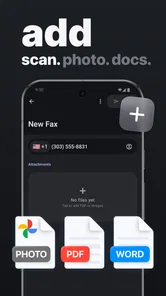
mFAX - Fax from Phone is a mobile faxing app designed to let you send documents directly from an Android or iOS device. After opening the app, you can usually import a file from your phone, cloud storage, photos, or a document scan, enter the recipient’s fax number, and submit the transmission. It is intended to replace the need for a traditional fax machine for occasional or mobile users.
Which file types and documents can I send with mFAX?
The app is generally useful for sending common business and personal documents, including PDFs, scanned pages, photographs, and image files. Its store summary specifically highlights scanning and sending PDF, DOC, and JPG files. Before sending an important document, check that the pages are readable, correctly ordered, and within any size or page limits shown by the app. Documents photographed in poor lighting may be difficult for the recipient to read, so scanning or using a high-quality PDF is usually the better option.
Does mFAX require payment or a subscription to send faxes?
Faxing services commonly use credits, one-time purchases, or subscription plans rather than offering unlimited free transmissions. mFAX may allow you to install the app and prepare a fax without charge, while sending it can require payment depending on the destination, number of pages, and current plan. In-app purchase prices range from $5.99 to $64.99 per item. Review the pricing screen carefully before confirming, especially if automatic renewal or in-app purchases are offered.
Pros
- Send faxes directly from your smartphone
- Supports document scanning with the phone camera
- Useful for remote work and urgent faxing
- Avoids the need for a physical fax machine
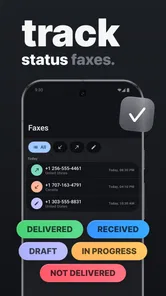
- Fax status tracking helps confirm successful delivery
Cons
- Most faxing features require paid credits or a subscription
- Large documents may take longer to upload and process
- Fax delivery can depend on the recipient’s machine
- Some advanced options may be limited on mobile devices
- Handling sensitive documents requires careful privacy checks











