

Mervious: AI Photo & Video Art
- 0.00
- 4.9
- Installs
- 100.00K
- Price
- Free

Screenshots


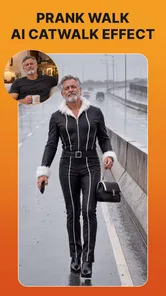
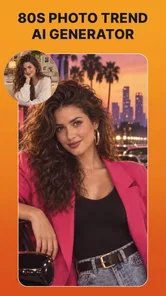


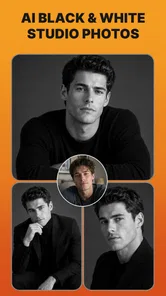

Analysis by Reviewed
I spent time with Mervious as a photography app built around AI-generated images, portraits, videos, and ready-made templates. Its appeal is easy to understand: instead of beginning with a blank editing screen, I could start from an idea and let the app turn it into something more stylized. That makes it feel less like a traditional photo editor and more like a creative playground for people who want quick visual results without learning a complicated desktop workflow.
The app is developed by CrocoTech and is available free of charge, with optional purchases ranging from about twenty dollars to nearly forty dollars per item. It is rated for Everyone, so its general positioning is broad rather than aimed only at professional photographers. The current release is version 1.0.0, and it runs on Android 7.0 or later. Those details matter because this is still an early product, and my expectations are different from what I would have for a mature editor with years of refinement behind it.
How Mervious feels in everyday use
The first thing I noticed is that Mervious is designed for momentum. The combination of portraits and templates encourages experimentation: I can begin with a person, a visual mood, or a format that already looks suitable for sharing. That is more approachable than opening a conventional editor and facing dozens of sliders before I have decided what I actually want to make.
For a casual user, the strongest use case is turning an ordinary image into something that feels deliberately styled. A quick portrait can become a profile image with more personality, while a template can help shape a post, invitation, or visual message when a plain photograph feels too ordinary. The AI focus is especially useful when the goal is an idea rather than faithful documentation.
I would not treat it as a replacement for a camera app, a serious retouching suite, or a full video editor. Those tools are better when I need precise control over exposure, color, cropping, layers, timing, or export decisions. Mervious makes more sense when I want the app to handle much of the creative direction and give me a result worth refining or sharing.
A realistic example is preparing a birthday post during a busy day. I might have one usable portrait but no time to design a polished visual from scratch. A suitable template can provide the starting structure, while the AI-oriented tools can push the image toward a more expressive look. The advantage is not that every result will be perfect; it is that I can reach a presentable concept faster than I would by manually assembling every element.
That speed comes with a trade-off. Automated generation often means accepting choices made by the app. If I have a very specific composition in mind, I may find the result less predictable than a manual workflow. Mervious is at its best when I am open to variations and willing to choose the most convincing outcome rather than demanding that the first attempt match a precise visual brief.
More From Our News Desk

 Instagram
Instagram’s Power Comes From Its Place in Your Phone
A close look at how Instagram turns Meta’s reach, recommendation systems and everyday camera habits into durable platform power—and what that costs users.

 Gmail
GmailGmail in a Busy Inbox: Who Benefits Most?
From first account to crowded workday, Gmail earns its place through dependable search and flexible sorting—but its best fit depends on how much inbox maintenance you can tolerate.

 Prime Video
Switching to Prime Video: What Changes in Your Viewing Routine
Prime Video can make a compelling second home for streaming, but switching means learning a different catalog, rental layer, and route from browsing to playback.

 Universal TV Remote Control
Universal TV Remote Control Works Best as a Reliable Backup
A phone remote earns its place through quick setup and reliable habits. Here is how to get more from Universal TV Remote Control—and where its limits show.

 Weather - By Xiaomi
Weather by Xiaomi Review: Clear at a Glance, Less Clear Up Close
Xiaomi’s weather app makes everyday forecasts quick to scan, but its calm surface can leave useful details and recovery paths harder to find than they should be.

 X
XX Under Pressure: Can It Recover When Posting Goes Wrong?
A resilience-focused review of X, examining setup, mistaken posts, interruptions, weak connections, and the gaps that matter when recovery needs to be dependable.
Latest News



Portrait work is the clearest reason to try it
The portrait angle gives the app a more focused identity than a general collection of filters. Portraits are usually the images people care about most when creating social content, profile artwork, or personal keepsakes, so a tool that can reinterpret them has an immediate everyday purpose.
My practical advice is to begin with a clean, well-lit source image and a clear subject. AI styling cannot fully rescue a photograph that is already blurred, heavily obstructed, or poorly framed. A simple image with a visible face gives the app a better foundation and also makes it easier for me to judge whether the generated result still looks like the person I intended to show.
I also found it useful to compare generated variations before deciding what to keep. The most dramatic version is not automatically the most usable one. For a profile image, a restrained result may work better because the face remains recognizable at a small size. For a poster-like design, a stronger transformation may be more appropriate. The right choice depends on where the image will appear, not only on how impressive it looks in the editor.
That distinction is important for families and casual creators. Someone making a playful image for private sharing can enjoy unusual results without worrying about perfect likeness. Someone preparing a professional-looking avatar should inspect details more carefully, especially around facial features, hair, hands, and edges. I would always zoom in before treating an AI-generated portrait as finished.
Templates make the creative process less intimidating
Templates are valuable because they reduce the number of decisions I need to make at once. Instead of choosing a canvas, arranging elements, and inventing a visual hierarchy, I can start with a structure that already suggests how the finished image should look. This is particularly helpful for people who know what they want to communicate but do not consider themselves designers.
The best way to use a template is as a starting point, not a final answer. I would first decide what the image is for: a personal post, a greeting, a promotional visual, or a short video concept. Then I would select a design that supports that purpose and adjust the content so the result does not feel disconnected from the original message. A template can improve presentation, but it cannot decide whether the image says the right thing.
One less obvious benefit is consistency. If I am creating several related visuals, beginning from a similar template style can make them feel like part of one small collection. That is useful for a recurring social series or a personal project. The limitation is that template-driven work can also look familiar if I never add my own choices. I would change the source image, wording, crop, or visual treatment rather than publishing the first untouched version.
This is where Mervious differs from a normal filter application. A filter mainly changes the appearance of an existing photograph. A template-based workflow helps shape the entire presentation. It is still less flexible than building a composition manually, but it gives casual users a clearer path from an idea to a finished-looking result.
Video generation adds ambition, but also higher expectations
The inclusion of video generation broadens the app beyond static photography. Even when I am starting from a single image, the possibility of turning an idea into moving content makes Mervious more relevant to today’s short-form publishing habits. It can be a useful option when a still image feels too limited but I do not want to learn a timeline-based editor.
At the same time, video places more pressure on quality and control. A small flaw in a still image may be easy to overlook, while movement can make an odd transition or inconsistent detail much more noticeable. I would review generated video from beginning to end instead of judging it from a single preview frame. The opening may look convincing while a later moment reveals an awkward change.
For a quick social clip, an AI-generated starting point can save time. For a carefully edited announcement, tutorial, or client project, I would still choose a conventional video editor because timing and sequencing matter too much to leave mostly to automation. Mervious is better suited to idea generation and lightweight publishing than to exact storytelling.
What the current release tells me
Version 1.0.0 places Mervious at the beginning of its product journey. I see that as both an opportunity and a warning. The opportunity is that the app has a clear space to improve as CrocoTech learns which creative tools people actually use. The warning is that early releases can feel less settled, especially when users expect the polish and predictability of established photography software.
The app’s public reach is already substantial, with more than one hundred thousand installs and an average rating of five stars from roughly seven hundred ratings. I take that as encouraging interest, but I would not treat it as proof that every workflow will suit every person. A rating can show that early users are enthusiastic; it cannot replace my own check of whether the generation style, editing control, and purchase model fit my needs.
The release information also helps set a practical expectation about evolution. I would watch for improvements to consistency, more refined handling of difficult portraits, clearer control over templates, and a smoother relationship between free access and paid creative options. Those are sensible areas to monitor without assuming that a particular update has already happened.
For someone already using the app, the current version is best approached as a creative tool to explore rather than a fixed professional pipeline. Save important originals separately, compare outputs before sharing them, and keep the version of an image that still works if the generated style becomes distracting. That habit protects the user from becoming dependent on one automated result.
For a new user, the free entry point lowers the barrier to testing the concept. I would explore the basic experience first and only consider an in-app purchase after identifying a repeated need. The available items cost from around twenty dollars to almost forty dollars each, so this is not a decision I would make casually just because one generated image looks appealing.
Where it fits beside familiar alternatives
Compared with a classic photo editor, Mervious asks me to make fewer technical decisions. That is its main advantage. I do not need to understand every adjustment before producing something visually distinct. The cost is reduced precision: if I want exact masking, detailed color correction, or a carefully controlled retouch, a conventional editor remains the stronger choice.
Compared with a simple filter app, Mervious offers a more idea-led workflow through portraits, templates, and AI-generated visual content. A filter app is usually faster when I only want to brighten a picture or apply a familiar tone. Mervious becomes more interesting when I want the image to feel transformed rather than merely adjusted.
Compared with a design platform based mainly on manual layouts, Mervious can feel quicker for an individual who wants an AI-assisted result. A manual design tool wins when brand consistency, exact typography, and repeatable placement are essential. I would choose Mervious for personal creativity and rapid experimentation, then move to a more controlled tool when the visual has to meet strict specifications.
Compared with a dedicated AI image generator, its portrait and template emphasis may be more approachable for people who already have photos and want to reinterpret them. A dedicated generator may offer broader conceptual freedom, while Mervious appears better aligned with turning personal visual material into shareable artwork. That difference makes the choice depend on whether I am starting from a photograph or from an entirely imagined scene.
Small workflow decisions that improve the results
I would keep the original photograph untouched and work from a duplicate. This is a simple safeguard, but it matters with any transformation-heavy app. The generated version may be more eye-catching, yet the original can remain useful for a different crop, a family archive, or a later project.
I would also decide the destination before choosing a style. A portrait for a small profile circle needs clarity and a recognizable face. A full-screen story or a decorative personal card can support more visual detail. Matching the generation choice to the final viewing size prevents a common mistake: selecting an image that looks impressive in the editor but becomes confusing after reduction.
Another useful habit is to treat the first output as a draft. I would inspect the face, fingers, hairline, background edges, and any text-like elements before sharing. AI imagery can look convincing at a glance while containing small inconsistencies that become obvious to friends or followers. A short pause for inspection is more valuable than repeatedly generating without a clear reason.
Finally, I would keep a simple record of which styles work for which subjects. Some portraits may benefit from a subtle treatment, while others suit a more imaginative template. Building that personal sense of what works is more efficient than expecting the app to make every creative decision perfectly on its own.
Who should use it, and who should skip it
I would recommend Mervious to casual creators, people who enjoy experimenting with portraits, and anyone who wants a faster route to stylized photo or video content. It is also a sensible option for users who feel blocked by traditional editing interfaces. The Everyone age rating makes it broadly accessible, although younger users should still involve a parent or guardian when considering purchases.
I would be more cautious if I needed professional reliability, exact control, or a predictable repeatable output. A photographer preparing client work, a designer following strict brand rules, or a video editor building a timed sequence will probably be happier with specialized software. Mervious can contribute ideas in those workflows, but I would not make it the only tool responsible for the final result.
I would also skip it if I dislike AI reinterpretation and want every change to be manually explained. The app’s appeal comes from allowing automation to influence the look. If that feels intrusive rather than helpful, a standard editor with direct controls will be a better match.
What I would watch as the app develops
The most important future question is whether Mervious can turn its attractive starting concept into a dependable daily workflow. I would look for stronger consistency between attempts, better ways to guide the result, and clearer control over how much the original portrait changes. Those improvements would make the app more useful beyond one-off experimentation.
I would also pay attention to how CrocoTech balances free access with the paid items. The free starting point is valuable for discovery, but users need to feel that they can understand the creative experience before committing to a relatively expensive purchase. Clear value in the paid options will matter more than simply adding more visual styles.
Another area worth watching is the relationship between still images and video. If the two sides develop together, Mervious could become a convenient place to move from a portrait concept to a short visual sequence. If video remains less controlled than the photo experience, users may continue to rely on separate apps for the final stage.
My current view is positive but measured. Mervious has a clear personality: it is for turning personal photos and quick ideas into more expressive AI-assisted visuals, not for replacing every tool in a photographer’s kit. I like the low-pressure experimentation, the portrait focus, and the way templates give uncertain creators a practical starting point. I would recommend trying the free experience first, checking every result carefully, and paying only when the workflow has proved useful in real life.
For me, that is the fairest way to approach this early release. It already offers enough creative direction to make ordinary images more interesting, while its version 1.0.0 status means I would leave room for refinement. If you want fast, playful visual experiments and do not need absolute manual control, Mervious is worth exploring. If precision is the priority, keep your usual editor close by.
Mervious: AI Photo & Video Art Frequently Asked Questions
What devices and operating systems can run Mervious: AI Photo & Video Art?
Mervious is a photography app for Android, and it requires Android 7.0 or later. Check your device’s Android version before downloading, particularly if you use an older phone or tablet. Meeting the minimum requirement means the app can be installed on a compatible device, though available storage and device performance can also affect how smoothly photo and video editing works.
Who develops Mervious, and is it intended for all ages?
Mervious: AI Photo & Video Art is developed by CrocoTech and has an Everyone content rating. Its tools focus on creating AI-assisted photos and videos, which may appeal to people who enjoy experimenting with portraits, visual effects, and templates. As with any app that handles personal images, younger users should have appropriate guidance when choosing photos to upload or share.
What is Mervious: AI Photo & Video Art used for?
Mervious: AI Photo & Video Art is designed for creating stylized images and videos with artificial intelligence. It can help transform ordinary photos into artistic portraits, apply creative visual effects, generate imaginative edits, and produce content suitable for social media. The app is mainly aimed at users who want quick results without needing advanced photo or video editing skills.
Is Mervious: AI Photo & Video Art free to download and use?
The app is free to download, while in-app purchases are available for $19.99 to $39.49 per item. Some features, effects, export options, or AI generations may be limited to paid options. Before confirming a purchase, check the price and what it covers in the app. The app has a 5.0 average from 699 ratings, but individual experiences with its tools and purchases can differ.
Do I need an internet connection to use Mervious?
Most AI-powered functions require an active internet connection because photos and videos may be uploaded to remote servers for processing. Basic navigation or previously saved content might remain available offline, but generation and advanced effects are generally unlikely to work without connectivity. A stable Wi-Fi or mobile-data connection is recommended, especially when processing videos or high-resolution images.
Pros
- Creates artistic photo and video effects with little editing experience.
- Offers a broad selection of AI styles for different creative moods.
- Simple interface makes experimenting quick and accessible.
- Useful for creating social media posts
- profile images
- and stories.
- Previewing multiple effects helps compare results before saving.
Cons
- Some advanced styles and tools may require a paid subscription.
- AI processing can take longer for videos or high-resolution images.
- Results may vary depending on lighting
- framing
- and image quality.
- Certain effects can look repetitive or overly artificial.
- Exported content may include limits such as watermarks or resolution caps.










