MeloTick
- 191.00
- 3.4
- Installs
- 1.00M
- Price
- Free

Screenshots
Analysis by Reviewed
I approached MeloTick as a practical productivity companion rather than another app that promises to reorganize my entire life. Its focus is easy to understand: help me wake up, keep track of time, and remember important things in one place. That combination makes it more interesting than a basic alarm, although it also means the app needs to fit comfortably into several parts of my daily routine.
Developed by Dorothy Craigie, this free productivity app has already passed the one-million-install mark. It carries a 3.5 average from more than four hundred ratings, which feels like a fair signal that people find value in it but may not all have the same experience. The app is rated Mature 17+, and version 1.3.5 is available for devices running Android 7.0 or later. I would not treat those figures as a guarantee of quality, but they do place MeloTick among established tools rather than an obscure experiment.
How I built a useful everyday routine around it
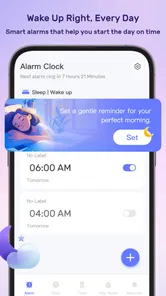
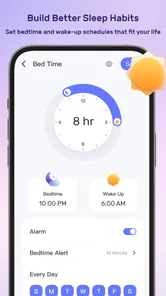
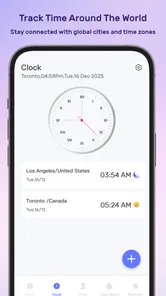
The most effective way to use MeloTick is to give each part of the app a clear job. I use the waking function for events that genuinely need a response, the time-tracking side for activities where I tend to lose focus, and the reminder function for commitments that are easy to overlook. When everything is treated as an urgent alert, the app becomes noisy. When each tool has a defined purpose, it feels much calmer.
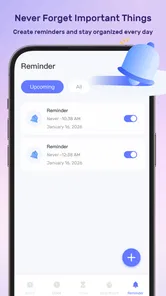
A realistic example is a busy weekday morning. I can set a wake-up alarm, leave a reminder for something I need to take with me, and use a time session later for focused work. The important habit is not simply creating more alerts. It is preparing the next action while I still have enough attention to think clearly. A reminder that says “take the documents” is more useful than one that only says “documents,” because the wording tells me what to do immediately.
I also found that MeloTick works best when I review the day in two short passes. In the evening, I check tomorrow’s wake-up and reminders. During the day, I look at time-related tasks before starting them instead of waiting until I am already distracted. This small routine reduces the temptation to use the app as a dumping ground for every thought.
The free price is a genuine advantage for anyone who wants to test this combined approach without committing to a subscription. It is particularly suitable for students, people working from home, and anyone whose schedule changes enough that a single alarm app feels too limited. The trade-off is that users who already have a carefully tuned calendar, task manager, and timer may find the extra layer unnecessary.
Start with a small number of dependable alerts
My first recommendation is to avoid transferring an entire to-do list into MeloTick. Begin with the events that are most likely to cause trouble if forgotten: leaving for an appointment, taking something important, beginning a study block, or stopping an activity that tends to run over time. This makes the alerts meaningful and gives me a better sense of whether the app’s rhythm suits me.
More From Our News Desk

Weather by Xiaomi Review: Clear at a Glance, Less Clear Up Close

X Under Pressure: Can It Recover When Posting Goes Wrong?

Clash of Clans Is Won Between the Battles

Android Auto Makes the Case for Quieter Car Software

MobiOffice: Transforming Mobile Productivity with Seamless Integration

EA SPORTS FC™ Mobile Soccer: Redefining Mobile Sports Gaming
For recurring responsibilities, consistency matters more than clever wording. I prefer a short label that begins with an action, such as “send,” “pack,” or “call.” That format saves a decision when the notification appears. I would not use the app for every minor chore, because constant prompts can make genuinely important alerts easier to ignore.
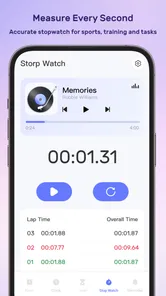
There is also a useful distinction between a reminder and a time-tracking session. A reminder tells me that something should happen. A tracked session helps me understand how long I am spending on something or protects a block of attention. Mixing those purposes can create confusion. I use reminders for external commitments and tracking for activities I am actively doing.
Settings that deserve attention before daily use
The settings are worth checking before relying on MeloTick for an important morning. I would confirm the alarm and reminder behavior, then test one alert while I am awake. That simple test answers practical questions about how the notification appears on my device and whether the timing feels noticeable without being disruptive.
I also recommend checking the app after changing the phone’s general sound, notification, or battery behavior. Android devices can handle background activity differently, and a productivity tool is only useful if its alerts fit the phone’s current configuration. I do not assume that a setting that worked yesterday will remain ideal after switching to a quieter sound profile or a more restrictive power mode.
For time tracking, I keep the labels specific enough to be useful later. “Work” is too broad if I want to understand my day. “Draft project outline” tells me what the session was actually for. This is one of the less obvious strengths of a combined tool: the same app can connect a reminder to the activity that follows it, but only if I name both parts clearly.
Users who share a room should be especially deliberate with wake-up alerts. A strong alarm may solve one person’s problem while creating another person’s. I would test the sound and placement of the phone rather than assuming the default behavior is suitable. MeloTick can support a morning routine, but it cannot replace consideration for the people nearby.
Shortcuts and repeatable patterns save more time than constant editing
Experienced use is less about adding complicated schedules and more about repeating a few reliable patterns. One pattern I like is the “start and finish” pair: a reminder to begin a task and another prompt to stop, review the result, or move on. This is useful for study sessions, household tasks, and work that tends to expand into the whole evening.
Another pattern is to prepare tomorrow’s first action at the end of today. Instead of waking up to a vague intention, I leave a reminder with a concrete next step. The benefit is psychological as much as practical: I do not have to reconstruct my priorities while still tired. This works particularly well when the time-tracking function is used afterward for a clearly named block.
I also avoid editing an alert repeatedly throughout the day. If the timing changes, I make one deliberate adjustment and then leave it alone. Constant rescheduling can turn a reminder into a negotiation with myself. A better approach is to create alerts around stable points in the day and use fewer, more dependable prompts.
For people who move between work and personal responsibilities, separate naming styles can make the list easier to scan. I might use direct action labels for personal reminders and project-based labels for work sessions. This is not a flashy feature, but it creates a faster mental filter when several items appear close together.
The app’s simple store description suggests a broad purpose, but the practical value comes from these habits. MeloTick is not automatically a better organizer just because it includes waking, timing, and remembering tools. It becomes useful when I decide which information belongs in each part and resist the urge to make every alert urgent.
Where it compares well with familiar alternatives
A standard alarm app is usually better when all I need is a dependable wake-up call. It has less to configure and does not ask me to think about reminders or tracked activities. MeloTick earns its place when my morning alarm is connected to a wider routine, such as preparing for a shift, starting study, or remembering an item before leaving home.
A calendar is stronger for appointments involving other people, locations, and longer-term planning. I would keep those commitments in a calendar if I need a broad view of the week. MeloTick feels more immediate: it is better suited to the moment when I need to act, begin, stop, or remember something specific.
Dedicated task managers are usually preferable for projects with many subtasks, notes, priorities, and dependencies. I would not try to manage a complex renovation, a large work project, or a detailed content plan entirely through MeloTick. Its appeal is the directness of a prompt, not the depth of a project database.
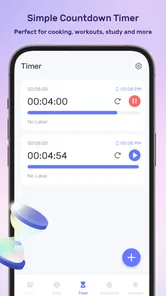
Timer apps can also be more comfortable for people who use focus cycles constantly. MeloTick is more appealing when timing is part of a broader reminder routine. If I only want a quick countdown while cooking or exercising, a dedicated timer may feel faster. If I want to remember the session and connect it to a later action, the combined approach is more useful.
The limits become clearer with complicated schedules
The same simplicity that makes MeloTick approachable can become restrictive. Users with rotating shifts, overlapping calendars, detailed recurring rules, or many shared responsibilities may eventually need a more specialized system. I would skip it as my main planner if I depend on extensive project structure or need collaboration features as part of everyday planning.
There is also a risk of false confidence. Seeing an item in an app does not mean the task has been completed, and receiving an alert does not guarantee that I will act on it. The app can put a prompt in front of me, but I still need a realistic routine for confirming what happened. For important commitments, I prefer to use MeloTick alongside a calendar or another record rather than treating it as my only source of truth.
The Mature 17+ rating is another reason parents and younger users should not assume it is intended for every household. I would check the app’s suitability for the person using it before building a family routine around it. That is especially important when a device is shared or when reminders may be visible to others.
Version 1.3.5 feels like a reasonable point at which to evaluate the app on its current behavior rather than on future promises. I would install it on a supported device, create a small test routine, and observe how naturally the alerts fit into real life. The minimum Android requirement of 7.0 keeps it accessible to many older devices, but practical compatibility still depends on the phone’s own notification and power settings.
Who will get the most from this approach
MeloTick is a good match for someone who repeatedly forgets transitions: getting up, starting work, leaving home, changing tasks, or stopping before a deadline. It is also useful for people who dislike maintaining several separate productivity apps. Having waking, time awareness, and reminders together can reduce the number of places I need to check.
It suits users who prefer direct prompts over elaborate planning. A student could use it to protect a study block and remember materials for the next morning. A remote worker could use it to create a clear boundary around focused work. Someone with an irregular personal routine could use a few carefully placed alerts without building a full calendar system.
I would recommend looking elsewhere if you want shared task ownership, rich notes, detailed analytics, or a sophisticated project hierarchy. I would also skip it if notifications themselves make you anxious or if you already have a trusted system that handles these jobs without friction. Adding another app is not progress when the existing workflow already works.
My verdict after turning it into a habit
I like MeloTick most when I treat it as a bridge between intention and action. It is not a replacement for every productivity tool, and its value does not come from filling the day with alerts. Its value comes from placing a small number of well-written prompts at the moments when I am most likely to drift, forget, or keep going longer than planned.
The strongest workflow is simple: use the wake-up function for a reliable start, reminders for concrete actions, and time tracking for activities that deserve a defined boundary. Check the settings with a live test, keep labels action-focused, and review the next day before going to sleep. Those habits make the app feel more deliberate than a collection of disconnected notifications.
With its free access, broad device support, and established user base, MeloTick is easy to try. The 3.5 average rating also matches my balanced view: it can be genuinely helpful, but it will not suit every planning style. My recommendation is to use it as a focused daily layer, not as your entire organizational system.
If you want one lightweight place to connect waking up, remembering, and managing time, I think it is worth testing for a week. If you need collaboration, deep project management, or a complete calendar replacement, another app will probably serve you better. For the right routine, though, MeloTick can make the small transitions of the day more visible—and those are often the moments where productivity is won or lost.
MeloTick Frequently Asked Questions
Who developed MeloTick, and how popular is it?
MeloTick is a productivity app developed by Dorothy Craigie. It has more than one million installs, with an average rating of 3.5 from 452 ratings and 191 written reviews. Those figures offer a quick sense of its reach and user feedback, but individual experiences can differ. Reading recent reviews can help you decide whether its approach suits the way you want to manage your day.
What does MeloTick’s “Wake up better. Track time. Never forget anything” promise mean in practice?
The app’s short description is simply “MeloTick,” while its summary presents it as a way to wake up better, track time, and remember important things. That gives a broad picture of its intended productivity focus, rather than a detailed feature guide. If you are considering it for a particular routine, such as organizing reminders or keeping track of time, check the app’s current description and explore its available tools after installation.
What is MeloTick and what can I use it for?
MeloTick is a music-focused application designed to help users explore, organize, and enjoy musical content in a convenient mobile environment. Depending on the version and platform, it may include features such as music discovery, playlists, artist or track information, reminders, and personalized content. Before downloading, check the current store description because available tools and supported services can vary between Android and iOS.
Is MeloTick free to download and use?
MeloTick is free to download. Some features could still require in-app purchases, a subscription, or access to third-party music services. Users should review the pricing section in Google Play or the App Store before installing. It is also worth checking whether the free version includes advertising, limits certain functions, or offers only a trial period for premium features.
Does MeloTick require an internet connection?
An internet connection may be necessary for downloading music-related information, synchronizing content, discovering new tracks, or accessing online services within MeloTick. Some functions may continue to work offline if the app supports locally stored data, but this should not be assumed. If offline listening or access is important to you, review the app’s current feature list and permissions before downloading.
Pros
- Simple interface makes creating and managing music reminders quick.
- Useful for organizing practice sessions
- lessons
- or personal music goals.
- Lightweight design should run smoothly on most modern mobile devices.
- Customizable alerts can help maintain a consistent practice routine.
- Helpful for users who prefer structured
- time-based music planning.
Cons
- Limited appeal for users who do not regularly practice or study music.
- Reminder features may feel basic compared with full productivity apps.
- Customization options may not satisfy users wanting advanced scheduling tools.
- Notifications can become easy to ignore if too many are created.
- Some features may depend on permissions or reliable background notifications.












