Meet Mobile: Swim
- 2.01K
- 2.6
- Installs
- 500.00K
- Price
- Free

Screenshots
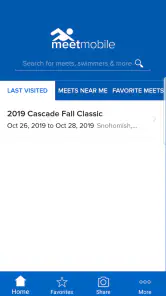
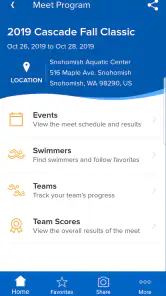
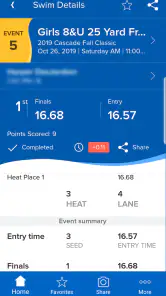
Analysis by Reviewed
When I want to follow a swim meet without constantly searching for paper schedules or asking someone for results, a phone can be a useful companion. Meet Mobile: Swim is built for that particular job: keeping meet information and swimmers’ performances close at hand. Its focus is welcome, though I think it’s most valuable when the meet you care about is available and the people you follow are easy to identify.
A focused tool for meet day
This is a sports app from ACTIVE Network, LLC, rather than a general fitness tracker or a place to plan workouts. The distinction matters: I’d open it to follow competition, not to record my own training or learn swimming technique. It’s free to download, rated for Everyone, and has in-app purchases listed from $0.99 to $29.99 per item, so I’d check what a particular purchase covers before paying.
A practical use is a busy weekend when a swimmer has events spread across several sessions. Instead of trying to remember every event number, I can use the app to keep an eye on the meet, check results, and follow selected swimmers. That’s especially helpful for relatives who can’t stay at the pool all day. It also suits coaches or dedicated fans who want a quick way to see how a meet is progressing.
Where it fits among swim meet options
Compared with a paper program, the main appeal is having meet information and results on a phone instead of carrying and marking up pages. Compared with a general sports-results app, its swimming focus makes it more relevant to heats, event schedules, and individual swimmers. But it isn’t a replacement for being at the pool, and a team message or meet organizer may still be the better source when you need a personal update or clarification.
I’d also avoid treating a notification as a reason to stop paying attention to the venue. Live updates are useful, but the app’s value depends on information being available for the meet and arriving when expected. If you need a definitive answer about a schedule change, checking with a coach or official is a sensible backup.
Following the meet from your phone
First things first, diving into the app is quite intuitive. With Meet Mobile: Swim, everything you need is right at your fingertips. The app provides live results from swim meets around the world, and trust me, it’s as close as you can get to being poolside without the splash.
Event schedules and heat sheets
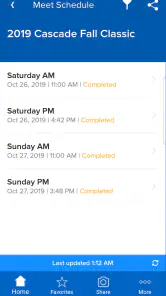
One of my favorite features is the event schedules. No more paper programs that end up soaked by the end of the day! You can easily access heat sheets right from your phone. Whether you’re tracking your own events or keeping an eye on competitors, it’s all neatly organized.
More From Our News Desk

Clash of Clans Is Won Between the Battles

Android Auto Makes the Case for Quieter Car Software

MobiOffice: Transforming Mobile Productivity with Seamless Integration

EA SPORTS FC™ Mobile Soccer: Redefining Mobile Sports Gaming

How Microsoft OneDrive Became a Mobile Productivity Giant

How Google Translate Breaks Language Barriers Effortlessly
Every swim meet has its unpredictable moments, but with this app, you can quickly check if there are any schedule changes. It’s like having a personal assistant dedicated to your swim meet needs.
A small habit makes this more useful: I’d check the meet and relevant events before heading to the pool, then verify the schedule again once there. That gives me a quick reference point without relying on memory, and it helps me notice if the running order has shifted. When sharing information with family, I’d send the event details through the channels they already use rather than assume everyone will install the same app.
Real-time results and their limits
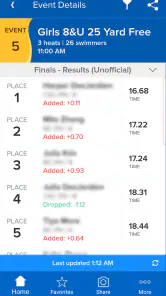
Another standout feature is the real-time results. Imagine sitting in the stands and getting results as soon as the swimmers touch the wall. It’s incredibly satisfying, especially when you’re cheering for someone special. The app updates instantly, allowing you to follow along without missing a beat.
“The real-time results feature is like having a personal commentator in your pocket.”
For a parent splitting time between the pool and errands, that convenience can change how the day works: I can check a result while away from the stands, then decide whether it’s worth returning for a later race. I’d still treat the app as a companion rather than the official voice of the meet, especially if a result affects a decision that needs confirmation.
Following the swimmers who matter to you
The app isn’t just a one-size-fits-all deal. You can customize it to follow specific swimmers, which is perfect for parents or coaches. Just add your favorites, and you’ll receive alerts whenever they compete. Honestly, it’s like having a VIP pass to all their events.
The app also lets you track scores and rankings, giving you a comprehensive overview of the meet’s progress. It’s super handy if you’re competitive or just love staying in the loop.
Following a few swimmers is more practical than trying to monitor everyone at once. For a family with multiple children competing, I’d make a short favorites list and use the schedule to plan when to check in. That reduces noise and makes alerts more meaningful. If you follow many athletes across different events, the stream of updates may become harder to manage than simply checking the results at intervals.
A useful view of the wider swimming scene
Beyond the logistics, the app serves as a tool for connecting the swim community. You can see how swimmers from different regions are performing, which adds an exciting broader perspective.
That broader view is most useful when I already have a reason to follow a swimmer or meet; browsing results without a specific interest can feel less engaging than watching a race. For casual viewers who mainly want highlights, a video or social feed may be a better fit. This app is strongest when the question is “How did that swim go?” rather than “Show me the race.”
Getting comfortable before the session starts
Now, let’s talk about usability. The interface is really user-friendly. Whether you’re a tech whiz or someone who struggles with apps, you’ll find it easy to navigate. It’s straightforward, with clear tabs and options, making your experience smooth and enjoyable.
Even so, I’d give myself a moment to get familiar with the meet and swimmer selection before the session gets hectic. A quick setup at home is less stressful than trying to search while the next race is lining up. If someone only attends one meet occasionally and already gets printed information from the team, the extra setup may not be worthwhile.
What its release history tells existing users
The current release is version 5.0.1.2327, and the app has been available since June 1, 2012. That history suggests a product that has continued through multiple stages, but I wouldn’t assume that every update changes the parts I use most. Existing users should judge an update by whether their usual meet, saved swimmers, and result-checking routine still work smoothly, rather than expecting a complete redesign with each release.
For someone who already relies on it, the most practical way to assess a new version is to check the basics during a low-pressure moment: can you find the meet, locate the swimmers you follow, and reach the results you normally check? Those everyday steps matter more than a version number on its own. If your routine is working, there’s little reason to expect a release to transform how you follow a race; if something feels different, it’s worth getting oriented before a busy session.
Who is likely to get the most from it?
The app has an average rating of 2.6 from around 8,400 ratings, alongside roughly 2,000 written reviews, so I’d go in with measured expectations rather than assuming every user has had a seamless experience. It has passed 500,000 installs, which shows that many people have tried it, but popularity alone doesn’t guarantee that it will suit your particular meet-day routine.
I’d recommend trying it if you regularly attend swim meets, follow particular athletes, or need results while you’re away from the pool. I’d skip it if you mainly want training logs, race video, or a general-purpose sports feed; those needs call for different tools. Before relying on it for an important event, I’d set up the meet and favorites early, check that the information I need is visible, and keep the team or venue as a backup for urgent schedule questions.
A realistic example is a parent who needs to leave before a child’s later event. I’d first use the schedule to understand when that event is expected, add the swimmer to favorites, and check the results when there’s a quiet moment away from the pool. The app can make that handoff between watching in person and following remotely easier, but I wouldn’t plan a pickup or make a time-sensitive decision based only on an alert. A coach or team contact remains the better person to ask when the result or timing needs context.
It can also help a coach or teammate keep tabs on more than one race without relying on memory. The trade-off is that a longer favorites list takes more attention, not less: it can be harder to pick out the one result you need when many swimmers are producing updates. I’d start with the people whose races affect my plans and add others only if I have a real reason to track them.
Questions worth settling before race day
Will it replace the meet program? For quick checks of available schedules, heats, and results, it may reduce how often I need to handle paper. I would still keep any instructions or details supplied by the team, because a digital result view is not a substitute for information that applies specifically to a swimmer or a venue.
Is it useful if I’m not at the pool? Yes, if the meet and swimmer you care about are available and you mainly want to follow progress. It is less satisfying if what you want is a video, commentary, or a personal explanation of what happened in a race. For those, a team’s own communication or a video source is a better complement.
Do I need to pay to use it? It is free to download, while in-app purchases range from $0.99 to $29.99 per item. I’d inspect the purchase details in the app before committing, and I wouldn’t assume that a paid item is necessary for the basic reason I opened it: checking a meet or a swimmer’s progress.
What if the information looks late or confusing? I’d refresh my understanding by checking the meet details again, but for anything urgent I’d ask a coach, official, or organizer. That’s not a criticism unique to this app; live event information is only helpful when it matches what is happening at the venue, and people on site can explain changes that a results screen cannot.
A measured recommendation
If you’re thinking about diving into this app, let me reassure you—it’s worth trying if swim meets are already part of your life. Its focused approach can make schedules, athlete tracking, and results easier to manage, especially when you can’t remain in the stands. Still, I’d treat it as a practical companion rather than a complete replacement for the meet program, live viewing, or direct communication with a team.
So, next time you’re at a swim meet, give it a try if you want a phone-based way to keep track of the action. Set up the meet before things get busy, keep your favorites list purposeful, and use the venue or team as your source for urgent clarifications. That’s where this swimming-specific app makes the most sense: not as the whole experience, but as a handy way to stay connected to the races you care about.
Meet Mobile: Swim Frequently Asked Questions
Can I follow a particular swimmer or event instead of browsing every meet?
Yes. Meet Mobile: Swim is built to help users follow favorite swimmers and keep up with meet information, so you can focus on the competitors and events that matter to you. This can make it easier to check results during a busy competition, whether you are an athlete, coach, parent, or swimming fan.
Who is Meet Mobile: Swim designed for?
Meet Mobile: Swim is a sports app for people who want to follow swimming meets and results. Its features can be useful to swimmers, coaches, families, and fans who want to keep track of performances and event details. The app is free to download, and it is rated for Everyone, so its stated audience is not limited to a particular age group.
What is Meet Mobile: Swim and how does it work?
Meet Mobile: Swim is an app designed to provide real-time results and information for swimming meets. It allows users to track swimmers' performances, view meet schedules, and get event details. By aggregating data from various competitions, it offers a comprehensive view of swimming events, making it a must-have for swim enthusiasts, coaches, and athletes.
Is Meet Mobile: Swim free to use, or does it require a subscription?
Meet Mobile: Swim is free to download and includes in-app purchases. The app offers both free and premium versions. The free version provides basic features like viewing limited meet information and results. For a more comprehensive experience, including detailed analysis and historical data, users can opt for a subscription, which enhances the app's functionality significantly. In-app purchases are listed at prices ranging from $0.99 to $29.99 per item.
How accurate and up-to-date is the information provided by Meet Mobile: Swim?
The app is known for its real-time updates, pulling data directly from the meets as they occur. Accuracy can depend on the meet's organizers and their data entry efficiency. Users generally find the app reliable for live updates, although occasional discrepancies can occur, as with any real-time data service.
Pros
- Real-time race results and updates.
- User-friendly interface for easy navigation.
- Comprehensive event scheduling.
- Customizable alert notifications.
- Detailed swimmer profiles available.
Cons
- Requires subscription for full access.
- Occasional delays in result updates.
- Limited offline functionality.
- Some features need stable internet.
- Ads can be intrusive at times.
- Category
- Sports
- Version
- 5.0.1.2327





