

MedStar eVisit – Telehealth
- 383.00
- 3.9
- Installs
- 100.00K
- Price
- Free

Screenshots


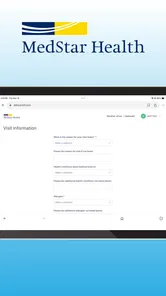
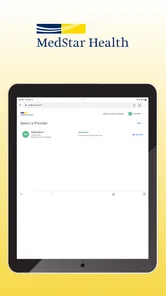
Analysis by Reviewed
I found MedStar eVisit most useful when I treated it as a quick path to medical guidance rather than a complete replacement for an in-person clinic. Developed by MedStar Health, this free medical app connects users with virtual urgent care, making it practical for problems that need attention but do not appear immediately life-threatening. Its central promise is simple: open the app, create an account, and meet a provider online.
That simplicity is also the reason to keep expectations realistic. A video or online consultation can save a trip and reduce waiting-room friction, but it cannot handle every examination, test, procedure, or emergency decision. My overall view is favorable for straightforward urgent-care situations, especially when convenience matters, but I would not make it my only healthcare option.
How MedStar eVisit works in everyday use
The first step is signing up inside the app. That account setup is not just a minor formality: it is the gateway to requesting a virtual visit, so someone who downloads the app during a stressful moment should allow enough time to enter personal and health details carefully. I recommend setting it up before you actually feel ill. Preparing an account while healthy makes the service more useful when a minor problem appears outside normal plans.
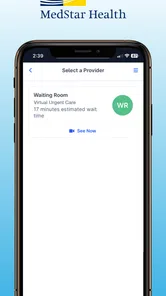
Once signed in, the app is designed around seeing a provider online. The experience is best understood as a digital urgent-care front door. Instead of driving to a clinic, checking in at reception, and waiting in a shared room, you begin the process from a phone. That difference is especially valuable for people who are uncomfortable traveling with a mild illness or who need advice during a busy day.
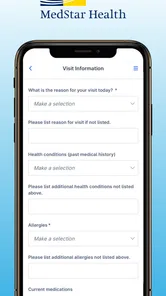
I would prepare a short description of the problem before starting. Note when it began, whether it is getting better or worse, any relevant medicines, and what you have already tried. This is not a feature of the app itself, but it makes a virtual consultation more productive. Online care depends heavily on clear communication, and a rushed explanation can leave important context out.
The app belongs firmly in the medical category, and its age rating is Everyone, which makes the presentation approachable for a broad audience. That does not mean every medical situation is suitable for remote care. Age-friendly access and clinical suitability are separate questions. A parent, caregiver, or adult user still needs to judge whether the symptoms call for urgent in-person attention.
Where the virtual format genuinely helps
The strongest case for MedStar eVisit is a problem that needs professional input but does not obviously require equipment or hands-on treatment. A user may want to discuss a new, non-emergency symptom, ask whether a condition deserves prompt attention, or seek guidance about the next step. In those situations, avoiding a trip can be a meaningful benefit rather than a superficial convenience.
More From Our News Desk

 Instagram
Instagram’s Power Comes From Its Place in Your Phone
A close look at how Instagram turns Meta’s reach, recommendation systems and everyday camera habits into durable platform power—and what that costs users.

 Gmail
GmailGmail in a Busy Inbox: Who Benefits Most?
From first account to crowded workday, Gmail earns its place through dependable search and flexible sorting—but its best fit depends on how much inbox maintenance you can tolerate.

 Prime Video
Switching to Prime Video: What Changes in Your Viewing Routine
Prime Video can make a compelling second home for streaming, but switching means learning a different catalog, rental layer, and route from browsing to playback.

 Universal TV Remote Control
Universal TV Remote Control Works Best as a Reliable Backup
A phone remote earns its place through quick setup and reliable habits. Here is how to get more from Universal TV Remote Control—and where its limits show.

 Weather - By Xiaomi
Weather by Xiaomi Review: Clear at a Glance, Less Clear Up Close
Xiaomi’s weather app makes everyday forecasts quick to scan, but its calm surface can leave useful details and recovery paths harder to find than they should be.

 X
XX Under Pressure: Can It Recover When Posting Goes Wrong?
A resilience-focused review of X, examining setup, mistaken posts, interruptions, weak connections, and the gaps that matter when recovery needs to be dependable.
Latest News



Consider an ordinary evening scenario. I might develop a bothersome symptom after local clinics have closed, while still feeling well enough to use a phone. Instead of guessing from search results or sitting in an emergency department for a concern that may not require it, I could sign in, request online care, and explain the situation to a provider. The value is not that the app magically solves the problem; it gives me a more responsible route than self-diagnosis alone.
That distinction matters. Search engines can produce an overwhelming list of possible conditions, while a virtual visit gives the conversation a clinical direction. On the other hand, the provider may still decide that an in-person assessment is necessary. I see that as a useful outcome, not a failure. A remote consultation can help identify the appropriate level of care even when it cannot finish the treatment process online.
Another less obvious advantage is reducing exposure to a waiting room when the concern is minor and the user is otherwise stable. This can be helpful for someone who is already uncomfortable, has limited transportation, or needs to avoid bringing a mild illness into a crowded facility. The benefit is situational, but in the right situation it is substantial.
What I would do before requesting care
I would keep the phone charged, use a quiet place, and have a concise timeline ready. If the issue involves a visible change, good lighting may make the conversation easier, although a camera view cannot replace a physical examination. I would also keep a list of current medicines and known health conditions nearby. These small preparations reduce the chance that the visit becomes a vague description followed by repeated questions.
For a child or another person receiving help, I would make sure the patient is available during the consultation rather than relying entirely on a secondhand account. A caregiver can provide essential context, but the provider may need to observe or speak with the person who has the symptoms. This is one of the practical differences between using the app thoughtfully and treating it like a quick messaging shortcut.
I would also decide in advance what outcome I need from the visit. Am I trying to understand whether the issue needs same-day attention? Do I need guidance on what to monitor? Am I hoping to discuss a straightforward urgent-care complaint? Clear expectations make the online format less frustrating. If I expect a diagnosis that normally depends on testing or touch, I am likely to be disappointed.
The main limitation: remote care has a clinical ceiling
The biggest weakness is inherent to telehealth. A provider online cannot perform every physical check, collect every sample, or carry out procedures through a phone. Some complaints may sound simple but require measurements or examination before a safe conclusion is possible. In those cases, the app may save an initial trip only to direct me to an in-person service afterward.
That extra step can feel inconvenient, especially if I opened the app expecting a complete solution. Still, it is better than assuming an online conversation is enough for every problem. My criticism is therefore less about poor design and more about the gap between what users sometimes want from telehealth and what telehealth can responsibly provide.
There is also a communication trade-off. Describing pain, swelling, breathing difficulty, or a changing skin issue through a screen is not the same as being examined. Even a clear video may fail to show the detail a clinician needs. Users who are not comfortable explaining symptoms, sharing relevant history, or following instructions may find an in-person visit more efficient.
I would skip the app as the primary option for a medical emergency or a rapidly worsening condition. Severe symptoms should not be delayed while someone creates an account or waits for an online consultation. The app is aimed at virtual urgent care, not emergency response. When the situation feels immediately dangerous, the appropriate emergency channel matters more than the convenience of a mobile interface.
How it compares with familiar alternatives
The usual alternative is a walk-in urgent-care center. That option has the advantage of physical examination and access to on-site processes, but it also means travel, check-in, and time spent waiting. MedStar eVisit is more convenient when the problem can reasonably be assessed remotely. The clinic is stronger when hands-on evaluation is likely to be central.
Primary care is another comparison point. A regular doctor usually has more background on a patient and can provide continuity, which is important for ongoing conditions and long-term treatment decisions. MedStar eVisit makes more sense when the need is immediate, limited, or outside the timing of a routine appointment. I would not use a virtual urgent-care visit as a substitute for maintaining an established relationship with a primary-care professional.
Self-care and internet searching are cheaper in terms of time and effort, but they offer less personalized clinical direction. They may be reasonable for a familiar, mild issue that is already improving, yet they become risky when symptoms are new, persistent, or confusing. The app occupies a middle ground: more direct than searching, less comprehensive than an examination.
Emergency services remain the correct comparison for serious symptoms. The app should never win that comparison simply because it is easier to open. Its value depends on choosing the right level of care first. Convenience is useful only when it does not delay necessary treatment.
Who will get the most from this app?
I think MedStar eVisit is best for adults who want a straightforward way to begin a virtual urgent-care consultation and who can describe their symptoms clearly. It may also suit caregivers who need a convenient starting point for a non-emergency concern, provided the patient is available and the caregiver understands that an in-person referral may still follow.
It is particularly appealing to people whose schedules make a clinic visit difficult, users who live far from convenient care, and anyone who wants to avoid an unnecessary waiting room for a problem that appears suitable for online assessment. The free price removes one obvious barrier to trying it, although free access should not be confused with a guarantee that every later healthcare need will be handled inside the app.
People who need ongoing monitoring, specialist management, testing, physical treatment, or a detailed review of a complicated medical history may be better served by their established clinician or an appropriate in-person service. I would also advise against relying on it if the user cannot comfortably communicate online or has a condition where visual and conversational information is clearly insufficient.
Before depending on it, I would check that the current app version runs on the intended device. The listed minimum operating system is Android 5.0, and the current version is 16.1.0. Those details suggest broad compatibility for many older Android phones, but device performance, camera quality, connection reliability, and the user’s comfort with account setup still affect the experience.
What its adoption says—and what it does not
MedStar eVisit has passed one hundred thousand installs, with an average rating of 3.9 from roughly nine hundred ratings and more than three hundred written reviews. I read that as evidence of a useful but not universally smooth experience. The rating is respectable rather than exceptional, which fits my own balanced impression: the concept is practical, but telehealth depends on circumstances that an app cannot fully control.
Those figures are best treated as context, not as a promise about an individual visit. A person’s experience can depend on the urgency of the complaint, the clarity of the connection, the completeness of the information provided, and whether remote care is clinically appropriate. A high download count would not make an unsuitable emergency appropriate for a video consultation, just as a middling rating would not erase the convenience of avoiding a needless trip.
Small habits that make the service more useful
My first tip is to use the app as a decision-support step, not as a diagnosis machine. Go in prepared to hear that you need another form of care. That mindset prevents the common mistake of judging the service only by whether it resolves everything online.
My second tip is to describe change over time rather than only naming a symptom. “This started yesterday and is worse tonight” gives a provider more useful context than a single label. Include what makes the issue better or worse, and mention relevant medicines or conditions early rather than waiting until the end.
My third tip is to keep a follow-up plan in mind. If the provider recommends in-person care, write down where you should go and how soon you should act. If you are told to monitor the issue, note which changes should prompt another call or a higher level of care. The online visit becomes more valuable when it leads to a clear next action.
Finally, I would avoid downloading it only at the moment of panic. Creating an account and learning the basic flow ahead of time turns the app into a practical backup instead of another unfamiliar task. That preparation is especially worthwhile for households where one person may need to arrange care for someone else.
My final recommendation
MedStar eVisit succeeds because it makes virtual urgent care feel like a realistic first step for suitable problems. Its free access, broad age rating, and focus on seeing a provider online make it approachable, while MedStar Health gives the app a clear healthcare identity rather than presenting it as a generic symptom-search tool.
My recommendation is specific: install it if you want a convenient option for non-emergency concerns and understand that online care may end with an in-person referral. I would keep it alongside, not instead of, a primary-care relationship and emergency plan. If your main need is physical examination, testing, procedures, or emergency treatment, a clinic or emergency service is the better choice from the beginning.
For the right user, the app can replace an unnecessary journey with a focused conversation and a clearer next step. That is a meaningful benefit. Its limitation is equally clear: the screen is a doorway to care, not the whole healthcare system. Use MedStar eVisit when convenience and clinical suitability meet, and it becomes a sensible tool rather than a misleading shortcut.
MedStar eVisit – Telehealth Frequently Asked Questions
Is MedStar eVisit free to download, and what device do I need?
MedStar eVisit is a free medical app from MedStar Health for connecting with a provider online. The app requires Android 5.0 or later on Android devices; availability and compatibility can vary on other devices. Downloading the app does not necessarily mean a virtual visit itself is free, so check any charges shown during the visit process and confirm your coverage before proceeding.
Can I use MedStar eVisit at any time, including nights and weekends?
The service is presented as virtual urgent care available 24/7, so it is intended to give users a way to seek care beyond standard office hours. You can download the app, sign up, and request to see a provider online. A request does not guarantee an immediate connection, however, and the visit method or timing may depend on the service’s current availability.
What is MedStar eVisit – Telehealth, and how does it work?
MedStar eVisit is a telehealth app that lets eligible patients connect with a healthcare provider through a smartphone or tablet. After signing in, you generally describe your symptoms, provide relevant health information, and request a virtual consultation. A clinician reviews the details and may communicate through secure messaging or a video visit, depending on the service and current availability.
Can MedStar eVisit diagnose and treat every medical condition?
No. MedStar eVisit is designed for many common, non-emergency health concerns, but it cannot replace in-person medical care for every condition. Some symptoms may require a physical examination, testing, imaging, or treatment at a clinic. The app may direct you to an appropriate facility when virtual care is not suitable. For severe or life-threatening symptoms, contact emergency services immediately.
Do I need to be an existing MedStar patient to use the app?
Access requirements can depend on your location, insurance plan, employer benefits, and MedStar’s current eligibility rules. Some users may need an existing account or a connection with a participating MedStar service before requesting an eVisit. During registration, the app typically asks for identifying and health-plan information, so check the official eligibility details before relying on it for urgent care.
Pros
- Connects users with providers without traveling to a clinic.
- Useful for minor
- non-emergency health concerns.
- May offer convenient appointment scheduling and virtual visits.
- Can help reduce waiting-room exposure during illness.
- Supports remote care when an in-person visit is difficult.
Cons
- Availability may depend on location
- insurance
- and provider participation.
- Not suitable for emergencies or conditions needing physical examination.
- Video visits require a reliable internet connection and compatible device.
- Some symptoms may still require an in-person follow-up appointment.
- Costs and copays can vary based on the user's health plan.











