Medical records
- 57.00
- 3.7
- Installs
- 100.00K
- Price
- Free
Screenshots
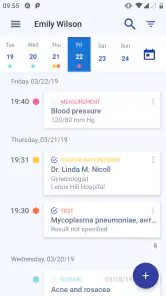
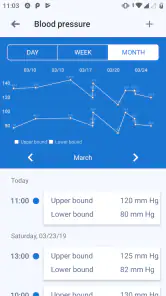
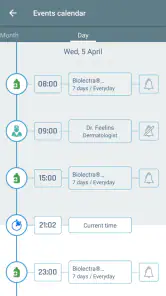
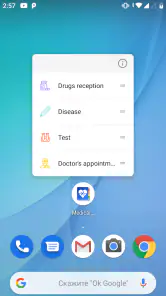
Analysis by Reviewed
I like the idea behind Medical records because it solves a problem that appears at exactly the wrong moment: trying to remember a diagnosis, medication, test result, or past treatment while speaking with a doctor. This free medical app from Volodymyr Yerokhin is designed as a personal electronic medical card, so the useful question is not whether it replaces a hospital system, but whether it makes your own information easier to carry and consult.
After using it as a personal record-keeping tool, I see it as a practical companion for people who visit more than one clinic, manage information for a relative, or simply want an organized place for health details. It is not the sort of app I would open for entertainment or casual browsing. Its value appears when I need a dependable reference point and do not want to search through old messages, paper folders, or scattered photographs of documents.
What Medical records is really useful for
The app sits in the medical category and has a straightforward purpose: keeping personal medical records available on a mobile device. That sounds simple, but simplicity matters here. Health information is often spread across appointment cards, discharge papers, laboratory printouts, and notes written in a hurry. Bringing those details together can make a consultation less stressful, especially when I am tired or distracted.
I would use it before a new appointment rather than waiting until I am sitting in the examination room. A few minutes spent checking what I have already recorded can help me describe a previous condition more clearly and avoid relying entirely on memory. It can also be useful when another family member asks about an older treatment and the answer is not immediately obvious.
The strongest use case is continuity. If I move between a general practitioner, a specialist, and a diagnostic center, I may be asked similar questions several times. A personal record gives me a consistent reference. It does not automatically create communication between those professionals, but it can help me provide the same background each time.
There is an important distinction between an electronic medical card and an official medical record held by a clinic. This app is a personal organizer. I would not treat an entry in it as a verified medical document, and I would not expect a doctor to see updates unless I show them directly. That limitation is not a flaw in the basic concept, but it changes how responsibly I should use it.
A calm workflow for everyday health information
My preferred workflow is to enter information soon after an appointment, while the details are still fresh. I can then review the record later instead of trying to reconstruct the visit from memory. For older information, I would add only what I can identify confidently and mark the context in my own notes rather than guessing at missing details.
A useful habit is to keep entries focused on facts that will help during a future consultation: the name of a condition, the date or approximate period of an event, the treatment discussed, and questions I want to ask next time. I would avoid turning the app into a stream of anxious observations. A shorter, clearer record is easier to scan when time is limited.
Another practical approach is to prepare before travel. If I am away from my usual doctor, having my own information close at hand may be more convenient than carrying a thick folder. That does not mean the app replaces emergency identification or formal documentation. It simply gives me a compact personal reference when the usual paperwork is not nearby.
Speed expectations and the feel of routine use
For this kind of app, perceived speed is less about flashy transitions and more about how quickly I can reach the information I need. Medical records has a focused purpose, so I expect ordinary interactions such as opening the app, moving through a record, and entering a short note to feel direct on a compatible device. The current version is 1.2.4, and the app supports Android from version 6.0 onward, which makes it suitable for a wide range of older phones as well as newer ones.
I would not judge it by the standards of a social network or a graphics-heavy game. A medical record tool should feel quiet and predictable. When I open it before an appointment, I want to spend my attention on the information rather than on decoration. That focused design is a strength when I am using the app for short, purposeful sessions.
The trade-off is that a simple interface can require more care from me. If I enter a vague note, the app cannot turn it into a well-structured clinical summary by itself. Speed at opening the record does not solve messy input. The best results come from using consistent wording and keeping related information together from the beginning.
I also would not assume that a fast response means every record is ready for professional use. I still need to check names, dates, and medication details before showing anything to a clinician. In health-related situations, a quick glance is helpful, but verification remains my responsibility.
Heavy-use moments: where the app earns its place
The most demanding moments are not necessarily technical. They are situations in which I have many details to manage at once. A long medical history, several recent appointments, or information belonging to a dependent family member can make any record system harder to use. This is where organization becomes more important than raw speed.
For a complex history, I would avoid entering everything in one huge block. Separate, readable entries are easier to scan than a long paragraph containing symptoms, treatments, and test results mixed together. I would also review older notes periodically, because an outdated item can be more confusing than no item at all.
A realistic example is a parent helping an older relative prepare for a specialist visit. The parent may remember the broad story but not the exact sequence of previous treatments. A personal electronic card can provide a quick prompt while they are waiting. Still, I would use it as a memory aid, not as permission to change a medicine or interpret a result without professional advice.
Another heavy-use situation is a sudden visit to an unfamiliar clinic. I may need to explain a previous diagnosis while feeling unwell. In that moment, a concise record can reduce the mental effort of recalling everything. The app is most helpful when I have prepared it in advance; it cannot create a complete history at the moment of crisis.
This leads to one of my more important tips: do not wait for an emergency to test your personal record. Open it occasionally and make sure the information is understandable to someone other than you. If a doctor or family member cannot tell what an entry means, the record needs clearer wording before it becomes genuinely useful.
Reliability, responsibility, and recovery habits
Reliability in a medical record app has two sides. The first is whether the application behaves consistently during ordinary use. The second is whether I can trust myself to maintain accurate information. Even a stable app becomes unreliable as a health reference if I forget to update it or record a detail incorrectly.
I would therefore treat every entry as something worth checking. After adding a medication or diagnosis, I would reread it immediately. After an appointment, I would compare my note with the paperwork or instructions I received. This small habit is especially important when similar medicines or conditions have names that are easy to confuse.
Recovery is another practical concern. Before depending heavily on any personal record, I would think about what I would do if my phone were lost, damaged, or unavailable. I would keep essential emergency information in the form recommended by my healthcare professionals and avoid assuming that a single app is the only safe location for critical details.
That does not make the app pointless. It simply defines its role correctly. Medical records can be a convenient working copy of personal information, while official documents, clinician systems, and emergency procedures remain important in their own right. For me, the safest approach is to use the app to improve recall, not to create a single point of failure.
I also recommend keeping entries neutral and factual. A note such as “ask doctor about reaction after treatment” is more useful than an emotional paragraph that is difficult to scan. This is one of the less obvious strengths of using a dedicated medical record tool: it encourages me to prepare questions and observations in a form that can support a conversation with a professional.
Device constraints and practical expectations
The minimum operating system of Android 6.0 gives Medical records a relatively broad device range. That is good news for anyone using an older phone and does not want to replace it simply to maintain a personal health record. At the same time, older hardware can affect the general experience of any app, particularly when storage is tight or the phone is already struggling with many installed applications.
I would keep enough free storage for normal phone operation and avoid judging the app by a device that is already unstable. If the phone frequently closes applications or has an unreliable battery, the problem may not be specific to this medical tool. A personal record is only useful when the device is available when I need it.
The app is free to install, which lowers the barrier for trying it with a small amount of information first. It also includes in-app purchases ranging from under one dollar to a little over five dollars per item. Because of that, I would look carefully at any purchase screen before confirming anything and decide whether the available free experience already covers my needs.
For a health app, age suitability is also worth noting. It is rated for Everyone, but that label does not mean every health decision is suitable for independent use by every person. A child, an older adult, or someone managing a complicated condition may still need help from a parent, caregiver, or clinician when entering or interpreting information.
Privacy is part of the device decision too, even when I am only using a personal record locally. I would protect the phone with a strong screen lock and avoid leaving it open in a public place. I would also be cautious about showing the entire record when a doctor needs only one detail. Sharing less information than necessary is a sensible habit with any health-related app.
Who should use it, and who should choose another option
I think Medical records is a good fit for someone who wants a personal health notebook that is easier to carry than paper. It is particularly suitable for people with recurring appointments, multiple providers, or a family member whose medical history needs to be remembered accurately. It can also help someone who tends to forget questions during consultations.
It is less suitable for a person looking for direct communication with a hospital, automatic access to laboratory systems, appointment booking, prescription management, or remote medical advice. Those needs belong to a different kind of healthcare platform, usually one connected to a specific clinic or national health service. A personal card cannot replace those connected services.
I would also hesitate to recommend relying on it alone for a complicated treatment plan. If timing, dosage, or clinical interpretation is central to the situation, I would use the instructions from a qualified healthcare professional as the authority. The app can hold a reminder or personal note, but it should not become the source of treatment decisions.
Compared with a paper folder, the app is easier to carry and quicker to consult when the phone is available. Compared with a general notes app, its medical focus makes it a more natural home for health information. A general notes app may be better for attaching broad project-style material, while a clinic portal is better for official records and communication. Medical records sits between those choices: more focused than ordinary notes, but more personal and limited than an integrated healthcare system.
My performance verdict after weighing the trade-offs
My overall impression is that Medical records works best as a quiet preparation tool rather than a complete healthcare platform. Its value comes from helping me keep personal information together, review it before a consultation, and communicate my history with less guesswork. The experience is most convincing when I use it regularly in short sessions and keep the entries clear.
The app has a 3.7 average from over six hundred ratings, along with more than fifty written reviews, and it has passed the one-hundred-thousand-install mark. Those figures suggest a real user base, although they do not tell me whether the app matches every person’s preferred workflow. I would use the rating as context, not as a substitute for testing it with my own records.
My recommendation is cautious but positive. If you want a free, focused place for personal medical notes and understand that you remain responsible for accuracy, it is worth trying. Start with one recent appointment, enter only information you can verify, and see whether the structure helps you find details quickly. If you need official synchronization, clinical messaging, or advanced care management, choose a connected healthcare service instead.
The key trade-off is convenience without clinical authority. That is exactly why I would keep Medical records on my phone as a personal reference, while continuing to follow professional instructions and retain important official documents elsewhere. Used with that boundary in mind, Medical records can make everyday health information easier to carry, review, and explain when it matters.
Pros
- Keeps essential health information organized in one accessible place.
- Makes it easier to review medical history before appointments.
- Can help users track medications
- allergies
- and previous treatments.
- Useful for sharing accurate information with healthcare professionals.
- May reduce the need to carry printed medical documents.
Cons
- Data entry can be time-consuming
- especially for extensive medical histories.
- Some features may require an internet connection or account registration.
- Users must verify that entered health information is accurate and complete.
- Privacy depends on the app’s security practices and device protection.
- Not a substitute for professional medical advice or emergency care.
- Category
- Medical
- Version
- 1.2.4