MaxPreps: High School Sports
- 2.33K
- 4.3
- Installs
- 500.00K
- Price
- Free

Screenshots

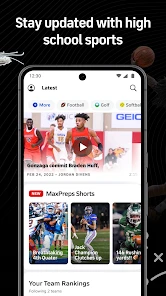

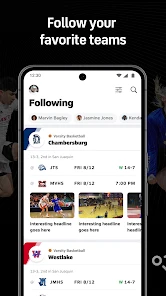
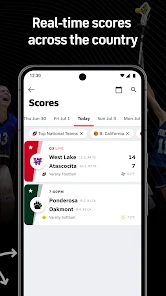
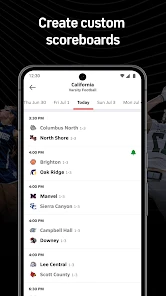

Analysis by Reviewed
I judge a high school sports app by a few practical things: can I find the right school without a fuss, can I check a game’s timing and result quickly, and does the information help me follow a season rather than just one headline? MaxPreps: High School Sports is built around that local, school-by-school view. It is a free sports app from MaxPreps Inc, rated for Everyone, and it makes the most sense for families, students, alumni, and fans who want to keep up with teams they already care about.
A useful choice for following a whole season
The app has an average rating of 4.3 from around 9,700 ratings, and has been installed over 500,000 times. Those figures suggest an established audience, but they do not tell me whether it fits every school or every sport equally well. The key decision is whether you want a focused place for high school coverage or simply need a quick result. If you follow several teams, a schedule-and-score view can save you from searching the web again each time a game comes around.
For a parent juggling work and evening plans, the practical routine is straightforward: check the schedule before the week starts, note the games you might attend, then look at the score if you cannot make it. If you are following a student athlete, team and player information can add useful context to a result. I would still verify an important time or venue with the school or team before setting off; local schedules can change, and a sports app should not be your only source for a last-minute logistics decision.
All-in-One Sports Hub
The first thing you’ll notice when you fire up the MaxPreps: High School Sports app is its clean, user-friendly interface. Navigating through the app is as easy as pie, and trust me, I’ve seen some clunky sports apps in my time. Here, everything is at your fingertips. Whether you want to check out the latest scores or find out when the next big game is, this app makes sure you’re always in the loop.
Stay Updated with Ease
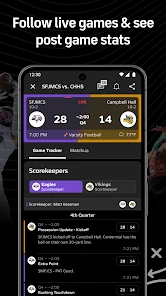
One of the standout features of MaxPreps is its live score updates. Gone are the days of waiting for the next day’s paper or endlessly refreshing your browser. With real-time updates, you can feel like you’re right there in the stands. Plus, the app covers a wide range of sports. So whether you’re into basketball, football, or even lacrosse, you’ll find what you’re looking for.
A small habit makes the score features more useful: follow only the schools and teams you genuinely need, then check the schedule before a busy weekend. That keeps the app from becoming another stream of updates to skim. If you are comparing two teams, look at the broader season context rather than treating one score as a verdict; school sports seasons can involve uneven schedules, and a single result rarely tells the whole story.
Deep Dive into Stats
For the stats nerds among us, and I say that with love, this app is a goldmine. You can track player statistics, team rankings, and even dive into historical data. It’s perfect for those heated debates over who’s the best quarterback in the league or which team has been the most dominant this season.
More From Our News Desk

Clash of Clans Is Won Between the Battles

Android Auto Makes the Case for Quieter Car Software

MobiOffice: Transforming Mobile Productivity with Seamless Integration

EA SPORTS FC™ Mobile Soccer: Redefining Mobile Sports Gaming

How Microsoft OneDrive Became a Mobile Productivity Giant

How Google Translate Breaks Language Barriers Effortlessly
That detail is most valuable when it answers a specific question: how a player’s season is developing, how a team has performed across multiple games, or what makes a matchup interesting. I would not use rankings alone to judge a young athlete or predict an outcome. Statistics can help frame a conversation, but they are only one view of a school team, not a complete account of effort, role, or performance on a particular night.
Customize Your Experience
What’s even cooler is the ability to customize your experience. You can follow specific teams, get notifications for upcoming games, and even receive alerts for any major updates. It’s like having your own personal sports assistant. And let's be honest, who wouldn't want that?
Notifications are useful when you want a reminder, but they can also become noise if you follow every nearby team. I’d start with the teams that matter most, then adjust the selection after a week. If you mainly need one school’s calendar, the school’s own channels may be a better source for changes and event details; this app is more compelling when you want a broader season picture across teams and sports.
One of my favorite features has to be the photo and video galleries. Relive the excitement of last week’s game or catch the highlights you missed. The app really brings the community together, showcasing the talent and hard work of high school athletes.
Where another option may suit you better
Compared with a general sports-score app, this one is aimed at the school level rather than major professional leagues, which is its clearest advantage for local fans. A search engine or a team’s social feed can be quicker for a single announcement, while a school calendar may be more dependable for directions, ticketing, or a venue change. I see those as complements, not reasons to expect one app to handle every part of game day.
It is also worth asking what you want to follow. If you only watch an occasional match and do not care about schedules, player details, or season tracking, opening a browser when needed may be simpler. On the other hand, a student, coach, relative, or committed supporter following several sports has more reason to keep a dedicated high school sports app close at hand. MaxPreps has been available since December 4, 2015, and its current version is 5.5.5-Prod-251112; it requires Android 7.0 or later.
Settling into a routine
Switching from bookmarks, group messages, or scattered searches does not require abandoning them. I would use the app to discover the schedule and follow results, while keeping the school’s direct communication channel for urgent changes. That division of labor avoids a common frustration: expecting a score-focused service to replace every local source. The free price makes it easy to try, but the real value comes from whether the teams you care about are easy to find and their updates fit your routine.
For a realistic game-day example, imagine you are leaving work and deciding whether there is enough time to get to a game. Check the schedule earlier in the day, then use the app to follow the score if traffic or family plans keep you away. A gallery can help you catch the atmosphere afterward, while stats give you something more useful to discuss than the final number alone. For an exact departure plan, confirm the venue and timing through the school as well.
In a nutshell, if you’re passionate about high school sports or just want to stay connected to the local sports scene, this app is a must-have. It’s comprehensive, easy to use, and honestly, a lot of fun. So go ahead, download it, and let the games begin!
Who I’d recommend it to
I’d recommend it most to people who follow a school through a season: parents, students, alumni, and fans who want schedules, results, and player context in one place. I would skip it if my only need were a one-off score, or if I needed official last-minute directions and event changes more than sports coverage. Used with realistic expectations, it is a handy companion rather than a replacement for a school’s own announcements.
Making the app work for different kinds of followers
The best way to judge whether this is worth keeping is to start with one concrete need rather than trying to follow an entire local sports scene. A relative might begin with the school their student attends, while an alumnus may follow a former school and a nearby rival to understand the season’s wider picture. That distinction matters: a compact follow list makes schedules easier to scan, while a long list can turn useful alerts into background noise.
For a student athlete, the most useful routine may be less about checking every score and more about reviewing the team’s season context after a game. Player details and historical information can make a result easier to place, but I would treat them as conversation starters, not as a definitive evaluation of a young player. If you are a coach or a family member discussing performance, look at the pattern across games and consider a player’s role rather than drawing conclusions from a ranking alone.
Questions to settle before relying on it
Will it replace a school’s own messages? I would not make that assumption. The app is useful for following sports information, but for an urgent venue adjustment, arrival instructions, or another local detail, I would still check the school or team’s direct communication. Keeping both sources available is a small effort and avoids the frustration of arriving with an outdated plan.
Is it useful if I care about only one sport? It can be, especially if the team’s schedule and scores are what you repeatedly look up. The value is lower if you want only an occasional final score and have no interest in the rest of a season. In that case, a quick web search may be the more convenient choice; the dedicated app earns its place when returning to the same school or team becomes part of your routine.
Can I use it as a complete game-day planner? I would use it for the sports-following side of the day, not as the only place to check practical arrangements. Schedules help you plan ahead, and scores help when you cannot attend, but directions, ticket details, and last-minute changes are better confirmed through the people organizing the event. That boundary is not a flaw so much as a sensible way to use a sports app.
The trade-off when changing your habits
If you already rely on saved browser searches or family group messages, moving everything into one app may not be an immediate improvement. The payoff comes from having a repeatable place to check school sports across a season; the cost is remembering to follow the right teams and still consult direct sources when plans change. I would try it alongside your current routine first, then drop the searches that become redundant rather than expecting a complete switch on day one.
For my own recommendation, the strongest reason to install it is not a single feature but the combination of local schedules, score tracking, player context, and galleries in a high school sports setting. Its weakness is equally practical: a person looking for a one-time answer or official event logistics may be better served by a browser or the school itself. If you care about following teams over time, the free app is an easy option to test; if not, there is little reason to add another place to check.
MaxPreps: High School Sports Frequently Asked Questions
Who is MaxPreps designed for?
MaxPreps is aimed at people who want to keep up with high school sports, including fans, families, students, and athletes. Its focus on scores, schedules, and athlete information makes it useful for checking what is happening with teams and players. The app is in the Sports category and has an Everyone content rating, so it is intended for a broad audience.
What should I check before installing MaxPreps on my phone?
Before downloading, check that your phone runs Android 7.0 or later if you are installing the Android version. MaxPreps is free to download, and its content rating is Everyone. It is available for Android and iOS, so you can choose the version for your device. Also consider whether you want an app centered on high school sports scores, schedules, and athletes.
What is MaxPreps and what features does it offer?
MaxPreps is a comprehensive app designed for high school sports enthusiasts. It offers a variety of features including live scores, player statistics, team rankings, and game schedules. Users can follow their favorite teams and athletes, access detailed profiles, and receive real-time updates on games. It serves as a one-stop platform for all high school sports-related information.
Is MaxPreps accessible for both Android and iOS devices?
Yes, MaxPreps is available for download on both Android and iOS devices. The app is designed to provide a seamless user experience on both platforms, ensuring that users can access high school sports information, live scores, and updates regardless of their device preference. The app is downloadable from Google Play Store for Android users and the Apple App Store for iOS users.
Does MaxPreps require a subscription or is it free to use?
MaxPreps is free to download and use, offering a vast array of features without any subscription fees. While users can access most of the app's features for free, there may be premium features or content available for purchase. However, the free version is robust enough for most users to enjoy comprehensive sports coverage.
Pros
- Comprehensive high school sports coverage.
- Real-time updates on scores and stats.
- User-friendly interface for easy navigation.
- Access to team rankings and player profiles.
- Customizable notifications for favorite teams.
Cons
- Limited coverage for less popular sports.
- Occasional glitches in live score updates.
- Requires internet connection for updates.
- Some features locked behind a paywall.
- Initial setup can be time-consuming.
- Category
- Sports
- Version
- 5.5.5-Prod-251112





