Marquee Sports Network
- 717.00
- 2.7
- Installs
- 100.00K
- Price
- Free

Screenshots

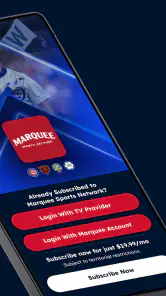
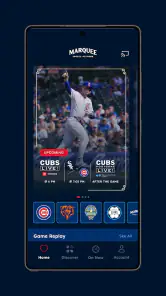
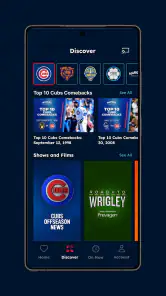
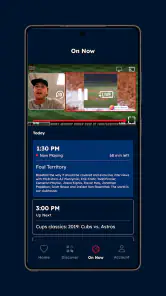
Analysis by Reviewed
For a Chicago Cubs fan, Marquee Sports Network is a very specific kind of sports app: it is meant to bring the team’s local television home to a phone or tablet. I approached it less like a general sports-score tool and more like a companion for following Cubs coverage when the television is occupied, I am away from home, or I want team-focused programming instead of a broad league feed.
That narrow purpose is both its appeal and its main limitation. I would not install it expecting a complete replacement for every sports service or a neutral scoreboard covering everything I follow. I would consider it when my viewing habits already revolve around the Cubs and when access to the network matters more than having the widest possible range of teams and competitions in one place.
The app is free to install, carries an Everyone content rating, and is developed by Marquee Sports Network. Its presence on Android is established, with over one hundred thousand installs, although the average user rating sits at 2.7 from roughly a thousand ratings. I take that combination seriously: the audience is substantial enough to show that the app has a real use case, while the middling rating is a clear reason to test the experience carefully rather than assume it will be effortless for every fan.
What the app is really for
The best way to understand this app is to separate the network itself from the device on which I watch it. The service is the exclusive local TV home of the Chicago Cubs, while the mobile application is the convenient access point for people who want that Cubs-centered viewing experience on a compatible device. That makes it more focused than a general sports news application and more dependent on a viewer’s relationship with one team.
In everyday use, I can imagine opening it before a game to see whether the content I want is available, checking in during a break at work, or using a phone when the main television is being used for something else. It also makes sense for a fan who travels around the home or wants to keep Cubs coverage nearby while doing routine tasks. The value is not simply “sports on a screen”; it is having the team’s local network in a more portable form.
That distinction helps set expectations. If I mainly want scores, schedules, standings, and quick alerts, a league app or a dedicated score tracker may be faster and lighter. If I want a broad collection of live sports, another streaming platform may offer more variety. Marquee Sports Network becomes the more sensible choice when the question is, “How can I follow Cubs coverage?” rather than, “Which app gives me the most sports?”
Why the rating deserves attention
The store rating of 2.7, based on around a thousand ratings and hundreds of written reviews, is not something I would ignore. It does not tell me that every viewer will have a poor experience, but it does suggest that practical details such as sign-in, availability, playback, or device behavior may matter greatly to individual users. For a paid viewing habit, even small points of friction can feel more serious than they would in a casual free app.
More From Our News Desk

Clash of Clans Is Won Between the Battles

Android Auto Makes the Case for Quieter Car Software

MobiOffice: Transforming Mobile Productivity with Seamless Integration

EA SPORTS FC™ Mobile Soccer: Redefining Mobile Sports Gaming

How Microsoft OneDrive Became a Mobile Productivity Giant

How Google Translate Breaks Language Barriers Effortlessly
I would therefore treat installation as the beginning of an evaluation, not the end. Before planning an important game night around it, I would open the app on the device I actually intend to use, review the available choices, and make sure the viewing route is clear. That simple trial is more useful than relying only on the store score because streaming needs can vary with account status, location, device setup, and the content being sought.
The current Android version is 26.7.4 and the app supports Android 7.0 or later. That broad operating-system reach is helpful for people who do not own a recent phone, but older hardware can still affect the practical experience of any video-focused application. I would keep the app updated where possible and avoid judging it solely on an aging device that already struggles with other streaming services.
Free installation does not mean every viewing choice is free
The app costs nothing to download, but it lists in-app purchases of $19.99 per item. That is the point at which I would slow down and read the purchase screen carefully. A free install can be useful for exploring the interface, yet the content or access path I want may involve a transaction. I would not enter payment details until I understood exactly what the item provides, whether it is relevant to my situation, and whether it matches the viewing access I expect.
This is also where user trust becomes practical rather than abstract. A clear purchase description, a visible confirmation step, and an easy way to back out are more important to me than a polished promotional message. If I were helping a family member use the app, I would explain the difference between downloading it and buying anything inside it before handing over the device.
For fans who already receive the network through another television arrangement, the app may be most useful as an additional screen rather than as a reason to purchase access separately. For someone who has no connection to Cubs coverage, the purchase decision is harder to justify because the app’s central value is deliberately team-specific.
Trust, controls, and moments that need care
My trust assessment starts with what I can see and control inside the app, not with assumptions about what happens behind the scenes. When I open a sports streaming app, I pay attention to whether account prompts are understandable, whether purchase choices are distinct from ordinary navigation, and whether I can tell what action the app is asking me to take. Those checkpoints are especially important here because the free download and paid in-app items create two different stages of use.
I would also review the device’s permission prompts rather than approving everything automatically. If the app asks for access that seems unrelated to watching Cubs content, I would pause and decide whether that access is necessary for the feature I want. I cannot treat a permission request as harmless merely because the application is from a recognizable sports network. On the other hand, I would not label a permission unsafe without understanding its purpose; the responsible approach is to inspect the wording, grant only what I am comfortable with, and revisit the choice later in the operating system’s settings.
Account control matters just as much. I would use an email address I can reliably access, choose a password that I do not reuse elsewhere, and avoid leaving an account signed in on a shared device. If I were watching from a hotel, a friend’s television, or a family tablet, I would make signing out part of the routine. That is a small habit, but it gives me more control than assuming the next person will not open the app.
The most data-sensitive moments are usually the ones that involve identity, payment, or personalization. Creating an account, recovering access, accepting a purchase, and changing notification choices all deserve a slower reading than simply opening a game stream. I would check the account screen after setup to see what information I supplied and whether there are visible controls for changing preferences. If a prompt is unclear, I would postpone the decision instead of tapping through it just to reach the next screen.
Notifications are another area where I prefer gradual setup. A Cubs fan may genuinely want reminders or breaking updates, but constant alerts can become distracting quickly. I would begin with the smallest useful set, then adjust from the phone’s notification controls if the messages become excessive. This approach keeps the app useful without allowing it to dominate the device.
A realistic game-day routine
Imagine that I am preparing dinner while a Cubs game is approaching, but someone else is using the living-room television. I would install the app ahead of time rather than waiting for the first pitch, open it on my Android phone, and check the available viewing path before I start cooking. If an account or purchase choice appears, I would handle it while I have time to read the details, not while trying to follow the opening inning.
During the game, I would keep the phone on a stable surface and use headphones if other people are nearby. The phone is convenient, but it is not always the best screen for long viewing sessions. A larger television remains more comfortable for a full game, while the mobile app is better suited to flexibility: a second screen, a short viewing period, or a situation where I cannot control the main display.
Afterward, I would check whether I had left the account active and whether notifications were set more aggressively than I wanted. This two-minute cleanup is one of the most useful habits for any streaming app. It reduces accidental access on shared devices and prevents a one-time game-day setup from turning into a permanent stream of alerts.
Where the app fits beside familiar alternatives
Compared with a general sports news app, Marquee Sports Network should offer a more Cubs-centered experience, but it is unlikely to be the fastest choice for someone who only wants a score or a league-wide overview. A scoreboard application is usually better for quick glances across many teams. I would choose this app when the broadcast and network coverage matter more than compact statistics.
Compared with a broad streaming bundle, the trade-off goes in the opposite direction. A larger service may be more attractive to a household that follows several sports, while this app is easier to justify for a committed Cubs viewer. The narrower focus can be a strength because it avoids making me search through unrelated channels, but it can also feel restrictive if my interests change from one team to many.
Compared with watching through a standard television setup, the phone adds mobility but loses some comfort. I would use it in a kitchen, office, bedroom, or travel situation where the television is unavailable. I would not automatically prefer it for an entire evening on a small screen, especially if the household already has a reliable way to watch the network on a larger display.
How I would handle access and purchases
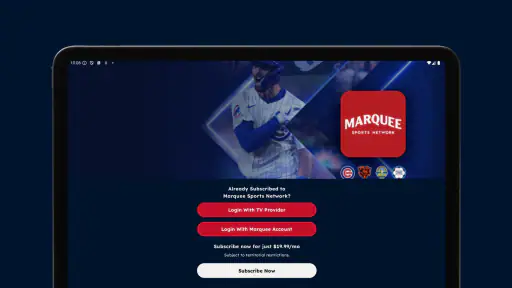
Before paying for anything, I would identify the exact goal: live Cubs viewing, network programming, or another type of access shown in the app. I would read the item description and confirmation screen, note the price displayed there, and make sure I am signed into the intended account. If the app does not make the relationship between the purchase and the viewing benefit clear, I would stop and seek clarification rather than guess.
I would also avoid sharing login details casually. A household may want to watch together, but passing credentials through messages or using one account on every device can create confusion about who controls the account and where it remains signed in. Keeping the account owner involved in purchases and recovery gives the user a clearer line of control.
For a parent setting up the app for a younger family member, the Everyone rating is reassuring in terms of the listed content classification, but I would still manage purchases through the device’s own family and payment controls. Age labeling and spending control are different things. A child may be able to use an app safely while still needing an adult barrier before any in-app item can be bought.
Who should use it, and who should skip it
I would recommend trying it to a Cubs fan who already values Marquee Sports Network and wants a portable way to reach that local coverage. It is also a reasonable option for someone who regularly loses access to the main television, follows games from different rooms, or wants a team-specific app rather than a crowded sports hub.
I would be more cautious with a viewer who follows many teams, wants only instant scores, or expects every feature to be available without any account or purchase decision. That person may be happier with a general sports application or a broader streaming service. The app’s identity is not a weakness by itself, but it means the right audience is relatively clear.
I would also skip making it my only game-day plan until I had tested it on my own device and network. The combination of a modest average rating and paid in-app items makes preparation worthwhile. Install it before the event, confirm the route to the content, and keep an alternative viewing method in mind if the game is especially important.
My cautious verdict
After looking at it as both a Cubs viewing tool and an account-based streaming app, I see a product with a clear purpose rather than a universal sports solution. The developer, Marquee Sports Network, has built around one local team’s television home, and that focus is exactly why the app can be useful to the right fan. It gives the network a place on a mobile device and makes the viewing experience more flexible than relying on one television.
My recommendation is conditional but positive: choose it for Cubs-centered access, not for general sports coverage. I would install it for free, inspect the visible account and permission choices, test the viewing path before a major game, and treat every in-app purchase as a separate decision. The app’s 2.7 average rating tells me to keep expectations realistic, while its established install base shows that it serves a meaningful audience.
In the end, I would keep it on my phone if I regularly needed Marquee Sports Network away from the main screen. If I only wanted scores, followed a wide range of sports, or disliked managing another account, I would choose a simpler alternative. For a dedicated Cubs viewer who values local network coverage and is willing to check the controls carefully, Marquee Sports Network is worth trying, provided convenience does not replace a sensible look at access, privacy choices, and purchase confirmations.
Marquee Sports Network Frequently Asked Questions
Is Marquee Sports Network free to download, and are there extra costs?
The app is free to download, but that does not mean every stream is free to watch. Premium live programming may require a participating TV-provider login or a subscription, depending on your location and how you receive the network. Marquee Sports Network also lists in-app purchases at $19.99 per item, so review the purchase details shown in the app before confirming any transaction.
What devices and operating systems can run the Marquee Sports Network app?
Marquee Sports Network is intended for supported smartphones and tablets, and the Android version requires Android 7.0 or later. Compatibility can still vary with your device and software, so it is worth checking the app-store requirements on your phone before downloading. The app may also support streaming or casting to a larger screen, depending on the device and the current app version.
What is Marquee Sports Network, and what can I watch on the app?
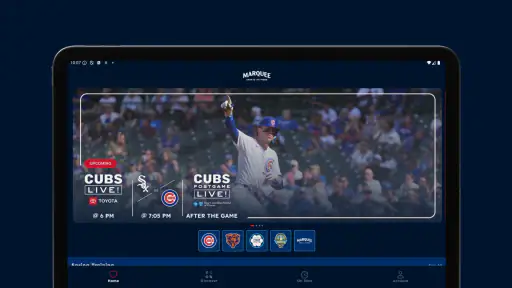
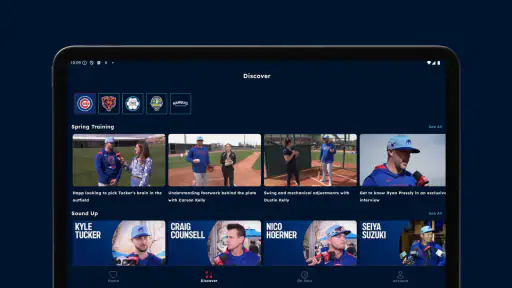
Marquee Sports Network is the exclusive local TV home of the Chicago Cubs. In the app, viewers may find live game coverage, pregame and postgame shows, analysis, interviews, documentaries, original series, and other team-focused content. The exact selection can depend on your location, the current season, broadcast rights, and whether your subscription or TV provider includes the necessary access.
Can I watch Chicago Cubs games live with Marquee Sports Network?
You may be able to watch live Chicago Cubs games through Marquee Sports Network, but availability is not universal. The service is designed mainly for viewers within its regional broadcast territory, and local blackout or league restrictions may apply. Before downloading or subscribing, check your ZIP code and the current availability rules. Some nationally televised, postseason, or special-event games may also be carried elsewhere.
Do I need a subscription or TV provider login to use Marquee Sports Network?
Access requirements depend on how you receive the network. Some users can watch through a participating pay-TV provider by signing in with their provider credentials, while eligible viewers may have access to a direct-to-consumer subscription if that option is offered in their market. The app itself can usually be downloaded at no cost, but most premium live content requires authentication, an active subscription, or both.
Pros
- Live coverage of Chicago Cubs games and team-related programming.
- Includes replays
- highlights
- interviews
- and original Cubs content.
- Clean interface makes schedules and video content easy to find.
- Supports streaming on compatible phones
- tablets
- and connected devices.
- Useful for fans who want Cubs news beyond nationally televised games.
Cons
- Availability may depend on your location and regional broadcast rights.
- A subscription or participating TV provider may be required for full access.
- Blackouts can restrict live game viewing in some areas.
- Video quality may vary with network speed and device performance.
- The app focuses heavily on the Cubs
- limiting value for general sports fans.
- Category
- Sports
- Version
- 26.7.4





