Manus AI
- 3.92K
- 4.6
- Installs
- 10.00M
- Price
- Free

Screenshots
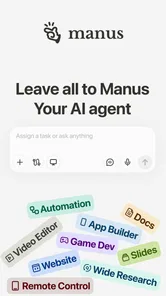




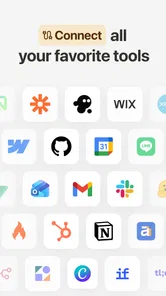
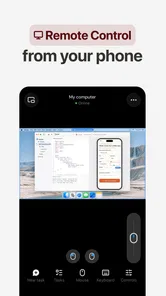
Analysis by Reviewed
At its most useful, Manus AI turns an open-ended writing request into a place to begin. I see the appeal less as a replacement for a writer and more as a way to get unstuck: give an AI a clear task, then use the result as material to check, reshape and make your own. That distinction matters. A fluent draft can save time, but it still needs your judgement, especially when accuracy, tone or personal experience matters.
Where an AI assistant fits in a writing routine
Compared with a blank document, an AI assistant can help you move from a rough intention to a first pass without spending as long staring at the cursor. Compared with a conventional grammar checker, the broader promise is help with generating and developing text, not only catching surface errors. I would treat those as different jobs: use AI to explore a structure or wording, and a dedicated proofreading tool or careful reread for the final polish.
A practical way to get more useful results is to include the audience, purpose and limits in your request. If I wanted help with a short email, for example, I would say who it is for, what outcome I need and whether the tone should be warm or direct. Then I would check names, dates and claims myself before sending. That small habit makes the output easier to assess and reduces the chance of accepting a confident-sounding mistake.
A realistic moment when it can help
Imagine you have a school assignment or a work note to start after a busy day. You know the point you want to make, but your thoughts are scattered. Asking for a simple outline or a few possible opening approaches can give you a manageable next step. I would then choose the angle that reflects what I actually think, add the relevant details, and rewrite anything that sounds unlike me. The useful gain is momentum, not a finished piece that needs no attention.
That workflow also helps with a common question: should you trust the first answer? I wouldn’t. Treat generated text as a draft, verify factual statements independently, and avoid sharing sensitive personal or work information unless you are comfortable doing so. If a task depends on exact sourcing, specialist knowledge or strict institutional rules, a trusted reference source and your own review should lead.
Who is likely to get the most from it
I’d recommend trying Manus AI if you often need a first draft, a clearer outline or a fresh way to phrase an idea, and you are willing to edit what comes back. It is less suitable if you want a traditional writing environment with predictable, manual controls, or if you need every suggestion to be demonstrably correct without checking. For sensitive drafts, work within your organization’s approved tools and policies rather than assuming any AI assistant is appropriate.
Manus AI is a free productivity app from BUTTERFLY EFFECT PTE. LTD. It has a 4.7 average from around 180,000 ratings, with over 1 million installs, and is rated for Everyone. It was released on April 23, 2025; version 1.60.1 requires Android 7.0 or later. The app can be downloaded without an upfront price, while optional in-app purchases range from $18.99 to $998.99 per item, so I would check what a paid option includes before committing. Those purchase amounts are a meaningful caveat if you only need occasional help.
More From Our News Desk

Weather by Xiaomi Review: Clear at a Glance, Less Clear Up Close

X Under Pressure: Can It Recover When Posting Goes Wrong?

Clash of Clans Is Won Between the Battles

Android Auto Makes the Case for Quieter Car Software

MobiOffice: Transforming Mobile Productivity with Seamless Integration

EA SPORTS FC™ Mobile Soccer: Redefining Mobile Sports Gaming
Have you ever wished you could have a digital assistant that could help you write more efficiently and creatively? Enter Manus AI, an app designed to revolutionize the way we approach writing. Whether you're a seasoned author, a student cramming for an essay, or just someone who loves to jot down thoughts, this app promises to become your trusty sidekick.
Your New Writing Companion
From the moment you launch Manus AI, you’re greeted with an intuitive interface that feels like a breath of fresh air. It's like stepping into a cozy writer's nook where inspiration naturally flows. The app offers a variety of features aimed at enhancing your writing experience. From grammar checks to style suggestions, it’s like having a personal editor in your pocket.
Features That Make a Difference
One of the standout features of Manus AI is its real-time feedback. As you type, the app analyzes your text and offers suggestions not just for grammatical errors, but also for stylistic improvements. It’s like having a second pair of eyes that never tire. The app also supports multiple languages, making it a versatile tool for writers around the globe.
Another impressive feature is the app's ability to adapt to your writing style. Over time, Manus AI learns from your writing habits and tailors its suggestions accordingly. This personalized touch means that the more you use the app, the more it feels like it understands you.
Easy to Use, Hard to Live Without
Installation is a breeze, and getting started takes just a few minutes. You can easily sync your projects across devices, so whether you’re at your desk or on the go, your writing is always within reach. Plus, the app's clean design means you won't be distracted by unnecessary bells and whistles.
For those worried about privacy, Manus AI has you covered. The app ensures that your data is secure, allowing you to focus on what matters most: your writing. It’s reassuring to know that your drafts and ideas are kept safe and sound.
Final Thoughts
Overall, Manus AI is more than just a writing tool; it's a game-changer for anyone looking to enhance their writing process. With its combination of powerful features and user-friendly design, it’s no wonder that writers are raving about this app. If you’re serious about writing, Manus AI is definitely worth a try. It's like having a little piece of magic at your fingertips, pushing your creativity to new heights.
Manus AI Frequently Asked Questions
Is Manus AI free to download, and could using it cost money?
Manus AI is free to download, so you can install it without paying an upfront price. However, the app also offers in-app purchases, with listed items ranging from $18.99 to $998.99. Check the purchase options and terms shown in the app before confirming anything, especially if you plan to use it regularly or share a device with someone else.
How can I decide whether Manus AI is suitable for my everyday productivity needs?
Manus AI is presented as a productivity app, and its store summary says, “Leave it to Manus.” It may be worth considering if you want an app to help with work or other tasks on your phone. Before downloading, think about the activities you expect it to support and whether its features and purchase options fit your routine.
Is Manus AI intended for writing, or can it help with other kinds of tasks too?
Manus AI’s name and productivity focus may appeal to people looking for AI assistance, but it is best to judge the app by the tasks you want to complete. The app’s store summary is “Leave it to Manus.” Consider what you need from a mobile productivity tool and review its available options after installing it to see whether they match your workflow.
Who develops Manus AI, and what kind of app is it?
Manus AI is a productivity app developed by BUTTERFLY EFFECT PTE. LTD. Its store summary invites users to “Leave it to Manus,” and the short description identifies it as Manus AI. If you are considering a download, it helps to think of it as an AI-powered tool intended to assist with tasks, rather than a general-purpose social or entertainment app. The app is free to download, with in-app purchases available.
What should I know about Manus AI’s age rating and device requirements before downloading?
Manus AI is rated Everyone, so its content rating is suitable for a broad audience. The listed minimum operating-system requirement is version 7.0, which is worth checking against your device before installing. The app is available for Android and iOS, and checking that your phone meets the relevant platform requirement can help avoid download or compatibility problems.
Pros
- Intuitive user interface
- Efficient document management
- AI-driven insights
- Real-time collaboration
- Cross-platform compatibility
Cons
- Limited offline functionality
- Subscription-based access
- Occasional sync issues
- Learning curve for new users
- Requires internet connection











