Magica
- 1.20K
- 2.8
- Installs
- 100.00K
- Price
- Free

Screenshots




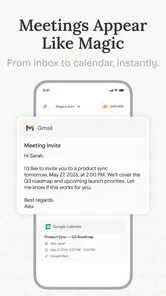


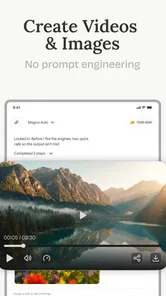
Analysis by Reviewed
I approached Magica as a productivity app built around the idea of an AI “super agent,” rather than as a conventional notes tool, checklist, or calendar replacement. That distinction matters. The app is trying to help with the messy middle of everyday work: turning a vague request into something more organized, drafting a starting point, or helping me move from an empty screen to a usable result. My experience was most positive when I treated it as a capable first assistant, not as an authority that should make every decision for me.
It is free to install, aimed at everyone, and developed by AI Assistant Apps. The current release is version 1.0.49, and it runs on Android devices using Android 7.0 or later. Those details make it accessible to people with older phones, although the quality of an AI-focused app can still depend heavily on the device, connection, and the complexity of the request. Magica has passed over 100 thousand installs, but its average sits at 2.8 from around 2 thousand ratings, with roughly 1.2 thousand written reviews. I would read that combination as a reason to try it carefully rather than assuming it will suit every workflow.
Magica’s central idea: one assistant for open-ended tasks
The most interesting capability here is not a single button or narrow automation. It is the attempt to give me one place where I can describe what I want in ordinary language and let the assistant help shape the next step. That makes Magica different from a traditional productivity app, where I usually need to decide first whether I am creating a task, note, outline, message, or plan.
In practice, the benefit is strongest when the task is still poorly defined. If I know exactly what I need, a dedicated tool is often faster. I can enter a reminder directly into a task manager, write a paragraph in a notes app, or use a spreadsheet for structured information. Magica becomes more useful when I have a half-formed thought such as “help me prepare for a busy week” or “turn these points into something I can send.” The assistant can provide a starting structure, which is often the hardest part.
The real value is reducing the friction between intention and action. That sounds simple, but it changes how I judge the app. I am not looking for a perfect answer to every request. I am looking for a useful first pass that saves me from staring at a blank page or repeatedly reorganizing the same idea.
That also explains why the short store description, “Magica,” tells me very little about the actual experience. The product is easier to understand as a flexible productivity companion than as a fixed-purpose utility. It can fit several kinds of work, but that flexibility also means I need to give it clear direction and check what it produces.
What the capability feels like during ordinary use
I found the best results came from writing a request with three parts: the goal, the context, and the format I wanted back. For example, instead of asking for help with a trip, I would explain the destination, the number of days, my priorities, and whether I wanted a compact checklist or a day-by-day outline. The extra context does not make the app less convenient; it prevents the assistant from filling gaps with assumptions.
More From Our News Desk

Weather by Xiaomi Review: Clear at a Glance, Less Clear Up Close

X Under Pressure: Can It Recover When Posting Goes Wrong?

Clash of Clans Is Won Between the Battles

Android Auto Makes the Case for Quieter Car Software

MobiOffice: Transforming Mobile Productivity with Seamless Integration

EA SPORTS FC™ Mobile Soccer: Redefining Mobile Sports Gaming
A useful habit is to ask for a rough version first and refine it in a second message. Trying to describe the entire perfect result in one long prompt can make the interaction harder to control. A first pass gives me something concrete to correct. I can then say that a section is too long, that the tone is wrong, or that an item should be moved earlier. This two-stage workflow is more reliable than expecting a single request to understand every preference.
Another practical technique is to separate facts from preferences. If I am preparing a weekly plan, I can state fixed commitments first and then identify flexible tasks. If I am drafting a message, I can provide the important facts separately from the tone I want. This helps me notice whether the result is based on what I actually supplied or on a plausible assumption. With an AI assistant, that distinction is more important than polished wording.
I would also avoid treating the first answer as a finished document. Magica is better at helping me get moving than at removing the need for review. I still need to check names, dates, priorities, calculations, and any wording that could be misunderstood. That is not a flaw unique to this app, but the broad “super agent” positioning can tempt users to expect more independence than a general assistant should be given.
A realistic everyday scenario
Imagine I finish work on a Friday with a crowded weekend ahead: groceries, a family commitment, a personal errand, and a report I want to begin before Monday. Rather than opening four separate apps immediately, I can describe the situation in one place and ask for a realistic sequence that protects the fixed appointment and leaves room for travel or preparation. The useful result is not a magical completion of the weekend. It is a first arrangement that makes the competing demands visible.
I would then inspect the proposed order and make the decisions that belong to me. Perhaps the report should move to Sunday morning, or perhaps the errand can wait. The assistant helps expose the choices, while I remain responsible for whether the plan fits real life. That is a good example of where Magica can save mental effort without pretending to replace judgment.
The same pattern works for a workday. I can use it to turn scattered meeting notes into follow-up points, prepare a concise outline before writing, or break a large assignment into smaller actions. The advantage is not that these tasks are impossible without AI. It is that the assistant can reduce the number of small organizational decisions I have to make before beginning.
Where it compares well with familiar productivity tools
Compared with a standard notes app, Magica is more helpful when I do not yet know how to organize the material. A notes app gives me a blank surface and excellent control over what I type. Magica gives me more guidance, but less certainty that every output will match my intention. If I already have a clear filing system and enjoy organizing information manually, a conventional notes tool may remain the better choice.
Compared with a task manager, Magica is better at interpreting a broad request and suggesting a breakdown. A dedicated task manager is better for dependable recurring reminders, status tracking, and a visual record of what is complete. I would not replace a carefully maintained task system with an AI conversation if missing a deadline would have serious consequences.
Compared with a word processor, the app can help me overcome the blank-page problem. A word processor still wins for detailed editing, layout, version control, and long-form work. My preferred arrangement is to use Magica for the outline or rough draft, then move the material into the tool where I normally edit and store important documents.
Compared with a search engine, an AI assistant feels more direct when I want synthesis or a tailored structure. Search remains preferable when I need to inspect original sources, compare current information, or verify a claim. Magica should not become a substitute for checking information that affects money, health, legal decisions, or other high-consequence choices.
The tradeoffs behind the convenience
The broad scope is both the attraction and the main limitation. A specialized app usually has a clearer workflow because it solves one defined problem. Magica asks me to explain what I want, which gives it flexibility but also places more responsibility on my wording. Two people can approach the same task differently and receive results that are equally plausible but not equally useful.
There is also a learning curve in discovering how specific to be. Very short prompts may produce generic help. Extremely detailed prompts can bury the main goal. I got better results by stating the desired outcome first, adding only the context that changes the answer, and specifying the format at the end. That small discipline makes the app feel more predictable.
The rating of 2.8 suggests that expectations and real-world experience have not matched for everyone. I would not use that number as proof that the app is poor, but I would take it seriously. An AI productivity tool can feel impressive in a casual experiment and disappointing when someone expects flawless execution, stable results, or a complete replacement for several established apps. The safest approach is to test it on low-risk tasks before building an important workflow around it.
Cost is another point worth considering. The app is free, but its in-app purchases range from $4.99 to $499.99 per item. That is a very wide span, so I would pay close attention to the purchase screen and understand exactly what an upgrade provides before confirming anything. Users who only want occasional brainstorming may find the free entry point sufficient, while heavier users should judge the paid options against the value of their existing productivity tools.
I also would not install it solely because it is available on an older Android version. Compatibility with Android 7.0 or later is convenient, but an older device may not offer the smoothest experience for a modern AI-centered workflow. If the app feels slow or awkward on a particular phone, that does not necessarily tell me how it will feel on newer hardware, but it does affect whether it is practical for daily use.
Three workflows that make the app more useful
My first recommendation is to use Magica as a “preparation layer.” Before opening a presentation editor, email client, or project board, I can ask the assistant to turn a rough idea into an outline with clear next actions. This keeps the creative and organizational work together at the beginning, while the final material still goes into the specialized tool that handles it best.
The second is to ask for alternatives rather than one supposedly perfect answer. For a schedule, I might request a conservative version and a faster version. For a message, I might ask for a direct tone and a warmer tone. Seeing the tradeoff between options is more useful than accepting the first polished response, especially when the correct choice depends on my priorities.
The third is to use it as a review partner after I have done some work myself. I can provide a draft plan and ask where it is unrealistic, what dependencies I have missed, or which steps are unclear. This is different from asking it to invent a plan from nothing. My own draft supplies the context, while the assistant helps identify weak points. That workflow can produce more practical results because I remain connected to the details.
A fourth habit is to keep sensitive or high-stakes material out of casual prompts unless I have considered whether it is appropriate to share. Even for ordinary productivity, I would remove unnecessary personal details from a request and use placeholders when the exact identity is irrelevant. That keeps the task focused and makes the resulting text easier to reuse.
Who is most likely to benefit
Magica makes the most sense for someone who regularly has ideas but struggles to turn them into an orderly first step. Students, independent workers, busy household organizers, and people who write frequently may appreciate the ability to describe a goal conversationally instead of selecting a rigid template. It is also a reasonable experiment for anyone curious about AI-assisted productivity but unwilling to commit immediately to a complex paid system.
It is less suitable for someone who wants a dependable, highly structured task manager above all else. If my priority is recurring reminders, precise due dates, project dashboards, or a long-term archive that I control in detail, I would choose a dedicated productivity tool first. The same applies if I dislike reviewing generated text or prefer to build every plan manually.
People handling confidential business information should be especially deliberate about their workflow. I would use generic descriptions, avoid unnecessary identifiers, and keep the app in a supporting role unless its handling of the material fits my own requirements. The convenience of a conversational assistant is not a reason to lower normal care around private information.
My conclusion after using it as a working companion
Magica is an interesting productivity app because its strongest feature is its openness. I can bring an unclear task to it and receive enough structure to begin, which is more valuable than it sounds on days when the main obstacle is deciding where to start. The app is not at its best as a replacement for every tool I already use. It works better as a flexible front door to planning, drafting, and organizing.
I would recommend trying it if you want help shaping rough ideas and are comfortable checking the result yourself. I would skip it if you need a specialized system with predictable controls, or if you expect the “super agent” concept to mean fully automatic, error-free work. The free starting point makes experimentation easy, but the in-app purchase range means I would test the everyday value before spending money.
My final view is cautiously positive. Magica is most convincing when it turns a vague intention into a workable first draft. Used that way, it can save time and mental energy without taking away my judgment. Used as an unquestioned replacement for notes, tasks, research, and editing, it becomes much harder to trust. For me, the right role is clear: let it help me begin, challenge my rough plans, and prepare material, then let dedicated tools and my own review handle the final result.
Magica Frequently Asked Questions
Will Magica run on my phone or tablet?
Magica is a mobile productivity app, and it requires Android 7.0 or later. Before downloading, check your device’s operating system version and make sure there is enough free space for the app and any content you choose to add. Compatibility can also depend on your device and the app store available in your region, so confirm that the installation option appears for your device.
Who makes Magica, and what should I know about its track record?
Magica is developed by AI Assistant Apps, and its store summary describes it as an “AI super agent.” It has more than 100,000 installs and around 2,000 ratings, with an average rating of 2.8. Those figures offer a quick sense of its current reception, but individual experiences can differ, so it is worth reading recent user feedback and checking whether the app’s features suit what you want to do.
What is Magica, and what can I do with the app?
Magica is a creative mobile app focused on making visual content more engaging through magical effects, themed filters, editing tools, and playful transformations. After testing its main features, the app feels designed for users who want quick results without learning complicated editing software. Depending on the version available in your region, you may be able to enhance photos, create short videos, apply animated effects, and share finished creations directly with friends or social networks.
Is Magica free to download and use?
Magica is free to download, but it also offers in-app purchases ranging from $4.99 to $499.99 per item. Some effects, editing tools, templates, or advanced options may be restricted to paid purchases. The free version can be useful for trying the basic experience, although users who want the complete collection of creative tools may encounter paid upgrades. Check purchase details carefully before confirming any transaction.
Is Magica suitable for beginners?
Yes, Magica is suitable for beginners because its interface emphasizes simple controls, visual previews, and ready-made effects rather than complicated professional settings. During use, most functions can be explored by selecting an image or recording content and then choosing an effect or adjustment. However, the number of available options may feel slightly overwhelming at first, so new users may need a few minutes to understand where saved projects, premium tools, and sharing controls are located.
Pros
- Simple interface that is easy for new users to understand.
- Useful magical effects for creative photos and videos.
- Quick access to the main editing tools.
- Works well for short
- casual editing sessions.
- Offers entertaining results without advanced editing skills.
Cons
- Some features may require in-app purchases or a subscription.
- Effects can become repetitive after frequent use.
- Results may depend heavily on the quality of the original media.
- Export options may be limited compared with professional editors.
- The app may require considerable storage for downloaded effects.











