

Lumina: Scripture & Bible
- 647.00
- 4.7
- Installs
- 100.00K
- Price
- Free

Screenshots
Analysis by Reviewed
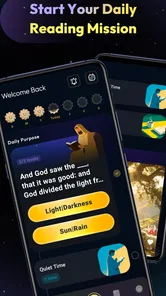
I approached Lumina: Scripture & Bible as a reading and reflection app rather than simply another digital Bible. Its promise is quiet and straightforward: make time for Scripture, think about what you have read, and turn that habit into something steady. After spending time with it, I found the most important question was not whether it replaces a printed Bible or a broader study tool, but whether its focused approach fits the way you actually read.
Developed by WiseWakeTech, Lumina belongs to the Books & Reference category and is free to use. It is rated for Everyone, which makes it suitable for a broad audience, including families and readers who want a gentle entry point into Bible reading. The app has reached over one hundred thousand installs and holds a 4.7 average from around two thousand ratings, a useful sign that its basic experience is connecting with many people. I would still treat those figures as a starting point rather than a substitute for trying the reading experience yourself.
The app was released on January 9, 2026, and the current version is 1.2.0. It works on Android 8.0 and later, so it is available on many older phones as well as newer devices. That matters for inclusive access: a person does not necessarily need a recent handset to begin using it. At the same time, compatibility alone does not guarantee that every reader will find the interface comfortable, so the details of navigation, text handling, and daily circumstances matter more than the installation screen.
How Lumina supports different readers and routines
I find the most useful way to judge a Bible app is to ask whether it makes a reading moment easier to begin, not whether it can replace every book or study tool. In this section, I look at how different readers can shape a manageable routine around Lumina and where a small practical adjustment may help. That leads naturally to the question of what a realistic session can look like.
Readability and navigation come before decoration
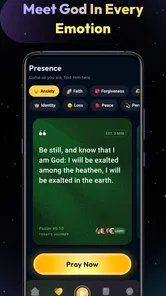
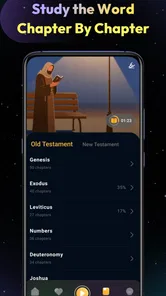
My first impression is that Lumina works best when I want to reduce the distance between opening an app and beginning a reading session. That simplicity is valuable for people who find crowded interfaces tiring. A Bible app can easily become overloaded with cross-references, study notes, community features, audio controls, reading plans, and account prompts. Those tools can be helpful, but they also create more decisions. Lumina’s appeal is its narrower purpose: open it when I want to read, reflect, pray, and maintain a sense of spiritual continuity.
That focus can support readers with different levels of technical confidence. Someone who is comfortable with a printed Bible but less comfortable with complicated mobile menus may appreciate an experience that does not feel like a research database. It is also a reasonable choice for a new reader who is unsure where to begin. Rather than approaching Scripture as a large reference project, I can treat the app as a regular reading companion and build familiarity gradually.
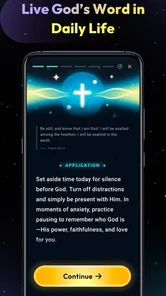
For readers with attention difficulties, a less demanding workflow can be useful. I would not describe Lumina as a replacement for every organizational tool, but its central idea encourages a single task at a time. A practical routine is to open the app at a predictable moment, read a short passage, pause before switching to another application, and write down one thought elsewhere if I need a longer record. This keeps the reading session from turning into a chain of unrelated taps.
More From Our News Desk

 Gmail
GmailGmail in a Busy Inbox: Who Benefits Most?
From first account to crowded workday, Gmail earns its place through dependable search and flexible sorting—but its best fit depends on how much inbox maintenance you can tolerate.

 Prime Video
Switching to Prime Video: What Changes in Your Viewing Routine
Prime Video can make a compelling second home for streaming, but switching means learning a different catalog, rental layer, and route from browsing to playback.

 Universal TV Remote Control
Universal TV Remote Control Works Best as a Reliable Backup
A phone remote earns its place through quick setup and reliable habits. Here is how to get more from Universal TV Remote Control—and where its limits show.

 Weather - By Xiaomi
Weather by Xiaomi Review: Clear at a Glance, Less Clear Up Close
Xiaomi’s weather app makes everyday forecasts quick to scan, but its calm surface can leave useful details and recovery paths harder to find than they should be.

 X
XX Under Pressure: Can It Recover When Posting Goes Wrong?
A resilience-focused review of X, examining setup, mistaken posts, interruptions, weak connections, and the gaps that matter when recovery needs to be dependable.

 Clash of Clans
Clash of Clans Is Won Between the Battles
Its raids are quick; its community is a long-term project of coordination, teaching, rivalry, and shared responsibility—with all the friction that entails.
Latest News



The trade-off is that a focused Bible app may feel limited to someone who wants extensive research features. If your normal study involves comparing several translations, tracing themes through many books, or consulting detailed commentary, a dedicated study Bible or a larger reference platform may suit you better. Lumina makes more sense when the goal is a calm, repeatable encounter with Scripture rather than a full academic workspace.
I also think navigation should be judged by how it feels on a tired day, not only when the phone is held comfortably and the reader has plenty of time. A useful test is whether I can return to the app after a busy morning and remember what to do without relearning the interface. That is especially relevant for older adults, people with limited digital experience, and anyone whose concentration is affected by stress or fatigue.
Motor and sensory considerations in everyday use
Mobile reading always involves physical interaction, and that can exclude people who have tremors, reduced dexterity, joint pain, or difficulty maintaining a grip. Lumina’s value in this area comes from how little physical effort a short session can require. Reading a passage is less demanding than repeatedly entering notes, managing many panels, or navigating a complex study system. For someone with limited hand movement, a simple reading habit may be more realistic than an ambitious plan that depends on frequent precise taps.
That does not make the app automatically accessible to every motor-impaired reader. Any phone-based experience can become difficult when controls are close together, when a reader must scroll precisely, or when a session requires repeated gestures. I would recommend testing the app with the phone placed on a stand rather than held in one hand. That small change can reduce grip fatigue and make it easier to pause, read, and continue without stabilizing the device constantly.
People with low vision may also need to make their own comfort checks. The text size that works for one reader can be too small for another, and a bright screen can be unpleasant in a dark room. I found it more sensible to use Lumina in a well-lit space and adjust the phone’s display settings before deciding whether the app is comfortable. Increasing system text size, reducing glare, and choosing a suitable screen brightness can improve the experience, but these are phone-level adjustments rather than a guarantee that every part of the app will respond perfectly.
Readers who are sensitive to visual stimulation may prefer the app’s quieter purpose over a feature-heavy alternative. A Bible application that constantly invites exploration can make reflection feel like browsing. Lumina is better positioned for someone who wants to protect a small period of calm. On the other hand, readers who depend on strong contrast, large controls, screen-reader-friendly labeling, or specialized input support should test those needs directly before building a routine around it. I would not assume that a clean-looking reading screen meets every accessibility requirement.
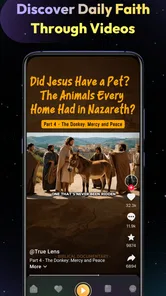
Auditory access is another important distinction. Some people process spoken content more comfortably than printed text, while others need silence because they are reading in a shared room. Lumina should be considered primarily as a reading and reflection choice unless its current interface clearly provides the specific audio workflow you need. If listening is central to your practice, an alternative designed around narration may be a better first choice. That is not a criticism of Lumina’s purpose; it is a reminder that inclusive design depends on matching the format to the reader.
Situational access: where the app fits naturally
The strongest use case I found is a small daily pause that does not require elaborate preparation. Imagine finishing a commute, sitting in a quiet corner before work, or waiting while a family member attends an appointment. Instead of opening social media and losing the available time, I can use the moment for Scripture and reflection. The session does not need to become a long study period to be worthwhile. A short reading can still provide a clear break in the day.
This kind of routine can help people whose schedules are unpredictable. A parent may have only a few uninterrupted minutes. A shift worker may not follow a conventional morning or evening schedule. A student may want a calm transition between classes. Lumina’s simple spiritual focus makes it easier to treat reading as a flexible habit rather than something that requires a perfect environment.
There is also a benefit for shared spaces. A person can read quietly without needing to play audio or speak aloud, which makes the app practical in a break room, waiting area, or bedroom where someone else is sleeping. In my experience, situational access is often less about adding features and more about avoiding a workflow that demands privacy, sound, or a large amount of uninterrupted time.
For people with limited connectivity or strict data habits, I would make a deliberate test before depending on Lumina away from home. Open the passages and parts of the app you expect to use while connected, then check what remains available in the exact situation where you plan to read. I would not assume that every function behaves identically without a connection. This is a useful habit for commuters, travelers, and anyone who manages data carefully.
The free price also lowers the barrier to experimenting. Someone can try Lumina without first making a financial commitment, which is helpful when a reader is still discovering whether digital Scripture fits their routine. Free access does not remove other barriers, such as screen comfort, device familiarity, or the need for audio and larger text, but it does make the first step easier for households watching their spending.
Its Everyone age rating broadens the possible settings in which it can be introduced. A family might use it as a quiet reading option, while an older relative might prefer it to carrying a heavier book. Still, I would let each person choose their own pace and level of support. A child, a senior, and an experienced Bible reader may all need different explanations even when they use the same application.
Remaining barriers that affect the decision
The main limitation is the same quality that makes Lumina approachable: concentration on a narrow reading purpose. Readers looking for a complete study environment may outgrow it quickly. If you need extensive annotation, advanced search, parallel translations, historical background, or a large library of reference material, a more specialized app will probably save time. Lumina is not the right choice simply because it is free or well rated; it is the right choice when its focused rhythm matches your needs.
Screen-based reading can also be tiring. People with migraines, visual processing differences, or eye strain may prefer paper, an e-reader, or an audio Bible for longer sessions. I would use Lumina in shorter intervals and switch formats when the screen becomes a distraction. The best spiritual reading setup does not have to be exclusively digital. Lumina can occupy one part of a broader routine rather than replacing every other format.
Another barrier is the difference between reflection and record keeping. If you want a detailed journal of every thought, prayer, and passage, you may need a separate notebook or note-taking application. That separation can actually be helpful: it lets Lumina remain the place where I read, while a notebook becomes the place where I process. But readers expecting an all-in-one system should understand that a focused reading app may require this extra step.
There is also a personal preference issue. Some readers want a strong sense of customization, while others find too many settings distracting. I prefer to decide this by asking a practical question: do I want the app to guide me toward a consistent reading moment, or do I want to build my own study environment? Lumina is more convincing for the first goal. A general Bible platform is likely better for the second.
When helping another person start, I would avoid handing over the phone and assuming they will understand everything immediately. I would first set the display to a comfortable brightness, place the device where it is easy to see, demonstrate one complete reading session, and ask what felt difficult. That approach is more inclusive than treating installation as the end of accessibility work. It also reveals whether the person prefers reading, listening through another tool, or using a printed Bible alongside the app.
My inclusive verdict after using Lumina
I see Lumina as a welcoming, low-pressure option for people who want a dedicated Bible reading app without turning every session into a research task. Its free access, Everyone rating, broad Android compatibility, and focused purpose make it easy to consider for households, beginners, older phones, and irregular schedules. The strongest benefit is not a flashy feature; it is the possibility of creating a small, repeatable space for reading and reflection.
I would recommend it to a friend who wants to establish a habit, who prefers a quieter interface, or who needs a simple way to use spare moments meaningfully. I would also recommend trying it alongside a paper Bible or another format rather than assuming one application must serve every ability and situation. That combination can be especially useful when screen brightness, hand fatigue, or changing connectivity makes mobile reading uncomfortable.
I would steer a different friend toward a broader Bible study tool if they need advanced research, extensive personal notes, multiple formats, or audio-centered access. I would also suggest a non-digital option for anyone who finds phone reading visually exhausting or distracting. Lumina should not be judged as a failure because it does not solve every need; its usefulness depends on whether its focused design removes more friction than it creates.
Overall, my view is positive but measured. The app’s store summary, “Read. Reflect. Pray. Grow.”, describes a direction rather than a promise of universal accessibility, and that distinction matters. Lumina offers a straightforward path into Scripture and can fit real life surprisingly well, especially when the reader adjusts the surrounding phone settings and chooses a realistic routine. Its best feature is the reduced pressure to do everything at once: open it, read, pause, and return when the day allows. For readers seeking that kind of gentle consistency, Lumina is worth trying.
Lumina: Scripture & Bible Frequently Asked Questions
Is Lumina: Scripture & Bible available for Android and iOS?
Lumina: Scripture & Bible is a mobile app in the Books & Reference category, intended for reading and reflection on a phone or tablet. Before downloading, check that your device meets the platform’s requirements; the Android version requires Android 8.0 or later. The app is free to download, and its content is rated suitable for everyone.
Who develops Lumina: Scripture & Bible, and is it an established app?
Lumina: Scripture & Bible is developed by WiseWakeTech. It has more than 100,000 installs and an average rating of 4.7 from around 2,400 ratings, giving prospective users a snapshot of its reception. Those figures can help with initial comparisons, but it is still worth reading recent user feedback and considering whether the app’s approach suits your own reading habits.
What is Lumina: Scripture & Bible, and what can I use it for?
Lumina: Scripture & Bible is a mobile Bible-reading and spiritual reflection app designed to help users engage with Scripture in a convenient, guided format. Depending on the available features and version, it may provide Bible passages, reading plans, devotional content, prayer tools, notes, bookmarks, and reminders. It can be useful for personal study, daily inspiration, or maintaining a consistent reading habit.
Does Lumina: Scripture & Bible work offline?
Offline availability may depend on the version of Lumina: Scripture & Bible and the specific Bible translation or content you access. Some apps allow previously downloaded passages, plans, or devotionals to be read without an internet connection, while other features require online access. Before relying on it during travel or in areas with limited connectivity, open the app while connected and check whether your preferred content can be downloaded.
Is Lumina: Scripture & Bible free to download and use?
Lumina: Scripture & Bible is free to download. That does not necessarily mean every feature, translation, devotional material, or advanced tool is included at no cost; any available purchase or subscription terms should be checked in the app before you commit. Review the pricing screen carefully, especially if an offer includes a free trial, so you understand what may be charged and when.
Pros
- Clean
- calming design makes daily Bible reading feel focused.
- Helpful search tools make finding verses and topics quick.
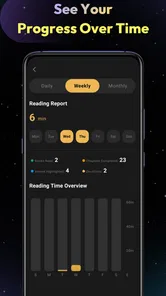
- Reading plans provide structure for consistent Scripture study.
- Supports personal reflection with bookmarking and note-taking options.
- Suitable for both first-time readers and experienced Bible users.
Cons
- Some features or translations may require an in-app subscription.
- Offline access may be limited depending on the selected Bible version.
- The number of available translations can vary by device or region.
- Frequent reminders may feel intrusive if notification settings are unchanged.
- Notes and highlights may not transfer easily across different platforms.












