

Lumary
- 386.00
- 4.6
- Installs
- 100.00K
- Price
- Free

Screenshots

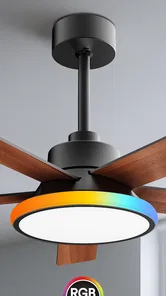

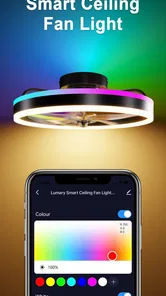
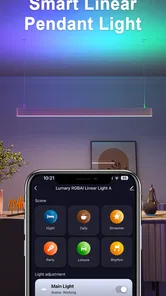



Analysis by Reviewed
If you are trying to make a room feel more connected without turning home control into a technical project, Lumary is worth a closer look. I reviewed it as a house and home app, and my first impression was that it aims to make smart-home use feel approachable rather than overwhelming. The store summary, “Let there be smart,” is brief, but the practical idea is easy to understand: this is an app for people who want a simpler way to interact with compatible Lumary devices.
The app is free and suitable for everyone, which makes it easy to try without committing money first. It comes from Shenzhen Lingke Technology Co., Ltd., and its current version is 1.8.8. Lumary has reached over 100 thousand installs and holds a 4.6 average from around 2.4 thousand ratings, so it is not an obscure experiment with no user base behind it. Still, those numbers should not be mistaken for a guarantee that every smart-home setup will feel effortless. The experience depends heavily on having compatible hardware and a stable home network.
What Lumary feels like when you first open it
I would describe Lumary as a control point rather than a general home-management app. Its value appears when you already own, or are planning to use, compatible smart lighting or home products. If you only want a shopping catalog, a room-design tool, or a broad home-maintenance planner, this is not the right category of app. Its purpose is more practical: helping you bring supported devices into one place and use them from your phone.
That distinction matters because a smart-home application can look polished and still be frustrating if it does not match the equipment in your home. Before spending time on setup, I would check the product packaging and instructions for Lumary compatibility. A phone app cannot make an unsupported device work, and this is the first point where expectations can become unrealistic. The best experience starts with treating the app and the hardware as a pair, not as separate purchases.
On a suitable device, Lumary is most useful for everyday actions that would otherwise mean reaching for a physical switch, walking across the room, or managing several separate controls. I find this especially appealing in rooms where lighting is used differently throughout the day. A bedroom, hallway, office, or living room can benefit from having the control available on a phone, provided the product you own is supported.
The age rating of Everyone also makes the app feel accessible for a shared household. That does not mean every family member will automatically understand the setup, but it does mean the app is presented as a general home utility rather than something aimed at a specialist audience. In my experience, that is helpful for first-time users who want a clear starting point instead of a long technical learning curve.
Who is likely to enjoy it
Lumary makes the most sense for someone who has compatible Lumary equipment and wants a phone-based way to manage it. It is also a reasonable choice for a renter or homeowner who prefers gradual upgrades: one supported product can become a first step, rather than requiring a complete smart-home renovation. The free app lowers the barrier to testing the control experience before deciding whether the wider product ecosystem suits you.
More From Our News Desk

 Instagram
Instagram’s Power Comes From Its Place in Your Phone
A close look at how Instagram turns Meta’s reach, recommendation systems and everyday camera habits into durable platform power—and what that costs users.

 Gmail
GmailGmail in a Busy Inbox: Who Benefits Most?
From first account to crowded workday, Gmail earns its place through dependable search and flexible sorting—but its best fit depends on how much inbox maintenance you can tolerate.

 Prime Video
Switching to Prime Video: What Changes in Your Viewing Routine
Prime Video can make a compelling second home for streaming, but switching means learning a different catalog, rental layer, and route from browsing to playback.

 Universal TV Remote Control
Universal TV Remote Control Works Best as a Reliable Backup
A phone remote earns its place through quick setup and reliable habits. Here is how to get more from Universal TV Remote Control—and where its limits show.

 Weather - By Xiaomi
Weather by Xiaomi Review: Clear at a Glance, Less Clear Up Close
Xiaomi’s weather app makes everyday forecasts quick to scan, but its calm surface can leave useful details and recovery paths harder to find than they should be.

 X
XX Under Pressure: Can It Recover When Posting Goes Wrong?
A resilience-focused review of X, examining setup, mistaken posts, interruptions, weak connections, and the gaps that matter when recovery needs to be dependable.
Latest News



I would be more cautious if you already use another smart-home platform and want every device from different manufacturers to appear in one universal dashboard. Lumary may be a better fit when your hardware is already within its ecosystem. If your priority is broad cross-brand compatibility, a larger general-purpose platform may be more convenient, even if its menus are more complicated. Choosing the app should follow the hardware you actually own, not just the appearance of the app page.
What I would prepare before installing
For a smoother first session, I would put the supported device near the home router, keep its manual nearby, and make sure the phone is connected to the network you intend to use. This sounds basic, but it prevents a common mistake: beginning setup from a weak signal or from a different network than the one used by the device. When pairing fails, people often blame the app first, even though distance and network selection are frequent causes of friction.
I would also decide where the device belongs before naming it. “Living room light” is more useful later than a vague label such as “new device,” especially if you add more than one product. A clear name reduces hesitation when you are tired, in a hurry, or trying to control something from another part of the home. This small organizational step is one of the easiest ways to make a smart-home app feel less cluttered.
Getting through the first setup without guessing
After installing Lumary, I would approach the first launch as a guided pairing session rather than exploring every screen immediately. Start with the device powered and ready according to its own instructions. Then follow the in-app route for adding a product, paying attention to any prompts about the home network or the device’s pairing state. The exact wording can vary by product, so the physical manual remains important.
The most reassuring way to judge the setup is to look for one complete success, not to configure the entire home at once. Add a single device, give it a useful name, and test it from the main control screen. If that works, you have confirmed the essential chain: the hardware is compatible, the app can see it, and the phone can send a command. Only then would I add more rooms or products.
One practical tip is to avoid changing several variables at once. If a device does not appear, do not immediately rename it, move it, restart the router, and reinstall the app together. Try one correction at a time. This makes the problem easier to understand and prevents you from losing track of what actually fixed it. For a first-time user, that calm approach is more valuable than rushing through a setup checklist.
Another useful habit is to test the device where you will really use it, but only after initial pairing succeeds nearby. Pairing beside the router can remove one source of trouble; moving the product afterward shows whether the intended room has a reliable enough connection. This two-stage process is more informative than trying to pair in a distant corner and assuming the app itself is broken when the signal is poor.
The first meaningful success
For me, the first meaningful success with an app like this is not simply seeing a device listed. It is opening Lumary, selecting the correctly named device, sending a command, and seeing the physical product respond as expected. That is the moment the app becomes useful instead of merely installed. I recommend repeating the action once more after a short pause, because a control that works only once is not yet a dependable part of your routine.
A realistic example would be arriving home with your hands full and wanting to adjust a connected light without searching for a wall switch. Another is settling into bed and using the phone to handle a supported light instead of getting up again. These are small moments, but they are the reason smart-home control earns a place on a phone. The benefit is convenience repeated over time, not a dramatic transformation on the first day.
Once the basic action works, I would spend a few minutes refining the device name and its location. This is especially important if several products look similar in the app. A name based on the room and purpose is easier to recognize than a model-style label. If someone else in the household will use the app, choose wording they would naturally say aloud. Good naming is an overlooked part of accessibility.
I would also test the app at the times when the device matters most. A light that responds during the afternoon may behave differently from one used late at night when the phone, router, or device has been idle. Testing in the real routine exposes problems before they become annoying. It also helps you decide whether the app is reliable enough to replace your usual manual control or whether it should remain a convenient extra.
Where the experience can become confusing
The biggest source of confusion is usually not the control itself but the boundary between the app and the hardware. If Lumary cannot find a product, the cause may be the device’s pairing mode, network conditions, compatibility, or the order in which the steps were completed. I would read the device instructions carefully instead of repeatedly tapping the same discovery button. Repetition without changing the setup rarely solves a pairing problem.
Network changes can also create uncertainty. If your home connection has been replaced, renamed, or reorganized, a previously configured device may need attention even though nothing is wrong with the phone. This is why I recommend recording the room and device names you use. Clear organization makes troubleshooting much easier than trying to remember which unnamed product belongs to which room.
There is also a psychological trap with smart-home apps: users expect the first screen to explain every possibility. I would not judge Lumary solely by how quickly you understand all of its controls. For a first visit, focus on one device and one action. Once that foundation is stable, explore the rest of the interface at your own pace. A narrow first goal prevents the app from feeling more complicated than it needs to be.
If you share control with other people, agree on naming before adding several products. A room-based system is easier to maintain than personal nicknames that make sense only to one person. This is a concrete advantage in homes where one user handles installation and another mainly uses the finished setup. The person who rarely opens the app should still be able to identify the right device without asking for help.
How it compares with ordinary alternatives
The obvious alternative is the traditional wall switch or the control supplied directly with a product. Those options are often faster when you are standing beside the device, and they do not depend on opening an app. For a single light in a fixed location, a physical control may remain the simplest choice. Lumary becomes more attractive when phone access saves movement or when you want a consistent control method for supported products.
A second alternative is using several manufacturer-specific apps. That approach can work, but it becomes tiring when every product has a different layout, naming style, and setup process. Lumary’s advantage is strongest when your devices belong to its compatible range, because keeping related products in one environment can reduce the number of apps you need to remember. The trade-off is that you are choosing convenience within an ecosystem rather than maximum freedom across every brand.
Compared with a broad smart-home hub, Lumary may feel less suitable for someone who wants an elaborate, mixed-brand automation system. A universal platform can be better for combining products from many ecosystems, but it may demand more configuration and create more places where something can go wrong. I would choose Lumary when straightforward control of compatible equipment matters more than building a complex network of unrelated devices.
Small habits that make the app more useful
My first recommendation is to keep the initial setup deliberately small. One working device teaches you more than a half-configured collection. After the first success, add products one at a time and test each one in its final location. This makes it easier to identify whether a problem belongs to a particular device or to the wider home network.
My second recommendation is to treat names as part of the setup, not as decoration. Use the room first and the function second, such as a living-room light or bedroom light. If two devices share a room, add a distinguishing detail that remains obvious later. This becomes particularly valuable when you are controlling the home quickly rather than browsing slowly.
My third recommendation is to keep a simple recovery plan. Know which physical switch or manual control still operates the device, and do not remove that fallback just because the app worked once. Smart control is useful, but a home should not become inconvenient when a phone is unavailable or a connection needs attention. The best setup combines digital convenience with an ordinary backup.
A fourth insight is to evaluate reliability by routine, not by novelty. Use the app for several normal moments: entering a room, leaving the house, preparing for sleep, or adjusting a workspace. If those actions feel natural, Lumary is earning its place. If you constantly need to reopen menus, rename devices, or repeat commands, the physical alternative may be better for that particular room.
My recommendation after living with the idea
Lumary is a sensible starting point for people who own compatible products from its ecosystem and want a free, approachable way to control them from a phone. Its strongest quality is not that it replaces every other smart-home system; it is that it can make a supported device more convenient in ordinary situations. The first-time path is manageable when you focus on one product, use clear names, and verify one successful command before expanding.
I would skip it if you are looking for a universal controller for a house filled with unrelated brands, or if you prefer controls that work without an app or network connection. I would also avoid buying hardware solely because an app looks appealing before checking compatibility. In this category, the relationship between the physical product and the software matters more than either one in isolation.
For the right household, the free price and Everyone rating make trying it low-risk. The established user base, 4.6 average, and current version 1.8.8 suggest an actively used product, but my practical advice remains the same: begin with a single supported device and judge the experience in your own room. That test tells you more than any broad promise about smart living.
My final view is positive but measured. Lumary can turn repetitive home-control tasks into quick phone actions, especially when the device is correctly paired and clearly labeled. It is not a magic fix for incompatible hardware or weak connectivity, and it should not be chosen as a universal platform without checking your needs. If your goal is a gentle first step into connected home control, I would install it, prepare one compatible product, and aim for that first reliable response before doing anything more ambitious.
Lumary Frequently Asked Questions
What phones can run Lumary?
Lumary is available for Android, and its minimum operating-system requirement is Android 6.0. Before downloading, check your phone’s software version in its settings to make sure it meets that requirement. The app is listed as a House & Home app and is free to download, making it worth considering if you want to manage compatible smart-home products from your phone.
Is Lumary suitable for beginners setting up a smart home?
Lumary is designed to bring compatible connected products into a mobile app, so it can serve as a straightforward starting point for managing smart lighting. You will need to pair supported devices and follow the setup steps for your particular product. The app’s usefulness depends on having compatible Lumary equipment; it is not a replacement for the smart devices themselves.
What is Lumary, and what can I use it for?
Lumary is a smart-home control application designed to manage compatible lighting and other connected devices from a mobile phone. After pairing supported products, you can switch lights on or off, adjust brightness and colors, create schedules, organize devices by room, and sometimes control them remotely. Available features may vary depending on the Lumary products and accessories you own.
Which devices are compatible with the Lumary app?
The Lumary app is primarily intended for Lumary smart lighting products, including compatible bulbs, recessed lights, strip lights, and other connected fixtures. Compatibility can depend on the exact model, firmware, region, and connection method. Before downloading, check the product packaging or manufacturer’s specifications to confirm that your device supports the current Lumary application.
Does Lumary require Wi-Fi, Bluetooth, or an account?
Lumary generally requires a smartphone, a supported wireless network, and an account for setup and remote-control features. Many devices use a 2.4 GHz Wi-Fi connection during pairing, while some models may also use Bluetooth for initial setup or local control. A stable internet connection is normally needed for remote access, cloud features, voice assistants, and synchronization.
Pros
- Supports schedules and timers for automated lighting control.
- Offers scene customization for different moods and activities.
- Remote access lets you control lights while away from home.
- Color and brightness adjustments provide flexible lighting options.
- Can group compatible lights for synchronized control.
Cons
- Requires compatible Lumary hardware to access its full functionality.
- Some features may depend on a stable Wi-Fi connection.
- Initial device pairing can take several attempts for some users.
- Advanced automation options may feel confusing at first.
- Cloud-based controls may raise privacy concerns for some users.







