Luma: Events & Invites
- 25.00
- 4.9
- Installs
- 100.00K
- Price
- Free

Screenshots

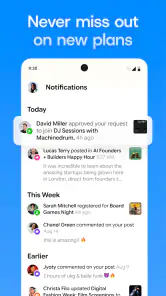
Analysis by Reviewed
I came away from Luma: Events & Invites with the impression that its real value is not simply putting an event on a screen. It is about reducing the small pieces of coordination that usually get scattered across messages, calendars, and last-minute reminders. As an Events app from Luma Labs, Inc., it is aimed at people who want to discover gatherings or organize their own without turning the process into a project.
The app is free, carries a Teen content rating, and has built a strong early audience, with an average rating of 4.9 from around 1.9 thousand ratings and more than 100 thousand installs. Those figures suggest that the basic idea is connecting people around events, rather than offering a complicated planning suite, is resonating. After spending time with it, I think it works best when you treat it as a focused event hub instead of expecting it to replace every calendar, chat, ticketing, or community tool you already use.
Where the event experience can become confusing
The first point where I would expect users to hesitate is the difference between discovering an event and managing one. A discovery-oriented screen encourages browsing, while hosting requires decisions about the event details, audience, timing, and invitations. If you arrive expecting a simple list of things happening nearby, the organizer side can feel more involved than anticipated. If you arrive ready to host, the discovery layer may initially seem like a distraction.
That is not necessarily a flaw, but it affects how quickly the app makes sense. I recommend deciding what you want to do before tapping around: are you looking for something to attend, or are you preparing an invitation? Keeping that goal in mind makes the interface easier to read and reduces the common mistake of starting an event before you have gathered the information you need.
A second sticking point is event context. An invitation is more useful when the recipient can understand what the gathering is, when it happens, and what response is expected without asking several follow-up questions. I found that the quality of the host’s setup matters as much as the app itself. A beautifully organized event with vague wording still creates friction, while a plainly written invitation can work very well.
The most important practical tip is to write for the person receiving the invite, not for yourself as the organizer. Put the purpose of the gathering into everyday language, make the timing easy to recognize, and state anything guests need to know before they decide. Luma can organize the event, but it cannot fill in missing context.
There is also a social hurdle. Some people are comfortable opening a dedicated event app, while others prefer a familiar messaging service or a calendar entry. That means an organizer may need to explain what the invitation is and why it is worth opening. For a close group that already communicates in one place, a normal chat may be faster. For a gathering where responses and event details need to stay together, Luma has a clearer purpose.
What to check before creating an event
Before I would send an invitation, I would review the event as if I had never heard about it. Is the title specific enough to distinguish it from another gathering? Does the description answer the obvious first question? Is the time written in a way that makes sense to everyone invited? These checks sound basic, but they prevent more confusion than repeatedly editing an event after people have responded.
I would also decide whether the event is mainly for discovery or for a known group. Luma is more convincing when the host wants one central place for the event rather than a loose chain of messages. If the gathering depends on detailed back-and-forth planning, specialist registration requirements, or a complicated ticketing process, I would compare the app with a dedicated service before committing to it.
Another useful setup check is to separate information that belongs in the event from information that belongs in a private message. The event should contain details every attendee needs. Personal arrangements, sensitive directions, or individual questions are better handled separately. This keeps the main event page readable and avoids making one invitation carry information that only applies to one person.
On the technical side, I would make sure the app is updated before relying on it for an important gathering. The current version is 2.2.5, and the minimum operating-system requirement is version 9. That makes the app accessible to a broad range of compatible devices, but an older phone can still behave differently from a newer one because of storage, connectivity, or system-level issues.
If the app opens slowly, an event does not appear immediately, or an invitation seems stuck, I would first check the simple causes: confirm that the device is online, close and reopen the app, and try again after switching between available connections. I would avoid repeatedly pressing a publish or send control while uncertain about the result, because duplicate actions can make an already unclear situation harder to understand.
A realistic setup for an everyday gathering
Imagine I am arranging a small weekend workshop with friends. I would create the event only after deciding the name, start time, location details, and the response I need from guests. I would then read the invitation on my own phone as though it had arrived from someone else. If I could not tell whether a response was required, or if I had to search through another conversation to understand the plan, I would revise the event before sharing it.
That workflow shows one of Luma’s strengths: it encourages the host to gather the plan in one place. It also exposes its limitation. The app cannot decide whether a guest needs to bring something, whether the timing is flexible, or whether a location needs extra explanation. The host still has to think through the event like a host.
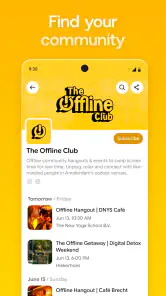
For a recurring club or informal community, I would use the app as the event-facing layer and keep broader conversation elsewhere if necessary. That division is healthier than trying to force every announcement, discussion, and private exchange into the invitation itself. Luma is most useful when the event record stays focused and the surrounding communication has a clear boundary.
Recovering when an invitation or event does not behave as expected
When something goes wrong, the first job is to identify which part of the workflow failed. There is a difference between an event not appearing for the host, a guest not seeing an invitation, and a response not being reflected as expected. Treating all three as the same problem usually leads to unnecessary changes and repeated attempts.
I would begin by returning to the event and checking whether the original details are still present. If they are, the issue may be with viewing, sharing, or connectivity rather than with the event itself. If the details are missing or incomplete, I would correct the event before sending anything again. This simple separation prevents a host from creating several versions of the same gathering while trying to repair one mistake.
For a guest, I would confirm that the invitation was opened through the intended message or notification and that the app is using the same account or device context used during the original attempt. I would also ask the host to resend only after checking the event status. Resending immediately can create uncertainty about which invitation is current, especially when the recipient is already unsure what to tap.
One of the more useful habits is to keep a plain-language backup message ready. It does not need to duplicate the entire event; it can simply say what the gathering is, when it takes place, and where the current invitation can be found. This is not a replacement for Luma. It is a practical recovery step when someone misses a notification, has an older device, or is unfamiliar with event apps.
Hosts should also avoid changing several important details at once while troubleshooting. If the time, title, location, and guest information all change together, it becomes difficult to know what solved the problem. I prefer changing one element, checking the result, and then moving to the next. That approach is slower for a minute but much clearer when an event matters.
There is a trade-off here between convenience and control. A dedicated event page can be cleaner than a busy group chat, yet it introduces another place for guests to check. The best recovery plan therefore depends on the audience. People who regularly attend organized gatherings may adapt quickly. A casual group that rarely uses event tools may need a short explanation and a direct reminder.
When the app is not the cause
It is easy to blame the app when an event feels disorganized, but many problems begin before the invitation is created. A vague plan, conflicting schedules, an incomplete location, or guests who do not know whether they are expected to respond can produce the same frustration in any service. Luma can make information easier to gather, but it cannot resolve a planning decision that the host has not made.
Connectivity is another common source of confusion. If one person can see an event and another cannot, that does not automatically mean the event was created incorrectly. The two devices may be using different connections, different app states, or different routes into the invitation. I would compare the exact event details first and only then decide whether the problem is technical.
Device limitations can matter as well. The app supports operating systems from version 9 onward, but compatibility alone does not guarantee a smooth experience on every phone. Limited storage, an overloaded system, or an unstable connection can affect loading and notifications. Restarting the device, freeing some storage, and testing the connection are sensible general steps before rebuilding an event.
There is also a human explanation for many missed responses. People ignore invitations when the purpose is unclear, when the timing is inconvenient, or when they are unsure whether accepting creates an obligation. A host who sees few replies should not immediately assume the app failed. A clearer title, a direct note, or a personal reminder may solve the problem more effectively than another technical attempt.
How it compares with familiar alternatives
Compared with a standard calendar, Luma feels more event-centered. A calendar is excellent for maintaining my own schedule, but it is not always the most natural place to present the character of a gathering or encourage people to discover something new. Luma makes more sense when the event itself is the main object, not merely a block of time.
Compared with a group chat, the advantage is structure. Messages move quickly and can bury essential details. An event-focused space gives the plan a stable home, which is especially helpful when people join at different times or need to revisit the details later. The disadvantage is that a chat remains better for spontaneous discussion, jokes, negotiation, and rapid changes.
Compared with a specialized ticketing or registration platform, Luma is the more approachable choice for ordinary gatherings that do not need a heavy administrative process. If the event involves complex payments, formal attendee management, or requirements beyond a straightforward invitation workflow, a specialist service may be a better fit. I would not choose a general event app merely because it is convenient if the gathering has serious operational needs.
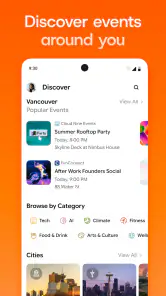
Discovery is another area where expectations matter. Luma’s store summary presents it as a place to discover and host events, but discovery is only useful when the available events match what I want to do and where I want to go. For highly local, niche, or time-sensitive activities, I would still check community groups and familiar local channels. Luma can complement those places rather than replace every source of event information.
Who should use it, and who should skip it
I would recommend Luma to people who host meetups, classes, social gatherings, community activities, or other events where a clear invitation matters. It is particularly suitable for an organizer who is tired of answering the same questions in several conversations and wants the event details to have a central home.
It is also a good option for someone who enjoys browsing events as well as creating them. The combination gives the app more purpose than a one-time invitation tool. A person who attends different gatherings may appreciate having an event-oriented place to start, while a host can use the same app to organize their own plans.
I would be more cautious about recommending it to someone who only needs a private reminder for themselves. A normal calendar is likely faster for that job. I would also steer a large, highly regulated, or financially complex event toward a more specialized platform. Luma’s appeal is its focused middle ground: more organized than scattered messages, but less demanding than enterprise-style event software.
Privacy and audience judgment should remain part of the decision. The Teen rating means families and younger users should consider whether the event context is appropriate, while hosts should think carefully about what information they place in an invitation. I would keep personal details limited to what attendees genuinely need and use separate communication for anything sensitive.
My practical verdict after using the app
My overall view is positive, but it depends on using Luma for the problem it actually solves. It is not a magic fix for unclear plans, unreliable notifications, or groups that refuse to check a new app. It is a practical way to give an event a clear identity and a more stable home than a fast-moving chat.
The strongest workflow is simple: decide the event’s purpose, prepare the essential details, review the invitation from a guest’s perspective, share it once, and troubleshoot by separating event problems from delivery or device problems. That process makes the app feel calmer and prevents the host from turning minor confusion into multiple duplicate events.
With a 4.9 average and a growing audience of over 100 thousand installs, it is clear that many people find the approach useful. I would not treat popularity as a reason to use it for every occasion, though. The better question is whether your gathering needs a dedicated event space. If the answer is yes, the free price makes it easy to try, and the current release from Luma Labs, Inc. offers a focused experience for discovering and hosting events.
My recommendation is to use Luma when clarity, invitations, and event context matter more than instant conversation. Start with a small gathering, keep the event information concise, and maintain a backup way to reach guests if someone has trouble opening the invitation. Used that way, it can remove a surprising amount of coordination friction without pretending to be a complete replacement for calendars, chats, or specialist event services.
Pros
- Clean
- modern interface makes creating events quick and visually appealing.
- Useful RSVP tracking helps hosts monitor attendance in one place.
- Invitation sharing is convenient for both private and group events.
- Event details are easy to update without sending a completely new invite.
- Helpful for organizing dinners
- parties
- meetups
- and casual gatherings.
Cons
- Some advanced planning features may require a paid subscription.
- Guests may need the app for the smoothest invitation experience.
- Limited customization may disappoint users wanting highly themed invites.
- Notifications can become distracting when several events are active.
- Privacy-conscious users may prefer more control over guest visibility and data.

- Category
- Events
- Version
- 2.2.5