

Lufthansa
- 1.68K
- 4.8
- Installs
- 10.00M
- Price
- Free

Screenshots
Analysis by Reviewed
When I’m planning a flight, I want the useful details close at hand without having to jump between several travel apps. The Lufthansa app is built around that kind of trip: it brings flight booking, trip details and online check-in into one place. I find it most valuable when I’m flying with Lufthansa and want a simpler way to handle the practical steps before departure, rather than as a general-purpose travel planner.
That airline focus is also the best way to decide whether it belongs on your phone. If you have a Lufthansa trip coming up, it can serve as a working place for the journey rather than just another source of travel inspiration. If you are still deciding where to go or comparing many carriers, I’d start with a broad search service and bring this app into the process once a Lufthansa flight is relevant.
First Impressions
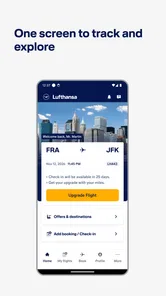
So, the first thing I noticed when I downloaded the Lufthansa app was its sleek design. It's got this clean, modern vibe that makes navigation a breeze. You know how some apps just bombard you with options and you kind of feel like you're lost in a digital maze? Well, not this one. Everything is laid out in a user-friendly manner, and even if tech isn't your best friend, you’ll probably find it easy to get the hang of.
For a traveler, a calm layout matters most when attention is divided: you may be packing, checking a connection, or standing in a busy terminal. I like the idea of opening one airline app to deal with airline-related tasks instead of searching through email for each detail. Still, a simple-looking screen does not remove the need to read carefully; booking and check-in involve decisions that deserve more than a quick tap.
Booking Made Easy
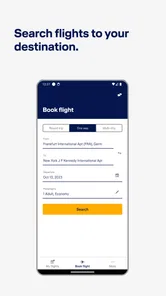
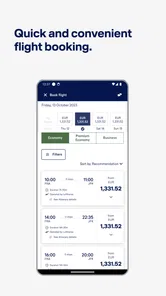
One of the standout features of the Lufthansa app is its booking process. Seriously, it’s like having a personal travel agent in your pocket. The app allows you to search for flights, compare prices, and book your tickets with just a few taps. And if you're a frequent flyer, you’ll appreciate how it saves your details for even quicker bookings. It’s like magic, but without the smoke and mirrors.
For me, the main advantage over searching through a broad travel-booking app is keeping the airline’s own trip tools in the same place as the booking. That matters most after you’ve chosen a flight: you can return to the app to review the journey and handle check-in instead of treating the booking as a one-off transaction. If you are comparing several airlines, though, a multi-airline search tool may be more convenient for seeing a wider range of options before you decide.
A useful way to approach a booking is to separate exploration from commitment. I’d use a broad search to understand the choices, then check the Lufthansa option directly in the airline app before making a decision. That keeps the comparison stage flexible while giving the airline’s own booking flow a chance to show the details that matter to your particular trip. Before confirming, I’d take a moment to review the itinerary and passenger information rather than rushing because the steps feel straightforward.
More From Our News Desk

 Prime Video
Switching to Prime Video: What Changes in Your Viewing Routine
Prime Video can make a compelling second home for streaming, but switching means learning a different catalog, rental layer, and route from browsing to playback.

 Universal TV Remote Control
Universal TV Remote Control Works Best as a Reliable Backup
A phone remote earns its place through quick setup and reliable habits. Here is how to get more from Universal TV Remote Control—and where its limits show.

 Weather - By Xiaomi
Weather by Xiaomi Review: Clear at a Glance, Less Clear Up Close
Xiaomi’s weather app makes everyday forecasts quick to scan, but its calm surface can leave useful details and recovery paths harder to find than they should be.

 X
XX Under Pressure: Can It Recover When Posting Goes Wrong?
A resilience-focused review of X, examining setup, mistaken posts, interruptions, weak connections, and the gaps that matter when recovery needs to be dependable.

 Clash of Clans
Clash of Clans Is Won Between the Battles
Its raids are quick; its community is a long-term project of coordination, teaching, rivalry, and shared responsibility—with all the friction that entails.

 Android Auto
Android Auto Makes the Case for Quieter Car Software
The car interface is no longer judged by how much it can do, but by how quietly it helps. Android Auto shows what drivers now expect—and what still gets in the way.
Latest News



Saved details can make repeat bookings less tedious, but convenience and care should go together. I’d check that any information carried into a new booking is still correct, especially when arranging travel for someone else or booking a different kind of journey from the previous one. A quicker form is helpful; it is not a substitute for checking names and trip choices before purchase.
Keeping Tabs on Your Flights
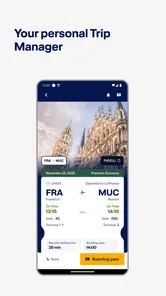
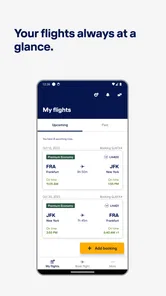
If you're anything like me, you probably worry about missing a flight or getting the gate wrong. The Lufthansa app tackles this head-on with real-time updates. You can check your flight status, get notifications about any changes, and even see which gate you need to head to. It’s like having a personal assistant whispering in your ear, keeping you on track.
A practical routine is to check the trip details before leaving home, then look again when you reach the airport rather than relying on a screenshot saved hours earlier. For example, if I’m on the way to the terminal and plans have shifted, checking the flight information in the app gives me a reason to pause and confirm the latest details before heading to a gate. I would still pay attention to airport signs and announcements; an app is useful support, not a reason to ignore the information around you.
That last point is especially useful when the day gets hectic. I’d treat a notification as a prompt to verify what changed, not as a complete explanation of what I should do next. If I’m traveling with another person, I’d share the practical update in plain language rather than assuming they are watching the same screen. And if connectivity is unreliable, I’d keep essential booking details accessible in a way that does not depend on receiving a fresh alert at exactly the right moment.
For a straightforward outbound flight, the routine can be simple: check the itinerary while getting ready, confirm the current flight information before setting off, then use airport displays and announcements alongside the app once inside the terminal. This avoids two opposite mistakes—checking constantly when nothing has changed, or trusting an old screenshot as if it were live. I find the app most valuable as a convenient reference point within that wider routine.
Loyalty Perks
For those of you who rack up frequent flyer miles like they’re going out of style, the app integrates seamlessly with the Miles & More program. You can view your points, check tier status, and discover ways to earn more. Trust me, if you’re a points junkie, this feature is going to be your new best friend.
This is a more meaningful reason to keep the app installed if you already use Miles & More than if you only take an occasional flight. It puts travel and loyalty information alongside each other, which can help you check your account as part of trip planning. If you don’t care about earning or tracking miles, you can simply focus on booking and flight details instead; the loyalty tools are not the reason every traveler needs this app.
I’d make a habit of checking loyalty details when they are relevant to a booking, rather than letting points become the main reason for choosing a flight. For someone who travels regularly, seeing account information near airline tasks can make it easier to keep track of the program. For a traveler who rarely flies, the practical value is likely to come from managing the journey itself, not from earning or monitoring rewards.
In-flight Entertainment is another fun feature the app offers. Before you even board, you can select movies, shows, and music to enjoy during your flight. It’s like curating your own little in-flight cinema. And honestly, having control over your entertainment options can make a long flight feel a lot less daunting.
I’d treat that as a pleasant extra rather than the deciding reason to install the app. It can be useful to think about entertainment before boarding, especially if you like having a plan for a long stretch in the air. But I would not assume that an app-based option removes the value of bringing a backup, such as something already available on your device, when you want to be sure you have something to do.
Trust, Choices and Travel Details
Travel apps can involve personal details, so I prefer to be deliberate about what I enter and when. Lufthansa is a travel and local app from Lufthansa Group, and its core purpose is clear: helping passengers manage airline tasks. I would use it when I need those tasks, rather than handing over details casually or treating any travel app as a substitute for checking the choices presented on screen.
For a time-sensitive task such as online check-in, I’d open the app when I’m ready to complete the process and review each step before confirming. That small habit is useful in any airline app: it keeps account and trip actions tied to a specific purpose, and it reduces the chance of tapping through a screen without noticing what it asks. If a prompt or choice is unclear, I’d stop and read it rather than assume what it means.
My approach to trust here is deliberately practical: I can judge the app’s stated travel purpose and the choices I actually see while using it, but I should not guess about permissions or data practices that are not visible to me. I’d look at the prompts on my own device, decide whether each request makes sense for the task at hand, and use the settings and account choices that are presented there. That is more useful than treating a familiar airline name as a reason to skip ordinary care.
Booking and check-in are the moments when I would pay closest attention, because those are the points where I’m actively handling a trip and may be asked to confirm information or choices. I’d avoid doing that hurriedly in a queue if I can complete the task somewhere calmer. If I’m only checking a flight detail, I would keep the interaction limited to that purpose instead of exploring account options I do not need.
The app is free, has an Everyone age rating, and its current version is 9.548.3; it requires Android 10 or later. It has a 4.7 average from around 88,000 ratings and more than 10 million installs. Those figures suggest it is widely used, but they don’t tell me whether it suits every traveler. I’d judge it by whether I regularly need Lufthansa’s booking, check-in and flight-management tools.
One limitation is also its natural boundary: this is an airline companion, not a complete trip organizer for every carrier, hotel and ground-transport leg. If I’m assembling a complicated itinerary across different airlines, I’d use a broader travel planner as well. And if I’m not flying Lufthansa, the app is unlikely to be my first choice for managing that trip.
That distinction answers a common practical question: should this replace the travel apps already on your phone? For most people, I’d say no. A broad booking service is better for scanning across carriers, while a general itinerary organizer may be more convenient for collecting reservations from several providers. This app earns its place when you want airline-specific tasks close at hand; it complements those other tools rather than covering every part of a holiday.
It is also a better fit for a traveler who is comfortable checking details directly than for someone who wants one service to organize every leg automatically. If your trip combines separate tickets, hotels and local transport, you will still need a way to keep those pieces together. I’d keep the Lufthansa app for the airline portion and use a wider planning method for the rest, rather than expecting a focused airline app to become a universal itinerary manager.
As an everyday example, imagine I have a Lufthansa flight coming up and a busy morning before departure. I can review the trip before leaving, check flight information again on the way, and use the app for the airline task I need at the appropriate point. At the terminal, I still compare what I see in the app with airport displays and listen for announcements. That combination lets the app reduce small bits of friction without making it the only source I trust.
Final Thoughts
So, is the Lufthansa app worth the download? In my humble opinion, absolutely. Whether you’re a seasoned traveler or just taking a quick trip, this app is designed to make your flying experience smoother and more enjoyable. From easy bookings and real-time updates to loyalty program integration and entertainment options, it’s got everything you need to fly hassle-free. So go ahead, give it a whirl, and let the Lufthansa app be your trusty travel companion in the skies.
I’d recommend it most to people who fly Lufthansa often enough to appreciate having their bookings and airline tasks together, especially travelers who also use Miles & More. For a one-off journey, it can still be handy for checking trip details and checking in, but it won’t replace a wider search tool when comparing airlines. In the end, I see it as a focused, practical companion: useful when its airline-specific tools match the trip, and easy to skip when they don’t.
If I were deciding today, I’d install it when I had a Lufthansa booking to manage, then judge whether its day-to-day usefulness justified keeping it afterward. The appeal is not that it can replace every travel service, but that it brings several airline-specific steps together. If those are the steps you need, that focus is a strength; if your travel rarely involves Lufthansa, another tool will probably serve you better.
Lufthansa Frequently Asked Questions
What is the Lufthansa app’s minimum operating system requirement?
Before downloading, check that your phone is running Android or iOS version 10 or later, as this is the app’s minimum operating system requirement. The Lufthansa app is a free travel companion from Lufthansa Group, with tools for booking flights, viewing flight details, and checking in online. It is rated Everyone, making its content suitable for a broad audience.
Who develops the Lufthansa app, and what is it designed for?
Lufthansa Group develops the Lufthansa app as a mobile travel companion for people arranging or taking flights. Its main purpose is to bring useful travel tasks together on a phone, including booking flights, viewing flight details, and checking in online. The app is listed in the Travel & Local category, so its focus is on practical travel support rather than general-purpose services.
Is the Lufthansa app free, and what devices can I use it on?
The Lufthansa app is free to download and is available for Android and iOS devices. Before installing it, check that your device runs a compatible operating system; the listed minimum is Android or iOS version 10. The app is rated Everyone, so its content is suitable for a broad audience. It is a travel app from Lufthansa Group.
What is the Lufthansa app and what are its main features?
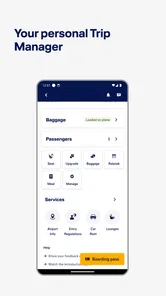
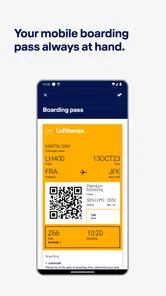
The Lufthansa app is a comprehensive travel companion designed to enhance your flying experience with Lufthansa. It offers features like booking and managing flights, checking in online, storing boarding passes, and tracking flight status. Additionally, the app provides real-time updates on flight schedules and gate changes, ensuring a smoother travel experience.
Is the Lufthansa app available for both Android and iOS devices?
Yes, the Lufthansa app is available for download on both Android and iOS platforms. Users can easily find it on the Google Play Store for Android devices and the Apple App Store for iOS devices, making it accessible to a wide range of smartphone users.
Pros
- User-friendly interface
- Real-time flight updates
- Easy booking process
- Wide range of destinations
- Strong customer support
Cons
- App occasionally crashes
- Limited offline functionality
- Frequent login issues
- High ticket prices
- Slow loading times











