LUDEX Sports Card Scanner +TCG
- 1.65K
- 4.5
- Installs
- 1.00M
- Price
- Free

Screenshots
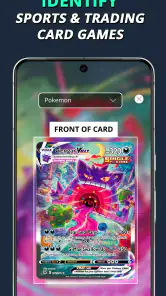
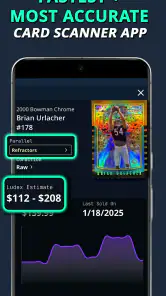

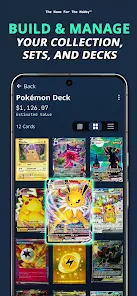
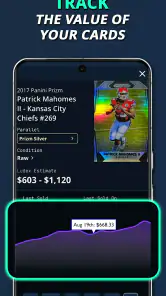
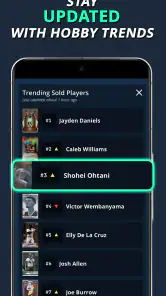
Analysis by Reviewed
For a new collector, a card scanner can turn an untidy stack into something easier to understand; for a longtime collector, it can save some repetitive searching. I find the key is to use LUDEX Sports Card Scanner + TCG as a starting point for identification and collection tracking, not as the final word on a card’s value. A scan can help you decide what to look at next, but condition and recent comparable sales still matter when you’re trading or selling.
Where a scan can get stuck
Scanning feels straightforward when a card is easy to see, but a quick result is not the same as a guaranteed match. Similar designs, glare, sleeves, and worn surfaces can make identification less certain. If a result looks off, I’d treat it as a prompt to inspect the card rather than accept it automatically. Check the name, season or set details shown, and any visible variation before relying on a value estimate.
This is especially useful for cards that look nearly identical but differ in a detail collectors care about. A scan can narrow down what you’re holding; it cannot judge every physical condition issue for you. I’d keep uncertain cards in a separate “check later” pile instead of letting a doubtful match flow straight into a trade list.
Getting a useful first session
Before scanning a large collection, I’d test a few cards I already know well. That gives you a simple way to see whether the camera is recognizing your cards and whether the results are easy to verify. Keep the card flat and clearly visible, and use steady, even lighting. If a scan fails, adjust the card or lighting and try again rather than repeatedly scanning from the same angle.
LUDEX Sports is a sports app from Ludex AI, with a 4.5 average from around 13,000 ratings and over a million installs. It is free, rated for Everyone, and its current version is 1.8.4; in-app purchases range from $4.99 to $239.99 per item. I’d start by checking how the free experience suits your needs before considering any purchase. If you’re helping a younger collector, the Everyone rating is useful context, but I’d still review any purchase choices together.
From scan to a collection you can use
A practical way to recover from a bad match
If the app identifies the wrong card, I wouldn’t build more decisions on that result. Remove or correct the questionable entry if the collection tools allow it, then try a clearer scan and compare the printed details yourself. For a valuable card, verify the exact version and condition through another source before using an estimate to set a selling or trading price. That extra check is slower, but it’s safer than treating one scanner result as a firm market quote.
A useful routine is to scan in small batches and pause to review the results before moving on. It helps catch mistakes while you still remember which physical card produced each entry. If the app seems stuck, close and reopen it, check that your connection is working, and try again with one card. These are sensible first checks for a scan workflow without assuming that every delay has the same cause.
More From Our News Desk

Clash of Clans Is Won Between the Battles

Android Auto Makes the Case for Quieter Car Software

MobiOffice: Transforming Mobile Productivity with Seamless Integration

EA SPORTS FC™ Mobile Soccer: Redefining Mobile Sports Gaming

How Microsoft OneDrive Became a Mobile Productivity Giant

How Google Translate Breaks Language Barriers Effortlessly
When the issue may be elsewhere
Sometimes the difficulty is not the scanner. A card may be hard to identify because its printing is unusual, its details are obscured, or the exact version matters more than the broad card name. Likewise, a value that feels surprising may reflect differences in condition or the market rather than a faulty scan. I’d use the app to organize and research, then consult a trusted marketplace or knowledgeable collector when a decision has real money attached.
The app is most helpful if you regularly handle mixed sports cards and TCG cards and want one place to begin sorting them. It is less suited to someone who only needs a precise appraisal of a rare card, or who prefers to record every detail manually and verify each sale individually. Compared with a spreadsheet, scanning can save repetitive typing; compared with checking marketplace listings, it is a faster first pass but not a substitute for checking comparable sales.
Making the collection work for you
A realistic use is sorting cards after a weekend trade: scan the new additions, review questionable matches while the cards are still in front of you, and add only entries you’ve checked to your collection. That creates a more dependable record than rushing through a whole box and trusting every result. I’d also keep valuable cards physically organized while scanning so that a digital entry doesn’t become detached from the card it represents.
For a beginner, this kind of workflow can make a collection feel easier to manage without requiring a spreadsheet from day one. For an experienced collector, the main benefit is speed when identifying familiar cards in volume; the trade-off is that condition grading and price decisions still need your own judgment. If you collect only one niche with very specific cataloging needs, a dedicated database or your own records may be a better fit.
Choosing what to scan first
I wouldn’t begin with the rarest or most valuable card in the box. Start with a few common cards whose names and versions you can verify easily, then move to cards with less obvious details. This gives you a feel for the scan-and-review rhythm before you depend on it for anything important. It also helps you spot whether a particular type of card is consistently harder to identify, so you can set those aside for manual checking instead of repeatedly losing time to the same uncertainty.
For a household collection, a practical division of labor is to have one person scan while another checks the physical cards and confirms the printed details. That is especially handy when sorting a mixed pile with sports cards and TCG cards together: a second pair of eyes can catch a wrong version before it becomes part of the digital record. If you’re working alone, place each reviewed card in a separate pile so you can tell what has already been checked.
What the value estimate can and cannot do
A displayed value is most useful as a clue about which cards deserve more research, rather than a promise of what a buyer will pay. Two cards with the same identity can differ meaningfully because of condition, and a market figure may not match the price someone is willing to offer at a local trade. I’d use the estimate to prioritize: check the cards that look unusually valuable, then compare the exact version and condition against current sales before negotiating.
This distinction also helps avoid a common collecting mistake: treating a collection total as money you could immediately recover. The app can make it easier to see what you have, but a total assembled from estimates is not the same as a completed sale. If you are cataloging for insurance, resale, or a major trade, keep your own notes about condition and verify important entries independently.
Who benefits most from the workflow
I’d recommend trying the app if you often inherit, buy, or trade mixed stacks and want a quicker way to identify what needs attention. It can also suit a casual collector who wants a digital record but doesn’t enjoy entering every card by hand. The strongest use case is a collection large enough that manual lookups become a chore, while still small enough that you can review scan results as you go.
On the other hand, someone cataloging a small, carefully curated set may get more control from a spreadsheet or a specialist database. Those approaches take more manual effort, but they make it easier to define custom fields and maintain a record around the details that matter to that collector. Likewise, if your main goal is a defensible appraisal, a scanner alone is not enough; careful condition assessment and comparable sales are more important than speed.
Keeping the digital record dependable
The most useful habit is to connect each digital entry to a physical card before moving on. Scan a few, check the results, and keep the corresponding cards together until you’re confident the matches are right. That small pause is less exciting than processing a whole box at once, but it reduces the chance of mixing up similar cards or forgetting which result needs another look.
I’d also treat collection maintenance as part of the process, not a task to leave until the end. When you trade away a card or add a new one, update the record while the transaction is still fresh. A scanner can make the first cataloging pass easier, but a collection stays useful only if the digital list keeps pace with what is physically in your hands.
Practical verdict
My overall view is that LUDEX Sports Card Scanner + TCG makes the most sense as a convenient first pass: scan, check, organize, and then verify anything that could affect a real trade or sale. It is not a substitute for a collector’s knowledge, but it can help turn a disorganized pile into a clearer list of questions and next steps. If that is the part of collecting that slows you down, the free starting point makes it reasonable to try on a small batch before deciding whether it belongs in your routine.
Have you ever found yourself sifting through a pile of sports cards, wondering which ones hold the most value? If you’re a sports card enthusiast like me, then you’ll definitely want to check out LUDEX Sports Card Scanner + TCG. It’s like having a card expert right in your pocket! Let me walk you through my experience with this nifty app.
Scanning Made Simple
One of the standout features of the app is its seamless scanning capability. I remember the first time I used it, I was a bit skeptical about how accurate it would be. But boy, was I impressed! All you need to do is point your camera at the card, and voilà, the app recognizes it within seconds. It’s almost like magic!
Comprehensive Database
The app boasts a vast database that covers a wide range of sports cards and trading card games (TCGs). Whether you’re into baseball, basketball, or even Pokémon cards, this app has got you covered. I found it incredibly useful when I stumbled upon a rare card in my collection. The app not only identified it but also provided detailed information about its value and rarity.
What’s even cooler is that the app is constantly updating its database. So, you don’t have to worry about it being outdated. I’ve noticed new cards being added regularly, keeping me in the loop with the latest trends and values in the card world.
User-Friendly Interface
Another aspect that I absolutely love about this app is its user-friendly interface. Navigating through the app is a breeze, even if you’re not tech-savvy. The layout is intuitive, with easy-to-access menus and clear instructions. I appreciate how it doesn’t bombard you with unnecessary information, keeping the focus on what truly matters – your cards!
Adding to that, the app allows you to save and organize your collection digitally. It’s like having a personal digital binder, where you can track which cards you own and their current market value. This feature has been a game-changer for me, especially during trades. No more second-guessing or undervaluing my cards!
Final Thoughts
All in all, the app is a must-have for any card enthusiast. It’s not just an app; it’s a comprehensive tool that enhances the card collecting experience. Whether you’re a seasoned collector or someone just starting out, this app offers invaluable insights and ease of use that you won’t find elsewhere.
So, if you’re looking to take your card collecting to the next level, give the LUDEX app a try. Trust me, you won’t regret it!
LUDEX Sports Card Scanner +TCG Frequently Asked Questions
What is LUDEX Sports Card Scanner +TCG?
LUDEX Sports Card Scanner +TCG is a sports app for people who collect sports cards and trading card game cards. Its central purpose is to help users scan cards, find their value, and build a collection. If you want to keep track of cards on your phone or look up information while sorting a collection, that focus makes the app worth considering.
Who developed LUDEX Sports Card Scanner +TCG?
LUDEX AI is the developer of LUDEX Sports Card Scanner +TCG. The app is focused on card scanning, card values, and collection building, so it may appeal to collectors who want those tasks gathered in one mobile tool. Before downloading, it is also sensible to check that your phone meets the app’s operating-system requirement and that its optional in-app purchases suit your budget.
Is LUDEX Sports Card Scanner +TCG available for my phone?
LUDEX Sports Card Scanner +TCG is an app for Android, and its minimum system requirement is Android 5.0. If your phone runs that version or a newer one, it meets the stated operating-system requirement. The app is free to download, though purchases are available inside it. Checking your device’s software version before downloading can help you avoid compatibility surprises.
Who is LUDEX Sports Card Scanner +TCG intended for?
The app is aimed at sports card and trading card game collectors who want to scan cards, find their value, and build a collection. Its content rating is Everyone, so its rating is not limited to adult users. It may suit someone just starting to organize a collection as well as a more experienced collector who wants card information available on a phone.
What does LUDEX Sports Card Scanner +TCG cost, and are there in-app purchases?
LUDEX Sports Card Scanner +TCG is free to download, but it also offers in-app purchases. The listed purchase range runs from $4.99 to $239.99 per item, so it is worth reviewing the purchase details in the app before paying for anything. You can begin with the free download and decide whether any paid option fits your needs.
Pros
- Fast card scanning capability
- Extensive card database
- User-friendly interface
- Real-time market pricing
- Multi-language support
Cons
- Limited free features
- In-app purchases required
- Occasional scanning errors
- Requires stable internet
- Battery consumption high
- Category
- Sports
- Version
- 1.8.4





