

LiveLocate - Family Tracker
- 0.00
- 4.4
- Installs
- 10.00K
- Price
- Free

Screenshots
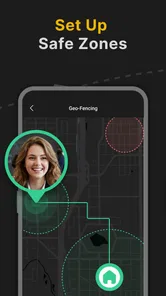
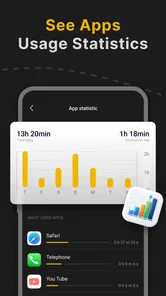
Analysis by Reviewed
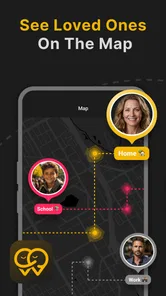
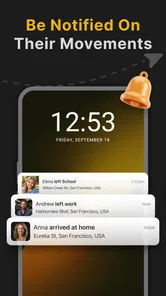
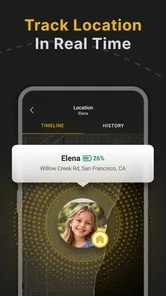
I look at family-location apps as practical tools, not magic guarantees: they can make coordination easier, but only when everyone understands how location sharing works and is comfortable using it. LiveLocate is a parenting app from Ads4you OU, built around seeing where family members and children are in real time. Its idea is straightforward; the more important question is whether it fits the way your household communicates and what you expect from a tracker.
Where location sharing can get confusing
The first thing I would clarify with my family is what “real time” means in everyday use. A location can help you understand where someone is, but it is not a substitute for a reply, a confirmed pickup plan, or a conversation about a change of route. If a child is late, for example, I would use the app as one useful clue and still call or message rather than treating the map as the whole story.
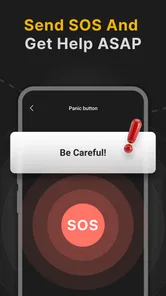
That distinction matters because people often expect a location app to answer more than it can. A map may reduce the number of “Where are you?” messages, but it cannot explain why someone has stopped, whether they are safe, or whether a displayed position is current enough for a time-sensitive decision. I would use LiveLocate for coordination and reassurance, not as an emergency service or a replacement for adult supervision.
There can also be a family-side friction point: tracking only feels helpful when the people being tracked know about it and agree on its purpose. With younger children, a parent may manage the decision, but older children and other adults deserve a clear explanation. I would talk through when location sharing is expected, who can see it, and what everyone should do if the app and a direct message seem to disagree.
This is where LiveLocate’s focused purpose is both its appeal and its limit. If your main need is family location awareness, a dedicated tracker is easier to understand than a broad social app with location tucked among unrelated features. If you need detailed parental controls, device-use limits, or a full communication suite, do not assume that a location-focused app covers those jobs too.
Set expectations before the first outing
A useful first test is a short, ordinary trip rather than a stressful moment. Agree that one person will travel to a familiar place, then check whether the family can use the app to answer the practical question you care about: has the person arrived, or are they still on the way? This gives everyone a chance to learn the interface and decide whether the information is clear enough for your routine.
I would also agree on a backup habit. For a school pickup, that might mean sending a quick message if plans change instead of expecting a parent to infer the situation from a location. A tracker works best as one layer in a family plan, alongside simple check-ins and clear pickup arrangements.
More From Our News Desk

 Gmail
GmailGmail in a Busy Inbox: Who Benefits Most?
From first account to crowded workday, Gmail earns its place through dependable search and flexible sorting—but its best fit depends on how much inbox maintenance you can tolerate.

 Prime Video
Switching to Prime Video: What Changes in Your Viewing Routine
Prime Video can make a compelling second home for streaming, but switching means learning a different catalog, rental layer, and route from browsing to playback.

 Universal TV Remote Control
Universal TV Remote Control Works Best as a Reliable Backup
A phone remote earns its place through quick setup and reliable habits. Here is how to get more from Universal TV Remote Control—and where its limits show.

 Weather - By Xiaomi
Weather by Xiaomi Review: Clear at a Glance, Less Clear Up Close
Xiaomi’s weather app makes everyday forecasts quick to scan, but its calm surface can leave useful details and recovery paths harder to find than they should be.

 X
XX Under Pressure: Can It Recover When Posting Goes Wrong?
A resilience-focused review of X, examining setup, mistaken posts, interruptions, weak connections, and the gaps that matter when recovery needs to be dependable.

 Clash of Clans
Clash of Clans Is Won Between the Battles
Its raids are quick; its community is a long-term project of coordination, teaching, rivalry, and shared responsibility—with all the friction that entails.
Latest News



Setup checks that prevent avoidable frustration
LiveLocate is free to install, and its age rating is Everyone. Those details make it approachable for a household to consider, but “free” does not mean every option is necessarily included: the app offers in-app purchases ranging from $9.99 to $59.99 per item. I would check what an optional purchase covers inside the app before paying, then decide whether it addresses a real need rather than buying on the assumption that it is required for basic use.
Before relying on a tracker, I would confirm that each family member has the correct app and that everyone has completed the steps needed to participate in the same family setup. A common source of confusion is not the map itself, but one person using a different account, missing a setup step, or expecting another household member to appear without being added through the intended process. Follow the app’s own prompts and verify the family connection with a low-stakes test.
Phone settings are another sensible place to check if location information does not appear as expected. Make sure the device’s location service is available and review the app’s location access choices in the operating system settings. The exact controls differ between phones, so I would follow the labels on the device rather than hunting for a setting by a name that may not match. A change to phone settings can affect location sharing, so retest after adjusting anything.
Battery-saving settings can also interfere with apps that need a phone to keep updating in the background. If updates seem delayed, check whether the phone is restricting background activity or has entered a particularly aggressive power-saving mode. I would not disable protections across the board; instead, make a careful adjustment only if the device’s own settings suggest the app is being limited, and see whether that resolves the issue.
LiveLocate is at version 1.2.3 and requires Android 8.0 or later. That makes checking the Android version an easy first step for anyone setting it up on an older phone. A compatible operating system is only one part of a successful setup, though: the phone still needs working connectivity and the relevant location settings enabled.
A calmer way to test the family setup
For the first day, I would keep the test simple: have one person open the app before leaving, another check the family view after the trip begins, and both compare what they see with a direct check-in. This helps distinguish a setup issue from an unrealistic expectation about how quickly a phone should update. It also lets the person carrying the phone notice whether the app is comfortable to use without turning a normal outing into a constant monitoring exercise.
If one family member’s position is missing, check the basics in order: confirm the right person is using the app, verify that the family connection is in place, review location access on that phone, and make sure it has internet access. Then reopen the app and try again. Changing several settings at once makes it harder to know what helped, so I prefer one adjustment followed by one clear test.
Recovering a routine when something looks wrong
When a location looks stale or unexpected, resist the urge to treat it as proof that something has happened. First ask the person to open the app or send a message, if that is practical. Then check whether their phone has a connection and whether location access is still enabled. If the person is somewhere safe and simply has a low signal, waiting for the device to reconnect may be more sensible than repeatedly refreshing or changing settings.
A realistic example is a parent waiting for a child after an after-school activity. If the map still shows the school while the child says they are walking to the pickup point, I would use the message as the immediate update, then check the app again once the phone has a chance to connect. The app can help orient the parent, but a direct message should win when it provides newer, clearer information.
It is also useful to set a threshold for when to stop troubleshooting and switch to ordinary contact. If an arrival matters now, call or message rather than spending several minutes toggling settings. If there is a genuine safety concern, follow your family’s normal emergency plan and contact appropriate help. A tracker is most valuable when it reduces uncertainty; it should not delay a more direct response.
For recurring problems, note the pattern rather than guessing. Does the issue happen only on one phone, only when its battery is low, or only in places with poor reception? A pattern can point you toward device settings or connectivity without assuming LiveLocate is at fault. If the app itself repeatedly fails after basic checks, consult its in-app support or the relevant app-store support route instead of making broad changes to every family member’s phone.
When the app may not be the cause
Location quality depends on the phone as well as the app. A device with weak connectivity, disabled location access, or restrictions on background activity may not provide the update a family expects. That is why I would check the phone and network before reinstalling the app or removing people from the family setup. Reinstalling can create extra work and may not solve a problem caused by a setting or a poor connection.
Expectations can be the other source of trouble. Families sometimes picture an always-perfect moving dot, but location information is better treated as an aid to coordination than as a guarantee of someone’s exact position at every instant. If your household needs a dependable arrival confirmation, agree on a message or call as well. If you mainly want reassurance during ordinary journeys, LiveLocate may be a more suitable part of the routine.
There is also a privacy trade-off that deserves attention before installation. Continuous family location sharing can feel reassuring to one person and intrusive to another. I would make the purpose specific—such as coordinating school journeys or checking that someone has reached a destination—and revisit the arrangement as children grow. If a family member is uncomfortable with ongoing tracking, a less intrusive check-in routine may be a better choice.
Who will get the most from LiveLocate
I can see LiveLocate fitting households that regularly coordinate children’s journeys, family pickups, or separate errands and want a shared location view to complement messages. It is especially practical when the recurring question is simply whether someone is on the way or has reached a familiar destination. The app has a 4.4 average from 19 ratings and has passed 10,000 installs, which gives a prospective user some evidence that other people have tried it, while still being a modest pool of feedback rather than a guarantee it will suit every family.
Compared with the usual alternatives, the main choice is often between a dedicated family tracker, location sharing built into a phone ecosystem, and manual check-ins. Built-in sharing may be more convenient if everyone already uses the same device platform and wants fewer apps. Manual calls or messages are better when sharing is occasional or privacy is the priority. A dedicated app such as LiveLocate makes more sense when a household wants a distinct place for family location coordination, provided its setup and purchase options match what the family needs.
I would skip it if you want a complete parental-control package, expect a tracker to replace direct communication, or need a guarantee of precise updates in every situation. I would also be cautious if the family has not agreed on tracking or if the likely benefit is too small to justify adding another app and managing another setup. In those cases, a simple check-in agreement or the phone’s existing sharing tools may be easier.
Overall, I see LiveLocate as a focused family-location option with a sensible role: help relatives coordinate ordinary movement, then let direct communication handle context and urgent decisions. Its free entry point is convenient, but I would review the optional purchases before committing money and test the setup on a normal trip before depending on it. The app is most useful when everyone knows why it is being used, phone settings are in order, and the family treats the map as helpful information rather than a promise.
My practical verdict
For a household that wants a straightforward location-sharing routine, I would give LiveLocate a try with a clear purpose and a low-pressure test. Ads4you OU has positioned it for family safety, and the focused approach may be enough for parents who chiefly want to coordinate where family members are. Keep a backup check-in habit, be thoughtful about consent, and troubleshoot the phone before blaming the app. Those small choices make the difference between a useful reassurance tool and another source of confusion.
LiveLocate - Family Tracker Frequently Asked Questions
What is LiveLocate - Family Tracker, and how does it work?
LiveLocate - Family Tracker is a location-sharing app intended to help family members see one another’s whereabouts on a map. Its features may depend on the current app version and the permissions each person grants. Before relying on it, check the app’s listing for supported features, and remember that location updates can be affected by connectivity, device settings, and battery-saving restrictions.
Does everyone in my family need to install the app?
For family members to share their locations through a tracker, each person whose location is to be viewed will generally need to use the app and allow the relevant location permissions. Confirm how LiveLocate handles invitations, accounts, and family groups before setup, as these details can vary by version. Make sure every participant understands what is shared and agrees to take part.
What permissions does LiveLocate need, and should location access stay enabled?
A family-tracking app typically needs location permission to provide map updates, and some features may work differently when access is limited to while the app is in use. Background location access can improve updates when the app is closed, but it has privacy and battery implications. Review the permission prompts carefully, choose the access level you are comfortable with, and check your phone’s settings if updates stop.
Is LiveLocate - Family Tracker free to use?
Pricing and included features can change, so check the current Google Play or Apple App Store listing before downloading. Look for details about subscriptions, in-app purchases, trial periods, and whether particular tracking or family-group features require payment. If you start a trial or subscription, review its renewal terms and manage or cancel it through the store account used to subscribe.
How accurate is LiveLocate, and what should I do if a location is not updating?
No phone-based location tracker can guarantee an exact, uninterrupted position. Accuracy and update frequency can be affected by GPS reception, internet access, device permissions, and battery optimization. If a family member’s location appears stale, check that their phone is online, location services and the app’s permissions are enabled, and background activity is not restricted. Treat map locations as approximate rather than as an emergency service.
Pros
- Quickly check a family member’s location on a shared map.
- Useful for coordinating pickups and meetups.
- Location sharing can make everyday check-ins easier.
- A shared family view keeps everyone’s whereabouts in one place.
- May offer peace of mind when loved ones are travelling.
Cons
- Everyone must agree to share their location for tracking to work.
- Location accuracy can vary with GPS
- signal
- and device settings.
- Frequent location updates may use extra battery and mobile data.
- Background location access may raise privacy concerns.
- The app is less useful if family members do not keep it running.











