

Lisa Law: AI Legal Help 24/7
- 90.00
- 2.3
- Installs
- 10.00K
- Price
- Free

Screenshots


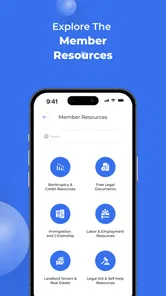
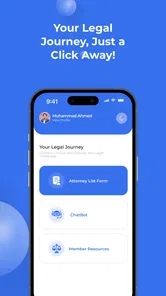
Analysis by Reviewed
I approached Lisa Law: AI Legal Help 24/7 as a practical business app rather than a replacement for a solicitor. Its purpose is to give quick, local legal guidance, help with forms, and point people toward attorney referrals. That combination makes sense for moments when you need to understand your next step but are not ready to arrange a full consultation. My overall impression is mixed: the idea is useful, the free entry point lowers the barrier to trying it, but the modest user rating suggests that the experience may not work equally well for everyone.
What interested me most was not the promise of instant answers, but how the app fits into real situations. Legal questions often arrive when someone is tired, worried, short on time, or unfamiliar with legal vocabulary. In that setting, readability, navigation, and the ability to explain a problem clearly matter as much as the underlying information. I found Lisa Law most suitable as an early orientation tool: something to help organize facts, identify possible routes, and decide whether professional advice is needed.
How Lisa Law handles readability and navigation
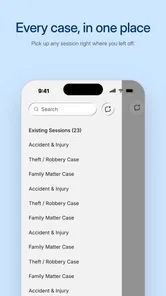
I find readability in a legal app is about more than short answers: it also means knowing what to do with them. I’d use each response to make a small, practical checklist, then keep that checklist beside the original documents so explanations don’t get mistaken for evidence. That approach also helps reveal how the app’s navigation and content organization affect the effort of returning to an issue.
A simple starting point for an intimidating subject
The app belongs to the Business category, but it is not limited to company owners. A person dealing with a workplace dispute, a contract question, a form, or another everyday legal concern may find the business classification slightly misleading at first. The useful way to think about it is as an AI legal assistant with a practical, task-focused purpose.
The short store name is Lisa Law, while the fuller title makes its role clearer: AI legal help available around the clock. I would not judge it by the brevity of the name alone. The important question is whether the app helps you turn a vague concern into a clear question. That is where a legal assistant can be more approachable than opening a general search engine and sorting through pages written for professionals.
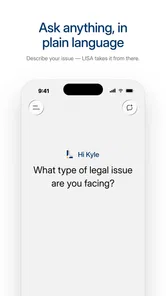
For readability, the best workflow is to start with plain language. Instead of entering a long emotional account, I would write the basic situation first: who is involved, what happened, when it happened, and what outcome I want. This creates a cleaner foundation for guidance and makes it easier to notice which facts still need checking. It is also more comfortable for people who struggle with legal terminology, because the first step does not require them to know the correct name for a legal issue.
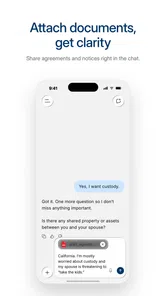
A useful habit is to keep a separate note with important dates, names, document titles, and questions before using the assistant. That is not a glamorous feature, but it is one of the most valuable ways to use this kind of tool. It reduces the chance of forgetting a key detail and makes any later conversation with an attorney more efficient. I would also review any generated form or explanation slowly instead of accepting it just because it sounds confident.
More From Our News Desk

 Gmail
GmailGmail in a Busy Inbox: Who Benefits Most?
From first account to crowded workday, Gmail earns its place through dependable search and flexible sorting—but its best fit depends on how much inbox maintenance you can tolerate.

 Prime Video
Switching to Prime Video: What Changes in Your Viewing Routine
Prime Video can make a compelling second home for streaming, but switching means learning a different catalog, rental layer, and route from browsing to playback.

 Universal TV Remote Control
Universal TV Remote Control Works Best as a Reliable Backup
A phone remote earns its place through quick setup and reliable habits. Here is how to get more from Universal TV Remote Control—and where its limits show.

 Weather - By Xiaomi
Weather by Xiaomi Review: Clear at a Glance, Less Clear Up Close
Xiaomi’s weather app makes everyday forecasts quick to scan, but its calm surface can leave useful details and recovery paths harder to find than they should be.

 X
XX Under Pressure: Can It Recover When Posting Goes Wrong?
A resilience-focused review of X, examining setup, mistaken posts, interruptions, weak connections, and the gaps that matter when recovery needs to be dependable.

 Clash of Clans
Clash of Clans Is Won Between the Battles
Its raids are quick; its community is a long-term project of coordination, teaching, rivalry, and shared responsibility—with all the friction that entails.
Latest News



Why clear reading matters more than speed
Legal guidance is a poor place to skim. A short answer may still contain conditions, exceptions, or a recommendation to seek professional help. I found that the app’s value depends heavily on the user being willing to read the response carefully and compare it with their own documents. Someone who wants a single definitive sentence may be disappointed, because legal situations rarely fit neatly into one.
The interface should be approached with a low-distraction mindset. If you are using it while rushing between appointments or handling a stressful dispute, pause before sending a message. A concise question is easier to review than a stream of incomplete thoughts. I would write one issue at a time, save the relevant wording elsewhere, and avoid mixing several unrelated problems in one conversation.
This matters especially for users with reading difficulties, limited concentration, or low confidence with written English. The app can make the first step less intimidating, but it does not remove the need to understand the response. Breaking a complicated matter into smaller questions is the most practical accessibility-minded strategy I can recommend here.
Where it sits beside ordinary alternatives
Compared with a general web search, Lisa Law has a narrower purpose and can feel more direct. Search results often mix official guidance, advertisements, outdated explanations, and discussion forums. An AI assistant may help you frame the issue faster, particularly when you do not know which legal phrase to search for. The trade-off is that a search engine lets you inspect multiple sources, while an assistant may present a smoother answer that still needs verification.
Compared with a traditional attorney, the app is more convenient for an initial question and potentially less demanding to access. It cannot offer the same level of personal responsibility, detailed case review, or professional judgment as a qualified lawyer handling your matter. I would use it to prepare for a conversation with an attorney, not to avoid one when the consequences are serious.
Compared with a blank form downloaded from a government or legal website, its form-related help may be easier for a beginner to approach. However, the convenience of assistance should not be confused with official acceptance. Before submitting anything, I would check the destination, required attachments, deadlines, and whether the wording suits the relevant jurisdiction.
Motor, sensory, and cognitive considerations
For people who process information differently, the most useful adjustment is to control the pace rather than trying to absorb everything at once. I’d read one point, note what remains unclear, and return with a focused follow-up instead of asking for a sweeping conclusion. With that strategy in mind, it’s worth considering how physical and sensory needs can shape a comfortable session.
Reducing the amount of work in a stressful task
Legal tasks can be physically and mentally demanding even when the app itself is straightforward. A person with limited hand movement, tremors, fatigue, or pain may find long text entry difficult. The most helpful workflow is to prepare a short factual outline first and then enter only the details needed for the immediate question. This reduces repeated typing and makes corrections less frustrating.
I would also avoid treating the chat box as a place to compose a perfect legal statement. Everyday wording is enough to begin. You can describe the problem in your own terms and then use the response to identify the next question. That approach is friendlier for people who find formal writing difficult and reduces the motor effort involved in rewriting the same information again and again.
For users with visual sensitivities or reduced vision, comfort will depend on the device’s own display and text settings as much as on the app. Increasing system text size, using a comfortable screen brightness, and taking breaks can make a long legal explanation easier to manage. I would not rely on tiny on-screen details when completing an important form; enlarging the document or checking it on a larger screen is safer.
People with hearing loss are unlikely to need audio-based interaction for the basic written purpose of the app, which can be an advantage in quiet, text-centered use. At the same time, any referral or follow-up process may involve communication outside the app, so users should choose a contact method they can comfortably manage. The app’s usefulness should be judged as part of that whole process, not only by the first written exchange.
Supporting users who process information differently
Legal language can overwhelm people with attention difficulties, anxiety, dyslexia, or limited experience with official paperwork. I recommend asking for a plain-language explanation, then asking the assistant to separate the answer into facts, possible next steps, documents to gather, and questions for a lawyer. This is a practical way to turn one dense response into smaller tasks.
Another useful technique is to ask what information could change the answer. That question exposes the assumptions behind the guidance and helps prevent false certainty. For example, the relevant location, the wording of a contract, or the timing of an event may matter more than the general topic. This is one of the strongest ways to use an AI legal tool responsibly: make it show you what still needs checking.
I would be cautious about copying a generated explanation directly into a formal complaint or letter. A person with limited confidence may be tempted to do that because the wording sounds polished. Instead, I would compare it with the original documents and remove anything that is not supported by the facts. The app can help with structure, but the user remains responsible for accuracy.
Keeping sensitive information under control
Legal questions often include private names, addresses, employment details, financial information, or family circumstances. Before entering anything, I would ask whether every detail is necessary for the initial guidance. Replacing a full name with a role, such as “my landlord” or “my employer,” can help create a useful first description without oversharing.
This is not merely a privacy preference. It also improves clarity. Too many personal details can bury the central issue and make it harder to identify the question that needs answering. I would add specific identifying information only when it is genuinely needed for a form or referral step, and I would read the app’s current privacy and usage information before relying on it for sensitive matters.
Situational access in everyday life
Access in everyday life often depends on timing: a question can arise when a person is away from their papers, under pressure, or unable to make a call. I’d use the app then to capture the issue and identify what to check later, rather than treating a quick interaction as a substitute for a complete review. The next consideration is where that convenience still meets practical barriers.
A realistic workplace example
Imagine receiving a confusing message from an employer about a contract change late in the day. You may not know whether the issue is about notice, pay, duties, or something else. In that moment, Lisa Law can be useful for organizing the situation. I would enter the basic facts without accusations, ask what documents to gather, and request a list of questions to take to an employment attorney.
The benefit is not necessarily an immediate final answer. The benefit is moving from panic to preparation. You might discover that the original contract, recent messages, pay records, and the date of the proposed change are all relevant. You can then keep those materials together and approach a professional with a much clearer account.
This workflow also helps someone who has difficulty speaking spontaneously during appointments. Writing the facts first creates a reference point. If the person later needs an attorney referral, they can explain the matter more consistently instead of trying to remember everything under pressure.
Using it when time, location, or confidence is limited
The app’s always-available positioning is most appealing outside normal office routines. A question may arise before a deadline, while traveling, or when local legal offices are closed. Its free price makes it easier to test in that moment, although individual in-app items cost $19.90 each, so I would pay attention before choosing any paid action.
That pricing detail changes how I would use it. I would begin with the free experience, prepare my facts, and decide whether the paid item addresses a real need before spending money. Someone who only wants general orientation may not need to purchase anything. Someone who needs a tailored form or a referral-related step should first understand exactly what is included and whether a local professional would be better value.
For users in areas with unreliable connectivity, any app-dependent workflow can become inconvenient. I would keep essential documents and notes available separately rather than assuming the assistant will be the only place to find the information. That preparation is particularly important if the legal issue involves a deadline.
When an attorney referral is the better next step
The referral aspect is valuable because it acknowledges the limit of automated guidance. If the matter involves a court appearance, a large financial risk, possible criminal exposure, immigration consequences, domestic safety, or a complicated contract, I would move toward a qualified attorney rather than continuing to refine AI questions.
A referral is also preferable when the other side already has legal representation or when the facts are disputed. In those cases, the exact wording, evidence, and strategy can matter more than a broad explanation. Lisa Law may still help prepare a timeline and list of questions, but it should not become the decision-maker.
People who need formal representation immediately should probably skip the app as their main solution. The same is true for anyone who expects guaranteed jurisdiction-specific accuracy without checking the details. The app is strongest at orientation and preparation, not at carrying responsibility for a high-stakes case.
Remaining barriers and practical limits
A guided legal conversation can make a first step feel less daunting, but it does not remove the work of checking documents, dates, and jurisdiction-specific details. I’d decide in advance what the app is meant to help with—organizing facts, preparing questions, or exploring a possible next step—and switch to an authoritative source or qualified professional when the stakes demand it. That boundary is central to judging its lasting usefulness.
Trust is the central difficulty
The current average rating is 2.3 from around 139 ratings, with roughly 90 written reviews. I take that as a reason to be careful rather than as a complete verdict. Ratings can reflect many parts of an experience, including expectations, technical friction, billing, answer quality, or referral outcomes. Still, the figure makes it difficult for me to recommend blind trust.
My advice is to treat every answer as a draft for investigation. Check dates, names of official bodies, filing instructions, and jurisdictional language against authoritative sources. If the answer affects your rights or money, ask a professional to review it. A confident tone is not proof that the conclusion is correct.
Cost and expectations need close attention
The app is free to install, but paid in-app items are listed at $19.90 each. That is not automatically unreasonable, yet it is significant enough to justify a pause before purchase. I would look for the exact purpose of the item, whether it produces something I can review before submission, and whether the same basic document is available from an official source.
Users who assume “free” means every useful step is included may feel frustrated. The safest approach is to separate three goals: understanding the issue, preparing information, and obtaining professional help. The first may be possible without payment; the latter two may involve different costs or outside services. Keeping those goals separate makes the app easier to evaluate honestly.
Compatibility and adoption
Lisa Law is developed by Lext Inc and has passed the early stage of its release, having arrived on March 14, 2025. The current version is 3.4.5, and it supports Android 7.0 or later. That broad operating-system requirement should make it approachable for people using older Android devices, although the quality of the experience will still depend on the phone, display, and system settings.
With over 10 thousand installs, it has attracted some early interest, but it is not a universally established legal service. I would be comfortable testing it for a low-risk orientation question. I would be much more cautious about building an urgent legal strategy around it without independent confirmation.
The Everyone content rating is reassuring for households and younger users who may need basic information, but age suitability does not mean that every legal topic is emotionally easy or appropriate to handle alone. A young person dealing with housing, work, family, or safety issues may still need a trusted adult or qualified professional alongside the app.
Situations where another option wins
An official government website is usually better for filing instructions, deadlines, and authoritative forms. A licensed attorney is better for advice that depends on a complete record or requires representation. A legal aid organization may be better for someone who cannot afford professional help. A general note-taking app may even be better for building a timeline before asking any legal question.
Lisa Law earns its place between those options. It can help a person decide which source to use next, especially when the problem is still poorly defined. It is less suitable when the user already knows the exact legal service required or when the risk of misunderstanding is too high.
My inclusive verdict after weighing the whole experience
I see Lisa Law as a potentially approachable first stop for people who need help naming a legal problem, preparing documents, or finding a direction. Its text-centered nature can suit users who prefer to think and communicate in writing, and its free entry point makes experimentation less difficult. The strongest users will be those who ask focused questions, protect sensitive details, and treat the responses as preparation rather than final authority.
Its inclusive value has limits. People with reading, motor, sensory, or cognitive challenges may still need to adjust their device settings, divide tasks into smaller steps, and use another person or professional for review. Those are not failures of the user; legal information is demanding by nature. The app can reduce the first barrier, but it cannot make every document, deadline, or legal consequence easy.
I would recommend trying it for a low-risk question, a document checklist, or preparation for an attorney conversation. I would not recommend relying on it alone for urgent, disputed, or high-consequence matters. The low average rating and the per-item purchase price also mean that expectations should stay realistic.
My final judgment is that Lisa Law is best understood as a bridge: more guided than a blank search page, less dependable than a qualified lawyer, and most useful when it helps you take the next sensible step. Use it to become better prepared, not to hand over responsibility for an important legal decision.
Lisa Law: AI Legal Help 24/7 Frequently Asked Questions
Who develops Lisa Law: AI Legal Help 24/7, and what kind of app is it?
Lisa Law: AI Legal Help 24/7 is a business app developed by Lext Inc. It is presented as an AI legal assistant for fast, local guidance, forms, and attorney referrals. That focus may make it useful when you want to explore a legal topic or organize next steps, but it is still an app rather than a replacement for a qualified professional who can review your circumstances.
What is Lisa Law: AI Legal Help 24/7, and what can it do?
Lisa Law: AI Legal Help 24/7 is an artificial intelligence-based legal information app designed to provide quick answers to common legal questions. It can help explain general concepts, summarize possible options, and guide you toward topics worth discussing with a qualified professional. Its responses are intended for information and education, not as a substitute for personalized legal representation or official legal advice.
Can Lisa Law provide legal advice or represent me in court?
No. Lisa Law should not be treated as a lawyer, law firm, or legal representative. The app cannot appear in court, file documents on your behalf, create an attorney-client relationship, or guarantee that its suggestions are correct for your specific circumstances. Laws differ between countries, states, and local jurisdictions, so important decisions should always be checked with a licensed attorney or an appropriate official legal service.
Is Lisa Law: AI Legal Help 24/7 free to download and use?
The app is free to download, but in-app purchases are available at $19.90 per item. Access to certain features can depend on the current version, purchase, or usage limits. Review the app’s payment screen carefully before confirming a purchase, and check the terms for any recurring charge if one is presented. Do not assume that every tool or service is included with the free download.
What should I check before installing Lisa Law on my device?
Lisa Law: AI Legal Help 24/7 is available for Android devices running version 7.0 or later. Before installing, make sure your device meets that requirement and that you are comfortable using an app for legal information and guidance. The app is rated for Everyone, but its answers may still concern serious legal matters, so treat them as a starting point rather than a decision-making authority.
Pros
- Provides quick answers to common legal questions at any time.
- Useful for preparing questions before speaking with a qualified lawyer.
- Simple chat-based interface is easy for non-legal users to navigate.
- Can help explain complicated legal terms in more accessible language.
- Convenient for initial guidance when local legal services are unavailable.
Cons
- AI responses may be incomplete
- outdated
- or inaccurate for your situation.
- It cannot replace advice from a licensed attorney or formal legal representation.
- Privacy concerns may arise when entering sensitive personal or case details.
- Support for specific countries
- laws
- and jurisdictions may be limited.
- Complex cases often require documents and context the app cannot fully assess.











