Linemate
- 97.00
- 4.6
- Installs
- 100.00K
- Price
- Free

Screenshots

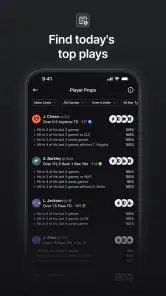


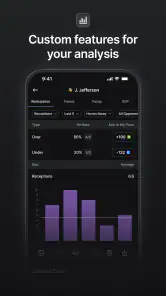
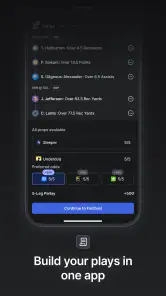

Analysis by Reviewed
I approached Linemate as a sports research companion rather than as a replacement for a sportsbook, a live-score service, or a full statistics database. That distinction matters. Its purpose is to help everyday sports fans think through betting information, so the value comes from how clearly and comfortably I can use it before making a decision—not from the app making the decision for me.
After spending time with it, my impression is that Linemate is most useful when I slow down and treat it as part of a repeatable research routine. I would not open it expecting a one-tap answer or a guaranteed edge. I would open it when I want to organize my thinking, compare what I already know, and avoid placing a wager based only on a quick emotional reaction to a team or player.
How Linemate feels during everyday sports research
The app comes from Linemate Inc. and sits in the Sports category. It is free to install, with optional purchases ranging from $9.99 to $79.99 per item. That makes the first step easy for a curious user: I can try the basic experience without committing money immediately. The important question is whether the free starting point gives me enough room to understand the workflow before I consider paying for anything.
In practical use, perceived speed is less about flashy movement and more about whether I can move from one research thought to the next without losing focus. A betting research app has a particular rhythm: I may check a matchup, reconsider a line, look for context, and then return to the original event. Any delay feels more noticeable in that situation because the user is already comparing several pieces of information mentally.
Linemate makes the most sense when I use it before the rush begins. If I am sitting down ahead of a game with a short list of events to investigate, the experience feels more manageable than opening it in a panic just before action starts. My advice is to decide what I am trying to answer first—whether a matchup deserves attention, whether a wager fits my reasoning, or whether I should simply pass. That small habit reduces unnecessary tapping and keeps the app from becoming a source of more noise.
The biggest performance advantage is a focused workflow, not a promise of instant certainty. I get more from Linemate when I treat each session as a short research task instead of endlessly browsing. This is also where the app differs from a conventional sports news feed. A news app is built to keep me updated; Linemate is better suited to making me pause and examine a betting idea.
What happens when I use it heavily
Light use is straightforward to imagine: I open the app, review a sports situation, and leave once I have enough context to make a responsible choice. Heavy use is different. A long session can involve several games, multiple possible bets, and repeated comparisons between what looks attractive and what actually fits my reasoning. That is where organization becomes more important than raw speed.
More From Our News Desk

Clash of Clans Is Won Between the Battles

Android Auto Makes the Case for Quieter Car Software

MobiOffice: Transforming Mobile Productivity with Seamless Integration

EA SPORTS FC™ Mobile Soccer: Redefining Mobile Sports Gaming

How Microsoft OneDrive Became a Mobile Productivity Giant

How Google Translate Breaks Language Barriers Effortlessly
I found that the best way to handle a busy slate is to separate research into passes. First, I narrow the events that genuinely interest me. Next, I examine the reasoning behind those candidates. Finally, I decide whether the information is strong enough to act on or whether passing is the smarter outcome. This workflow prevents me from treating every available option as equally important, and it also makes the app feel less demanding during longer sessions.
There is a useful trade-off here. A dedicated research platform can encourage more deliberate thinking, but it can also tempt me to keep searching after I have already reached a sensible conclusion. More screens and more angles do not automatically improve a decision. I would set a personal stopping point before beginning a session, especially if I am following several sports at once.
One non-obvious use is to record the reason for my interest before I investigate further, even if I do that mentally or in a separate note. For example, I might begin with a team trend, a matchup concern, or a change in expectations. Then I can check whether Linemate strengthens that original idea or exposes a weakness in it. This is more valuable than opening the app with a vague feeling that something “looks good.”
Another practical tip is to use it as a filter for attention rather than as a machine that must produce a wager. If the research leaves me uncertain, that is still a useful result. The app is serving me well when it helps turn an impulsive bet into a considered pass. Users who expect every session to end with an action may find the experience frustrating, while users who value discipline will understand the benefit.
Stability and recovering from interrupted sessions
Reliability matters especially in sports because the context can change while I am away from the screen. A call, a message, a low battery warning, or simply switching to another app can interrupt a research session. I judge an app like this not only by how it behaves when everything goes perfectly, but also by how easy it is to regain my place after an interruption.
My practical approach is not to depend on one uninterrupted session. I keep the scope small, finish one research question before moving to another, and avoid assuming that an unfinished train of thought will always be waiting exactly where I left it. That is good practice for any information-heavy sports tool, but it is particularly relevant here because betting research often involves several connected judgments.
I also recommend reopening the app before an important session rather than waiting until the final moments before a game. That gives me time to orient myself, confirm that the relevant information is available to me, and decide whether the app fits the task I have in mind. It is a simple recovery strategy: use Linemate early enough that a restart or a brief interruption does not turn into pressure.
The app’s public presence suggests a reasonably established user base, with an average rating of 4.6 from around 2.3 thousand ratings and more than 100 thousand installs. Those figures make me more comfortable recommending a trial than I would be with an unknown sports tool, but they do not replace personal testing. A high rating cannot tell me whether the workflow suits my preferred sport, decision style, or phone.
There are also 97 written reviews associated with the app, which is enough to show that people have taken time to comment rather than only tapping a score. I still read user feedback carefully in this category. Sports apps can feel excellent to one person and poorly matched to another depending on how often they use them, how much research they expect, and whether they want analysis or rapid updates.
Device limits, operating system support, and resource expectations
Linemate supports Android 7.0 and newer. That is helpful for people using older compatible phones, but compatibility alone does not guarantee the same comfort on every device. A newer phone may handle transitions and multitasking more comfortably, while an older model could make a busy research session feel less fluid even when the app itself remains usable.
I would be cautious about judging it from a single quick launch. The more revealing test is a normal session on the device I actually use: open Linemate, move between several pieces of research, switch briefly to another app, and return. That tells me more about perceived responsiveness and recovery than a short first impression.
Resource demands are also relative. A sports research app may not be the heaviest thing on a phone, but a user who keeps several apps open, streams a game, and researches at the same time is asking more from the device than someone who uses Linemate alone. If my phone is older or frequently short on storage and memory, I would keep expectations modest and avoid running an unnecessarily crowded setup.
Battery behavior deserves the same common-sense treatment. I would not leave any sports app open for hours without checking the phone’s overall condition, especially while watching video or using other connected services. Linemate is best used in purposeful sessions: investigate, make a decision, and close it when the task is finished. That habit reduces background clutter and keeps my phone available for the things that matter during a game.
There is a clear device trade-off. Support for Android 7.0 makes the app accessible to a wider range of users, but people on older hardware should value stability and readability over demanding a modern, instantaneous feel. If the phone already struggles with ordinary multitasking, a lightweight browser page or a simpler score app may feel more comfortable for quick checks, while Linemate remains the better choice when I want a dedicated research process.
Where it fits beside familiar sports alternatives
Linemate is not the same kind of tool as a live-score app. A score service is usually the better choice when my only question is what happened, what time a game starts, or whether a result has changed. It is also different from a general sports news app, which is stronger when I want interviews, headlines, injury reporting, or broad coverage without necessarily thinking about a wager.
Compared with a sportsbook’s built-in research pages, Linemate’s appeal is the possibility of approaching betting research as its own activity rather than as a feature attached to the place where money is eventually committed. That separation can be healthy. It gives me a chance to form a view before the act of placing a bet creates extra pressure. On the other hand, someone who wants a single screen containing odds, account actions, live markets, and research may prefer the convenience of a sportsbook app.
A spreadsheet or notes app can still be better for users who want complete personal control. I can build my own columns, write long explanations, and track decisions in exactly the format I prefer. Linemate is more convenient for a purpose-built sports workflow, but a self-made system can be more flexible and may suit advanced users who already know precisely what they want to record.
The strongest comparison is not “which app has more information?” It is “which app helps me make a better decision with less confusion?” Linemate earns its place when I need a sports-focused research environment and want to slow down before acting. It is not the right choice if I mainly need instant scores, general news, or a fully customizable personal database.
Who will benefit, and who should skip it
I would recommend Linemate to everyday sports fans who already think about betting and want a more structured way to examine their ideas. It is especially suitable for someone who notices a tendency to act on a favorite team, a recent result, or a last-minute hunch. The app can create a useful pause between noticing an opportunity and deciding whether it deserves attention.
It may also suit a casual user who does not want to build a complicated spreadsheet. The free entry point makes experimentation less intimidating, while the Teen content rating signals that it belongs in a mature sports context rather than being treated like a simple score toy. Because betting involves real financial risk, I would still use it with a fixed personal budget and never confuse research with a guarantee.
I would skip it if I never bet and only want live results. I would also look elsewhere if my priority is extensive news coverage, a highly personalized database, or direct account management inside one application. Users who dislike reviewing information before making a choice may find the app unnecessary, because its main benefit depends on actually engaging with the research process.
There is another audience that should be careful: people who use analysis to justify betting more often rather than to improve discipline. In my view, Linemate should make it easier to say “not enough information” or “this is not for me,” not harder. If opening a research tool encourages me to chase losses or keep searching until I find an excuse to bet, the problem is not a missing feature; the healthier choice is to step away.
Purchases, version, and the real value of trying it
The app is free, but optional purchases cost between $9.99 and $79.99 per item. That spread is wide enough that I would not buy anything immediately. I would first establish whether Linemate changes my routine in a useful way, whether I return to it consistently, and whether the features behind a purchase solve a real problem rather than simply adding more material to browse.
The current version is 2.1.2. I treat a version number as a sign that the product has continued to develop, not as proof that every experience will be perfect on every phone. My recommendation is to begin with a small, clearly defined test: use it for several ordinary research sessions, compare the time and clarity it gives me with my usual method, and then decide whether an optional purchase is justified.
That trial should include an everyday scenario, not just an ideal one. For example, before an evening game, I might shortlist one or two events, write down why they caught my attention, use Linemate to challenge that first impression, and then choose between acting, waiting, or passing. If the app helps me reach that decision without making the process feel chaotic, it has earned a place in my routine. If I finish with more confusion and no clearer reason for my choice, a simpler alternative may be better.
My performance verdict
My overall view is positive but measured. Linemate feels most valuable as a deliberate betting research platform for sports fans who want to replace impulse with a repeatable check. Its perceived speed and stability matter, but the larger performance question is whether it helps me complete research without distraction. Used in short, planned sessions, it can feel focused and practical.
I would not describe it as a universal sports app. It does not replace a score tracker, a news reader, a personal spreadsheet, or the account functions of a sportsbook. Its role is narrower, and that is also its strength. The right user will appreciate having a dedicated place to think through betting possibilities; the wrong user will see an extra step between opening an app and getting a quick answer.
Linemate Inc. has built an app that is easy to try because it is free, available for Android 7.0 and above, and already used by more than 100 thousand people. The 4.6 average gives it a reassuring first impression, while the Teen rating is appropriate for the subject. Still, I would judge it by my own habits rather than by popularity.
My recommendation is to try Linemate if you want better betting discipline, not simply more betting activity. Start with the free experience, use it before the pressure of a live event builds, and set a stopping point for each session. If it helps you explain your decisions—and occasionally helps you decide not to bet—it is doing something worthwhile. If you only need scores or headlines, choose the simpler tool and leave Linemate for the moments when careful sports research is genuinely what you need.
Linemate Frequently Asked Questions
What is Linemate and what can I use it for?
Linemate is a companion-style application designed to help users connect, communicate, or organize interactions through a simple mobile interface. Depending on the version and region, its features may include profiles, messaging, social discovery, and activity management. Before downloading, check the current store description because available tools, supported countries, and the app’s main purpose can change with updates.
Is Linemate free to download and use?
Linemate may be available as a free download, but some features can require in-app purchases, subscriptions, or other paid upgrades. During testing, users should pay attention to locked tools, premium prompts, and renewal information rather than assuming every function is included at no cost. Review the Google Play or App Store pricing details before creating an account or starting a trial.
Does Linemate require an account or personal information?
Linemate may ask you to register with an email address, phone number, or an existing sign-in provider before you can access its main features. Social and communication apps can also request profile details, photos, contacts, or location permissions. Only provide information you are comfortable sharing, and read the privacy policy to understand how data is collected, stored, used, and potentially shared.
Is Linemate safe and suitable for all users?
Linemate’s safety depends not only on the app itself but also on how other users behave on the platform. Avoid sharing passwords, financial details, home addresses, or private documents with anyone you meet through the service. Use available blocking and reporting tools, keep conversations inside the app when possible, and check the official age rating before allowing teenagers or children to use it.
What should I check before downloading Linemate on Android or iPhone?
Before installing Linemate, verify that you are downloading the official listing from Google Play or Apple’s App Store and that the developer name matches the legitimate publisher. Check device compatibility, required operating-system version, recent reviews, update history, permissions, subscription terms, and privacy information. A stable internet connection may also be necessary if the app depends on online accounts, messaging, or synchronized content.
Pros
- Clear
- beginner-friendly interface makes climbing data easy to review.
- Supports route logging
- helping users track progress over time.
- Useful for organizing climbing sessions and personal achievements.
- Can make training more structured with accessible performance insights.
- A practical companion for climbers who enjoy recording their activity.
Cons
- Some features may require account creation or additional setup.
- Data quality depends on accurate user-entered climbing information.
- Less useful for climbers who rarely log routes or training sessions.
- The app may feel limited for users seeking advanced coaching tools.
- Compatibility and feature availability can vary by device or region.
- Category
- Sports
- Version
- 2.1.2





