

Lilly Health™
- 233.00
- 4.4
- Installs
- 100.00K
- Price
- Free

Screenshots
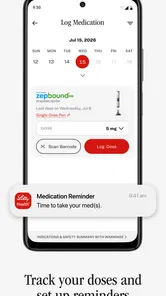
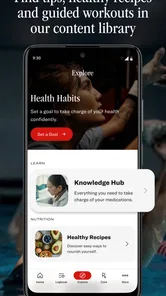
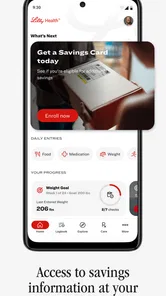
Analysis by Reviewed
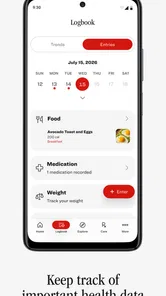
I approached Lilly Health™ as a practical medical companion rather than as a general wellness app. Developed by Eli Lilly and Company, it is designed to bring health-related tools, tracking, and support into one place. That sounds simple, but the real question is whether having those elements together makes everyday health management easier than relying on notes, reminders, separate tracking apps, or information from a clinic.
My overall impression is that this free app makes the most sense for people who already have a clear reason to use Lilly Health™ and want a more organized way to follow their health routine. It is less compelling as a casual download for someone browsing medical apps without a specific need. The usefulness depends heavily on how closely its tools and support fit your situation.
How Lilly Health™ fits into everyday health management
The app belongs to the medical category, and that distinction matters. I would not treat it like a fitness dashboard or a replacement for professional medical care. Its role is more focused: helping users access health tools, keep track of relevant information, and find support connected with their care experience.
That focus can be valuable because health tasks are often scattered. One day I might need to remember a symptom, check a routine, prepare a question for a healthcare professional, or review something connected with treatment. A dedicated medical app gives those activities a more appropriate home than a general notes app, where important details can easily disappear among shopping lists and unrelated reminders.
The app was released on April 30, 2025, and the current version is 3.0.2. It requires Android 10 or later, so users with older phones should check compatibility before planning around it. The age classification is Everyone, which makes the app broadly accessible from an age-rating perspective, although the medical subject matter still means that parents and caregivers should decide how it fits a younger person’s needs.
What I like about this positioning is that it avoids pretending that health tracking is the same as diagnosis. A record can help me notice patterns or communicate more clearly, but it does not automatically explain what those patterns mean. I would use the app to support a conversation with a qualified professional, not to make a treatment decision on my own.
What the free access actually means
Lilly Health™ is free to download and use as an app. That is an important advantage for anyone comparing it with paid health-management services. There is no purchase price to weigh against the basic opportunity to try its tools and see whether they fit a personal routine.
More From Our News Desk

 Instagram
Instagram’s Power Comes From Its Place in Your Phone
A close look at how Instagram turns Meta’s reach, recommendation systems and everyday camera habits into durable platform power—and what that costs users.

 Gmail
GmailGmail in a Busy Inbox: Who Benefits Most?
From first account to crowded workday, Gmail earns its place through dependable search and flexible sorting—but its best fit depends on how much inbox maintenance you can tolerate.

 Prime Video
Switching to Prime Video: What Changes in Your Viewing Routine
Prime Video can make a compelling second home for streaming, but switching means learning a different catalog, rental layer, and route from browsing to playback.

 Universal TV Remote Control
Universal TV Remote Control Works Best as a Reliable Backup
A phone remote earns its place through quick setup and reliable habits. Here is how to get more from Universal TV Remote Control—and where its limits show.

 Weather - By Xiaomi
Weather by Xiaomi Review: Clear at a Glance, Less Clear Up Close
Xiaomi’s weather app makes everyday forecasts quick to scan, but its calm surface can leave useful details and recovery paths harder to find than they should be.

 X
XX Under Pressure: Can It Recover When Posting Goes Wrong?
A resilience-focused review of X, examining setup, mistaken posts, interruptions, weak connections, and the gaps that matter when recovery needs to be dependable.
Latest News



Still, “free” should be interpreted carefully. It tells me the app itself does not require a purchase, but it does not turn every possible healthcare service into a free service. Medical appointments, prescriptions, devices, and treatment decisions remain separate matters. I would also avoid assuming that free access guarantees that every tool will be equally relevant to every user.
For me, the best way to evaluate the cost is to treat the first use as a fit test. If the app helps me keep important information organized and makes support easier to reach, it offers useful value without an app fee. If I do not have a Lilly-related health need or a clear tracking goal, installing it simply because it costs nothing may add clutter rather than convenience.
The app has reached over one hundred thousand installs, with an average rating of 4.2 from around seven hundred ratings and more than two hundred reviews. Those figures suggest that it has attracted a meaningful user base and generally positive reactions, but they are not a guarantee that it will suit a particular condition, routine, or device.
The practical value is in reducing scattered tasks
The strongest benefit is organizational. Instead of treating health information as a series of isolated moments, I can approach it as an ongoing routine. That is especially useful when a person needs to remember several small details over time rather than complete one dramatic task inside the app.
A realistic example would be someone preparing for a follow-up appointment. During the week, they may want to note changes, questions, or difficulties instead of trying to reconstruct everything in the waiting room. Using a dedicated health app can make that preparation feel more deliberate. The result is not a diagnosis, but a clearer starting point for a conversation.
Another useful scenario involves a caregiver helping a family member stay organized. The caregiver may not need a complicated medical record system; they may simply want a central place for relevant tracking and support resources. Lilly Health™ could be more suitable than a generic diary because its purpose is already connected with health management.
A less obvious advantage is continuity. When health routines become stressful, people often remember the major event but forget the smaller details around it. A tracking tool can preserve those details while they are fresh. I would use it immediately after an important event or at a consistent time of day, rather than waiting until I need to recall several days at once.
Three workflows that make the app more useful
First, I would set up a simple “capture now, discuss later” habit. Whenever a question or concern comes to mind, I would record it promptly instead of trusting memory. Before an appointment, I could review the collected points and choose the most important ones. This turns tracking into preparation rather than passive data entry.
Second, I would keep entries consistent. A short note made in the same general format is easier to compare than a long description one day and a single word the next. I would record what happened, when it happened, and what I want to ask about it. That approach makes the information more useful without encouraging me to interpret it medically.
Third, I would use the support side of the experience alongside tracking instead of treating the app as a diary only. The store summary emphasizes tools, tracking, and support, and those functions serve different needs. Tracking helps me remember; support helps me find direction; tools may help me complete a practical task. Keeping those roles separate prevents me from expecting one feature to solve every problem.
These workflows are valuable because they address a common weakness in health apps: collecting information without turning it into a useful routine. The app cannot make me consistent, but it can give consistency a more natural place to happen.
Where it compares well with ordinary alternatives
A phone’s notes app is flexible, quick, and familiar. For a one-off reminder, it may be all I need. Its weakness is structure: health information can become mixed with unrelated notes, and a future version of the phone or a different note-taking habit may make old entries harder to find.
A calendar is better for appointments and scheduled reminders, but it is not naturally suited to recording changing experiences or questions. A spreadsheet can be powerful for people who enjoy organizing data, yet it may feel excessive when the goal is simply to maintain a manageable health routine.
General wellness apps often focus on exercise, sleep, nutrition, or broad lifestyle goals. That can be useful for a different purpose, but it may not provide the same sense of a medical support context. Lilly Health™ is a better fit when the user wants health-related tools and tracking rather than a motivational fitness score.
On the other hand, a clinic’s own patient portal may be the better choice for appointments, test results, direct messages, or formal records, depending on what that service provides. I would not replace a healthcare provider’s established system with this app if the task requires official clinical information. The two types of app serve different roles, and confusing them could create unnecessary frustration.
Where the experience may become frustrating
The main trade-off is that a focused medical app can feel less useful when the user’s needs fall outside its intended context. Someone looking for a broad fitness tracker, meal planner, meditation guide, or complete symptom-checking service may find the experience too narrow. Free access does not compensate for a mismatch in purpose.
There is also a commitment cost. Tracking only helps when I remember to do it, and repeated entry can become tiring during a busy or difficult period. I would start with the smallest routine that answers a real need instead of trying to document every detail. If the process becomes another source of stress, the app is no longer serving me well.
Medical information also requires careful judgment. I would avoid entering speculative conclusions such as “this definitely means” or “this proves.” A better record describes what I noticed and what I want clarified. That keeps the app in its proper role and makes the information safer to discuss with a professional.
Another limitation is that an app cannot replace human reassurance. Support tools may help me find useful direction, but they cannot fully reproduce the context of a clinician who knows my history. If something feels urgent or serious, I would seek appropriate medical help rather than waiting for an app workflow to guide me.
Device compatibility is a practical consideration too. The minimum operating system is Android 10, so an older Android phone may not be able to run the current version. For people who depend on an older device, that technical requirement could matter more than the app’s free price.
Who is most likely to get real value
I think Lilly Health™ is most useful for a person who has a specific health-management reason to install it, wants a dedicated place for tracking, and is willing to build a modest routine. It may also suit caregivers who need a clearer way to organize questions and observations connected with someone’s care.
It is particularly appealing when the alternative is a messy collection of notes, reminders, and memory. The app’s medical focus gives the routine a clearer purpose, and the combination of tools, tracking, and support may reduce the need to switch between unrelated resources.
I would be more cautious about recommending it to someone who wants only general wellness features. If the goal is counting workouts, planning meals, monitoring broad fitness trends, or finding entertainment, a specialized app in those areas may be more appropriate. Lilly Health™ should earn its place on the phone through a real medical use case.
I would also skip it if I expected an app to interpret symptoms, make treatment choices, or replace a patient portal. Those expectations point toward services with a different job. The fact that Lilly Health™ comes from Eli Lilly and Company may make it relevant in some treatment contexts, but the developer name alone should not be treated as a reason to use it for every healthcare need.
My verdict on trying it
My recommendation is conditional but positive: try Lilly Health™ if you have a clear reason to use its health tools, tracking, or support. Because access is free, the financial risk of testing the workflow is low. The more important question is whether it helps you complete a real task more reliably than your current notes, calendar, or healthcare portal.
I would begin with one concrete purpose, such as preparing questions for an appointment or maintaining a consistent record related to an ongoing routine. After using it for a short period, I would ask whether the information is easier to find, whether the tracking takes a reasonable amount of effort, and whether the support features are genuinely useful in my situation.
The best value here is not unlimited medical guidance; it is a clearer, more organized health routine. That distinction keeps expectations realistic. For the right user, a focused free app can be more helpful than a feature-heavy alternative that never becomes part of daily life.
For me, Lilly Health™ is worth considering when its medical purpose matches an existing need. I would recommend it to a friend who wants a dedicated place for health tracking and support, while reminding them to keep professional care at the center of important decisions. If that specific need is missing, I would skip the download and choose a tool designed for the task I actually want to accomplish.
Lilly Health™ Frequently Asked Questions
Who develops Lilly Health™, and what kind of app is it?
Lilly Health™ is a medical app developed by Eli Lilly and Company. Its store summary describes access to tools, tracking, and support, making it relevant to people looking for digital resources connected with their health journey. If you are considering a download, think about whether you want a health-support app and review its privacy information before entering personal details.
What is Lilly Health™ and what can I use it for?
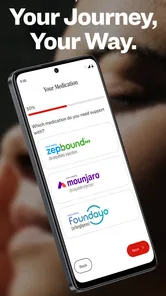
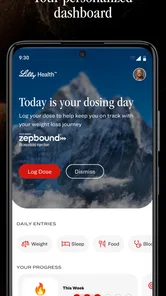
Lilly Health™ is a digital health application designed to help users access information, tools, and services related to their health journey. Depending on the features available in your region, it may provide educational content, treatment support, reminders, resources, or connections to healthcare programs. Before downloading, check the official listing to confirm which functions are available for your country and condition.
Is Lilly Health™ a replacement for my doctor or medical advice?
No. Lilly Health™ should be treated as a support and information tool, not as a replacement for a qualified healthcare professional. The app may help you understand treatment-related information, organize health resources, or follow program guidance, but it should not be used to diagnose an illness, change medication, or manage an emergency without medical advice. Always consult your doctor or pharmacist.
Is Lilly Health™ free to download and use?
Lilly Health™ is free to download. However, some programs, services, or features could require eligibility, registration, a prescription, or participation through a healthcare provider. Availability can also depend on your location and the specific Lilly service connected to the application. Review the current Google Play or App Store description, privacy information, and any in-app conditions before creating an account or sharing personal details.
What personal information does Lilly Health™ collect?
Because Lilly Health™ may support health-related services, it can request information such as account details, contact information, treatment preferences, or data needed for a particular program. The exact information depends on the features you use and your region. Before proceeding, read the app’s privacy policy carefully, especially its explanations about data storage, sharing, security, permissions, and your rights to access or delete information.
Pros
- Personalized cycle and symptom tracking supports better health awareness.
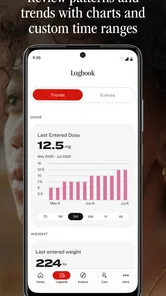
- Clear charts make changes in cycles and symptoms easy to understand.
- Helpful reminders can support consistent tracking and medication routines.
- Private journaling offers space to record mood
- pain
- and other daily symptoms.
- Educational content can help users prepare questions for healthcare visits.
Cons
- Some advanced insights may require a paid subscription.
- Predictions can be inaccurate when cycles are irregular or data is limited.
- Entering detailed symptoms every day may feel time-consuming.
- Health information may be sensitive for users concerned about digital privacy.
- The app should not replace professional advice for serious or persistent symptoms.











