

Lil Planner: Visual Schedule
- 42.00
- 4.7
- Installs
- 10.00K
- Price
- Free

Screenshots


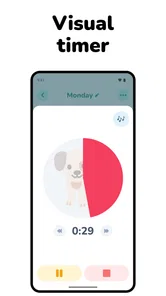

Analysis by Reviewed
Getting a child through a morning, school transition, bedtime, or an unexpected change can be harder than the task itself. Lil Planner: Visual Schedule takes a simple but useful approach: it turns a routine into something a child can see and follow, rather than relying only on repeated spoken reminders. After spending time with it, my view is clear: this is most valuable as a calm visual prompt for families who need predictable sequences, especially when attention, communication, or transitions are difficult.
It is not a replacement for a parent, therapist, teacher, or a flexible family calendar. It is also not the right choice if you want a broad household organizer with appointments, shopping lists, and shared calendars. Its strength is narrower and more practical. It focuses on helping a child understand what happens next. That focus gives the app a reassuring simplicity, but it also means you need to approach it as a routine tool rather than a complete parenting platform.
How Lil Planner turns daily friction into a visible routine
The app sits in the parenting category and is developed by Space Sweater. Its short store label is “Lil Planner,” while its fuller identity, Lil Planner: Visual Schedule, explains the main idea more clearly. It is aimed at daily routines and timers for children, including children with ADHD or autism. The age rating is Everyone, which fits the family-oriented purpose and makes it easier to consider for a shared device.
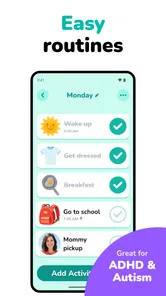
The most important design choice is moving instructions out of an adult’s voice and onto a visual sequence. A spoken instruction disappears quickly. A visual schedule gives the child something to return to, check, and understand at their own pace. In my experience, that difference matters most during transitions: getting dressed before school, stopping screen time, preparing to leave the house, or moving through the evening without turning every step into a negotiation.
I would not describe the app as magical, and it does not remove the need for encouragement. What it can do is make the structure of a routine more concrete. Instead of saying “hurry up, we have lots to do,” a parent can point to the next visible activity. That small change can reduce the amount of language involved, which is particularly helpful when a child is tired, overwhelmed, distracted, or already resisting a transition.
A realistic morning test
Imagine a school morning that normally unfolds as a chain of reminders: use the bathroom, get dressed, eat breakfast, brush teeth, put on shoes, and leave. The adult may feel as though they are repeating the same instructions every few minutes. With a visual routine, the child can see the order before the morning becomes rushed. The parent still helps when necessary, but the app gives the child a reference point that is separate from the parent’s voice.
The practical benefit is not simply that every step is listed. It is that the child can begin to anticipate the sequence. If breakfast is nearly finished, the next step is not a surprise. If shoes come after brushing teeth, that order is visible. For children who become anxious when plans change, this can create a more understandable starting point, provided the adult also explains changes instead of treating the schedule as an unbreakable rule.
More From Our News Desk

 Gmail
GmailGmail in a Busy Inbox: Who Benefits Most?
From first account to crowded workday, Gmail earns its place through dependable search and flexible sorting—but its best fit depends on how much inbox maintenance you can tolerate.

 Prime Video
Switching to Prime Video: What Changes in Your Viewing Routine
Prime Video can make a compelling second home for streaming, but switching means learning a different catalog, rental layer, and route from browsing to playback.

 Universal TV Remote Control
Universal TV Remote Control Works Best as a Reliable Backup
A phone remote earns its place through quick setup and reliable habits. Here is how to get more from Universal TV Remote Control—and where its limits show.

 Weather - By Xiaomi
Weather by Xiaomi Review: Clear at a Glance, Less Clear Up Close
Xiaomi’s weather app makes everyday forecasts quick to scan, but its calm surface can leave useful details and recovery paths harder to find than they should be.

 X
XX Under Pressure: Can It Recover When Posting Goes Wrong?
A resilience-focused review of X, examining setup, mistaken posts, interruptions, weak connections, and the gaps that matter when recovery needs to be dependable.

 Clash of Clans
Clash of Clans Is Won Between the Battles
Its raids are quick; its community is a long-term project of coordination, teaching, rivalry, and shared responsibility—with all the friction that entails.
Latest News



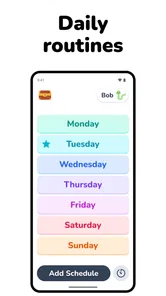
One useful habit is to build the routine around transitions rather than filling the day with every tiny action. A schedule that is too detailed can become another source of work for the parent and another screen to manage for the child. I found the concept more convincing when used for meaningful blocks such as “morning,” “after school,” or “bedtime,” with enough detail to guide the child but not so much that the sequence feels endless.
Why the visual approach can work better than reminders
Ordinary alarms are good at announcing that something should happen, but they rarely explain what the child should do next. A paper checklist can provide that information, yet it may be easy to ignore, lose, or forget to update. A general calendar is usually designed for adults and appointments, not for a child who needs a clear sequence of immediate actions.
Lil Planner occupies the space between those alternatives. It is more concrete than a verbal reminder and more child-focused than a standard calendar. The advantage is strongest when the problem is not knowing the time but understanding the order of events. A timer may say that five minutes have passed; a visual schedule can help answer the more important question: “What happens after this?”
That distinction is one of the app’s strongest arguments. Families should not expect it to solve every form of procrastination or emotional resistance. A child may still refuse to put on shoes even when the shoes are the next item. The app’s value is in reducing ambiguity and repetition, not in forcing cooperation.
Useful for ADHD and autism, but not limited to those families
The focus on ADHD and autism is understandable because predictable visual information can be helpful for children who struggle with working memory, shifting attention, sensory overload, or unexpected changes. Still, I would avoid treating the app as a diagnosis-specific solution. Children vary widely, and a routine that supports one child may irritate another.
It can also suit younger children who are still learning independence, children adjusting to a new school routine, or families trying to make weekends less chaotic. The app may be especially useful when the adult wants to gradually transfer responsibility. Rather than giving a long verbal list, the parent can direct the child back to the schedule and offer help only with the step that is causing trouble.
That approach has an important limitation: the app works best when the schedule reflects the child’s actual ability. If a routine contains tasks the child cannot yet complete independently, the visual sequence may expose the gap without solving it. I would use it alongside modeling, reminders, and encouragement, not as a test that the child must pass alone.
The small workflow choices that make a difference
The first non-obvious lesson is that consistency matters more than complexity. A parent may be tempted to create a perfect schedule covering every part of the day. I think a better starting point is one difficult routine. Bedtime, leaving the house, or getting ready for school usually provides clearer feedback than trying to organize everything at once. Once the child understands how to use the visual sequence, it becomes easier to decide whether additional routines are genuinely helpful.
The second lesson is to treat the schedule as a conversation starter when plans change. If an appointment runs late or a sibling needs attention, the visual routine should not become a source of panic. I would explain the change plainly, identify what is different, and return to the next stable step. This is where adult judgment remains essential: predictability helps, but rigid adherence can make an unusual day harder.
The third is to use the tool before the difficult moment, not only during it. Showing the routine when everyone is calm gives the child time to understand the sequence. Opening it for the first time in the middle of a meltdown is unlikely to produce the full benefit. The app is better as a preparation aid than as an emergency intervention.
Where the app feels less convincing
The focused design can also feel limited. If you are looking for a family command center, Lil Planner will probably seem too specialized. It is not the kind of app I would choose for coordinating parents, tracking school events, managing household chores for adults, or replacing a shared calendar. Its usefulness depends on whether visual routines are the particular problem you are trying to address.
There is also a practical screen-time trade-off. A visual schedule displayed on a phone or tablet can be convenient, but the device itself may compete with the routine. This matters most around bedtime or when the child is already drawn toward games and videos. I would keep the interaction brief and purposeful, then put the device away rather than allowing the schedule check to become another open-ended screen session.
Another limitation is that a schedule cannot capture every emotional or sensory reason a child is struggling. A child may be hungry, overstimulated, worried about school, or uncomfortable with clothing. Seeing “get dressed” on a screen does not explain why the task feels difficult. The app can show the next step, but the adult still needs to notice when the real issue is not organization.
Families should also think about maintenance. Any routine tool becomes less trustworthy when it no longer matches real life. If school times change, a new caregiver takes over, or the child’s abilities develop, the schedule needs attention. That is not a flaw unique to this app, but it is an easy cost to overlook when choosing a digital solution. The convenience comes from having a current routine available, not from setting it up once and forgetting it.
Performance, access, and cost considerations
The app is free to download, with in-app purchases ranging from $5.99 to $59.99 per item. That makes it possible to explore the basic experience before deciding whether the paid options fit your family. I would recommend resisting the urge to pay immediately. First, test whether your child responds to the visual format, whether the device can be used without arguments, and whether maintaining the routine is realistic for the adults in the home.
It requires Android 7.0 or later, so it is accessible on many older Android devices as well as newer ones. The current version is 3.0.32. Those details are useful when the app is intended for an older spare phone or tablet dedicated to routines. Before setting it up for a child, I would still check how comfortably the device can remain in the kitchen, hallway, or bedroom without becoming a distraction.
The app has a 4.7 average from around 559 ratings and has passed 10K+ installs. That level of response suggests that the concept is resonating with a meaningful group of families, although popularity alone cannot tell you whether it suits your child. In this case, the deciding factor is less the number of downloads and more whether your child understands and accepts visual sequencing.
Who should choose it, and who should look elsewhere
I would recommend trying Lil Planner if your child regularly asks what happens next, loses track of multi-step routines, becomes distressed during transitions, or depends on an adult repeating the same instructions. It is also worth considering if you want to encourage more independence without abruptly removing support. The best results are likely to come from families prepared to introduce one routine patiently and adjust it based on observation.
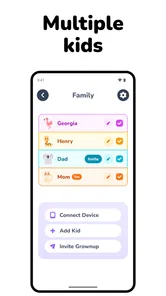
It may be particularly suitable for a child who responds well to pictures, ordered steps, and predictable repetition. The app can also help caregivers use the same language and sequence across the day, which is valuable when more than one adult is involved. A consistent routine is easier to follow when the child is not receiving a completely different set of instructions from every caregiver.
I would skip it if your main need is appointment management, shared family planning, or detailed behavior tracking. A regular calendar, paper routine board, or a specialized communication system may be a better fit depending on the goal. I would also be cautious if your child finds phones and tablets too stimulating or becomes upset whenever a digital routine changes. In that situation, a printed visual schedule may deliver the same core idea with less device-related friction.
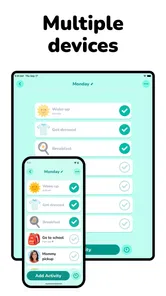
There is no requirement that this be the only routine system in the home. In fact, a hybrid approach may be stronger. Use the app when traveling, during a temporary schedule change, or when a portable sequence is useful. Keep a paper version in a familiar location for mornings or bedtime. This gives the child continuity when the device is unavailable and prevents the entire routine from depending on battery life or access to a screen.
My final view after using it as a routine aid
Lil Planner: Visual Schedule succeeds because it does not try to be everything. Its central idea is modest but meaningful: make the next steps visible so a child does not have to hold the whole routine in their head or wait for an adult to repeat it. I found that focus more useful than a crowded collection of general parenting tools would have been.
The app is at its best when introduced calmly, used for one genuinely difficult routine, and supported by an adult who can adapt when real life interrupts the plan. It is less effective when treated as an automatic behavior fixer, a substitute for emotional support, or a complete family organizer. The device can present structure, but it cannot decide whether a child is tired, anxious, overwhelmed, or ready for more independence.
For families exploring visual schedules for kids, ADHD-friendly routines, or autism-supportive transitions, the free starting point makes experimentation reasonable. I would begin with a short morning or bedtime sequence, observe whether the child checks it voluntarily, and adjust the level of detail before considering any in-app purchase. That trial will tell you more than a feature list can.
My recommendation is therefore specific rather than universal: choose it when the daily problem is sequence and predictability, not when the problem is general household organization. Used with realistic expectations, it can turn repeated instructions into a shared reference and give a child a clearer sense of what comes next. Its real strength is making routines understandable without pretending that a screen can replace a caring adult.
Lil Planner: Visual Schedule Frequently Asked Questions
Is Lil Planner: Visual Schedule suitable for children with ADHD or autism?
Lil Planner is presented as a daily routine and timer app for kids, ADHD, and autism. Its visual approach can help make activities and transitions easier to follow for children who benefit from predictable steps. Every child’s needs are different, so parents and caregivers can decide whether the app’s routine-based format suits their family and how best to incorporate it into a child’s day.
What devices and operating systems can run Lil Planner?
Lil Planner is an Android app that requires Android 7.0 or later. Before downloading, check the operating system version on the device you plan to use, since an older version may not be compatible. The app is free to download, and its content rating is Everyone, making it suitable for a broad audience from a content-rating perspective.
Who develops Lil Planner, and is it an established app?
Lil Planner is developed by Space Sweater and is listed in the Parenting category. It has a 4.7 average from 559 ratings, with 42 written reviews and over 10,000 installs. Those figures offer a quick sense of its reception and reach, though individual experiences can differ depending on how a family uses visual schedules and timers in everyday routines.
What is Lil Planner: Visual Schedule, and who is it designed for?
Lil Planner: Visual Schedule is a visual planning app that helps users organize daily routines, activities, and transitions with clear, easy-to-understand schedules. It can be useful for children, parents, caregivers, teachers, and anyone who benefits from visual structure. The app is especially suitable for users who find written to-do lists confusing or prefer seeing their day represented through pictures and simple steps.
How does Lil Planner help children follow daily routines?
The app breaks a routine into individual activities that can be viewed in a logical sequence, making it easier to understand what happens next. Parents or caregivers can create schedules for tasks such as waking up, getting dressed, eating, attending school, or preparing for bed. Visual cues can make transitions less stressful and encourage children to become more independent while completing familiar routines.
Pros
- Clear visual timelines make daily routines easy to understand.
- Helpful for children who benefit from predictable schedules.
- Custom activities can reflect individual routines and needs.
- Visual progress can encourage independence with daily tasks.
- Simple layout is approachable for parents and younger users.
Cons
- Some useful customization options may require in-app purchases.
- Creating a detailed schedule can take time at first.
- Limited appeal for users who prefer text-based planners.
- Requires consistent updates when routines or plans change.
- Accessibility may vary depending on device settings and screen size.











