

Life Steps
- 44.00
- 4.2
- Installs
- 10.00K
- Price
- Free

Screenshots




Analysis by Reviewed
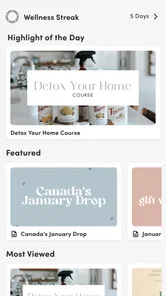
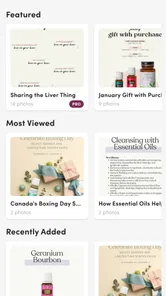
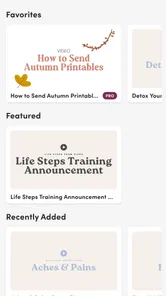
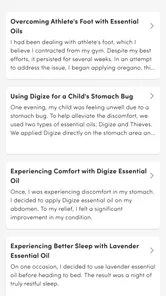
I approached Life Steps as a practical business app rather than a simple reference tool. Its focus sits at the intersection of essential oils, health-related information, and Young Living, so the experience is likely to appeal most to people who already spend time in that space and want related material gathered in one place. My overall impression is that it can make routine browsing more convenient, but its usefulness depends heavily on how comfortable you are with wellness content and how much guidance you need before making health decisions.
The app is free to install, carries an Everyone age rating, and comes from Support Stream, Inc. It has built a modest but noticeable audience, with more than ten thousand installs, an average rating of 4.2, and just under one hundred ratings overall. Those figures suggest a generally positive reception without making Life Steps look like an all-purpose business platform used by everyone. I would think of it as a focused companion for a particular interest, not a replacement for a medical app, a full customer-management system, or a general productivity suite.
How Life Steps handles readability and navigation
I find that readability is not only about whether text looks clear; it is also about how easily I can return to a useful point without losing my place. In this section, I would consider a simple approach: open the app with one question in mind, then note the section or idea I want to revisit outside the app. That habit can make brief lookups more dependable, especially when I am interrupted.
A focused starting point for a specialized audience
The strongest accessibility decision in an app like this is its narrow subject area. Instead of asking me to search across unrelated business tools, Life Steps keeps the purpose centered on essential oils, health, and Young Living. That focus can reduce mental effort for someone who already knows why they opened it. If I want to learn about a product, revisit a wellness topic, or orient myself around Young Living material, I am not beginning with an empty workspace or a complicated business dashboard.
That same focus can feel limiting to a first-time user. The phrase “everything essential” sets an expectation of broad coverage, while a newcomer may still need to work out where to begin and which information matters most. A person unfamiliar with essential oils could reasonably wonder whether to start with general education, product information, health guidance, or business-related material. In my view, the app works best when the user arrives with a question already in mind.
For readability, I would use it in short sessions rather than treating it as a long-form course. A phone screen is a small space for health and product information, and reading several dense sections at once can become tiring even when the writing itself is clear. Breaking a task into small visits makes more sense: look up one topic, note the useful point, then leave. This is also a good approach for users who find extended scrolling or information-heavy screens difficult.
Useful habits for reducing cognitive load
One practical habit is to decide what I need before opening the app. “I want to understand this oil” is a better starting point than “I will browse everything.” That small change prevents the broad subject area from becoming overwhelming. I would also keep a separate personal note for questions that require professional advice, because a wellness guide should not become a substitute for a clinician’s assessment.
More From Our News Desk

 Gmail
GmailGmail in a Busy Inbox: Who Benefits Most?
From first account to crowded workday, Gmail earns its place through dependable search and flexible sorting—but its best fit depends on how much inbox maintenance you can tolerate.

 Prime Video
Switching to Prime Video: What Changes in Your Viewing Routine
Prime Video can make a compelling second home for streaming, but switching means learning a different catalog, rental layer, and route from browsing to playback.

 Universal TV Remote Control
Universal TV Remote Control Works Best as a Reliable Backup
A phone remote earns its place through quick setup and reliable habits. Here is how to get more from Universal TV Remote Control—and where its limits show.

 Weather - By Xiaomi
Weather by Xiaomi Review: Clear at a Glance, Less Clear Up Close
Xiaomi’s weather app makes everyday forecasts quick to scan, but its calm surface can leave useful details and recovery paths harder to find than they should be.

 X
XX Under Pressure: Can It Recover When Posting Goes Wrong?
A resilience-focused review of X, examining setup, mistaken posts, interruptions, weak connections, and the gaps that matter when recovery needs to be dependable.

 Clash of Clans
Clash of Clans Is Won Between the Battles
Its raids are quick; its community is a long-term project of coordination, teaching, rivalry, and shared responsibility—with all the friction that entails.
Latest News



Another useful approach is to compare information with the reason I am reading it. Someone building a Young Living routine may need organization and product context, while someone simply exploring aromatherapy may need basic explanations and safety boundaries. These are different jobs, and treating them as the same can make any focused guide feel less accessible. Life Steps is more approachable when I use it as a reference point instead of expecting it to plan my entire health routine.
The current version is 2.1.7, and the app supports Android 7.0 and later. That broad operating-system reach is helpful for people who keep an older phone, particularly if replacing a device is not practical. At the same time, support for an older system does not automatically mean every screen will feel equally comfortable on every handset. Display size, text rendering, and device performance can still affect how easy the content is to follow.
What the business category means in practice
Although I would place Life Steps in the business category, I would not confuse it with a conventional office app. It is better understood as a specialized resource for people connected to a wellness product ecosystem. That distinction matters when comparing it with alternatives. A notes app gives me more control over my own structure, a browser offers wider research, and a dedicated health app may provide stronger tools for tracking personal information. Life Steps is most useful when convenience and subject focus matter more than customization.
For a small seller, educator, or enthusiast, the app may help keep frequently consulted material close at hand. It could support a conversation by giving the user a central place to review relevant topics before discussing them. However, I would not rely on it as a complete customer database, sales tracker, appointment calendar, or accounting tool. Anyone needing those functions will still be better served by purpose-built business software.
Motor and sensory considerations in everyday use
For everyday use, I would weigh physical comfort alongside the app’s subject matter: holding a phone, tapping through content, and reading for several minutes can affect people differently. I would test the experience when seated and unhurried before relying on it during a busy conversation, and adjust device settings if needed. The next section looks at how that practical check can shape access beyond the home.
Short interactions are easier than prolonged browsing
From a motor perspective, a focused mobile guide is generally easier to approach than a complex business suite, because the user is not expected to manage many fields, charts, or workflows at once. That can benefit people who prefer simple touch interactions or who tire quickly when navigating layered tools. I found the most sensible pattern to be opening the app for one clear task, reading at a comfortable pace, and closing it rather than repeatedly moving through unrelated areas.
Still, mobile reading can introduce friction for people with limited dexterity. Small touch targets, repeated scrolling, or a need to return to an earlier section can make a simple lookup unexpectedly demanding. I would use the phone’s built-in display and interaction settings where available, such as larger system text, increased contrast, or an alternative input method. These adjustments belong to the device rather than Life Steps itself, but they can make a meaningful difference.
Users with tremors or reduced precision may prefer to hold the phone securely and avoid trying to navigate while walking or multitasking. The app’s subject matter is not something I would rush through anyway. Essential-oil and health information deserves deliberate reading, especially when I am deciding whether a suggestion is appropriate for a child, an older adult, a pet, or someone with an existing condition.
Visual and auditory needs require a personal check
People with low vision should judge the experience on their own device rather than assuming that a clean topic focus guarantees comfortable reading. Larger text can improve legibility, but it may also change how much content fits on screen and increase scrolling. That trade-off is worth accepting if it prevents eye strain. I would rather read fewer lines comfortably than force myself through a dense page because I want to avoid moving down the screen.
For users who rely on screen readers, the practical question is whether the app’s controls and content are exposed in a logical order on their particular phone. I cannot treat the app as having a formal accessibility certification, and I would test the main navigation before depending on it for regular use. If headings, buttons, or reading order behave poorly, the experience can become frustrating even when the underlying information is relevant.
Hearing-related needs are less central to a text-oriented reference workflow, but that does not remove the importance of clear written content. If any part of the experience relies on sound, captions or an equivalent text path would be important. I would not choose Life Steps as my only source for a critical instruction unless I could comfortably access that instruction in writing and understand its limits.
A realistic routine for different energy levels
Imagine that I am preparing for a busy day and want to check one essential-oil topic before speaking with a customer or family member. I can open Life Steps, focus on that single question, write down the point I need, and stop. On a calmer day, I might explore a broader health topic and compare it with advice from a qualified professional. This flexible, low-pressure use is more inclusive than expecting every user to complete a long sequence of lessons.
That routine also works for someone managing fatigue, attention differences, or a fluctuating health condition. The app can be treated as an on-demand reference rather than another daily obligation. My tip is to avoid turning it into a checklist unless the content genuinely supports that workflow. A personal reminder or notes tool may be better for tracking what I have read, while Life Steps remains the place I consult when a specific subject comes up.
Access in real-world situations
A phone-based reference is most useful when it fits the setting rather than demanding attention at the wrong moment. I would avoid reading while walking, driving, or trying to answer someone at the same time, and instead use a quiet pause to check one topic. That small choice helps keep the information useful and the interaction safer; the next section considers what remains difficult even with a thoughtful routine.
When a phone-based guide is genuinely convenient
The app makes the most sense when I need information away from a desk. A phone is easier to carry into a consultation with a friend, a product discussion, or a quiet moment between errands than a collection of printed pages. That portability can help users who do not want to maintain several notebooks or repeatedly search the web for the same background material.
It may also suit people who prefer learning in private, manageable moments. Someone who feels uncomfortable asking basic questions in a group can explore topics independently and return later with more specific questions. That is a real benefit, especially for beginners who need time to understand unfamiliar terminology before discussing it with others.
However, situational access depends on the environment. Bright sunlight, glare, poor connectivity, a crowded room, or limited battery can make any phone-based guide harder to use. I would not plan an important health decision around the assumption that the app will always be available at the exact moment I need it. Saving personal notes about key questions and keeping professional contact information separately is a safer workflow.
Different users need different levels of explanation
Life Steps is likely to be most comfortable for an adult who already recognizes Young Living terminology or has a clear interest in essential oils. A complete beginner may need additional neutral sources to understand basic concepts and evaluate claims carefully. The Everyone rating makes the app broadly approachable by age, but an age label does not mean every health topic is equally suitable for every person without adult guidance.
For parents, I would treat the app as a starting point for discussion rather than a direct instruction manual for children. For older users, the larger text and device-level accessibility settings may matter more than the app’s subject focus. For people who are not fluent readers of English, the experience may be less comfortable if the material uses specialized wellness vocabulary or assumes background knowledge. In that case, a source in the reader’s strongest language may be the better first choice.
Users with allergies, medication concerns, pregnancy-related questions, chronic conditions, or sensitivities should be especially cautious. Essential oils are not automatically harmless because they are presented in a wellness context. I would use Life Steps to formulate questions, not to replace individualized medical guidance. That is one of the most important boundaries around the app.
Remaining barriers and practical trade-offs
Convenience does not settle every question about suitability: a focused wellness resource may still be the wrong tool for medical decisions, detailed personal records, or a user who needs a different language or interface. I would treat those needs as reasons to compare alternatives, not as personal shortcomings. The final section brings these trade-offs together and considers whether the app is worth keeping in a regular routine.
Free access does not mean the whole experience has no cost
Life Steps is free to download, which lowers the barrier for someone who wants to try it before committing. There are also in-app purchases priced from $12.99 to $39.99 per item. That range changes how I would evaluate the app: the initial download is easy to test, but I would examine what I can actually use before paying for additional material.
My advice is to begin with a specific need and decide whether the available content solves it. Do not purchase simply because a topic sounds relevant. If the app becomes part of a work routine, compare the cost of an item with alternatives such as a general reference book, a reputable educational resource, or a professional consultation. The right choice depends on whether the convenience of this focused ecosystem justifies the added expense for you.
Specialization can become a limitation
The connection to Young Living is both the app’s defining feature and its main boundary. People who already use or study that ecosystem may appreciate the focus. People seeking independent comparisons across brands, broader medical evidence, or a neutral overview of essential oils may find a general health source more suitable. I would not use Life Steps as my only research channel when the decision involves safety, diagnosis, treatment, or a significant purchase.
There is also a difference between information access and personal organization. Life Steps may help me find relevant material, but I would still use a notes app to record questions, dates, reactions, or advice from a professional. Keeping those functions separate reduces the chance of confusing general guidance with my own health history. This two-tool workflow is less convenient than an all-in-one system, but it is clearer and safer.
Another trade-off concerns trust and interpretation. A guide can present information in an easy-to-read way while still requiring careful judgment. I pay attention to wording, look for context, and avoid treating a product suggestion as a universal recommendation. That habit is particularly important when the reader has a disability, communicates differently, or needs adaptations that a general wellness resource may not discuss.
Who should choose something else
I would steer away from Life Steps if I needed detailed symptom tracking, medication reminders, secure clinical communication, formal accessibility support, or robust business administration. A medical app, an appointment platform, a spreadsheet, or a dedicated customer-management system would handle those jobs more directly. I would also choose another resource if I wanted broad, independent research rather than a guide centered on essential oils and Young Living.
On the other hand, I can see the appeal for someone who wants a compact, topic-specific companion and is willing to verify health-related information responsibly. The app’s current version, 2.1.7, makes it a reasonable candidate to test on a compatible Android phone before deciding whether its paid options fit a particular routine. The low initial commitment is useful, but I would still assess navigation, text comfort, and the relevance of the content during that trial.
My inclusive verdict on Life Steps
Life Steps is a focused business-category app that can make essential-oil, health, and Young Living material easier to approach in short, purposeful sessions. I like its potential as a portable reference, especially for users who already know the subject area and want less scattered browsing. Its free entry point and support for Android 7.0 and later also make testing relatively straightforward for people using older devices.
Its inclusive value depends less on a particular label and more on how each person’s phone, reading needs, motor control, language comfort, and health situation interact with the content. I would adjust the device for readability, use one question at a time, and keep professional advice separate from general wellness information. Those steps make the experience more manageable, but they do not remove every barrier.
My recommendation is therefore specific: try it if you want a Young Living-oriented reference and are comfortable evaluating wellness information critically. Do not rely on it as a medical authority, a complete business system, or a guaranteed accessible tool for every ability. With those expectations, Life Steps is most valuable as a convenient starting point rather than the final word. For me, that is a worthwhile role, provided the user chooses the app for focused exploration and keeps safety, independence, and personal context at the center.
Life Steps Frequently Asked Questions
Who is Life Steps designed for?
Life Steps is a Business app from Support Stream, Inc., with a focus on essential oils, health, and Young Living. It may suit people who want a single place to explore those subjects and keep related interests organized. If you are mainly looking for a general-purpose fitness tracker or a medical reference, consider whether the app’s specific focus matches what you want before downloading.
What is Life Steps and what can I use it for?
Life Steps is a wellness and habit-tracking app designed to help you organize personal goals through small, manageable actions. After reviewing its core features, the app appears useful for tracking routines such as exercise, hydration, mindfulness, productivity, and other lifestyle improvements. It is aimed at users who prefer gradual progress and simple reminders rather than complicated planning systems or highly competitive fitness programs.
Is Life Steps free to download and use?
Life Steps is free to download, though it offers in-app purchases priced from $12.99 to $39.99 per item. The app’s paid options may affect which features are available, so check the purchase details before committing. If an offer involves recurring billing, review its terms carefully. This helps you decide whether the free experience meets your needs before spending money.
Does Life Steps require an internet connection?
The basic tracking experience may work without a constant internet connection, particularly when you are recording completed steps, habits, or daily activities. However, an internet connection may be required for downloading the app, synchronizing information, restoring purchases, receiving updates, or accessing cloud-based features. Offline behavior can vary between Android and iOS, so users should test the app before relying on it while traveling.
Can Life Steps replace a doctor, therapist, or professional fitness coach?
No. Life Steps should be treated as a personal organization and wellness-support tool, not as a source of medical diagnosis or professional treatment. Its reminders and progress features may encourage healthier routines, but they cannot evaluate injuries, medical conditions, nutritional needs, or mental-health concerns. Anyone with a health condition, persistent symptoms, or a demanding exercise plan should consult a qualified professional.
Pros
- Simple step tracking with an easy-to-understand daily overview.
- Encourages consistent walking through achievable activity goals.
- Useful progress history helps you compare activity over time.
- Can support healthier routines without requiring complex fitness equipment.
- Suitable for beginners who want a straightforward activity companion.
Cons
- Step accuracy may vary when the phone is not carried consistently.
- Background tracking can contribute to battery usage on some devices.
- Limited value for users seeking advanced workout or training analytics.
- Some features may depend on device permissions or health-platform access.
- Walking reminders and goals may feel repetitive for highly active users.











