

Leslie's - Pool Care
- 922.00
- 4.0
- Installs
- 100.00K
- Price
- Free

Screenshots
Analysis by Reviewed
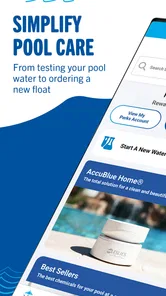
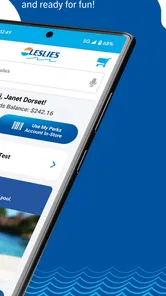
I found Leslie's - Pool Care most useful as a practical companion for the moments when pool maintenance becomes a series of small decisions: what to test, what to buy, and what to do next. It is a free House & Home app from Leslie's, Inc., aimed at pool owners who want store access, water-testing help, and professional tips in one place rather than juggling notes, browser searches, and a separate shopping trip.
That convenience is the main reason I would suggest trying it. It does not turn pool care into a fully automatic process, and it cannot replace good judgment when water looks unusual or equipment behaves badly. What it can do is make routine care more organized. In my experience, that distinction matters. A pool app is valuable when it helps me act on a real maintenance task, not when it simply presents a long collection of generic advice.
How the app earns trust during ordinary pool care
The app has been available since May 22, 2018, and its current version is 10.9.1. That history gives it the feel of an established service rather than a short-lived experiment. Leslie's, Inc. is also a recognizable name in the pool-care space, so the app's shopping and advice functions fit a clear real-world purpose instead of feeling disconnected from the products and services a pool owner may already use.
Its public reception is reasonably encouraging: it holds a 4.0 average from around 1.8 thousand ratings, with more than 900 written reviews and over 100 thousand installs. I would not treat those figures as proof that every device or household will have a smooth experience, but they do suggest that the app has reached a meaningful group of users. I also like that it is free and rated for Everyone, which lowers the barrier for a family member who helps with maintenance but does not want to pay for another specialist tool.
Trust here comes less from flashy presentation and more from keeping the app's purpose understandable. The central promise is straightforward: use it to shop, test water, and learn from pool-care guidance. That clarity helps me decide where it belongs in my routine. I would use it for maintenance planning and product discovery, while keeping manufacturer instructions, test-kit directions, and qualified help nearby for decisions that affect expensive equipment or swimmer safety.
There is an important difference between an app connected to a pool retailer and an independent water-analysis tool. Leslie's can be convenient when I already need supplies, but I would naturally read recommendations with a buyer's awareness. Advice that leads toward a product purchase deserves the same careful comparison I would apply in a physical store. The app is most trustworthy when I use it as one informed source, not as the only authority on every chemical decision.
What I can realistically use it for
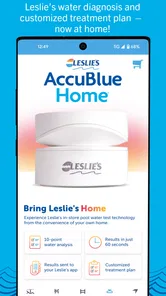
The most obvious use is preparing for a maintenance visit. Instead of arriving at a store with a vague thought such as “the pool needs something,” I can use the water-testing part of the experience to organize the problem first. That change sounds minor, but it can prevent an unnecessary purchase. The useful question is not simply which product looks relevant; it is what the water result or visible symptom actually calls for.
More From Our News Desk

 Instagram
Instagram’s Power Comes From Its Place in Your Phone
A close look at how Instagram turns Meta’s reach, recommendation systems and everyday camera habits into durable platform power—and what that costs users.

 Gmail
GmailGmail in a Busy Inbox: Who Benefits Most?
From first account to crowded workday, Gmail earns its place through dependable search and flexible sorting—but its best fit depends on how much inbox maintenance you can tolerate.

 Prime Video
Switching to Prime Video: What Changes in Your Viewing Routine
Prime Video can make a compelling second home for streaming, but switching means learning a different catalog, rental layer, and route from browsing to playback.

 Universal TV Remote Control
Universal TV Remote Control Works Best as a Reliable Backup
A phone remote earns its place through quick setup and reliable habits. Here is how to get more from Universal TV Remote Control—and where its limits show.

 Weather - By Xiaomi
Weather by Xiaomi Review: Clear at a Glance, Less Clear Up Close
Xiaomi’s weather app makes everyday forecasts quick to scan, but its calm surface can leave useful details and recovery paths harder to find than they should be.

 X
XX Under Pressure: Can It Recover When Posting Goes Wrong?
A resilience-focused review of X, examining setup, mistaken posts, interruptions, weak connections, and the gaps that matter when recovery needs to be dependable.
Latest News



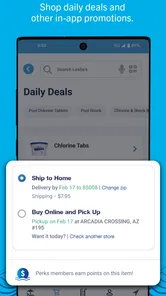
The shopping side is helpful when I already know the type of supply I need. It can reduce the friction of checking options before leaving home, especially during a busy week when a pool problem appears just before guests arrive. I would still check labels, dosage instructions, compatibility, and package details rather than relying on a product name alone. Pool chemicals are not an area where convenience should replace reading.
The professional tips are better suited to building confidence than to handling an emergency. I see them as a way to understand recurring tasks and terminology, particularly for someone who has recently taken responsibility for a pool. A new owner may benefit from having explanations close to the shopping and testing workflow, because the three activities are connected. A tip makes more sense when I can immediately relate it to a test result or a maintenance task.
One practical advantage is that the app can serve different people in the same household. The person who normally cleans the pool may understand the routine, while another family member may need help identifying supplies or interpreting the next step. Because the app is free and suitable for Everyone, it is easier to recommend as a shared reference than a paid specialist product that only one person installs.
A realistic weekend workflow
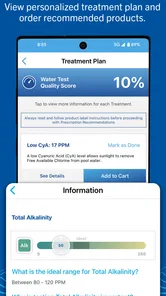
Imagine I notice cloudy water on Saturday morning and have visitors planned for the afternoon. My first mistake would be to open a shopping screen and buy several products based only on appearance. A more sensible workflow is to use the water-testing guidance first, record the result carefully, and then review the relevant advice before choosing anything. If the app helps me connect those steps, it has already provided value even before I make a purchase.
Next, I would compare the suggested product with the instructions on its packaging and consider whether the pool's size, circulation, and current condition fit those instructions. I would not mix chemicals simply because two items appear together in a recommendation. After treatment, I would allow the system to circulate as directed and retest rather than assuming that one application solved everything. The app can support this sequence, but my own measurements and patience remain essential.
This is also where I notice a trade-off. A retailer-focused app may make the route from problem to product shorter, but a shorter route can encourage impulsive buying. I get the best result when I treat the shopping function as the final step of a diagnosis, not the first. That habit is more important than any individual screen because it protects both my budget and the pool itself.
Water testing is useful, but it still needs careful handling
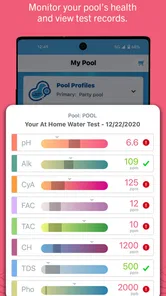
Water testing is the feature area I would approach most deliberately. Testing is only useful when the sample is collected correctly, the test is performed as instructed, and the result is interpreted in context. An app can make the process easier to follow, but it cannot correct a contaminated sample, an expired test product, or a reading entered incorrectly.
I would keep a simple record of results outside the app as well, especially if the pool has a recurring issue. A dated note can show whether a problem is improving and gives me something concrete to discuss with a professional. This is a non-obvious strength of using the app as a prompt: it encourages a repeatable routine. The weakness is that an app alone may not become a durable maintenance log unless I deliberately create that habit.
For experienced owners, the testing guidance may feel basic if they already know their preferred kit and adjustment process. For beginners, it can be reassuring, but reassurance should not be confused with certainty. If the water has a strong odor, causes irritation, changes color unexpectedly, or remains unstable after reasonable testing and treatment, I would stop experimenting and ask a qualified pool professional. The app is not the right place to take risks with unclear results.
Shopping convenience and the limits of retailer-led advice
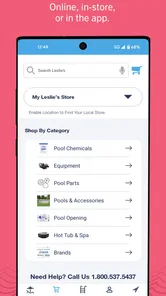
The shopping experience makes the most sense when I want to prepare before visiting Leslie's or when I need to identify a product category quickly. It can save time by putting pool-care supplies beside related guidance instead of forcing me to search the wider internet. That is a real advantage over a generic notes app, which can store reminders but cannot connect them to a retailer's product selection.
At the same time, I would compare alternatives when the choice is expensive, specialized, or equipment-related. A pump component, filter part, or treatment product may depend on compatibility details that are not obvious from a quick search. In those cases, the better option may be speaking with a technician or checking the equipment manufacturer's documentation. The app is stronger for routine shopping than for making a high-cost decision without additional verification.
I also would not assume that the first recommendation is automatically the most economical one. I would compare package sizes, concentration, intended use, and the amount required for my pool. A lower shelf price does not always mean lower cost per treatment. This is one of the most useful ways to keep personal control while using a retailer's app: let it narrow the search, then make the final decision using the label and the actual needs of the pool.
Permissions, data choices, and moments that deserve attention
When I install any shopping or home-maintenance app, I pay attention to the permissions it requests and to the choices shown during setup, sign-in, checkout, and notifications. I would do the same here. I do not want to grant access automatically just because the app is convenient. If a permission is optional, I prefer to leave it off until I understand why the app needs it and what I gain by enabling it.
The most data-sensitive moments are usually not the casual tip-reading sessions. They are the points where I create or use an account, enter contact details, save preferences, place an order, or allow notifications. Those actions can make the experience more personalized, but they also require more attention from me. I would review each visible choice instead of tapping through quickly, particularly if the app offers marketing messages or asks to remember information for future shopping.
I also separate practical access from unnecessary exposure. If I only want to read pool-care guidance, I would avoid creating an account until the app clearly requires one for the task I want. If I decide to shop, I would check the information requested at checkout and use the account controls available to manage saved details. This approach does not guarantee a particular data outcome, but it gives me a clearer sense of what I am choosing at each stage.
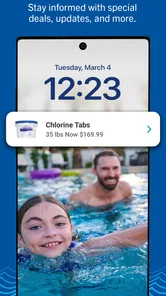
Notifications deserve a similar review. Reminders about maintenance can be useful, especially for someone who forgets testing during a busy season. Too many promotional alerts, however, can make the app feel like a sales channel rather than a care tool. I would keep useful maintenance notifications and disable anything that adds noise. The best experience is one in which I decide when the app interrupts me.
I would also avoid entering sensitive information that has no clear connection to pool care. A pool-maintenance app should not become a general storage place for household details. Keeping my use focused on testing, shopping, and relevant advice reduces the amount of personal context I expose and makes it easier to understand what the app is doing for me.
Who should use it, and who may prefer another approach
I think this app is a good fit for a first-time pool owner, a household that wants one shared starting point, or an experienced owner who regularly buys supplies from Leslie's. It is especially practical for people who want guidance close to a shopping workflow rather than a separate encyclopedia of pool chemistry. The free price makes it easy to try without committing money before deciding whether the routine suits you.
It may be less suitable for someone who already has a highly structured maintenance system, a preferred independent water-analysis service, and no interest in retailer shopping. That person may get more value from a dedicated testing log or equipment-monitoring solution. Likewise, a commercial pool operator with multiple properties would probably need stronger scheduling, team controls, and record management than I would expect from a consumer House & Home app.
I would also skip relying on it as the only resource when the problem involves electrical equipment, leaks, structural damage, persistent algae, or uncertain chemical interactions. Those situations call for hands-on inspection and professional judgment. The app can help me prepare questions or identify supplies, but it should not encourage me to turn a serious repair into a do-it-yourself experiment.
Compared with searching the web, the app feels more focused because its advice, testing context, and shopping purpose are brought together. Compared with a paper checklist, it is more convenient to consult while planning a store visit. Compared with an independent pool log, it may be less neutral because shopping is part of the experience. Each alternative has a place, and I would combine them rather than expecting one tool to cover every part of pool ownership.
My cautious verdict after using it as a maintenance companion
My overall impression is positive, with a clear boundary around what I expect it to do. Leslie's - Pool Care is a useful starting point for routine pool maintenance because it connects three practical needs: understanding water care, finding supplies, and getting advice. The app's established presence, free access, and accessible age rating make it approachable for ordinary households, while its 4.0 average shows a generally favorable but not flawless user response.
The best way to use it is as a guided decision tool, not an automatic pool expert. I would test carefully, read product labels, compare costly purchases, control notifications and permissions, and keep a separate record of important results. Those habits make the app more valuable and reduce the chance that convenience turns into guesswork.
I would recommend giving it a try if you want a retailer-connected way to organize everyday pool care and you are comfortable making the final decisions yourself. I would look elsewhere, or add a professional service, if you need advanced monitoring, detailed multi-property records, or diagnosis of serious equipment and water problems. Used within that realistic scope, it earns a place on my phone as a helpful companion for the routine work that keeps pool ownership manageable.
Leslie's - Pool Care Frequently Asked Questions
What devices and operating systems can run Leslie's - Pool Care?
Leslie's - Pool Care is available for Android devices running Android 8.0 or later. Before downloading, check your device’s operating-system version and make sure you have enough storage for the app. The app is intended for pool owners looking for shopping, water-care information, and practical pool-maintenance support, so its usefulness will depend on whether those features fit your needs.
Who makes Leslie's - Pool Care, and is it suitable for all ages?
The app is published by Leslie's, Inc. and is categorized as a House & Home app, with content rated Everyone. Its focus is pool care, shopping, water testing, and guidance rather than entertainment, so it is primarily useful to people responsible for a pool or helping maintain one. As with any app involving purchases or pool chemicals, adults should oversee transactions and follow product safety directions.
What is Leslie's - Pool Care, and what can I use it for?
Leslie's - Pool Care is a mobile companion for managing everyday pool maintenance. It can help you find pool-care products, review water-testing information, locate nearby Leslie’s stores, and access guidance for common maintenance tasks. The app is most useful for pool owners who want to organize their supplies and get practical support, although it should be used alongside the instructions on product labels and professional advice when necessary.
Can I use the app to test my pool water and receive treatment recommendations?
The app may support water-care assistance through Leslie’s testing services, product information, and tools designed to help users understand pool chemistry. Depending on the feature and location, you may need to enter test results manually or visit a Leslie’s store for a professional water analysis. Recommendations should be treated as guidance, since pool size, equipment, weather, and existing chemicals can affect the correct treatment.
Can I buy pool chemicals, equipment, and accessories through Leslie's - Pool Care?
Yes, the app is designed to make browsing and purchasing Leslie’s pool-care products more convenient. You can typically explore categories such as chemicals, cleaning tools, replacement parts, filters, pumps, and seasonal accessories. Product availability, pricing, delivery options, and store pickup can vary by location. Before ordering, check compatibility, package size, and the manufacturer’s safety instructions, particularly for treatment chemicals.
Pros
- Simple interface makes routine pool-care tasks easy to track.
- Useful reminders can help prevent missed maintenance and chemical checks.
- Keeps pool-related notes and information organized in one place.
- Helpful for beginners learning the basics of regular pool maintenance.
- Can make recurring care routines more consistent over time.
Cons
- May require manual updates to keep measurements and maintenance records accurate.
- Advanced users may find the tracking and analysis tools limited.
- Pool-specific recommendations may not suit every water type or equipment setup.
- Some features may depend on current data or an active internet connection.
- The app cannot replace professional advice for serious water or equipment problems.







