Lense: Disposable Event Camera
- 27.00
- 4.8
- Installs
- 50.00K
- Price
- Free

Screenshots
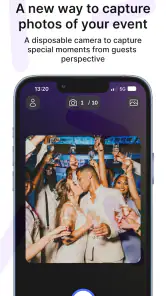
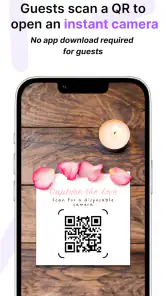
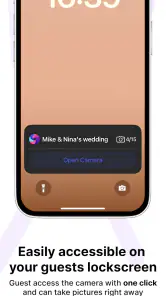
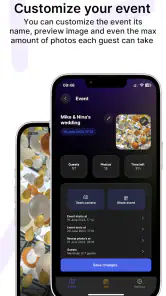
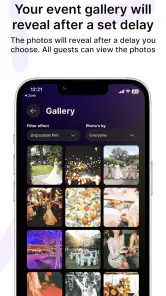
Analysis by Reviewed
At a small gathering, the best photos are often the ones nobody stopped the conversation to arrange. I like the idea behind Lense: Disposable Event Camera: instead of checking every shot, guests take pictures and wait for the collection to appear later. That makes photography feel more like part of the event than a separate task. The format is unusual enough to give a familiar birthday dinner or picnic a little shared ritual, but it works only if everyone understands the delay and wants to take part.
Who benefits most from a shared camera?
I’d reach for this kind of camera when the point is to collect candid moments from a group, not to produce a carefully edited photo set. At a birthday dinner, for example, guests can contribute from their own viewpoints instead of passing one phone around the table. The host can spend less time asking people to send pictures afterward, while the delayed reveal gives the group a reason to look through the images together later.
That workflow suits gatherings where everyone is comfortable joining in and the host has time to invite people before the event gets busy. It is less useful for a small occasion where one person already takes good photos, or for a formal event that needs dependable coverage of specific moments. I would treat it as a playful shared camera, not a substitute for a photographer when missed shots would matter.
Back to Basics with a Modern Twist
Remember the days when you'd snap a picture and have no idea how it turned out until you got the film developed? Lense: Disposable Event Camera brings back that same anticipation. The app lets you take photos during an event and, just like a real disposable camera, you can't see the results immediately. Instead, you wait for them to "develop," which adds a fun element of surprise. It’s a simple concept, but it creates a nostalgic vibe that many of us didn’t realize we missed.
How It Works
Using the app is a breeze. You just open it up, start snapping, and forget about the photos until the event is over. Once you’re done, the photos "develop" after a set period. This can vary, depending on the settings or event type. The app also offers a neat feature where you can share access with friends, allowing everyone to contribute to a shared album. It’s perfect for weddings, parties, or any gathering where you want to capture the moment from multiple perspectives.
One practical detail I’d plan around is the reveal. If the group expects to view pictures immediately after each shot, the wait may feel like a drawback rather than part of the game. I’d explain the delayed access before inviting anyone, then set aside a moment after the gathering to look through the results together. That small bit of expectation-setting helps the format feel intentional instead of confusing.
Features That Stand Out
One of the standout features of Lense is its simplicity. There are no complex editing tools or filters. You get what you get, just like with a real disposable camera. This can be liberating for those of us who spend way too much time trying to perfect every shot. Additionally, the app provides an authentic feel with its vintage-style overlays and light leaks, making each photo unique and evocative of a bygone era.
More From Our News Desk

Weather by Xiaomi Review: Clear at a Glance, Less Clear Up Close

X Under Pressure: Can It Recover When Posting Goes Wrong?

Clash of Clans Is Won Between the Battles

Android Auto Makes the Case for Quieter Car Software

MobiOffice: Transforming Mobile Productivity with Seamless Integration

EA SPORTS FC™ Mobile Soccer: Redefining Mobile Sports Gaming
The app also ensures privacy, as only the people you invite to your event can view the photos. This is a great touch, especially in today’s digital age, where privacy often takes a backseat.
Readability, control, and different ways of taking part
The deliberately simple camera idea keeps the main purpose easy to understand: take pictures for the event and let the reveal happen later. I appreciate that restraint, though it also means the experience depends on whether the screen and controls feel comfortable to each person using it. Anyone with reduced vision, limited hand mobility, or difficulty using a phone camera should try the basic camera flow before relying on it for an important occasion.
For a host, an inclusive approach is to avoid making participation a requirement. Invite guests to contribute if they want, but keep another way to capture key moments for people who cannot or do not want to use a phone during the event. A shared photo activity should add to the gathering, not turn into one more task that guests have to manage.
Practical Uses and Who It's For
If you’re hosting an event and want a way to capture the memories without the hassle of hiring a photographer, this app is a lively option for an informal gathering. It’s also great for those who love the thrill of waiting to see how their photos turned out. The app is designed for Android and iOS, so it can suit groups whose guests use either mobile platform.
Moreover, it’s an excellent choice for anyone who wants to focus on the moment rather than the perfect shot. The app encourages spontaneity and fun, making it ideal for creative souls who love a bit of nostalgia.
A useful everyday version could be a picnic or a relaxed get-together: invite a few friends, take occasional pictures without stopping the conversation to review each one, and make the delayed album part of the next-day catch-up. Compared with the standard camera app, this trades instant checking and editing for a shared event context and surprise. Compared with a disposable film camera, it avoids handing out physical cameras and waiting for a separate film process, but it still asks the group to accept a delay and use their phones.
Planning a smooth group photo session
A little preparation makes the shared format easier to understand. I’d invite people before the busiest part of the event, when they can decide whether they want to join rather than feeling put on the spot. I’d also say plainly that pictures are not available for immediate review. That avoids guests repeatedly asking where their shots went, and lets the host get back to welcoming people instead of explaining the app throughout the evening.
For a mixed group, the host can make participation genuinely optional by asking one or two willing guests to help capture moments while others socialize. That is more considerate than expecting every attendee to install or use an app. It also helps avoid a room full of people looking at phones at once. The aim is a collection of different perspectives, not constant camera activity.
It is worth choosing the occasion with the reveal in mind. A casual dinner can tolerate imperfect coverage because the pictures are there to prompt memories, not document a schedule. A reunion or house party may also work well if guests enjoy seeing what others noticed. For a tightly planned ceremony, however, a delayed shared album is a poor safety net: the host should use a conventional camera or photographer for moments that cannot be repeated.
Room for Improvement?
While I adore the concept, there are a few areas where the app could improve. For instance, offering more control over the "development" time could be beneficial. Currently, the time is fixed based on the event type, but having customizable options would be a great addition. Also, while the simplicity is refreshing, some users might miss having basic editing tools.
There is a social trade-off, too: people who prefer not to share personal photos, do not have a suitable phone available, or simply want to stay off their screens may not want to join an event album. I’d keep the invitation low-pressure and avoid treating the shared camera as the only record of an important moment. For a ceremony, presentation, or other occasion where timing and image quality are essential, a dedicated photographer or a conventional camera workflow is the safer choice.
Before an event, I’d also check that the group understands who is invited and when the images will become available. The private-by-invitation approach is reassuring, but it does not replace ordinary care about what people photograph or share. A quick explanation at the start can prevent guests from assuming that every picture appears immediately or that the album is public.
It is free to download, with in-app purchases priced from $5.49 to $109.99 per item, so I’d review the available options before planning a large event around it. Its average rating is 4.8 from around 958 ratings, and it has over 50,000 installs. Those figures suggest that people have tried it, but they cannot tell you whether your particular group will enjoy delayed access. Rewaive B.V. is the developer. The app is rated for Everyone, its current version is 1.3.7, and it requires Android 7.0 or later.
Making the event work for more people
For guests with sensory sensitivities, a phone-based activity can be easier to manage when it stays optional and does not interrupt conversation with pressure to keep taking pictures. If someone finds camera use distracting or uncomfortable, they can simply enjoy the occasion while others contribute. I’d also avoid making the photo reveal the only way the group remembers the event; people may have different preferences about screens, photographs, and sharing.
Battery planning is worth considering for a long gathering. The original experience can involve keeping the app active during an event, so I would start with a well-charged phone and avoid depending on it as the sole camera for a full day. If conserving power or capturing every important moment matters more than the shared surprise, the phone’s regular camera or a separate photographer is a better fit.
As an events app, it occupies a narrow but appealing space between a phone’s everyday camera and a physical disposable camera. The normal camera is more practical when you need instant review, edits, and direct control over each image. A film camera has its own tangible ritual, while this app makes a shared digital event feel less like an endless stream of individual uploads. The choice comes down to whether delayed access and group participation sound enjoyable to your guests.
Choosing it for the right kind of occasion
I would skip this approach if the event depends on getting one specific shot, if the group needs photos immediately, or if guests are unlikely to want another phone activity. It is also not a replacement for a proper camera workflow when someone needs precise control over framing, exposure, or edits. The app’s appeal is the shared, imperfect record; expecting it to behave like a professional camera sets it up to disappoint.
On the other hand, it can be a thoughtful choice when the host wants a relaxed archive made from many viewpoints. A low-key birthday, a weekend gathering, or a picnic gives people room to take a picture when something catches their eye and then return to the conversation. One useful trade-off is to use the shared camera for atmosphere and candid moments while assigning a separate camera or photographer to any must-have images. That keeps the playful part without risking the essentials.
The Final Snap
All in all, Lense: Disposable Event Camera is a delightful app that brings back the joy of surprise and simplicity in photography. It’s perfect for those who want to enjoy the moment without getting bogged down by technology. Whether you’re planning a big event or just want to add a touch of nostalgia to your everyday snaps, this app is definitely worth a try. So go ahead, give it a whirl, and rediscover the magic of waiting for your photos to "develop." You might just find it’s the refreshing change you didn’t know you needed!
My inclusive verdict is positive with a clear condition: it works best when the host makes the shared camera an invitation, not an obligation, and provides another route for documenting anything important. If your group enjoys candid photos and can live with the wait, it offers a distinctive way to remember an event. If immediate access, accessibility controls you can verify firsthand, extensive editing, or guaranteed coverage is essential, I’d choose a more conventional camera setup instead.
Lense: Disposable Event Camera Frequently Asked Questions
Who is Lense: Disposable Event Camera designed for?
Lense is aimed at people who want event photos to feel more shared and surprising than ordinary, instant camera snapshots. Its disposable-camera concept suits gatherings where guests can capture moments and look forward to seeing them later. The app is listed for Everyone, so its stated age rating is broad, while the delayed reveal is its distinctive appeal.
What is Lense: Disposable Event Camera?
Lense: Disposable Event Camera is a mobile app designed to mimic the experience of using a disposable camera at events. It allows users to capture photos with a nostalgic, film-like quality. After taking pictures, users must wait until a designated time to view and share their photos, replicating the anticipation of film development.
How does the photo development process work in Lense?
In Lense, once you capture a photo, it isn’t immediately available for viewing. Instead, the app uses a unique feature where photos are ‘developed’ after a certain period. This emulates the traditional film development process, adding excitement and anticipation as you await the reveal of your captured moments.
Is Lense available for both Android and iOS devices?
Yes, Lense: Disposable Event Camera is available for download on both Android and iOS platforms. You can find it on the Google Play Store for Android devices and the Apple App Store for iOS devices. The app's compatibility ensures a wide range of users can enjoy its unique features.
What devices can run Lense, and which version should I look for?
Lense is available for Android and iOS devices, and its current Android version is 1.3.7. Android users need a device running Android 7.0 or later to install it. Before downloading, check that your phone’s operating system meets that requirement and that you are selecting Lense: Disposable Event Camera by Rewaive B.V., so you choose the intended app.
Pros
- Simple and intuitive interface.
- Unique disposable camera concept.
- No need for editing skills.
- Encourages creativity and spontaneity.
- Great for capturing event memories.
Cons
- Limited to event-based usage.
- No control over photo quality.
- Photos have a waiting period.
- Requires internet for full features.
- Limited customization options.
- Category
- Events
- Version
- 1.3.7