Lens AI & Reverse Image Search
- 32.00
- 4.3
- Installs
- 10.00K
- Price
- Free

Screenshots
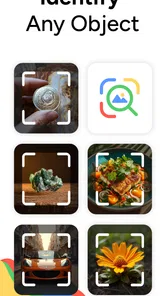

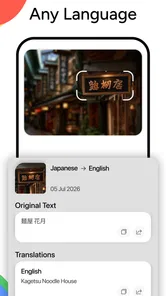
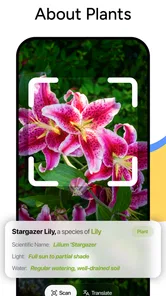
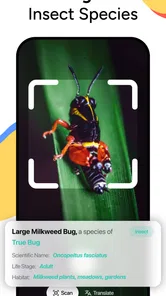
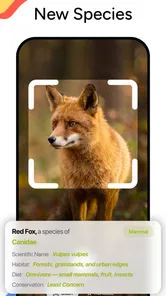
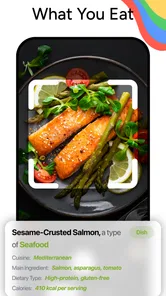
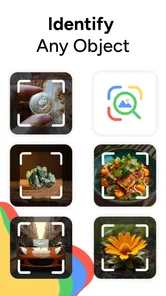
Analysis by Reviewed
When I need to identify a picture rather than simply look for words, I prefer a tool that lets the image do the explaining. That is the idea behind Lens AI & Reverse Image Search, a productivity app from HEYOS. Its focus is straightforward: photo search and search by image, with the short store label “Lens AI.” After using it, I see the strongest value in the central capability rather than in treating it as an all-purpose search replacement. It is most useful when I have a visual clue but no good phrase to type.
The app is free to install and is rated for Everyone, which makes it approachable for casual household use as well as work and study. It has a 4.2 average from around 1.6 thousand ratings, with more than 10 thousand installs. Those figures suggest a modest but real user base, and my impression is that the app is aimed at quick answers rather than a complicated research workflow. The current release is version 1.3.9, and it works on Android 8.0 or newer.
What image search changes in everyday use
The useful distinction here is between searching for an object and searching for a representation of that object. With ordinary text search, I first have to know what something is called. With a reverse image search tool, I can begin with a photograph, screenshot, or saved picture and let the visual information guide the search. That difference sounds small, but it matters when I am dealing with an unfamiliar plant, a product with no visible brand, a landmark, or an image whose original source I want to trace.
I find this particularly helpful when vocabulary gets in the way. A person may recognize the shape of a kitchen tool without knowing its name, or see a clothing item online without knowing the right style term. Instead of guessing several descriptions, I can start from the picture. The result is not magic, and it should not be treated as a guaranteed identification, but it gives me a more sensible starting point than repeatedly changing search words.
That makes the app different from a normal note-taking or task-management product, even though it sits in the productivity category. It saves time at the point where the usual search process stalls. The productivity gain is not that it does an entire project for me. It is that it can shorten the awkward first step between “I have this image” and “I know what to investigate next.”
The biggest strength is reducing the need to name something before searching for it. That is a narrow benefit, but it is a practical one. I would not install it expecting a complete visual research suite. I would install it because images often contain useful information that text search cannot easily reach.
Starting with a picture instead of a guess
In practice, the sensible workflow is to choose an image that contains the subject clearly, then use the visual search action to explore what matches it. A tightly framed picture generally makes more sense than a busy scene. If I am checking a product, I would crop away unrelated objects. If I am examining a landmark, I would keep enough surrounding detail to preserve the setting. This simple preparation is one of the most important ways to improve the usefulness of any reverse image search, including this one.
More From Our News Desk

Weather by Xiaomi Review: Clear at a Glance, Less Clear Up Close

X Under Pressure: Can It Recover When Posting Goes Wrong?

Clash of Clans Is Won Between the Battles

Android Auto Makes the Case for Quieter Car Software

MobiOffice: Transforming Mobile Productivity with Seamless Integration

EA SPORTS FC™ Mobile Soccer: Redefining Mobile Sports Gaming
I also treat the first result as a lead, not as a final verdict. Similar-looking objects can belong to different categories, and online images may be edited, reposted, or presented without useful context. If the result concerns a purchase, I compare the visible details, such as shape, buttons, stitching, packaging, or markings, rather than trusting a single visual match. The app helps me discover search directions; it does not remove the need for judgment.
A good habit is to make a second search with a better crop when the first attempt is vague. For example, a full photograph of a desk may produce broad matches, while a crop focused on one unusual lamp or accessory can make the search more specific. This is a non-obvious advantage of thinking like an editor: the quality of the input image often matters more than the number of words I could have typed.
A realistic shopping and research routine
Imagine I see a compact appliance in a short video and want to know whether it is a particular model. The clip may not show a readable label, and a text search for “small silver appliance with round controls” is unlikely to be efficient. I can save a clear frame, remove distracting background details, and search the image. If visually similar products appear, I can then use their names or design details for a more precise follow-up search.
This workflow is especially useful before buying something from an unfamiliar seller. I can use the image to look for visually related listings, compare whether the same photograph appears in different places, and check whether the product description seems consistent with what is shown. I would still verify specifications, seller information, and return conditions separately. The app can help expose clues, but it should not be the only basis for a financial decision.
There is a similar benefit for study. If I photograph an object in a museum, a diagram, or an unfamiliar piece of equipment, image search can help me find terminology that I did not know beforehand. Once I have the likely name, I can move to more authoritative sources. In that role, the app works as a bridge between visual curiosity and deliberate research.
Where the capability is less dependable
Reverse image search becomes harder when the picture is dark, heavily compressed, obstructed, or dominated by a background. A small screenshot can also contain interface elements that distract from the subject. I would not blame the app for every weak result, but the experience can still feel uncertain when the input is poor. A user who expects one-tap certainty may find the process less satisfying than someone willing to refine the image and inspect several possibilities.
There is also a difference between finding similar images and proving an image’s origin. A visual match may lead to a repost, a cropped version, or a page that copied the original. If my goal is attribution, I need to follow the trail carefully and look for the earliest credible source. If my goal is identification, I need to check whether the matching object really has the same details. These are separate tasks, and the app is better understood as an entry point to both than as a final authority.
Privacy is another reason to be selective about what I search. I would avoid uploading sensitive personal photographs, identity documents, private conversations, or images containing information that I would not want exposed during a search process. That is good practice for visual search generally. The convenience of recognizing an image is not worth being careless with private material.
How it compares with familiar alternatives
The usual alternative is a standard web search. That remains better when I already know the exact product name, model number, person, place, or technical phrase. Text search is also more efficient for an established question such as comparing two specifications. In those situations, opening a visual tool first would add an unnecessary step.
Another alternative is a camera-based recognition feature built into a phone or browser. Those tools may feel more convenient when they are already integrated into the camera or search screen. Lens AI & Reverse Image Search makes more sense to me when I want a focused app for working from an existing image rather than taking a new photograph in the moment. The choice comes down to habit: people who live inside an integrated camera workflow may prefer that convenience, while people who collect screenshots and saved pictures may appreciate a dedicated starting point.
Manual searching through shopping apps is better when I know the exact retailer or want filters such as size, delivery, color, and stock. Visual search can help me discover what an item might be, but it does not replace the detailed controls of a specialist marketplace. Likewise, a dedicated academic database is a better destination for serious research once I know the subject. I see this app as the discovery layer before those more specialized tools.
The trade-off between speed and confidence
The main trade-off is simple: image search can be faster than guessing words, but the answer may be less precise than a search built around an exact term. I gain a way into the problem, yet I still have to evaluate what comes back. That makes it excellent for exploration and weaker as a one-step verification tool.
The free price makes experimentation easy, but the app also includes in-app purchases ranging from $6.99 to $49.99 per item. I would pay close attention to what those purchases unlock before committing, especially if I only expect occasional searches. For light use, the free starting point may be enough to decide whether the workflow fits me. For frequent use, I would compare the value of any paid option with the alternatives already available on my phone.
I also would not choose it for someone who wants a broad productivity system with calendars, documents, reminders, or team collaboration. Its productivity value comes from visual lookup, not from organizing an entire working life. Someone who rarely searches from images may get more practical benefit from improving their normal browser habits instead.
Small techniques that make results more useful
My first tip is to keep two versions of an image: the original for context and a cropped copy for searching. The original may explain where the object came from, while the crop gives the visual search a cleaner subject. This is particularly helpful with screenshots, where menus, captions, and notification bars can compete with the item I actually care about.
My second tip is to search twice when the object has several distinctive parts. A full-object search can suggest the general category, while a close view of a logo, fastener, pattern, or unusual control can help narrow the model. I would not assume that the most attractive match is correct; I would use the second search to test it.
My third tip is to separate identification from evaluation. First I ask, “What is this?” Then I ask, “Is it genuine, safe, suitable, or worth buying?” The app can support the first question and help me gather terms for the second, but safety claims, technical specifications, medical interpretations, and seller trust require other sources. Keeping those stages separate prevents a convenient visual match from becoming an overconfident conclusion.
A fourth useful habit is to record the search term that finally works. If the app helps me identify an unfamiliar tool, I save the name in a note along with the original image. The next time I need replacement parts or instructions, I can use the precise term directly instead of repeating the visual search. That is where a one-off lookup becomes a lasting productivity improvement.
Who will get the most from it
I think the best audience is made up of curious shoppers, students, travelers, collectors, and anyone who regularly receives screenshots or photographs without useful labels. It can also help people who work with visual references and need to turn an image into searchable language quickly. For these users, the app addresses a real friction point: they have something concrete in front of them, but no reliable words for it.
It is less suitable for users who need authoritative answers immediately, who handle highly sensitive images, or who already have a visual search feature integrated into a workflow they prefer. It is also not the right choice for someone expecting every picture to produce an exact product or source. The more important the decision, the more I would treat the result as a starting clue and confirm it elsewhere.
Because it is free to begin with and supports Everyone, I can see why a general user might try it without much commitment. Still, the presence of paid items means regular users should decide whether their search frequency justifies spending more. I would test the basic experience with ordinary, non-sensitive images first, then judge whether it saves enough time to earn a permanent place on the phone.
My final take on the visual-search workflow
After looking at the app through its main capability, I find it useful for a specific reason: it lets me begin research with an image when language is the obstacle. That is more valuable than a vague promise of “AI” because it describes a real everyday problem. A photo of an unknown object, a screenshot from a video, or an unlabeled product can become a practical search starting point.
My recommendation is conditional but positive. If you often ask, “What is this?” while holding a picture, Lens AI & Reverse Image Search is worth trying. Use clear crops, treat matches as leads, and verify important conclusions through reliable text or specialist sources. If you already know exactly what you want to search for, or if you need a complete productivity suite, a normal search engine or a more specialized app will probably serve you better.
For me, the app succeeds when it shortens the distance between seeing something and finding the right words for it. It does not eliminate research, and it should not be used as proof by itself. Used with that limitation in mind, it is a focused, approachable tool from HEYOS that can make visual discovery noticeably less frustrating.
Lens AI & Reverse Image Search Frequently Asked Questions
Does Lens AI work on both Android and iOS?
Lens AI & Reverse Image Search is an app for finding information through images, and its minimum operating-system requirement is version 8.0. Before downloading, check that your device meets the requirement and that the app is available for your device through its app store. Compatibility can affect whether you can install and use the app smoothly.
What is Lens AI & Reverse Image Search used for?
Lens AI & Reverse Image Search helps you discover information related to an image. After selecting a photo or using your camera, the app can search for visually similar pictures, identify objects, find products, recognize places or artwork, and sometimes extract readable text. It is useful for shopping research, identifying unfamiliar items, checking image sources, and exploring similar visual content online.
How do I perform a reverse image search with Lens AI?
Open the app and choose whether to take a new picture with the camera or upload an image from your device. Crop or adjust the selected photo if necessary, then start the search. The app analyzes the visual content and displays matching or related results. Clear, well-lit images with the main subject centered generally produce more useful results than blurry or heavily edited pictures.
Does Lens AI & Reverse Image Search require an internet connection?
Yes, an internet connection is normally required for the main search functions because the image must be processed and compared with online visual databases or search indexes. Some camera or gallery features may open without connectivity, but results cannot usually be completed offline. Performance and available results may also vary depending on connection speed and regional service availability.
Is my uploaded image private and safe to use?
Before using the app regularly, review its privacy policy and the permissions requested on your Android or iOS device. Reverse image searches may require an image to be uploaded or processed by external services, so avoid submitting confidential documents, private photographs, identification cards, or sensitive personal information. Also check whether the app stores search history, images, or diagnostic data.
Pros
- Searches images by uploading photos or using camera input.
- Useful for identifying products
- places
- artwork
- and visual references.
- Offers multiple reverse-search engines for broader results.
- Simple interface makes image searches quick for most users.
- Can help find higher-resolution versions of an existing image.
Cons
- Results may vary significantly depending on image quality and subject.
- Some features may require a subscription or in-app purchases.
- Uploaded images could raise privacy concerns for sensitive content.
- Search results can include irrelevant
- duplicated
- or outdated pages.
- Heavy image processing may consume mobile data and battery.











