

LeakBot
- 631.00
- 4.8
- Installs
- 100.00K
- Price
- Free

Screenshots
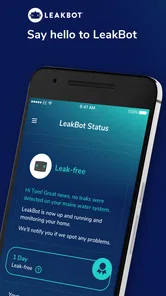
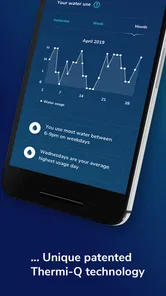
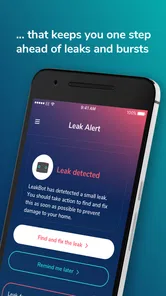
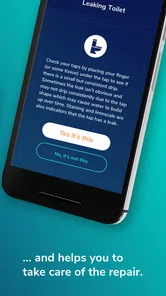
Analysis by Reviewed
Water damage is one of those household problems that is easy to ignore because the first sign may be hidden behind a wall, under a floor, or inside a cupboard. I like the idea behind LeakBot because it focuses on that uncomfortable gap between “everything looks fine” and “there is already a serious plumbing bill.” It is a free House & Home app from LeakBot Ltd, built to work with the company’s leak-detection system rather than act as a general home-maintenance checklist.
After spending time with the app, my impression is that it is most useful as a quiet monitoring companion. It is not designed to replace a plumber, inspect every visible pipe, or repair a leak for you. Its value is in helping you notice unusual water activity earlier, when the problem may still be manageable. That makes it especially interesting for homeowners who travel, people with older plumbing, and anyone who wants an extra layer of awareness without checking the water meter constantly.
How LeakBot fits into everyday home protection
The app’s purpose is straightforward: it connects the user with LeakBot’s approach to spotting hidden leaks before they grow into a larger household problem. The important distinction is that this is not simply an app that asks you to record a damp patch or manually inspect a tap. Its role is tied to monitoring, alerts, and helping you understand what may be happening with your home’s water use.
That changes how I think about it compared with ordinary home apps. A typical maintenance app might remind me to test a smoke alarm, clean a filter, or schedule a service. LeakBot is more passive. Once the relevant setup is in place, the point is to let the system keep watch while I carry on with normal life. That is a better fit for something that can happen at an inconvenient time, such as a slow toilet leak during a weekend away.
The app is free, carries an Everyone age rating, and supports devices running Android 7.0 or later. Those details make it accessible to many households, although the usefulness of the experience depends on having the compatible LeakBot setup rather than downloading the app alone. I would not install it expecting the phone itself to detect a leaking pipe from across the room.
In practical terms, I see three main audiences. The first is a homeowner who wants early warning without learning complicated plumbing techniques. The second is someone responsible for a property that may be empty for stretches of time. The third is a careful household manager who wants a clearer view of an otherwise invisible risk. Renters may also find the concept appealing, but they should first check whether they are allowed to use the required hardware and whether the arrangement makes sense for their landlord.
The current experience is about reassurance, not constant interaction
The best monitoring apps are often the ones I do not need to open repeatedly. LeakBot follows that logic. I would use it to complete the initial setup, check that the system is communicating properly, review an alert when one appears, and revisit the app when I want reassurance that the home is being watched. That is a healthier pattern than an app that demands daily attention for a problem I hope never occurs.
More From Our News Desk

 Instagram
Instagram’s Power Comes From Its Place in Your Phone
A close look at how Instagram turns Meta’s reach, recommendation systems and everyday camera habits into durable platform power—and what that costs users.

 Gmail
GmailGmail in a Busy Inbox: Who Benefits Most?
From first account to crowded workday, Gmail earns its place through dependable search and flexible sorting—but its best fit depends on how much inbox maintenance you can tolerate.

 Prime Video
Switching to Prime Video: What Changes in Your Viewing Routine
Prime Video can make a compelling second home for streaming, but switching means learning a different catalog, rental layer, and route from browsing to playback.

 Universal TV Remote Control
Universal TV Remote Control Works Best as a Reliable Backup
A phone remote earns its place through quick setup and reliable habits. Here is how to get more from Universal TV Remote Control—and where its limits show.

 Weather - By Xiaomi
Weather by Xiaomi Review: Clear at a Glance, Less Clear Up Close
Xiaomi’s weather app makes everyday forecasts quick to scan, but its calm surface can leave useful details and recovery paths harder to find than they should be.

 X
XX Under Pressure: Can It Recover When Posting Goes Wrong?
A resilience-focused review of X, examining setup, mistaken posts, interruptions, weak connections, and the gaps that matter when recovery needs to be dependable.
Latest News



There is also a useful psychological benefit. Household leaks are difficult to think about because they are both expensive and hard to see. A monitoring tool turns that vague worry into a process: install the equipment correctly, keep notifications available, and respond when the system highlights something unusual. I found that more practical than relying on memory or assuming that a normal-looking kitchen means the plumbing is fine.
Still, I would not confuse an absence of an alert with proof that every part of a property is dry. A monitoring system has a particular way of observing water activity, while a home contains many possible sources of moisture. Roof leaks, condensation, blocked gutters, appliance failures, and damage that does not create the expected water pattern may fall outside what this kind of setup can identify. The app is a useful early-warning layer, not a complete building inspection.
What the latest version tells me about the product’s direction
The current version is 6.4.0.9.3, and that matters mainly because it shows the app is still being maintained as a live product rather than left as a one-time companion for old hardware. I would treat the version number as evidence of ongoing software evolution, not as a promise that every household will see a dramatically different interface after updating.
For an existing user, the sensible approach is simple: keep the app updated, confirm that notifications remain enabled, and check the connection after changing phones or home-network equipment. Monitoring products are unusual because a small setup problem can remain unnoticed until the moment an alert is needed. I would rather spend a minute confirming the system is ready than assume it is working indefinitely.
The product was released on June 7, 2017, so it has had time to develop beyond the earliest version of the concept. That history is encouraging for people who dislike adopting a brand-new household system with an uncertain future. At the same time, a long-running app can accumulate older design decisions. Users moving from a modern smart-home platform may find parts of the experience less immediate than the newest consumer apps.
I would judge the update experience by practical questions rather than by visual novelty. Does the app make the monitoring status easy to understand? Are alerts noticeable without becoming noisy? Can I tell what action is expected from me? Does the connection recover cleanly after a temporary interruption? Those questions matter more here than decorative interface changes because the app’s main job is to support a response at the right moment.
How existing users can get more from it
One non-obvious habit I recommend is treating the first installation as a baseline exercise, not a box-ticking step. Run ordinary household routines deliberately: use the bathroom, operate the washing machine, fill the kettle, and let the system observe normal activity. The goal is to give yourself confidence about what “normal” looks like in your home and to notice any setup issue before leaving the property unattended.
A second useful workflow is to make alert handling part of the household plan. If a notification arrives while you are at work, who checks the property? If you are away, who has access? If the alert appears during the night, what is the first safe action? The app can make an unusual situation visible, but the response still depends on people. Writing down a simple contact and shutoff plan makes the technology much more valuable.
A third tip is to avoid dismissing a warning merely because the house looks dry. A slow leak may not produce a dramatic puddle. I would use an alert as a prompt to inspect toilets, appliance connections, under-sink plumbing, and exposed valves, then escalate to a qualified professional if the cause is unclear. The app is most helpful when it changes my behavior early rather than when I wait for visible damage.
For people who travel, I would test the notification path before relying on it. Check that the phone can receive alerts away from home and that another trusted person knows what to do if you cannot respond. This is a small but important trade-off: remote awareness is only useful if the message reaches someone who can act. A monitoring app cannot physically close a valve or enter a locked property unless the wider setup and household arrangements support that response.
The service also has a strong use case for families sharing responsibility. One person may handle installation while another manages the property day to day. Agreeing on who reviews an alert prevents the common smart-home problem where everyone assumes someone else saw it. I would keep the app on the phone of the person most likely to respond, rather than installing it everywhere without a clear owner.
Where it compares well with ordinary alternatives
The usual alternative is manual checking. That might mean looking under sinks, watching the water meter, asking a neighbor to visit, or hoping a visible stain appears before the damage becomes serious. Manual inspection is still necessary, but it is intermittent and easy to forget. LeakBot’s appeal is the possibility of continuous attention to a risk that people rarely remember to check.
Another alternative is a basic moisture sensor placed beside a washing machine, water heater, or sink. Those sensors can be excellent at detecting water exactly where they sit, and they may be the better choice for a small, targeted problem. Their weakness is coverage: a sensor cannot notice what happens in another room unless another sensor is installed there. LeakBot’s approach is more attractive when I want a broader household view rather than a collection of isolated dampness alarms.
There is also the option of a whole-home plumbing monitor or an automatic shutoff system. Those products may offer stronger intervention, especially for someone who wants water to be stopped without waiting for a person. The trade-off can be greater installation complexity, more equipment, or a higher overall cost. LeakBot is appealing when early awareness is the priority and I am comfortable taking the next step myself.
Compared with a general smart-home hub, this app is narrower but more focused. A hub can bring lights, cameras, thermostats, and sensors into one place, while LeakBot concentrates on water-related risk. I prefer that focus for a household where the main concern is hidden plumbing damage. Someone who already has a well-integrated smart-home system may instead prefer a compatible sensor that keeps everything in one dashboard.
The friction points I would consider before installing it
The first limitation is dependence on the wider LeakBot setup. Downloading the free app is not the same as creating a complete leak-monitoring solution. A user who wants a phone-only tool will be disappointed, and anyone comparing prices should think about the total system rather than stopping at the app’s free label.
The second limitation is interpretation. An alert can tell me that something deserves attention, but it cannot replace diagnosis. Normal activities may create confusing situations, and unusual water behavior may require patience and investigation. That means the app is a poor fit for someone who wants a completely hands-off service with no responsibility after an alert arrives.
Notification reliability is another practical concern. Phones silence alerts, people change devices, and connectivity can be interrupted. I would not rely on LeakBot as my only protection for a property with severe consequences if water is left running. A shutoff plan, regular visual checks, and appropriate insurance remain sensible companions. Technology reduces risk; it does not remove it.
There is also a human limitation: the system may encourage false confidence. If I know the app is monitoring the home, I might postpone basic maintenance or ignore a damp smell because no warning has appeared. That would be the wrong relationship with the product. I see it as an extra set of eyes, not permission to stop checking appliances, seals, hoses, and visible pipework.
Who should use it and who should choose something else
I would recommend trying LeakBot to a homeowner who wants early awareness, has a realistic plan for responding to alerts, and is willing to treat setup as part of home maintenance. It makes particular sense for people who leave a property empty, manage a second home, or have experienced the cost and disruption of a hidden leak before.
I would be more cautious for someone living in a rental where hardware installation is restricted, or for a person who only wants a cheap sensor beside one known risk. In those cases, a simple local moisture alarm may be easier and more direct. I would also steer a user toward a whole-home shutoff product if automatic intervention is the most important requirement rather than notification.
People with older Android phones should check compatibility before planning around the app; Android 7.0 is the minimum operating system. The Everyone rating makes the app broadly suitable from an age perspective, but household responsibility still matters. I would not hand alert management to a child simply because the app itself is age-friendly.
The app has earned a 4.8 average from around 2.6 thousand ratings, with about 630 written reviews and over 100 thousand installs. Those figures suggest that the concept has found a meaningful audience, although they do not tell me whether it will suit every plumbing layout or notification routine. I use them as a sign of established interest, not as a substitute for checking the system’s practical fit in my own home.
What I would watch as the product continues
Future improvements should focus on clarity more than adding distractions. I would like the app to make three things immediately obvious: whether monitoring is active, what caused an alert, and what the homeowner should do next. A calm, plain-language explanation is especially important when the user is away from home and has to decide whether to call someone immediately.
I would also watch how well the experience handles changes around the home. People replace routers, move appliances, switch phones, and alter their daily routines. A mature monitoring product should make those transitions understandable rather than leaving users to guess whether a silent period means “everything is normal” or “the connection needs attention.”
Another area worth watching is the balance between sensitivity and trust. If the system warns too often about harmless activity, people may stop taking alerts seriously. If it is too quiet, users may assume they are protected when they are not. The strongest future direction would be better context: not just an alarm, but useful guidance that helps distinguish a likely household routine from a situation worth investigating.
Finally, I would like to see the app remain welcoming to existing users as the product evolves. Version 6.4.0.9.3 shows a current software product, but updates should not make long-term customers feel that their familiar monitoring workflow has been replaced without explanation. Clear onboarding after an update, visible connection status, and practical help would do more for trust than a purely cosmetic redesign.
My recommendation after using it
LeakBot is best understood as an early-warning tool for hidden water risk, not a complete plumbing solution. I like its focused purpose and the way it can fit into a household routine without demanding constant manual checks. The free app, broad age rating, established history, and current maintenance make it approachable for the right user.
My recommendation comes with a condition: plan the response before you depend on the alert. Know who will inspect the property, where the water shutoff is, and when professional help is appropriate. If you want a small sensor for one appliance, a local moisture alarm may be simpler. If you want automatic shutoff, look beyond an alert-focused setup. But if your goal is to gain earlier awareness of a problem that might otherwise stay hidden, I think this is a sensible app to consider.
LeakBot Frequently Asked Questions
Can I use LeakBot without a LeakBot sensor?
The app is intended to work with the LeakBot system, so its leak-monitoring features rely on a compatible sensor being installed in your home. Downloading the app alone does not provide a way to monitor water flow. Before getting started, check how to obtain the device and whether your insurer or service provider supports LeakBot in your area.
What personal information or account details do I need to get started?
You will need to follow the app’s setup process and create or use an account to connect with your LeakBot service. Have the relevant details for your device and any participating insurer or provider available, as these may be needed to link the system to your home. Use the app’s own setup prompts and review its privacy information before entering personal details.
What is LeakBot and how does it work?
LeakBot is a smart water-leak detection system designed to help protect your home from hidden or unexpected leaks. After installation, its sensor monitors changes in your water usage and can identify unusual flow patterns. The companion app sends alerts when potential problems are detected, helping you investigate issues before they cause serious damage. Availability and included equipment may depend on your insurance provider or service plan.
Do I need special equipment or professional installation to use LeakBot?
Using LeakBot normally requires the LeakBot sensor and compatible installation hardware, which is often supplied through a participating insurer or service provider. The device is typically fitted to the incoming water pipe, so installation requirements can vary depending on your plumbing setup. Before downloading the app, check whether your home, region, and insurance policy are eligible and whether installation is included or requires assistance.
Does LeakBot detect every type of water leak?
LeakBot is intended to identify many leaks by monitoring unusual water-flow behavior, but it should not be treated as a replacement for regular maintenance or professional inspection. Very small, intermittent, concealed, or unusual leaks may not be detected immediately. The app can provide useful warnings and guidance, but users should still check plumbing fixtures regularly and contact a qualified professional when they notice dampness, damage, or persistent alerts.
Pros
- Monitors continuously without requiring daily user input.
- Compact sensor is easy to install on a household water pipe.
- Early alerts may help reduce damage and expensive repair bills.
- Useful for homes that are empty for long periods.
- Can provide extra reassurance when traveling or away from home.
Cons
- Requires compatible LeakBot equipment
- not just the app.
- Installation may be difficult on pipes with limited access.
- Alerts depend on a reliable Wi-Fi connection.
- Ongoing service costs may apply depending on the subscription plan.
- It may not detect leaks outside the monitored plumbing area.







