Kwikpic - Smart Photo Sharing
- 6.00
- 3.9
- Installs
- 1.00M
- Price
- Free

Screenshots




Analysis by Reviewed
When a group comes home from an outing with hundreds of pictures scattered across different phones, sharing them can turn into a chore: one person sends a few, someone else asks for the rest, and useful shots get buried in chat. Kwikpic - Smart Photo Sharing is an events app built around making that handoff easier. I see its best use as a shared place to collect and find memories, rather than another general-purpose social feed.
Cost and the value of a shared photo space
The app is free to download, so trying it does not require a purchase. Kwikpic is made by Kwikpic Ai Solutions Private Limited, and its focus is narrower than a general photo backup service: it is intended to help people share pictures connected to occasions. That focus can be worthwhile when the alternative is repeatedly asking a host or friend to send photos one by one.
The value depends on whether the people you want to share with will use it too. For a family gathering or a club event, one shared workflow can make pictures easier to find after everyone has gone home. If your friends already send everything in a group chat and are happy with that, a separate app may add a step instead of saving time.
Start with a small, low-pressure trial
I would not make Kwikpic the only place for an important event’s photos before I know how the group responds. Instead, I would try it with a small gathering or a few willing contributors and keep the usual chat available as a fallback. That lets me see whether people understand the invitation and whether they remember to add their pictures without turning the event into a test of everyone’s patience.
One useful habit is to explain the purpose in a sentence before sharing the invite: this is where the group can gather event pictures, not another chat everyone has to monitor. That distinction matters. Guests who understand that they can contribute and browse at their own pace may be more comfortable joining, while those who dislike installing apps can still use the familiar route.
Effortless Sharing with a Personal Touch
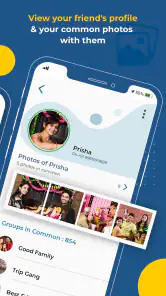
When I first downloaded Kwikpic - Smart Photo Sharing, I was intrigued by its promise of smart photo sharing. The app uses AI technology to organize and share photos seamlessly. Setting it up was a breeze. All I had to do was select the photos I wanted to share and choose the recipients. The app even suggested people based on the faces in the photos – talk about smart!
Intuitive Features and Easy Navigation
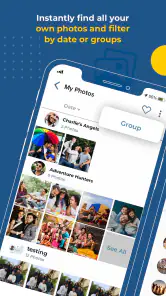
One of the standout features is the app's intuitive interface. Kwikpic makes it incredibly easy to navigate through your photo library. I particularly love the way it organizes photos by events, making it simple to find and share specific memories. Plus, the app allows you to create personalized albums, which you can share with just a tap. It's like having a personal photo curator at your fingertips!
More From Our News Desk

Clash of Clans Is Won Between the Battles

Android Auto Makes the Case for Quieter Car Software

MobiOffice: Transforming Mobile Productivity with Seamless Integration

EA SPORTS FC™ Mobile Soccer: Redefining Mobile Sports Gaming

How Microsoft OneDrive Became a Mobile Productivity Giant

How Google Translate Breaks Language Barriers Effortlessly
A practical way to handle event photos
For a low-friction workflow, I would decide on the event space before people start sending pictures, then invite the group to contribute there instead of splitting photos between several chats. Afterward, I would use the event organization to revisit the collection and make a smaller album of the pictures I actually want to keep close. That two-stage approach—collect first, curate later—helps avoid treating every snapshot as equally important.
There is a social trade-off: a shared collection works best when guests are comfortable joining another app and adding their pictures. For a one-off dinner with people who prefer not to install anything, a familiar messaging app may be simpler. For a recurring group, though, a dedicated event-oriented space can be easier to revisit than a long chat thread where photos are mixed with plans and unrelated messages.
Making a shared collection easier to use later
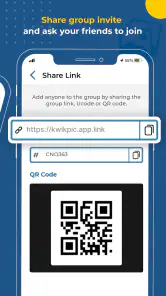
A little organization at the start can prevent the event space from becoming a second, messier camera roll. I would choose a clear event name and tell contributors what belongs there, especially if the group is covering several parts of the same occasion. If the collection is for a weekend trip, for example, agreeing that everyone should add trip photos to one shared place is more useful than leaving people to guess whether separate days need separate spaces.
I would also avoid trying to curate while everyone is still taking pictures. The point of collecting first is to make participation easy; sorting can wait until the group has finished contributing. Later, I can pick out the images I want to revisit or share more widely. That separation is helpful for anyone who takes many near-identical shots and does not want to interrupt the occasion to manage them.
Privacy and Security
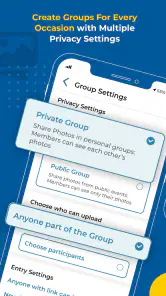
In an age where digital privacy is a major concern, Kwikpic doesn’t disappoint. The app ensures that your photos are shared securely. You can set permissions for each album, deciding who gets to view, download, or comment on your pictures. This feature gives me peace of mind knowing that my cherished memories are in safe hands.
Moreover, the app doesn’t store your photos on its servers, which is a fantastic feature for those of us who are cautious about cloud storage. Instead, it uses end-to-end encryption to keep your data safe during transfers. This level of security is something I genuinely appreciate, and it sets Kwikpic apart from other photo-sharing apps.
Sharing photos without over-sharing
Album-level controls are particularly useful when the same group includes people with different reasons for being there. At a school gathering, a family celebration, or a community event, not every picture needs to be available to every attendee. I would decide who should have access before inviting people, then review the audience when I create any smaller collection from the original event. That is a practical way to reduce accidental oversharing without making photo sharing feel formal.
Face-based suggestions can also be a convenience rather than a substitute for judgement. A suggested recipient is not necessarily the right recipient for every image, especially when a photo includes several people or an event has a mix of guests. I would check the selection before sending, and I would be cautious about treating automated organization as a final privacy decision. The time saved by suggestions is worthwhile only if I still make the call about who should see a picture.
What to consider before inviting everyone
Face-based suggestions can make sorting feel less manual, but I would still review the proposed recipients before sharing pictures from a mixed group. A quick check matters when an event includes people who should not all receive the same images. I would also set expectations with contributors: a shared event space is useful for gathering photos, but it does not automatically decide which shots are worth keeping or who should see them.
Kwikpic has an average rating of 3.9 from around 2.5 thousand ratings, and it has been installed over a million times. Those figures suggest that plenty of people have tried it, while leaving room for different experiences. It is rated for teens, runs on Android 5.0 and later, and version 15.5 is the current release. I would treat those details as a basic fit check, then judge the app by whether your own group finds the shared-photo routine convenient.
How it compares with chats and photo libraries
A messaging group is still the quickest choice when I need to send a few pictures to people who are already there. It keeps the conversation and photos together, which is convenient in the moment, but a busy thread can make older images difficult to find. Kwikpic’s event focus is more appealing when the collection itself matters after the conversation has moved on, particularly for a gathering where many people are contributing.
A general photo library, meanwhile, is usually better for keeping my own long-term archive organized across everyday pictures, not just a particular occasion. I would not replace that broader routine with an event-sharing app. I see Kwikpic as a companion for group occasions: use the event collection to gather and revisit shared pictures, while keeping personal backups and the rest of my library where they already belong. That division keeps the tool useful without asking it to do every photo job.
Everyday scenarios where it earns its place
Imagine a family birthday where several relatives take pictures while the host is busy. In a normal chat, the host may end up asking each person to send their best shots, then scrolling through a mixture of greetings, plans, and images. With an event-oriented collection, I would point everyone to one shared place before the celebration gets underway. Later, the family can browse the contributions together, and the host can make a smaller album of favorites rather than forwarding images individually.
The same approach suits a recurring walking group, a volunteer team, or friends who take pictures at regular meetups. The payoff grows when people already expect to share photos after each occasion, because the group can build a familiar habit. For a single quick exchange, however, asking everyone to join a separate space may take longer than sending the pictures directly. The app’s value is tied to the group’s routine, not simply to the number of photos.
When the extra step is not worth it
I would hesitate to use Kwikpic for a group that has little interest in contributing, or for an occasion where one person only needs to send a couple of images to a close friend. In those cases, a direct message or an existing shared album may be simpler because nobody has to learn a new process. It is also not a replacement for careful photo management: event organization helps with browsing, but I would still decide what to keep, what to share, and where my own lasting copies should live.
There is a coordination cost even when an app is easy to navigate. Someone has to create the shared routine, explain it, and make sure the right people are included. If guests do not join or add their pictures, the collection may be incomplete, and the organizer can end up doing the same follow-up work as before. I would treat participation as the key practical limitation and choose the app only when the group is likely to cooperate.
Final Thoughts
Overall, Kwikpic - Smart Photo Sharing is an app that delivers on its promises. It’s intuitive, secure, and incredibly efficient. Whether you’re a photo-sharing enthusiast or someone who just wants to keep friends and family updated with your life, this app is a game-changer. The ease of use combined with robust privacy features makes it a must-have for anyone looking to share their memories effortlessly. If you haven’t tried it yet, I highly recommend giving it a shot – you won’t be disappointed!
Who I’d recommend it to
I would try Kwikpic if I often organize gatherings where several people take pictures and the group wants one place to collect them. It may also suit a team or community that repeats the same kind of event and wants to return to earlier albums. I would skip it if I only share a handful of photos occasionally, rely on a different photo library already, or need everyone to participate without adopting a new app.
For deciding whether the free access is worth keeping, I would start with one real occasion rather than move my whole photo routine at once. Ask a few people to contribute, see whether event sorting makes the collection easier to browse, and check whether the album controls fit the group. Kwikpic is most useful when those small conveniences solve a recurring problem; if they do not, the familiar chat or photo-sharing option you already use may be the better choice.
Kwikpic - Smart Photo Sharing Frequently Asked Questions
Is Kwikpic free to download, and what devices can run it?
Kwikpic is free to download and is designed for Android devices running version 5.0 or later, so it may suit many older as well as newer phones and tablets. Its store age rating is Teen, which is worth checking if you are choosing apps for a younger user. The app is described as a photo-sharing option for occasions and events.
What is Kwikpic and how does it work?
Kwikpic is a smart photo sharing app that allows users to seamlessly share photos with friends and family. The app uses advanced algorithms to automatically sort and categorize photos, making it easy to find and share specific memories. Users can create albums, invite others to view and add photos, and even set privacy settings to control who can access their shared content.
Is Kwikpic available for both Android and iOS devices?
Yes, Kwikpic is available for download on both Android and iOS devices. Users can find the app on the Google Play Store for Android devices and the Apple App Store for iOS devices. The app is designed to work smoothly across different platforms, allowing users to share photos effortlessly regardless of their device.
How secure is my data on Kwikpic?
Kwikpic prioritizes the security and privacy of user data. The app employs encryption protocols to protect photos and personal information. Users have control over who can view their shared photos through customizable privacy settings. Additionally, Kwikpic regularly updates its security measures to safeguard against potential threats, ensuring users' data remains secure.
Can I use Kwikpic without an internet connection?
While Kwikpic requires an internet connection for sharing photos and syncing albums across devices, users can still access and organize their photo library offline. Once reconnected to the internet, any changes made offline will sync automatically. This feature ensures users can manage their photos anytime, even without internet access.
Pros
- Automatic photo sorting into albums
- Facial recognition for easy tagging
- User-friendly interface design
- Secure cloud storage integration
- Seamless sharing with friends
Cons
- Requires constant internet connection
- Limited free storage available
- Facial recognition can be inaccurate
- Occasional app crashes reported
- Photo editing features are basic
- Category
- Events
- Version
- 15.5