

KultureCity
- 57.00
- 4.6
- Installs
- 10.00K
- Price
- Free

Screenshots
Analysis by Reviewed
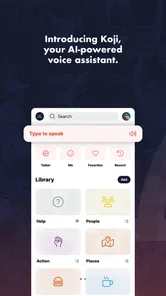
I approached KultureCity as a practical parenting app rather than as another tool that simply fills a phone with sound. Its purpose is unusual: it presents itself as an AI talker and conversation app designed to help people communicate, and it is available free of charge. That immediately makes it worth considering for families who need a simple communication aid without adding another paid subscription to the household budget.
My first impression was that the app makes the most sense when a parent thinks about a specific communication situation before installing it. A child may need help expressing a choice, a family member may need a more accessible way to participate in a conversation, or a caregiver may want a portable tool that can be opened quickly. Those are very different needs from learning a language, managing a child’s schedule, or replacing professional communication support. The better question is not whether this app does everything, but whether its conversation-focused approach matches the moment when you need it.
How I would decide whether KultureCity fits the family
The app belongs in the parenting category, and that positioning matters. I would not treat it as a toy or as an ordinary chat application. A parent choosing it should first consider who will use it, how much assistance that person needs, and whether the phone will be available during real conversations. A communication aid is useful only when it can be reached without creating a new barrier.
I would also consider the setting. At home, there is usually time to explore and adjust to a new interface. In a shop, appointment, school-related situation, or busy public place, the value comes from reducing hesitation. If the user has to search through several screens while everyone waits, the benefit drops quickly. That is why I recommend testing KultureCity during a calm moment and deciding which conversations it should support before relying on it outside the home.
The app is free, carries an Everyone age rating, and works on devices running Android 6.0 or later. Those details make it approachable for families using an older compatible phone, although an older operating system does not automatically mean the experience will feel equally smooth on every device. Screen size, responsiveness, battery condition, and the phone’s general accessibility settings can still affect how comfortable it is to use.
KultureCity was released on April 5, 2018, and the current version is 6.2.2. I see that history as useful context rather than a reason to judge it quickly. A mature app can be reassuring because it has had time to evolve, but parents should still test the current installation on the exact phone they plan to use. Communication tools are personal: a small delay, awkward button placement, or an interface that is difficult to read can matter more here than it would in a casual entertainment app.
The right expectations for an AI talker
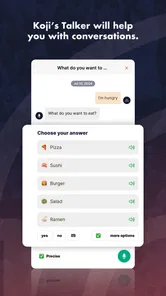
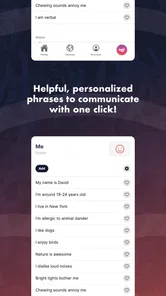
The phrase “AI talker” can create expectations that are too broad. I would not install this expecting an independent conversational partner, a child-development program, or a substitute for assessment by a speech and language professional. The useful interpretation is narrower and more practical: it is a tool intended to support conversation when speaking, organizing a response, or making a need understood is difficult.
More From Our News Desk

 Gmail
GmailGmail in a Busy Inbox: Who Benefits Most?
From first account to crowded workday, Gmail earns its place through dependable search and flexible sorting—but its best fit depends on how much inbox maintenance you can tolerate.

 Prime Video
Switching to Prime Video: What Changes in Your Viewing Routine
Prime Video can make a compelling second home for streaming, but switching means learning a different catalog, rental layer, and route from browsing to playback.

 Universal TV Remote Control
Universal TV Remote Control Works Best as a Reliable Backup
A phone remote earns its place through quick setup and reliable habits. Here is how to get more from Universal TV Remote Control—and where its limits show.

 Weather - By Xiaomi
Weather by Xiaomi Review: Clear at a Glance, Less Clear Up Close
Xiaomi’s weather app makes everyday forecasts quick to scan, but its calm surface can leave useful details and recovery paths harder to find than they should be.

 X
XX Under Pressure: Can It Recover When Posting Goes Wrong?
A resilience-focused review of X, examining setup, mistaken posts, interruptions, weak connections, and the gaps that matter when recovery needs to be dependable.

 Clash of Clans
Clash of Clans Is Won Between the Battles
Its raids are quick; its community is a long-term project of coordination, teaching, rivalry, and shared responsibility—with all the friction that entails.
Latest News



That distinction helps prevent disappointment. The app can be part of a communication routine, but it should not become the only routine. A parent can keep using gestures, pictures, writing, sign language, familiar phrases, and professional guidance alongside it. The strongest setup is often a flexible one in which the phone is available when it helps, but the user is never made to feel that every interaction must pass through an app.
Before handing over the device, I would show the user how to open the app, how to return to the main conversation area, and how to correct a mistaken choice. I would also agree on a simple backup signal for moments when the phone is unavailable. This preparation is one of the less obvious advantages of thinking of KultureCity as a communication aid rather than as a novelty. The technology matters, but the surrounding routine matters just as much.
Where the app feels especially useful
The clearest strength is portability. A phone is already something many families carry, so a communication tool on that device can be easier to bring along than a separate piece of equipment. That does not make a phone ideal in every situation, but it lowers the practical hurdle of having support available when plans change.
Imagine a parent taking a child to a crowded appointment. The child becomes uncomfortable and needs to communicate a basic request, but speaking is difficult in that moment. Instead of repeatedly asking questions and guessing, the parent can offer the app as another route into the conversation. The important benefit is not that the phone solves the entire situation. It is that it can give the child a more direct way to participate while the parent remains attentive to the environment.
I also like the possibility of using it in short, predictable practice sessions. A family could try it before leaving home, rehearse a few common conversation moments, and then use the same approach during an outing. This creates continuity. The app is less intimidating when it is familiar, and the user is less likely to associate it only with stressful events.
Another useful workflow is to involve the people who regularly communicate with the user. A parent can explain that the app is not a test and that the person should be given time to respond. That small change in behavior prevents a common problem with communication technology: the listener becomes impatient, answers on the user’s behalf, and turns the tool into decoration. KultureCity works best when the surrounding adults respect the response process.
The biggest practical win is not artificial intelligence by itself; it is having an additional communication path ready when ordinary conversation breaks down. That is a more grounded reason to try it than expecting a dramatic transformation.
Details that affect everyday use
I would keep the phone prepared for quick access. A charged battery, a readable screen, and a case that does not make the device difficult to hold are simple considerations, but they become important when the app is being used under pressure. If a child shares the phone with a parent, both people should know how to reach the app without searching through unrelated applications.
Practice should also include pauses. A parent may be tempted to tap through choices rapidly to help, but doing so can remove the user’s control. I found it more sensible to treat each interaction as a conversation: present the opportunity, wait, confirm what was selected, and then respond naturally. The app should support the person’s voice or intention, not replace it with the caregiver’s decisions.
For families using the app with children, I would set clear boundaries around the phone itself. KultureCity may be useful for communication, but the device can still lead to distractions from notifications, games, or unrelated media. Keeping the phone focused during an interaction makes it easier for everyone to understand why it is being used. This is a small but meaningful trade-off of choosing a smartphone-based aid over a dedicated communication device.
I would also avoid judging success by how much the app is opened. A quiet day does not mean the tool failed, and frequent use does not automatically mean it is helping. The more useful measure is whether the person can express a need, make a choice, or remain involved in a conversation with less frustration. That outcome may appear only in particular settings, and that is perfectly reasonable.
How it compares with the usual alternatives
The most obvious alternative is ordinary speech. When speaking is comfortable and reliable, a normal conversation is faster and more natural than reaching for any app. KultureCity is not meant to make simple conversations more complicated. Its value appears when speech is unavailable, tiring, unclear, or not enough for the person to participate fully.
Another alternative is writing in a notes application. Writing can be flexible and useful for detailed messages, especially for someone who is comfortable with a keyboard. However, it may demand more motor control, spelling effort, or time than a conversation requires. A talker-oriented app can be a better fit for shorter exchanges, while notes may win when the message is complex and the user prefers typing.
Picture cards and printed communication boards remain strong options in situations where a phone is distracting, fragile, out of battery, or not welcome. They can be visible immediately and do not depend on a device. Their limitation is that changing or expanding the available choices may be less convenient. I would see KultureCity and a small physical backup as complementary rather than mutually exclusive.
Dedicated augmentative and alternative communication systems may be more suitable for people who need a highly structured, long-term communication setup. Those systems can be selected with professional input and tailored around an individual’s established method. KultureCity is more appealing when the family wants a free, portable starting point or an additional option, but I would not assume that a general app can replace a carefully configured specialist solution.
Translation applications are another category people might confuse with this one. A translator helps two speakers communicate across languages; a talker or conversation aid addresses a different barrier. If the problem is language difference, a translation tool is the more appropriate choice. If the problem is expressing or participating in conversation, KultureCity is closer to the need described here.
Where another choice may be better
I would skip this app if the family is looking for a full parenting organizer, a developmental curriculum, or a general-purpose child safety service. The app’s identity is centered on communication, so installing it for unrelated parenting tasks would create the wrong expectations.
I would also be cautious if the intended user strongly dislikes interacting with a phone. Some people communicate more comfortably with paper, gestures, signs, or a dedicated device. For them, the presence of an app may add stress rather than remove it. The user’s preference should carry more weight than a parent’s enthusiasm about trying new technology.
Families should think carefully about supervision too. A young child may need help opening the app, choosing an option, or interpreting the response from another person. That does not make the app unsuitable, but it means the adult should plan to participate without taking over. If no one can provide that support during important conversations, a simpler always-visible method may be more dependable.
What switching to it really involves
The financial barrier is low because the app is free, but switching still has a human cost. The user has to learn a new interaction pattern, caregivers have to change how they wait and respond, and regular conversation partners may need an explanation. I would not introduce it during a crisis for the first time. A short, relaxed trial at home is a better way to discover whether the user finds it clear and comfortable.
There is also a risk of overreliance. Once a family finds a tool that helps, it can be tempting to use it for every exchange. I think the healthier approach is to define its role: perhaps it is for public outings, difficult moments, or conversations where speech is especially hard. Keeping other communication methods active protects the user from losing flexibility when the phone is unavailable.
When moving from paper cards or another familiar system, I would transfer only the most useful routines first. Do not attempt to redesign every communication habit in one afternoon. Start with a small number of everyday situations, observe what causes hesitation, and adjust the routine around the person rather than around the app. That gradual approach makes it easier to tell whether KultureCity is genuinely helping.
Its reception gives some useful social context. KultureCity has a 4.6 average from around 165 ratings, with roughly 57 written reviews and over 10K installs. I would read that as evidence that people are finding value in the idea, not as a guarantee that it will suit every communication style. Ratings cannot show how well an individual child responds to the interface, so a personal trial remains more important than the score.
My recommendation for parents and caregivers
I recommend trying KultureCity when you want a free, portable communication option and you are willing to practice with the intended user before depending on it in public. It is especially worth exploring for families who need an additional way to support conversation and who understand that the app works alongside human patience, familiar routines, and other communication methods.
I would not recommend presenting it as a cure, a replacement for professional support, or a magic solution for every difficult interaction. Its best role is more modest and more useful: a readily available bridge in moments when ordinary speech does not carry the whole conversation. That role can still be valuable, particularly when a family has planned how to use it and when the user remains in control.
Because it is free and rated for Everyone, the sensible next step is a low-pressure test on a compatible device. Try it at home, observe whether the intended user understands the interaction, and ask whether it feels empowering or frustrating. Then test it in one familiar outing rather than taking it immediately into the most demanding environment.
My final view is positive but measured. KultureCity stands out because it addresses a specific parenting concern with a portable conversation-focused tool, not because it replaces every alternative. If the person using it finds the format comfortable, it can become a valuable part of a broader communication plan. If paper, gestures, writing, or a dedicated system work better, choosing those options is not a failure. The right decision is the one that gives the user more control and makes real conversations easier.
KultureCity Frequently Asked Questions
Is KultureCity designed for people with a particular sensory condition?
KultureCity is intended to support people with sensory needs broadly, rather than focusing on just one condition. Its information may be helpful for people with autism, dementia, PTSD, or other conditions that can make crowded or unfamiliar environments difficult. Families, caregivers, and companions can also use the app to plan outings with sensory inclusion in mind.
Is KultureCity free to download, and what devices can run it?
KultureCity is free to download and is listed for everyone. The app is developed by KultureCity, and its current version is 6.2.2. It requires Android 6.0 or later, so check your device’s operating-system version before installing. These details make it easier to judge whether the app is a suitable fit before you begin planning with it.
What is KultureCity and what does the app do?
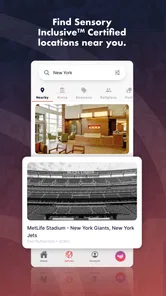
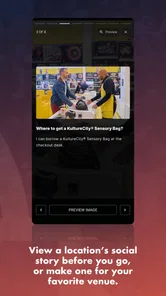
KultureCity is an accessibility-focused app designed to help people with sensory needs find and prepare for inclusive experiences. It provides information about sensory-inclusive venues, events, and accommodations, and may help users identify locations where trained staff and sensory support resources are available. The app is particularly useful for individuals with autism, dementia, PTSD, or other conditions that can make crowded environments difficult.
Who can benefit from using the KultureCity app?
The app can benefit people with sensory sensitivities and their families, caregivers, and companions. It may be useful when planning visits to stadiums, theaters, museums, airports, amusement parks, and other public venues. Parents and caregivers can use it to check whether a location offers sensory-inclusive services before arriving, helping them make better-informed decisions and reduce unexpected stress during an outing.
Can KultureCity help me find sensory-inclusive venues and events?
One of the app’s main purposes is to help users discover venues and experiences that support sensory inclusion. Depending on the location and available listings, you can review participating places, learn about their accessibility efforts, and find relevant information before your visit. Coverage may vary by region, so it is worth checking the listing details and confirming current accommodations directly with the venue when necessary.
Pros
- Helps venues make events more accessible for guests with sensory needs.
- The app can help users locate certified sensory-inclusive venues and events.
- Offers practical details that can support better event planning.
- Useful for families
- caregivers
- and people with non-visible disabilities.
- Free to download
- making accessibility information easier to reach.
Cons
- Coverage may vary significantly depending on your city or country.
- Venue information can become outdated if event details are not refreshed.
- Some features depend on participating venues and their staff training.
- The app may not replace contacting a venue about specific personal needs.
- Event listings and accessibility details may feel limited in smaller communities.











