

Kids Chores Tracker To Do List
- 61.00
- 4.4
- Installs
- 100.00K
- Price
- Free

Screenshots


Analysis by Reviewed
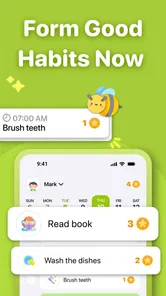
Getting a child to remember a chore is one thing; helping them understand when it is done and what happens next is harder. Kids Chores Tracker To Do List gives families a shared structure for that routine: parents assign jobs, children work toward stars, and the family can connect completed tasks with allowance. I like that practical sequence because it turns a vague reminder into a visible agreement. It can make chores easier to discuss, though it works best when adults still set expectations and follow through.
Who benefits most from a shared chore chart
I see the clearest fit in households where adults are tired of being the only memory system. If the same few jobs come up every afternoon, assigning them in a shared chart can make the next step easier to point out without turning each reminder into a fresh negotiation. It is also a good match for a child who responds to visible progress and wants to understand how chores connect to an allowance.
It is less compelling when children already manage their responsibilities independently, when a family wants chores to remain entirely unpaid, or when the adult cannot regularly review the arrangement. In those cases, the chart may add administration rather than remove it. A fridge note or a short verbal routine can be the better tool if that is what everyone already remembers to use.
A useful way to introduce stars and allowance
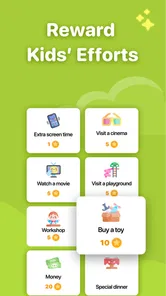
One practical tip is to treat the first setup as a family agreement, not a surprise reward system. Decide together which jobs earn recognition, whether stars represent completion or effort, and how allowance fits into the arrangement. This helps prevent a child from assuming every helpful act earns money, or a parent from changing the standard after a task has been completed.
I would also avoid putting every household job into the chart at once. A short list makes it easier to see whether the system is helping, and it gives the family room to adjust task wording before the chart becomes cluttered. If one job repeatedly causes disagreement, that is useful feedback: clarify the expected result, split the work into manageable steps, or decide that the task needs adult guidance rather than another reminder.
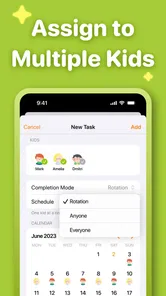
These choices matter especially when siblings are involved. A shared household standard can be fair without assigning identical jobs: a child’s age, schedule, and ability may call for a different responsibility. Explain the reason for those differences so the chart supports cooperation instead of becoming a scorecard for comparing who did more.
What happens when plans change
Chores do not always fit neatly into a routine. A child may have a late activity, feel unwell, or simply be away when a task is normally due. I would agree on a simple family rule for those days—such as whether the job moves to another time or is skipped—before a missed task becomes an argument about stars or allowance.
More From Our News Desk

 Gmail
GmailGmail in a Busy Inbox: Who Benefits Most?
From first account to crowded workday, Gmail earns its place through dependable search and flexible sorting—but its best fit depends on how much inbox maintenance you can tolerate.

 Prime Video
Switching to Prime Video: What Changes in Your Viewing Routine
Prime Video can make a compelling second home for streaming, but switching means learning a different catalog, rental layer, and route from browsing to playback.

 Universal TV Remote Control
Universal TV Remote Control Works Best as a Reliable Backup
A phone remote earns its place through quick setup and reliable habits. Here is how to get more from Universal TV Remote Control—and where its limits show.

 Weather - By Xiaomi
Weather by Xiaomi Review: Clear at a Glance, Less Clear Up Close
Xiaomi’s weather app makes everyday forecasts quick to scan, but its calm surface can leave useful details and recovery paths harder to find than they should be.

 X
XX Under Pressure: Can It Recover When Posting Goes Wrong?
A resilience-focused review of X, examining setup, mistaken posts, interruptions, weak connections, and the gaps that matter when recovery needs to be dependable.

 Clash of Clans
Clash of Clans Is Won Between the Battles
Its raids are quick; its community is a long-term project of coordination, teaching, rivalry, and shared responsibility—with all the friction that entails.
Latest News



This is also where the app’s usefulness depends on adult judgment. A digital assignment can keep the plan visible, but it cannot decide whether a child’s circumstances justify changing it. Keeping the chart flexible without making its rules unpredictable is the balance I would aim for: adjust the routine together, then make sure everyone knows what the new expectation is.
From a household problem to a workable routine
I frame this section around the moment a family decides that repeated reminders are no longer working and wants a routine children can understand. The useful first step is not adding more chores, but choosing a small set with clear expectations and deciding how adults will check in. That groundwork makes the next part—the everyday flow from assignment to recognition—much easier to judge.
Start with chores that are easy to define
The app makes the most sense when a family has a few recurring jobs that children can reasonably complete, such as putting toys away or helping prepare for the next day. Before adding tasks, I would decide what “done” means in plain language. “Tidy your room” can mean very different things to a parent and a child; a more specific instruction makes the later check-in fairer.
That small bit of setup matters because a digital chart cannot resolve unclear expectations. If a task is too broad, children may feel they have finished while a parent sees more work to do. I would begin with familiar, manageable chores and add detail in the task wording where needed, rather than filling the chart with every household responsibility at once.
Assign, complete, and recognize
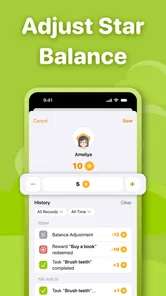
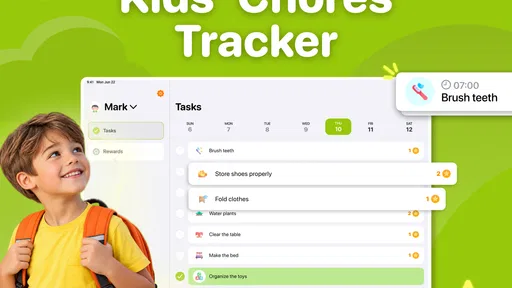
The core flow is straightforward: a parent assigns tasks, a child completes them, and stars provide a visible marker of progress. The allowance element gives families a way to connect that progress to real money. In my view, the strongest use is not treating stars as decoration, but agreeing in advance what they mean. Children should know whether stars recognize effort, completion, consistency, or some combination.
A useful everyday example is the after-school stretch. A child comes home, puts away their things, and completes a small agreed chore before screen time or another activity. Instead of repeating the same spoken reminder, a parent can refer to the assigned task. The child has a concrete next step, and the adult has a shared point of reference when checking in.
This works better as a routine than as a one-off reward scheme. If tasks and expectations change from day to day without explanation, the chart can feel arbitrary. I would review the list together when a child’s schedule changes, then keep the everyday jobs stable enough that the child can build a habit.
Make the handoff fair, not automatic
There is an important handoff between the child’s effort and the parent’s recognition. A child may mark or report a task as finished, but the family still needs a clear understanding of who checks it and when. I would make that step explicit: for example, agree that a parent checks the chore after dinner rather than expecting instant approval while everyone is busy.
That avoids a common source of friction: a child believes the work is complete, while the adult has not seen it yet. It also helps keep the app from becoming another source of notifications or negotiation. The tool can organize the agreement, but it does not replace a calm, consistent conversation about what counts as finished.
The allowance connection deserves the same care. Before using it, decide whether money follows each completed chore or a broader weekly standard, and explain what happens if a task is missed. I would avoid changing the rule after the work is done. Predictability is more useful to a child than a generous but inconsistent reward.
What the family gets out of the process
When the routine is clear, the result is more than a checked-off chore. Children can see that household responsibilities are part of family life, while parents have a simple way to make jobs and rewards less dependent on memory. The stars can help younger children grasp progress visually, and the allowance connection may suit families who already want to teach the relationship between effort and money.
There is a trade-off, though. A reward chart can encourage participation, but it can also make every small contribution feel transactional if the family treats payment as the only reason to help. I would use the app for jobs where a clear incentive helps, while still talking about shared responsibilities as something everyone contributes to. Not every helpful action needs to earn a star.
Where this approach can break down
The app is less suited to families who want chores handled without adult involvement. Someone still has to choose sensible tasks, explain them, check completion, and keep the reward rules steady. If parents do not have time to maintain the chart, a paper list on the fridge may be easier to keep current. Likewise, a simple verbal routine can be enough for a child who already remembers their responsibilities without prompts.
Another limitation is the risk of overloading the system. A long list of tiny tasks can make the chart feel like a compliance scoreboard rather than a helpful family tool. I would prioritize a small set of meaningful jobs, then adjust only when the existing routine is working. For chores that require several steps, the parent may need to explain the sequence separately; a task label alone may not teach the skill.
Families should also think about age and readiness. The app has an Everyone age rating, but that does not mean every child will find a digital chart motivating or easy to use. A younger child may need a parent to guide each step, while an older child may prefer more independence and dislike being monitored. The right setup depends on the child, not just the chart.
How it fits among the usual alternatives
Compared with a handwritten chore chart, this app offers a digital framework centered on assigned tasks, stars, and allowance. A paper chart can be more visible in a shared room and is easy to change with a pen; the app is more appealing if the family wants a digital record and a reward-oriented routine. Neither option solves unclear instructions or inconsistent follow-through, so I would choose based on what the household will actually maintain.
Compared with a general to-do list, the parenting focus is the meaningful difference. A standard checklist may track jobs, but it does not inherently frame them around children’s progress and allowance. On the other hand, families who only want reminders, or who do not want chores linked to rewards, may find a basic list less fussy and better aligned with their approach.
Cost, fit, and practical expectations
Kids Chores Tracker To Do List is a free parenting app from NEATKID KIDS CHORE TRACKER AND REWARD CHART, with in-app purchases ranging from $3.99 to $69.99 per item. I would start with the free experience and see whether the family’s routine benefits before considering any purchase. The app is at version 3.5.6 and requires Android 7.0 or later, which is useful to check if a child will use an older device.
It has a 4.4 average from around 1,600 ratings, with 61 written reviews, and has passed 100,000 installs. Those figures suggest that other families have tried it, but they cannot predict whether its reward-based approach will suit your household. The practical test is whether assigning chores and agreeing on follow-through becomes easier, rather than whether children simply enjoy collecting stars at first.
My recommendation for families
I would recommend this app to parents who want a more organized way to assign children’s chores and who are comfortable connecting progress with stars or allowance. It is particularly useful when reminders are being repeated, expectations need to be made visible, or a child responds well to a concrete sense of progress. Start small, define completion clearly, and decide how the parent-child handoff will work before relying on the chart.
I would skip it if your family prefers chores without incentives, needs a hands-off system, or already has a paper routine that everyone follows. Its value is not that it makes children responsible automatically; it gives a family a structure for practicing responsibility together. Used with clear rules and a little patience, that structure can make everyday chores feel less like an argument and more like a routine everyone understands.
A realistic test over a school week
To see whether the chart earns a place in daily life, I would try it with one predictable part of the day rather than reorganizing the whole household. For example, choose the after-school window and agree that a child puts away their belongings and completes one manageable job before moving on. The parent can check it at the time already agreed, then talk briefly about what worked at the end of the week.
That trial answers a useful question: is the problem remembering the job, understanding it, or getting it done? If the child knows what to do but forgets, a visible assignment may help. If the instruction is unclear, improve the wording or demonstrate the task. If the child objects to the reward arrangement, revisit the family agreement rather than assuming more stars will solve it. This kind of small test keeps the app from becoming a substitute for understanding the real source of friction.
Keeping the routine useful as children grow
A chore chart should change as a child becomes more capable, but constant edits can make expectations hard to follow. I would keep familiar jobs stable while occasionally replacing a task that has become too easy or no longer fits the family’s schedule. When a child is ready for more independence, shift the conversation from “Did you earn a star?” toward whether the agreed responsibility was handled and what support is still needed.
That transition is important if the long-term aim is responsibility rather than points. Stars and allowance can be useful training wheels for motivation, but they need not define every household contribution forever. If the child begins to take ownership, the family can simplify the reward side while retaining the shared task structure—or move to a paper list if the digital chart no longer adds enough value.
The bottom line for a parent deciding
For a family that wants a child-facing chore routine with visible progress and a deliberate allowance connection, this is a focused option rather than a general household organizer. Its best result comes from pairing the chart with specific instructions, a fair check-in, and stable reward rules. I would not expect it to settle arguments by itself, but it can give those conversations a shared starting point and help a child see what comes next.
Before adopting it, ask whether everyone who needs to participate will actually use a digital chart, whether the reward approach matches your values, and who will keep expectations current. If those answers are comfortable, begin with a few jobs and judge the app by whether it reduces confusion in your real routine. If the family mainly needs a visible reminder without stars or allowance, a simple written chart is likely the cleaner fit.
Kids Chores Tracker To Do List Frequently Asked Questions
What is Kids Chores Tracker To Do List?
Kids Chores Tracker To Do List is an app designed to help families organize children’s household responsibilities. Parents can use it to create chores, set due dates or recurring schedules, and track whether tasks are completed. Depending on the app’s available features and setup, it may also support rewards or progress tracking. Check the current app listing to confirm which tools are included in the version available for your device.
How do I add chores and track my child’s progress?
After setting up the app, you can generally create a chore by entering its name and assigning it to a child, then choose a schedule or deadline if those options are available. Children can check the list and mark tasks as done, while parents review completed work and outstanding responsibilities. Menus and options can differ between versions, so explore the app’s settings to tailor the routine to your household.
Can multiple children or family members use the app?
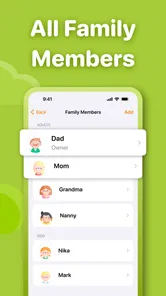
The app is intended to support family chore planning, but the number of child profiles and the way family members share access can depend on the current version. Before downloading, review the store description for details about profiles, devices, and account requirements. If several people need to manage the same list, check whether the app supports shared access or whether tasks must be managed from one device.
Is Kids Chores Tracker To Do List free, and does it include purchases or ads?
Pricing, advertisements, and optional in-app purchases can change over time and may differ between Android and iOS. Check the app’s store page before installing for its current price, any subscription terms, and disclosures about ads or data collection. If the app offers paid features, review what is included in the free version and whether a purchase is required for the tools your family plans to use.
Is the app suitable for young children, and what should parents consider before downloading?
A chore tracker can help children understand routines, but younger users may need an adult to set up tasks and explain how to use the app. Parents should check the recommended age rating, privacy information, and permissions requested by the current version. It is also worth considering whether children will use a shared family device or their own device, and setting expectations around notifications, rewards, and task completion.
Pros
- Clear task lists help children understand what they need to do each day.
- Recurring chores reduce the need to add the same tasks repeatedly.
- Progress tracking can make routines feel more rewarding for kids.
- Parents can tailor chores to suit a child’s age and responsibilities.
- A focused chores app can help build consistency and independence.
Cons
- Younger children may need an adult to set up and explain the app.
- Children without their own device may not be able to check tasks independently.
- A digital tracker still relies on kids remembering to open it.
- Parents may need to review completed chores rather than trust every check-off.
- Some families may prefer a shared paper chart over managing another app.











