Kia Access
- 11.23K
- 4.6
- Installs
- 1.00M
- Price
- Free

Screenshots
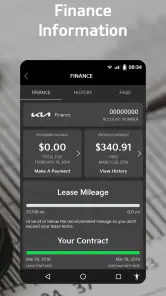
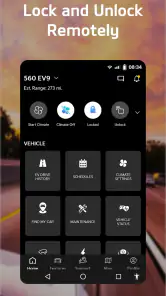
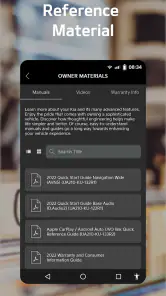
Analysis by Reviewed
Before I decide whether Kia Access belongs on my phone, I’d check one thing first: will its vehicle tools help with the way I use my Kia? A phone-based shortcut can be handy, but it matters only if my car supports the functions I care about and I’ll actually reach for them. I see this as a companion to owning a Kia, not a reason to change how I drive or maintain one.
Start with the cost, then check your car
There’s no purchase price to weigh when trying the app: it is free to download, and it is rated for Everyone. That makes giving it a look a low-commitment choice, though “free” by itself doesn’t tell me which connected services or functions will be available for a particular vehicle. I’d check compatibility for my Kia before building a routine around a feature I may not be able to use.
The app has an average rating of 4.6 from around 80,000 ratings, and it has passed 1 million installs. Those figures suggest it is widely used, but they don’t guarantee that every feature will suit every owner. Kia Access was released in 2018, and I’d treat the practical fit with my vehicle as more important than popularity when deciding whether to rely on it.
How the app fits into owning a Kia
Have you ever found yourself in a situation where you parked your car and then completely forgot where it was? Or maybe you’re just someone who loves to have control at your fingertips. Well, let me introduce you to the Kia Access app, a game-changer for every Kia owner out there.
What Kia Access is for
The Kia Access app is like having a remote control for your car, right on your smartphone. Designed specifically for Kia vehicles, this app offers a myriad of features that make managing your car a breeze. From remote starting to finding your car in a packed parking lot, it’s all about convenience and making your life a tad easier.
Vehicle tools that feel useful
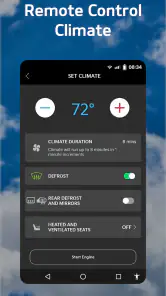
One of the standout features of Kia Access is the remote start. Imagine it’s a chilly morning, and you’re snug under your blankets. With just a few taps on your phone, you can start your car and let it warm up before you even step outside. How cool is that?
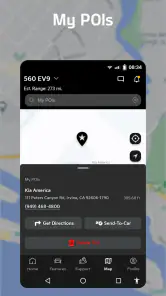
Another nifty feature is the Find My Car function. If you’re anything like me, you’ve probably wandered around a parking lot, pressing your key fob in every direction in the hopes of hearing that reassuring beep. With Kia Access, you can pinpoint your car’s location on a map, saving you time and frustration.
More From Our News Desk

Clash of Clans Is Won Between the Battles

Android Auto Makes the Case for Quieter Car Software

MobiOffice: Transforming Mobile Productivity with Seamless Integration

EA SPORTS FC™ Mobile Soccer: Redefining Mobile Sports Gaming

How Microsoft OneDrive Became a Mobile Productivity Giant

How Google Translate Breaks Language Barriers Effortlessly
A calmer routine for everyday errands
A realistic use for these tools is a busy shopping trip: I park in a large lot, head inside, and later use the location function to orient myself instead of retracing rows or relying on memory. That is especially useful when I’m carrying bags or leaving after dark. I’d still treat the map as a helpful reference, not a substitute for noticing where I parked; making a quick mental note of the section or nearby landmark gives me a backup if I need it.
Remote start can also make sense when I know I’ll be heading out soon and want the car ready before I walk outside. I’d use it selectively rather than tapping it out of habit: it is most helpful when the weather makes getting into a cold or hot cabin unpleasant, and less useful when I’m already beside the car. The phone adds convenience, but the key fob remains the simpler option when it is already in my hand.
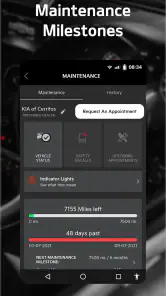
Let’s not forget the vehicle diagnostics. This feature allows you to check your car’s health status. Need an oil change? Got a low tire? The app will give you a heads-up before these minor issues become major problems.
Use diagnostics as a prompt, not a repair plan
I’d use a health check as a prompt to pay attention, not as a reason to ignore a dashboard warning or put off an inspection. A notification can help me notice that something needs follow-up, but it doesn’t perform maintenance or explain every possible cause. If a warning appears, I’d use the information as a starting point and consult the vehicle’s guidance or a qualified service professional when needed.
For an owner who already keeps a paper or phone-based maintenance log, the app’s diagnostics may be most useful as an extra check rather than a full replacement for that system. That distinction is worth keeping in mind: vehicle information can help me act sooner, while service records and scheduled maintenance still need deliberate attention.
Setup and day-to-day feel
Now, I’ll be honest, setting up the app initially requires a bit of patience. But once you’re past that, it’s smooth sailing. The user interface is sleek and intuitive, making it easy to navigate through the various features. Plus, Kia has done a great job of ensuring the app runs smoothly without any hiccups.
One thing to note is that some features are only available for newer Kia models. So, if you’re rolling in a classic, you might find yourself missing out on some of the fun stuff. But for most users, the app provides a comprehensive suite of tools that enhance the driving experience.
Compatibility is the deciding trade-off
Because access to features varies by model, I wouldn’t assume that another Kia owner’s experience will match mine. Before depending on remote controls or vehicle information, I’d confirm what my own car supports and complete the initial setup when I have a little time, rather than trying to sort it out in a hurry before a trip. That avoids expecting a tool to work on a vehicle that doesn’t offer the relevant function.
This is also where Kia Access differs from the usual alternatives. A key fob is quick and dependable for basic nearby actions, while the car’s own dashboard is the natural place to check information while driving. The app’s distinctive role is giving Kia owners a phone-based way to reach certain vehicle tools and details away from the driver’s seat. If I own a different make, or prefer not to manage car tasks through a phone, a manufacturer-specific app may add little to my routine.
Small habits that make it more useful
I’d set up the app before I need it, then check which parts match my actual routine rather than trying every control just because it is available. That means testing the location tool on an ordinary outing and learning where vehicle information appears before a warning or busy day makes me look for it. A few minutes of familiarization can prevent the phone from becoming another thing to troubleshoot in a parking lot.
I’d also keep a backup habit for anything time-sensitive. If I’m using the map to find the car, remembering a nearby sign or row gives me another clue. If I’m checking vehicle health, I’d continue to pay attention to the car’s own alerts and scheduled care. These small safeguards matter because an app is most helpful when it supplements rather than replaces ordinary awareness.
Who is most likely to get value
I’d recommend trying it if I owned a compatible Kia and regularly wanted to locate the car, use remote start, or keep an eye on vehicle health. It is particularly appealing to people who share errands, park in unfamiliar places, or appreciate checking vehicle information without sitting in the car. Kia America is the developer, so the app is aimed squarely at Kia ownership rather than serving as a general-purpose car manager.
I’d be less enthusiastic if my vehicle is older and supports few of the functions I care about, if I rarely use a smartphone for car-related tasks, or if I expect the app to replace inspections and maintenance records. In those cases, the key fob, dashboard, and a simple service log may be enough. The right choice depends on the car and the owner’s habits, not on the app’s download count.
When another approach is better
If I’m choosing between a phone app and the controls already in my Kia, I’d ask whether using the phone solves a specific inconvenience. For someone who parks in a familiar driveway and only needs nearby access, the key fob may be faster and easier. For someone who wants to review a warning while driving, the dashboard is the more sensible place to look; I wouldn’t use a phone as a substitute for safe attention to the road.
Likewise, drivers who want one app to organize vehicles from several manufacturers may prefer a broader system, if it supports their cars and needs. Kia Access is purpose-built around Kia ownership, which is an advantage for a compatible owner but a limitation for a mixed-brand household. I’d judge it by whether its Kia-specific role earns a place in my routine, not by expecting it to replace every vehicle tool I use.
Questions worth settling before relying on it
Will it work with my particular Kia? That is the first question I’d answer, since feature availability varies by model. I’d check compatibility and available functions before relying on remote start, location, or health information. Does free access mean every tool is guaranteed for every owner? I wouldn’t assume so: the app costs nothing to download, but the car and its supported functions determine the practical value.
Can it replace the key fob or maintenance records? I’d say no. The fob remains a straightforward option for nearby actions, while the app can offer another route when I’m away from the vehicle. Diagnostics can help flag something worth checking, but I’d still follow the vehicle’s guidance and keep up with maintenance. And is it useful if I don’t own a Kia? In my view, not really; its purpose is tied to Kia vehicles, so a different make’s own tools are likely the better fit.
My take after weighing the trade-offs
All in all, the Kia Access app is a must-have for any Kia owner who loves convenience and control. It’s like having your car’s command center right in your pocket. Whether you’re looking to warm up your car on a frosty morning or keep track of its maintenance schedule, this app has got you covered.
So, if you haven’t already, give Kia Access a try. It’s not just an app; it’s a companion that makes car ownership just a little bit sweeter.
My buy-or-skip verdict
Since there is no purchase price, I’d try it if my Kia is compatible and the remote or information tools solve a real annoyance for me. I wouldn’t count on a particular feature until I’ve checked what my model supports, and I wouldn’t install it expecting a universal car-management service. For the right Kia owner, it can make a few everyday tasks easier; for everyone else, the familiar controls may be all they need.
Kia Access Frequently Asked Questions
Do I need a Kia account to use Kia Access?
Kia Access is intended to connect Kia owners with information and connected functions for their vehicles. Getting started may involve setting up an account and linking the app to your vehicle, so have your vehicle details available and follow the prompts in the app. The exact setup experience can depend on your vehicle and the services available to it.
Can I use Kia Access on both Android and iPhone?
Kia Access is a mobile app for accessing Kia vehicle information and connected functions. Before downloading, make sure you choose the version intended for your phone’s operating system and that your device can install it. Once installed, the functions you can use are shaped mainly by your Kia model, its equipment, and the connected services available for that vehicle.
Will Kia Access work if my phone is not near my vehicle?
Some Kia Access functions are designed to let you manage vehicle-related tasks from a mobile device, which can be useful when you are away from the car. Remote controls depend on your vehicle’s compatibility and connected services, rather than simply on having the app installed. Check that your Kia supports the functions you plan to use before relying on them.
Can Kia Access replace my vehicle’s manual or routine servicing?
Kia Access can make vehicle information and maintenance-related reminders easier to manage, but it should be treated as a companion to your vehicle’s documentation and regular care. Use the owner’s manual for model-specific instructions, and follow the maintenance guidance applicable to your Kia. An app notification can be convenient, but it does not replace professional inspection or servicing when your vehicle needs it.
Does Kia Access need an internet connection to communicate with my Kia?
Kia Access is designed to connect a mobile device with vehicle information and connected functions, so an internet connection may be important for remote use. The experience can depend on your phone’s connectivity as well as the services supported by your vehicle. If you expect to use a feature away from the car, make sure your phone can access the network and that the feature is enabled for your Kia.
Pros
- User-friendly interface
- Remote start feature
- Vehicle health reports
- 24/7 roadside assistance
- Customizable notifications
Cons
- Requires stable internet
- Limited free features
- Occasional app crashes
- Drains battery quickly
- Complex initial setup

- Category
- Productivity
- Version
- Varies with device











