Journal: Notes, Planner, PDFs
- 888.00
- 4.6
- Installs
- 5.00M
- Price
- Free

Screenshots


Analysis by Reviewed
I know the small daily scramble of trying to remember where I wrote something down: a task in a notes app, an appointment in a calendar, and a form buried in a folder. Journal: Notes, Planner, PDFs aims to bring those jobs together, so there are fewer places to check and less friction between remembering an idea and acting on it. I find that promise most useful for people who want a simple personal hub, not a complicated project-management system.
When scattered details cost time
The problem this app tries to solve is ordinary but persistent: useful information gets split across tools, and the effort of switching can be enough to make a small task feel bigger. A note about a meeting may be in one place, the meeting itself in another, and the document you need beside neither. Bringing those items into a shared personal routine can make the next step easier to spot.
That does not mean one app automatically makes a better system. I judge a combined journal and planner by whether it helps me retrieve something quickly, not by how many kinds of content it can hold. If opening it feels like another chore, the consolidation has failed. Its strongest case is for someone whose everyday needs are modest and connected: jot down an idea, remember an obligation, and handle a document without moving through several unrelated apps.
One place for everyday loose ends
Starnest JSC makes this free productivity app, and its mix of journal, planner, notes, and PDF tools is the main reason to consider it. It has a 4.6 average from around 132,000 ratings and over 5 million installs, which suggests it has reached a sizable audience. The practical question is whether a combined workspace fits your habits: if you regularly switch between quick notes, plans, and documents, keeping them close can save time; if you already have a well-tuned system, moving everything may create more work than it removes.
Getting Started with Ease
Downloading and setting up Journal: Notes, Planner, PDFs is smoother than a fresh jar of Skippy. The interface is intuitive, which means no head-scratching moments wondering what button does what. You dive right into organizing your life with a few taps, and I promise, it’s almost fun!
Make the first setup practical
I’d start with one recurring need rather than trying to build a complete life archive on day one. For example, use a note for ideas you need to capture quickly, then put only time-sensitive commitments in the planner. That split keeps the journal from turning into a second inbox. If you are deciding whether to try it, the app is free to start, rated for Everyone, and currently at version 152; in-app purchases range from $0.99 to $44.99 per item. It requires OS 11 or later, so check compatibility before planning a switch.
My first-week test would be deliberately small: save a handful of notes you would otherwise scatter elsewhere, schedule the appointments you genuinely need to remember, and open a document you already handle regularly. After several days, ask whether it took fewer steps to get back to those items. Avoid importing every old note or planning an elaborate category structure before you know what you actually search for. A tidy system built around real habits is more useful than a detailed one that takes constant upkeep.
You May Like

Clash of Clans Is Won Between the Battles

Android Auto Makes the Case for Quieter Car Software

MobiOffice: Transforming Mobile Productivity with Seamless Integration

EA SPORTS FC™ Mobile Soccer: Redefining Mobile Sports Gaming

How Microsoft OneDrive Became a Mobile Productivity Giant

How Google Translate Breaks Language Barriers Effortlessly
Who gets the most from a combined workspace
I can see this fitting students who keep personal reminders beside reading notes and forms, freelancers managing their own appointments and client-related paperwork, and anyone who wants a home for small daily responsibilities rather than a workplace task board. The common thread is that the same person captures, organizes, and revisits the information. In that situation, having related material near each other can save a few app changes and reduce the chance of overlooking a detail.
It is less compelling for a group that needs shared ownership, approvals, or a complex view of who is doing what. A personal journal is not a substitute for a team’s established project system. I would also hesitate to move a large archive into it before checking how well its organization suits the way I retrieve older material. If your work depends on exact folder rules, cross-linking, or a specialized writing setup, test those needs first rather than assuming an all-in-one tool will cover them.
Notes That Speak Your Language
Whether you’re jotting down quick ideas or drafting the next great novel, this app’s got your back. The notes feature is robust—it supports text, images, and even voice memos. So, if you're like me and sometimes words just don’t cut it, a quick voice note does the trick. Plus, everything syncs across devices, ensuring your genius ideas are never lost in the ether.
Capture now, sort later
A useful way to handle a busy day is to record a rough thought immediately and refine it when you have a quiet moment. A voice memo can preserve a detail while walking or between errands, while an image can keep visual context beside written notes. I would still give important entries a clear title or a recognizable first line; that small habit makes later retrieval easier than relying on memory alone. If you mainly need shared team notes, however, a dedicated collaborative workspace may be a better fit than a personal journal.
One practical trade-off is that quick capture and long-form writing are different jobs. A short note works well as a temporary landing place, but a growing collection of half-finished thoughts can become difficult to scan. I’d review that collection once a week: turn anything actionable into a planner item, add context to notes worth keeping, and remove scraps that no longer matter. This small cleanup makes a journal more dependable without demanding a daily filing session.
For a realistic example, imagine I remember a question for a doctor while leaving work. I can record the wording as a quick note instead of trusting myself to remember it later, then add the appointment to the planner when I have a moment. Before leaving, I can revisit the note and carry the question into the appointment. The value is not that the app makes the day effortless; it is that one fleeting thought has a clear path from capture to use.
Planner That Actually Plans
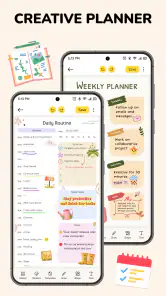
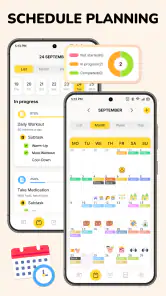
Now, onto the planner. It's like having a digital diary that doesn’t judge when you abandon it for a week. The planner integrates seamlessly with calendars, allowing you to set reminders that gently nudge you about meetings or birthdays you’d otherwise forget. I found the color-coding feature particularly handy—my life is now a rainbow of organized chaos.
Turn a plan into a doable day
For a realistic routine, I’d use the planner for appointments and deadlines, then add a short note with the details that make the event easier to handle: what to bring, who to contact, or the question I want to ask. That reduces the need to reopen several apps just before leaving. Color coding can help distinguish kinds of commitments, but too many colors become another system to maintain, so I’d keep the palette simple. If your calendar already handles reminders exactly as you like, there may be little benefit in duplicating that work here.
A useful test is whether a reminder changes what you do, rather than merely adding another notification to ignore. I’d reserve planner entries for commitments that have a time or deadline, and leave general ideas in notes until they become actionable. That boundary keeps the calendar readable. If you routinely plan in detail by hour, depend on shared calendars, or need complicated recurring schedules, compare the workflow with your current calendar before relying on this one. Familiarity and reliable alerts matter more than having every personal tool under one roof.
PDFs at Your Fingertips
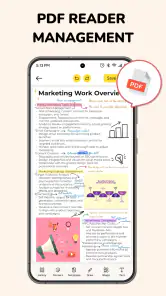
One of the standout features is the PDF functionality. You can read, annotate, and even sign PDFs directly in the app. No more jumping between apps or printing documents just to fill them out. For someone who’s always on the go, this is a game-changer. It's like having your office in your pocket.
Keep document work focused
This is especially handy for a student reviewing reading material or someone checking a form before sending it back: read the file, mark the parts that need attention, and sign when appropriate without breaking the task into separate app visits. I’d treat it as a convenience for everyday document handling, not automatically as a replacement for specialist PDF software. If your work depends on advanced document editing or a formal review process, keep the dedicated tool that already meets those needs.
For occasional paperwork, I would use the PDF tools as a short, focused step: open the file, mark what needs attention, complete the relevant action, and then return to the note or plan connected to it. Keeping that sequence simple is the advantage. If a document is important, I would also make sure I know where the final version is saved and can find it again; a convenient reading and signing experience is only useful if it fits a dependable filing habit.
That distinction helps answer a common decision: do you need a separate PDF app? If you mostly read, annotate, or sign everyday files, having those tasks alongside personal notes may be enough. If you regularly handle complex edits or need a strict professional document workflow, a specialist tool is the safer choice. The right setup depends less on how often a PDF appears and more on what you must do to it.
Why It’s Worth the Space
In a world filled with apps vying for your attention, Journal: Notes, Planner, PDFs earns its spot on my home screen. It combines the functionalities of multiple apps into one, saving you precious storage space and, frankly, a lot of headaches. Whether you're a student, a professional, or just someone trying to keep it all together, this app is a must-try.
Compared with the usual mix of a dedicated notes app, a separate calendar, and a PDF reader, this approach favors convenience over depth. A collection of specialist apps may offer a more tailored workflow for each task, but it also means remembering where each item lives. This app makes more sense when the overlap between your notes, plans, and documents is frequent enough that reducing those switches matters. If the tools you already use feel effortless, there is no need to replace them simply for the sake of consolidation.
Where the convenience has limits
The all-in-one approach is also its main trade-off. A specialist note-taking app may suit someone who needs a highly developed writing workflow, while a standalone calendar can be preferable for people who want scheduling to remain separate from journaling. Combining several kinds of information only saves time if you can find things again and keep the routine light. I’d test it with a few real notes, one week of plans, and a document or two before making it the center of your system.
There is also a small but important question about switching: what happens to the habits built around your current tools? Even a straightforward app can feel slower if you have to recreate years of labels, reminders, or filing conventions. I would keep the transition reversible at first. Try it for one kind of note or a limited set of upcoming plans, and leave essential information in its existing home until you are confident the new routine is reliable. That is not distrust; it is a sensible way to avoid turning a convenience experiment into a cleanup project.
The app is free to begin using, but purchases are available, so I would decide whether its everyday workflow is genuinely useful before paying for anything. A large audience—more than 5 million installs—can be reassuring as a sign that many people have tried it, but popularity cannot tell you whether its organization style matches yours. The practical measure is whether you can capture something quickly and retrieve it when it matters. Its Everyone age rating also makes it broadly approachable, though the best fit still depends on a person’s work habits.
My verdict after weighing the trade-offs
What I like most is the clear idea behind the app: personal notes, plans, and routine PDF work often belong to the same stretch of someone’s day. Putting them near each other can shorten the path from remembering a task to handling it. What I would not do is treat it as a universal replacement for every tool. Its strongest role is a convenient personal organizer; it is a weaker choice when a specialized calendar, collaborative notes system, or advanced PDF workflow is central to your routine.
If you are unsure, start with a low-risk trial: use it for one week of personal commitments, a few notes you know you will need again, and an ordinary document task. Notice whether you spend less time switching and whether you can still find things without extra organizing work. If the answer is yes, gradually bring in more of your everyday routine. If you find yourself maintaining duplicate reminders or searching longer than before, keep the tools that already serve you well.
To wrap it up, the app is like that reliable friend who always shows up when you need them. It’s user-friendly, packed with features, and genuinely helps simplify everyday tasks. So if you haven’t already, give it a whirl. Who knows? It might just become your new favorite sidekick.
Journal: Notes, Planner, PDFs Frequently Asked Questions
Who develops Journal: Notes, Planner, PDFs, and what is it designed to help with?
Journal: Notes, Planner, PDFs is a productivity app developed by Starnest JSC. Its focus is bringing everyday writing and organization into one place: you can use it as a journal, keep notes, plan tasks, and work with PDFs. It may suit people who want a flexible digital workspace for personal entries as well as practical planning.
What is the app’s general reputation among users?
The app has an average rating of 4.6 from around 132 thousand ratings, with around 888 written reviews. Those figures offer a broad snapshot of user response, though individual experiences can differ depending on which tools you use and what you expect from a journal or planner. It has also passed 5 million installs, showing that it has reached a substantial user base.
Is Journal: Notes, Planner, PDFs free to download, and what should I know about the cost?
The app is free to download, so you can try its journal, notes, planner, and PDF tools without paying upfront. It also offers optional in-app purchases, ranging from $0.99 to $44.99 per item. Check the purchase details in the app before confirming anything, and consider whether the included free features meet your needs first.
What features does Journal: Notes, Planner, PDFs offer?
Journal: Notes, Planner, PDFs is a versatile app designed to enhance productivity and organization. It offers features like note-taking, planning, and PDF annotation. Users can create detailed notes with text, images, and audio recordings, organize tasks with a built-in planner, and edit PDF documents seamlessly. This all-in-one tool is perfect for students, professionals, and anyone looking to streamline their workflow.
Is Journal: Notes, Planner, PDFs available on both Android and iOS platforms?
Yes, Journal: Notes, Planner, PDFs is available for download on both Android and iOS platforms. Users can find it on the Google Play Store for Android devices and the Apple App Store for iOS devices. This cross-platform availability ensures that users can access their notes and planner on multiple devices, keeping their information synchronized across all platforms.
Pros
- Intuitive user interface
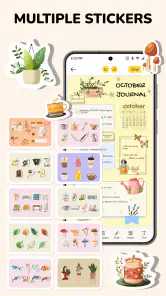
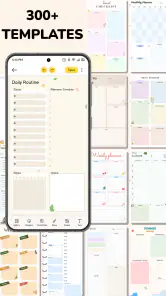
- Wide range of customization options
- Syncs across multiple devices
- Supports multimedia notes
- Secure encryption for privacy
Cons
- Limited free version features
- Requires internet for syncing
- Occasional ads in free version
- No handwriting recognition
- Can be resource-intensive

- Category
- Productivity
- Version
- 152











