Jellyfin for Android TV
- 98.00
- 4.2
- Installs
- 1.00M
- Price
- Free

Screenshots

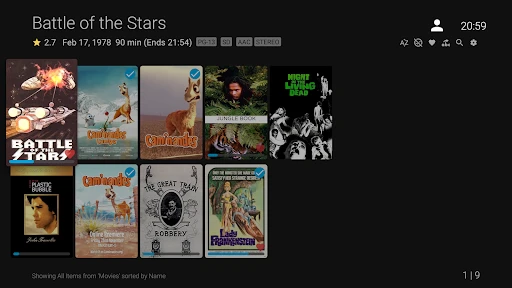
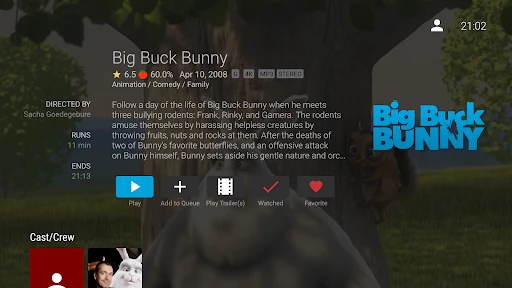

Analysis by Reviewed
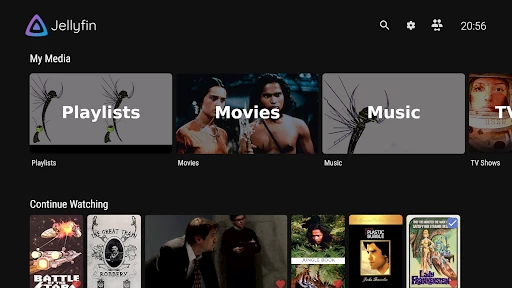
When several people share an Android TV, a streaming app has to work for the household, not just the person who installed it. I find Jellyfin for Android TV most appealing when a home already keeps its own films, shows, music, or photos in a Jellyfin library and wants to browse that collection from the sofa. It is a free video player and editor app from Jellyfin, though its role here is watching and browsing media rather than editing it. The key distinction is that this TV app connects to a media server; it is not a ready-made catalogue of films supplied with the download.
What a shared evening looks like
Picture one person choosing a film after dinner while someone else wants to find a show they were watching earlier. A shared television makes browsing and picking up where the household left off part of the experience, so I would treat the app as a front end for a library the home has already organized. That arrangement can feel more personal than jumping between commercial streaming apps, especially when the collection includes family videos or media that is not available through a subscription service.
There is a practical trade-off: the TV app’s usefulness depends on the server and library behind it. If nobody in the home maintains that setup, installing the app alone will not create a collection to watch. I would decide first who is responsible for keeping the server available and organizing the media, then let other household members know how to find the TV app and select the right library. That small agreement can prevent the shared screen from becoming a confusing collection of unfamiliar titles.
Setting Up Jellyfin: A Simple Affair
Getting started with Jellyfin for Android TV is a breeze. You don’t need to be a tech wizard to set it up. Just download the app from the store, and voila, you’re halfway there! The initial configuration is pretty straightforward, guiding you through adding your media libraries. Whether it’s movies, TV shows, music, or even photos, Jellyfin accommodates all your media types with ease. Plus, the interface is super user-friendly, making navigation a piece of cake.
Make the server the household boundary
For shared use, the important setup question is not only how to connect the television, but whose library and account the household will use. I would confirm that the server connection belongs to the intended home setup before settling in to browse. If different people need separate access, check how their server-side accounts and libraries are arranged rather than assuming the TV app itself creates household profiles or parental controls. Keeping that boundary clear is especially useful when some media is meant for adults while children also use the television.
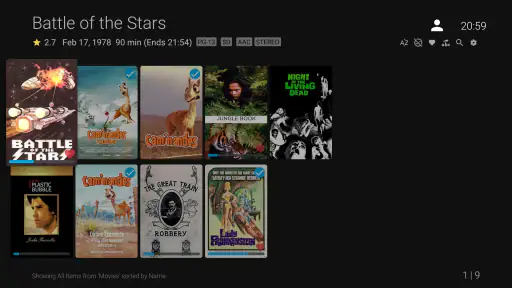
One useful habit is to agree on a simple naming and organization approach for shared libraries before the collection grows. If films, episodes, and personal videos are mixed without a plan, browsing on a remote control can take longer than expected. Clear library names and sensible organization on the server make a bigger difference to a shared TV experience than repeatedly changing the app’s appearance.
Streaming Without Boundaries
One of the standout features of Jellyfin is its ability to stream your own media library without any pesky licensing restrictions. That’s right—no more geo-blocks or subscription fees. You are in complete control of your media, accessing it anytime, anywhere. It’s like having your own personal Netflix, but without the monthly bill. How cool is that?
That freedom is best understood as control over media you already have access to, not a promise that every title will play from every location or under every network condition. For a household, I would test the connection and a typical film before planning a movie night around it. If playback struggles, checking whether the server is reachable and whether the chosen file works well on the TV is more useful than assuming the app will behave like a commercial service with a centrally managed catalogue.
Moreover, Jellyfin supports a wide range of formats and resolutions, ensuring your media looks and sounds great on your Android TV. Whether you’re watching in glorious 4K or just streaming your favorite tunes, Jellyfin has got you covered. It’s truly a powerhouse when it comes to versatility and performance.
Coordinate without turning browsing into a chore
For a shared screen, I would keep the household workflow simple: decide who handles library organization, and agree on how everyone will identify the right collection when opening the TV app. This is a small but valuable distinction from services where every viewer simply opens a personal profile and browses a centrally supplied catalogue. Jellyfin’s appeal is the home collection; the household needs to bring a little coordination to make that flexibility comfortable.
A good test is to ask another person in the home to find a particular show using only the remote. If they can tell which library to open and recognize the title, the setup is likely practical for everyday use. If they need the server owner to explain every screen, simplify the library structure before adding more customization. That is a more useful first improvement than spending time tuning cosmetic details.
Customization to the Core
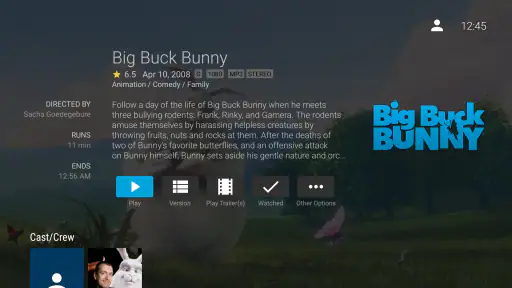
Another thing I absolutely love about Jellyfin is its customization capabilities. You can tailor the app to suit your preferences, from the appearance of the interface to the metadata of your media files. Want to change the theme or organize your library in a specific way? Jellyfin makes it possible. The level of personalization is phenomenal, allowing you to make the app truly your own.
On a television, though, I would prioritize readability and predictable navigation over endless tweaking. The person configuring the library may enjoy refining metadata, but the rest of the household mainly needs to recognize what they want to watch. One non-obvious benefit of tidying titles and artwork at the library level is that it helps everyone browse without having to remember filenames or ask who added a particular video.
Plus, for those of you who love tinkering around, Jellyfin offers a plethora of plugins to expand its functionality. Whether it’s adding new features or integrating with other services, the possibilities are endless. This flexibility makes Jellyfin not just a media server, but a hobbyist’s delight.
That flexibility comes with a real trade-off: plugins and server-side adjustments make more sense for the person willing to maintain the setup than for someone who wants a zero-maintenance TV experience. I would add changes gradually and check that the ordinary viewing path still works afterward. If the household just wants to press play without anyone tending a library, a mainstream streaming app is likely the easier fit.
Age, trust, and choosing the right option
The app is rated Everyone, but that label does not decide whether every item in a household’s library is suitable for every viewer. I would treat the rating as a statement about the app itself, then rely on the household’s own library choices and server arrangements when children share the television. Do not assume that a general app rating means the app automatically filters a personal collection for age or creates separate child spaces.
Compared with the usual subscription streaming apps, Jellyfin gives more attention to a collection the household controls, while commercial services are generally more convenient for finding a ready-to-watch catalogue without managing a server. Compared with basic media players, its attraction is browsing a connected library rather than opening one file at a time. That makes it a strong choice for homes that value ownership and organization, but a poor match for anyone expecting the download alone to provide entertainment.
Jellyfin has an average rating of around 4.2 from about 2.4 thousand ratings, and it has passed over a million installs. It is free, is suitable for Everyone, and its current version is 0.19.4; Android 5.0 or later is required. The project was released on July 25, 2019, and the app is developed by Jellyfin. These details make it easy to identify the Android TV app, but the decision that matters most is still whether you want to use a home media server.
When a household routine matters more than features
A useful way to judge the setup is to imagine an ordinary, slightly rushed evening rather than a carefully planned demo. One person has the remote, another suggests a title, and a child is waiting to choose something next. If the library names and artwork make the choices obvious, the app can fit naturally into that routine. If every request turns into a search for the server owner, the friction is less about the TV interface and more about how the home collection is arranged.
I would also keep a short fallback plan in mind. If a particular video will not play, choose another known-working item while the person responsible checks the file or server later; do not make the whole household troubleshoot during movie night. This is a small practical advantage of testing a few representative items early: you learn which parts of the collection are dependable before everyone relies on them.
For a home with guests, a clearly named shared library is easier to explain than a collection organized around one person’s private shorthand. I would avoid relying on memory for who added a video or where it belongs. A little care with naming and grouping is not glamorous, but it helps guests and less technical family members browse confidently without changing the underlying server setup.
Community and Support
Being an open-source project, Jellyfin has a vibrant community of developers and users who are always ready to help. Whether it’s troubleshooting or discussing new features, you’ll find a supportive community eager to share their knowledge. It’s comforting to know that you’re not alone in your Jellyfin journey, and there’s always someone ready to lend a hand.
For troubleshooting, I would first separate TV-app issues from server or library issues: confirm the server is available, then check whether the problem affects one item or the whole collection. That simple distinction can save time when asking the community for help, because a single troublesome file points to a different problem than an unreachable server. It also gives the person maintaining the setup a clearer way to explain what happened.
Who I’d recommend it to
In conclusion, Jellyfin for Android TV is a fantastic option for anyone looking to take control of their media streaming experience. With its ease of use, extensive customization options, and strong community support, it’s a no-brainer for those who want more freedom and flexibility in how they consume media. So, why not give it a try and see for yourself? Happy streaming!
My recommendation is strongest for a household that already has a Jellyfin server, wants to watch its own collection on a shared TV, and has someone comfortable keeping that collection organized. I would skip it if you want a self-contained service with a ready-made catalogue, automatic household profiles, or no server to think about. For everyone else, the best first step is modest: connect the TV, test a few familiar items, and make sure the people who share the screen can browse the library without help. If that feels natural, Jellyfin can make a home collection much easier to enjoy together.
Jellyfin for Android TV Frequently Asked Questions
Does Jellyfin for Android TV need a separate server or media library?
Yes. Jellyfin for Android TV is designed to connect to a Jellyfin server that hosts your media library, rather than acting as a place to store and organize files by itself. Before downloading, consider whether you already have a server set up or are prepared to configure one. Once connected, the TV app can provide a way to browse and stream the media available through that server.
What is Jellyfin for Android TV and how does it work?
Jellyfin for Android TV is a media server application that allows you to manage and stream your personal media library. It works by hosting your media content on a server that Jellyfin can access, enabling you to stream your music, movies, TV shows, and other media directly to your Android TV. It's a great solution for those who want to enjoy their media collection on a larger screen without the need for additional streaming services.
Is Jellyfin for Android TV free to use?
Yes, Jellyfin for Android TV is completely free to use. It is an open-source project, meaning there are no hidden fees or subscription costs. Users can enjoy all the features without any financial commitment. This makes Jellyfin an attractive option for those looking to manage and stream their media without incurring extra expenses.
What are the system requirements for running Jellyfin on Android TV?
To run Jellyfin on Android TV, you need a device with Android 5.0 or higher. Additionally, the device should have sufficient storage space to accommodate the Jellyfin app and any media you plan to stream. A stable internet connection is also recommended for smooth streaming. Devices with better processors and higher RAM will provide a more seamless experience.
Can I customize the user interface on Jellyfin for Android TV?
Yes, Jellyfin for Android TV allows a degree of customization to enhance user experience. Users can choose different themes, modify the layout, and adjust settings to suit their preferences. This flexibility helps in creating a personalized media environment that matches your viewing habits and aesthetic preferences.
Articles Related to Jellyfin for Android TV
Clash of Clans Is Won Between the Battles
Its raids are quick; its community is a long-term project of coordination, teaching, rivalry, and shared responsibility—with all the friction that entails.
Android Auto Makes the Case for Quieter Car Software
The car interface is no longer judged by how much it can do, but by how quietly it helps. Android Auto shows what drivers now expect—and what still gets in the way.
MobiOffice: Transforming Mobile Productivity with Seamless Integration
MobiOffice: Word, Sheets, PDF is redefining mobile productivity with a surprising blend of functionality and innovation.
EA SPORTS FC™ Mobile Soccer: Redefining Mobile Sports Gaming
Dive into EA SPORTS FC™ Mobile Soccer, where immersive gameplay and strategic depth transform mobile sports gaming.
Pros
- Open-source and free to use.
- Supports a wide range of media formats.
- Highly customizable user interface.
- No ads or tracking concerns.
- Seamless streaming across devices.
Cons
- Initial setup can be complex.
- Limited official support options.
- Requires a dedicated server setup.
- May experience occasional bugs.
- Lacks some premium features.

- Category
- Video Players & Editors
- Version
- 0.19.4