iVerify Basic
- 21.00
- 2.9
- Installs
- 10.00K
- Price
- $0.00

Screenshots
Analysis by Reviewed
I think about phone security most when I’m away from home: checking a work message on public Wi-Fi, approving a bank prompt, or handing my phone over to someone to show a photo. In those moments, a security app is useful only if it turns vague worry into clear steps. iVerify Basic is aimed at that practical gap, helping users notice device-security issues and understand what they can do about them. I see it as a companion for awareness, not a substitute for careful habits or the protections built into the phone.
A security check that gives you something to act on
The central idea is straightforward: review your device’s security and make the results easier to act on. Rather than expecting every user to know which settings matter, the app frames security as a set of checks and recommendations. That can be valuable if you are unsure where to begin, or if you want a reason to revisit settings you have not thought about since first setting up your phone.
For example, I would use a security review as a prompt to check whether the phone is up to date and whether my everyday choices still make sense. A result is most useful when I treat it as a starting point: read the recommendation, decide whether it applies to how I use the device, and make the change myself where appropriate. The practical benefit is a clearer next step, not a promise that every threat has been removed.
Turning a recommendation into a sensible routine
I would not try to work through every security suggestion in a hurry. A better approach is to open the review when I have a few uninterrupted minutes, read one item at a time, and decide what action actually fits my phone use. This is particularly helpful if I share a device with family or use it for work, because a setting that is convenient for one person may create friction for another.
One useful habit is to make a note of any recommendation I want to investigate rather than changing an unfamiliar setting immediately. I can then look at the relevant phone controls and weigh the benefit against the inconvenience. That small pause prevents a common mistake with security advice: treating every warning as equally urgent or assuming the most restrictive choice is automatically the right one.
Securing Your Digital World
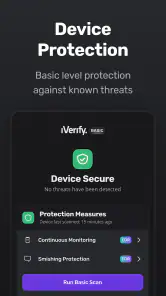
We live in a time where our smartphones are practically an extension of ourselves. From banking to personal photos, everything is stored on these tiny devices. This is where iVerify Basic steps in. It’s designed to help you identify and fix security weaknesses on your phone. The app is like having a personal digital bodyguard, ensuring that your data remains safe from prying eyes.
User-Friendly Interface
First impressions matter, right? And iVerify Basic does not disappoint in this department. The app greets you with a sleek, intuitive interface that even a non-techie can navigate with ease. With simple instructions and easy-to-follow steps, it guides you through the process of securing your device. It’s like having a tech expert right in your pocket, ready to assist at any moment.
More From Our News Desk

Clash of Clans Is Won Between the Battles

Android Auto Makes the Case for Quieter Car Software

MobiOffice: Transforming Mobile Productivity with Seamless Integration

EA SPORTS FC™ Mobile Soccer: Redefining Mobile Sports Gaming

How Microsoft OneDrive Became a Mobile Productivity Giant

How Google Translate Breaks Language Barriers Effortlessly
Features That Stand Out
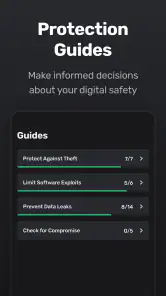
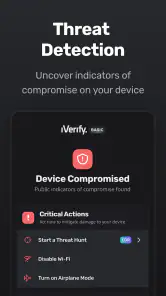
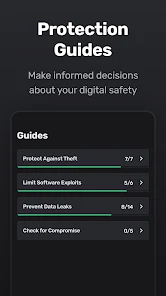
What sets iVerify Basic apart from other security apps is its comprehensive list of features. It includes a detailed security checklist that covers everything from software updates to password strength. Plus, it offers helpful tips on how to improve your device’s security. It even checks for potential vulnerabilities that you might not be aware of. It’s like having a digital Sherlock Holmes constantly on the lookout for threats.
Another cool feature is the app’s ability to provide actionable security recommendations. This isn’t just about pointing out problems; it’s about offering solutions that you can implement to beef up your phone’s defenses. It’s proactive, not reactive, which is crucial in today’s fast-paced digital world.
Awareness tools versus automatic protection
The distinction I would keep in mind is the difference between guidance and enforcement. A checklist can help me notice a setting or habit worth revisiting, but it is not the same as a tool that automatically blocks suspicious activity. If I am comparing options, I would put iVerify Basic alongside other security-awareness or device-checking tools, rather than expecting it to replace a dedicated protection product.
That makes the choice depend on what I want from an app. If I want help understanding which parts of my phone’s security deserve attention, a guided review has a clear role. If I want something that handles threats in the background with little input from me, I should look for a product built around that purpose and continue using the protections already provided by the phone.
Peace of Mind in a Few Taps
In a world where digital threats are constantly evolving, having a reliable security app like iVerify Basic is a game-changer. It offers peace of mind knowing that your personal information is safeguarded. With just a few taps, you can have the confidence that your phone is secure, letting you focus on what truly matters in your day-to-day life.
So, whether you’re a seasoned tech user or someone who just wants to ensure their device is safe, iVerify Basic is worth considering. It’s simple, effective, and most importantly, it provides the security that we all need in our increasingly digital lives. Give it a try, and let it become your trusty sidekick in the fight against digital vulnerabilities.
Where it fits beside built-in protections
I would not choose a checklist app instead of the phone’s own security controls. Built-in update prompts, screen locks, and account protections remain the foundation; a security-awareness tool is useful when it helps me notice a setting or habit I should review. That distinction matters because a checklist can guide decisions, but it cannot make every choice on my behalf or guarantee that an account or device is safe.
A useful routine is to review recommendations when something changes: after setting up a device, adding a work account, or realizing that an old passcode or update habit needs attention. I would avoid tapping through suggestions automatically. Some security changes can affect convenience, so it is worth understanding the trade-off before changing a setting. This makes the app more like a periodic inspection than a background shield that I can forget about.
A realistic moment to use it
Imagine I’m preparing for a business trip and notice I’ll be relying on my phone for email, travel details, and payment confirmations. I could use the app to take stock before leaving, then work through any relevant recommendations while I have time and a reliable connection. The benefit is not that travel becomes risk-free; it is that I can deal with avoidable housekeeping before I’m rushed at an airport or relying on unfamiliar networks.
That workflow also helps me separate urgent fixes from general advice. If an item concerns a setting I can change immediately, I can address it and check that the change suits my needs. If I’m uncertain what a recommendation means, I should pause and learn more rather than treating every prompt as an emergency. Security guidance is strongest when it makes me more deliberate, not more anxious.
Small decisions that make the review more useful
I would also use a checkup as a checkpoint after a change in routine, not only when I feel exposed. A new work account, a switch to using the phone for more business tasks, or a period of neglecting updates can all be reasons to take stock. The point is to connect the review to a real change in how I use the device, so the recommendations have context instead of becoming another item I dismiss without thinking.
When I help a less technical relative, I would let them read each recommendation and make the changes themselves, with me explaining unfamiliar terms. That is more useful than taking over the phone and changing settings without discussion: it builds understanding and makes it easier for them to maintain the habit later. For a work phone controlled by an employer, though, I would check with IT before altering security settings, since personal preferences may conflict with workplace requirements.
Who is likely to get the most from it
The app’s business focus makes it a sensible consideration for people who use one phone for both personal tasks and work, especially anyone who wants a guided way to think through basic device security. It may also suit a less technical family member who prefers clear prompts to hunting through settings menus. The developer is iVerify, and the app is free, so it is easy to consider as a low-cost starting point for building a more consistent review habit.
On the other hand, someone who expects a security app to silently block every threat or handle all device protection automatically may be disappointed. I would also skip it if I already have a security process that I understand and follow reliably, unless I specifically want another checklist to consult. For deeper help with a work-managed device, an organization’s IT guidance is usually more appropriate than general advice on a personal phone.
Questions I would settle before relying on it
Is it a replacement for the phone’s built-in security? No: I would keep those protections in place and treat this as a companion for reviewing habits and settings. Does using it mean my device is safe from every threat? No security check can justify that assumption, so I would still use care with messages, links, accounts, and public networks.
Would I recommend it to someone who wants a set-and-forget shield? Not as their only measure. Would I consider it if I am unsure which device-security basics to revisit? Yes, provided I read recommendations carefully and make changes with their effect in mind. That difference is the most important expectation to set before installing: it is useful when I am willing to participate in the process.
What to know before installing
iVerify Basic is a business-category app with an Everyone content rating. It was released on May 20, 2024, and version 16.16.0 requires Android 9 or later. It has an average rating of 2.9 from around 90 ratings, with 21 reviews, and has passed 10,000 installs. Those figures suggest a modest audience and mixed reception, so I would treat the app as a tool to evaluate for myself rather than assuming every user has had the same experience.
My overall view is that its value depends on how you use it: as a prompt to understand and improve your own security habits, not as a guarantee or replacement for built-in protections. If you want guided awareness and are willing to make the final decisions yourself, it is worth a look. If you want comprehensive, automatic threat blocking, choose a tool designed for that job and keep your phone’s own security settings current.
iVerify Basic Frequently Asked Questions
Who develops iVerify Basic, and what kind of app is it?
iVerify Basic is a Business app developed by iVerify. Its focus is device security and threat awareness, making it relevant to people who want security guidance as part of their mobile experience. Before downloading, consider whether that purpose matches what you need: the app is presented as a starting point for enhanced device security, rather than as a general-purpose business tool.
What is iVerify Basic and how does it work?
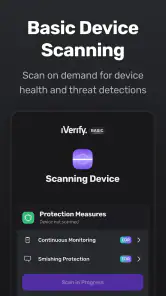
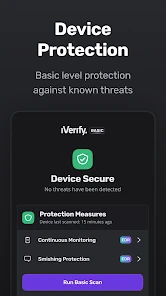
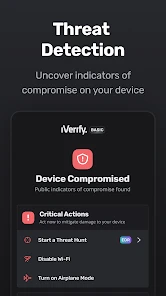
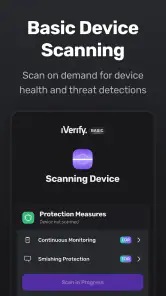
iVerify Basic is a mobile application designed to enhance the security of your smartphone by providing a suite of tools and tips to improve device security. It works by scanning your device, identifying potential vulnerabilities, and offering guidance on how to address these issues. The app focuses on user-friendly advice and actionable steps to make your device more secure.
Is iVerify Basic compatible with all mobile devices?
iVerify Basic is compatible with most modern smartphones running Android and iOS operating systems. However, it is recommended to check the app's compatibility with your specific device model and OS version on the app's download page or within the app store. Regular updates ensure broader compatibility and improved security features.
Which version of iVerify Basic is available, and what operating system does it require?
The current version of iVerify Basic is 16.16.0, and its minimum operating system requirement is version 9. Check that your device meets this requirement before downloading, since compatibility affects whether the app can be installed and used. The version number can also help you recognize the release when comparing it with the app shown in your device’s store.
Does iVerify Basic require an internet connection to function?
While iVerify Basic can perform some tasks offline, such as scanning and identifying vulnerabilities, certain features may require an internet connection. These include downloading updates, accessing cloud-based security checks, and receiving the latest security advice. For optimal performance and the most up-to-date security features, an internet connection is recommended.
Pros
- Comprehensive security features
- User-friendly interface
- Regular updates
- Detailed security reports
- Customizable settings
Cons
- Limited to basic features
- Subscription required for premium
- Occasional false positives
- No real-time protection
- Requires technical knowledge

- Category
- Business
- Version
- 16.16.0











