

Intermountain Health
- 723.00
- 4.1
- Installs
- 100.00K
- Price
- Free

Screenshots

Analysis by Reviewed
Managing healthcare from a phone sounds simple until you need to do it at an inconvenient moment. A medical app has to feel calm, clear, and dependable when you are checking an appointment, reviewing a message, or trying to find the right information while already feeling stressed. I spent time looking at Intermountain Health from that practical angle, focusing less on flashy presentation and more on how suitable it feels for ordinary healthcare tasks.
Developed by Intermountain Healthcare, this free medical app is built around the MyChart experience. Its store summary, “Care Simplified by MyChart,” gives a good sense of the intended role: it is a digital doorway into care rather than a general wellness tracker or an emergency treatment tool. That distinction matters. If you want a place to record workouts or browse broad medical articles, this is not the right kind of app. If you already use Intermountain Healthcare and want a mobile route to your care information, it makes considerably more sense.
The app is available to an Everyone audience, and its current version is 11.7.2. It has reached over 100,000 installs, with an average rating of 4.0 from around 1,300 ratings and 721 written reviews. Those figures suggest a useful but not universally effortless experience: enough people rely on it to make it relevant, while the rating leaves room for the small frustrations that often appear in healthcare software.
How Intermountain Health feels during everyday use
I find that everyday use is easiest when I open the app with one clear purpose, such as preparing for a visit or checking a care-related detail, rather than treating it as a place to monitor constantly. That habit can make the experience feel more manageable and help keep health information from becoming a source of needless worry. It also sets up a closer look at how I would approach trust and personal control in a medical app.
Speed expectations: quick enough for routine checks
My first expectation with a healthcare app is not instant animation or a highly polished entertainment-style interface. I want the important screen to appear without making me wonder whether I tapped the wrong thing. Intermountain Health is best judged by that standard. Its value comes from reducing the number of small steps between a patient and an existing care relationship.
For a routine check, the experience should feel lighter than calling a clinic and waiting for someone to answer. Opening the app to look at a care detail, prepare for a visit, or check a communication is the sort of task where mobile access earns its place. I also appreciate that a MyChart-based app has a more focused purpose than a broad medical search engine. Instead of asking you to interpret a sea of general information, it is intended to connect you with your own healthcare context.
That focus changes how I think about speed. A screen that loads promptly is helpful, but the bigger gain is reducing the mental effort of finding care information. When I am tired, traveling, or helping a family member organize a medical matter, a direct route is more valuable than a long list of educational content.
More From Our News Desk

 Instagram
Instagram’s Power Comes From Its Place in Your Phone
A close look at how Instagram turns Meta’s reach, recommendation systems and everyday camera habits into durable platform power—and what that costs users.

 Gmail
GmailGmail in a Busy Inbox: Who Benefits Most?
From first account to crowded workday, Gmail earns its place through dependable search and flexible sorting—but its best fit depends on how much inbox maintenance you can tolerate.

 Prime Video
Switching to Prime Video: What Changes in Your Viewing Routine
Prime Video can make a compelling second home for streaming, but switching means learning a different catalog, rental layer, and route from browsing to playback.

 Universal TV Remote Control
Universal TV Remote Control Works Best as a Reliable Backup
A phone remote earns its place through quick setup and reliable habits. Here is how to get more from Universal TV Remote Control—and where its limits show.

 Weather - By Xiaomi
Weather by Xiaomi Review: Clear at a Glance, Less Clear Up Close
Xiaomi’s weather app makes everyday forecasts quick to scan, but its calm surface can leave useful details and recovery paths harder to find than they should be.

 X
XX Under Pressure: Can It Recover When Posting Goes Wrong?
A resilience-focused review of X, examining setup, mistaken posts, interruptions, weak connections, and the gaps that matter when recovery needs to be dependable.
Latest News



There is an important qualification, though. A healthcare app can only be as immediate as the account, network, and clinical systems behind it. I would not install it expecting every action to behave like a calculator or notes app. Some information may depend on the healthcare organization processing it, and communication is not the same as live medical advice. In other words, the app can simplify access without making the healthcare process itself instantaneous.
A realistic scenario: preparing for a clinic visit
Imagine receiving a reminder about an upcoming appointment while you are away from home. Rather than searching through old messages or calling the office immediately, you open Intermountain Health and use it as your starting point for the visit-related details available through your care account. You can then make a short checklist of what you need to ask, what information you may need to bring, and whether there is anything you should clarify before arriving.
This is where the app feels more useful than a paper folder or a general phone calendar. A calendar can hold a time, but it does not replace a patient-facing healthcare portal. A note-taking app can store questions, but it does not provide the same connection to the care system. The advantage is not that the phone becomes a doctor; it is that the administrative side of care becomes easier to approach.
My practical tip is to open the app before the appointment day, not while walking into the clinic. That gives you time to sign in, review what is available, and write down questions without the pressure of a waiting room. It also helps you notice whether your account access is working when there is no immediate deadline.
Heavy-use moments: where patience matters more
The most demanding moments are not necessarily the ones with the most visual content. Healthcare apps become “heavy” when the user is moving between several related tasks: checking an appointment, reading a clinical message, gathering information for a family member, and switching between the app and other phone tools. That is when a small delay or unclear transition feels more serious than it would in a casual app.
I would treat Intermountain Health as a focused utility rather than something to leave open all day. Its strongest pattern is deliberate use: open it because you have a healthcare task, complete that task, and close it. That approach is also kinder to your attention. Constantly checking a medical portal can increase worry, especially when nothing requires immediate action.
For a more involved session, I recommend doing one job at a time. Start with the appointment or communication that prompted you to open the app, then note any follow-up questions separately. Trying to mentally manage several medical details at once can make even a stable app feel confusing. The limitation here is not only technical; healthcare information itself is emotionally and cognitively demanding.
Another useful habit is to keep a short, dated note outside the app when you are preparing for an appointment. I would not use that note as a replacement for the official record, but it can help you remember symptoms, questions, or changes to mention. This gives the app a clear role: it is the access point for care information, while your personal notes help you communicate effectively during the visit.
Reliability: useful when it complements, not replaces, care
Reliability in a medical app has two meanings. The first is technical: does it open and let you reach the relevant area? The second is practical: can you trust the app for the kind of decision you are making? Intermountain Health can be valuable for the first kind of access, but I would never confuse a patient portal with emergency support or a substitute for professional evaluation.
If you have severe symptoms, a rapidly worsening condition, or an urgent safety concern, opening a portal should not be your first move. Use appropriate emergency services or direct clinical help. The app is better suited to organized, non-emergency communication and record access, where taking a few minutes to review information is reasonable.
I also prefer to verify important details rather than relying on memory after reading them once. A portal can put information in front of you, but patients still need to understand what it means and ask questions when something is unclear. For medication changes, test-related concerns, or instructions that seem inconsistent, I would contact the relevant care team instead of trying to interpret the app alone.
The rating of 4.0 indicates a generally positive reception, but not a friction-free one. In my view, that is believable for this category. Medical apps often depend on account setup, organization-specific workflows, and information that may arrive at different times. A user can judge the interface harshly when the real delay comes from a clinical process, while another user may encounter a genuine sign-in or navigation annoyance. Both experiences can exist at once.
For dependable use, I would keep login details secure, avoid signing in on a shared device, and check that the phone itself is protected. Those are not glamorous tips, but they matter more for a healthcare portal than for a shopping app. Convenience should not come at the cost of casually exposing personal health information.
Device constraints and the iOS requirement
The listed minimum operating system is iOS 11, which makes the app accessible to a broad range of compatible Apple devices. That is helpful for people who do not replace a phone frequently. At the same time, an older supported operating system does not guarantee that every older device will feel equally comfortable. Screen size, available storage, battery condition, and general system responsiveness can all affect the experience.
I would be especially cautious on an older phone with very little free storage or a battery that struggles under ordinary use. A medical app does not usually need the same resources as a game, but it still has to coexist with the operating system, secure sign-in processes, and other background activity. If the phone is already slow everywhere, changing healthcare apps may not solve the underlying problem.
For a smoother session, I would update the phone within the limits of the device, close unrelated apps if the system is struggling, and use a stable connection when handling an important task. I would not test a new sign-in workflow for the first time immediately before an appointment. A few minutes of preparation can prevent a stressful scramble.
The device question also affects who should choose this app. Someone comfortable with smartphones will likely appreciate the convenience. Someone who rarely uses mobile accounts, shares a phone with relatives, or finds digital sign-in confusing may prefer help from a clinic, a trusted family member, or a more traditional communication route. The app is not a replacement for accessible human assistance.
Where it compares well with usual alternatives
The usual alternatives are calling the healthcare office, using a desktop browser, relying on email, or keeping paper records. Intermountain Health sits between those options. It is more direct than searching through an inbox, more portable than a desktop portal, and more connected to healthcare information than a personal calendar or notes app.
Calling still has an advantage when the question is complicated, urgent, or difficult to explain in writing. A conversation can resolve ambiguity faster than a series of messages, especially when several details are involved. A desktop browser may be better when you are reviewing information for a long time or need a larger screen. Paper remains useful for people who are uncomfortable with accounts or who need something visible during a conversation.
Where the app wins is in the gap between those approaches. It gives you a private, convenient place to begin a routine care task without committing to a phone call. That can be particularly useful for people who work irregular hours, manage appointments for a relative, or want to prepare questions before contacting a clinic.
Where it loses is flexibility outside the Intermountain Healthcare relationship. This is not a universal medical organizer that I would recommend to everyone simply because it is free. Its usefulness depends heavily on whether your care is connected to the developer’s healthcare ecosystem. If it is not, a different patient portal or a general health-record tool may be more practical.
Three details that make the experience easier to manage
First, I would treat the app as a preparation tool, not only a viewing tool. Before contacting a care team, gather your questions and identify the exact detail that is confusing you. This makes any message or follow-up more focused. The app becomes more valuable when it helps you communicate clearly rather than merely displaying information.
Second, separate “I need to understand this” from “I need to act on this.” A medical message may require careful reading, while an appointment-related task may require a concrete next step. Mixing both in your head can create unnecessary stress. I find it more effective to read first, pause, then decide what action is actually needed.
Third, do not make the app your only memory system. If a clinician asks you to monitor something or remember a question, use a secure personal note or calendar reminder as appropriate, while keeping the official healthcare information in its proper place. This trade-off is easy to miss: a portal can centralize care details, but it does not automatically organize your life around them.
A fourth point is worth adding for families. If you help another adult with healthcare, clarify whose account you are using and avoid casually mixing one person’s details with another’s notes. Convenience can lead to mistakes when several appointments or messages look similar. A simple naming habit in your personal reminders can prevent confusion without changing anything inside the app.
Who should use it, and who should skip it?
I would recommend Intermountain Health to patients who already receive care through Intermountain Healthcare and want a mobile way to approach routine portal tasks. It is also a sensible choice for people who prefer preparing questions digitally, dislike making unnecessary phone calls, or need access while away from a computer.
It is less suitable for someone looking for symptom diagnosis, emergency guidance, fitness tracking, or a cross-provider health dashboard. Those needs call for different tools and, in some cases, direct medical attention. I would also hesitate to recommend it as the sole option for a person who cannot reliably manage passwords, device security, or digital messages without assistance.
The free price removes one common barrier, but free does not mean universally useful. The real question is whether your healthcare relationship matches the app’s purpose. If it does, the lack of a subscription cost makes it easy to try. If it does not, installing it may simply add another account to maintain.
Performance verdict: a practical medical companion with clear boundaries
After considering speed, heavier sessions, reliability, and device demands, my opinion is positive but deliberately measured. Intermountain Health is not trying to be an all-purpose health coach. Its strength is giving Intermountain Healthcare patients a more convenient mobile route into care-related tasks that would otherwise involve a call, a desktop, or a stack of notes.
I like it most when I use it with a plan: prepare before an appointment, read messages carefully, keep urgent problems out of the portal, and use another method when a human explanation is needed. That workflow respects both the app’s convenience and its limits. It also avoids the common mistake of expecting a digital portal to solve every part of healthcare.
The current version, 11.7.2, and broad iOS 11 minimum make it approachable for many Apple users, while the Everyone age classification keeps its audience open. Still, the experience will depend on your device, connection, account access, and relationship with Intermountain Healthcare. Those conditions are not minor details; they determine whether the app feels like a useful shortcut or an unnecessary extra step.
My final recommendation is straightforward: if Intermountain Healthcare is part of your care, I think this free app is worth trying for routine access and preparation. Keep a phone number or another direct care route available for urgent or complicated situations, and do not rely on the app alone to interpret medical information. Used within those boundaries, it offers a sensible balance of convenience and focus, with enough practical value to earn a place on the phone of the patients it is actually designed to serve.
Intermountain Health Frequently Asked Questions
What devices and operating systems can run the Intermountain Health app?
Intermountain Health is a medical app for mobile devices, and its current version is 11.7.2. On Apple devices, it requires iOS 11 or later, so check your device’s software version before downloading. Keeping the app and operating system up to date can also help you use the latest available features and maintain compatibility.
Who develops the Intermountain Health app, and what does it offer?
The app is developed by Intermountain Healthcare and is described as care simplified by MyChart. It brings patient-facing healthcare tools together in a mobile app, which can be useful if you receive care through Intermountain Health. The app is free to download and is rated for everyone, though access to specific health services depends on your patient account and care arrangements.
What is the Intermountain Health app used for?
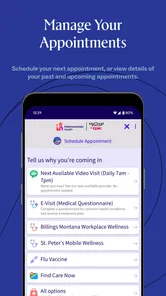
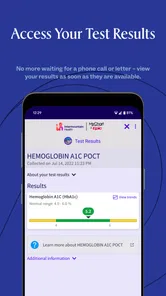
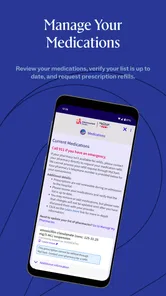
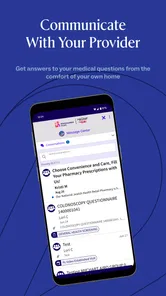
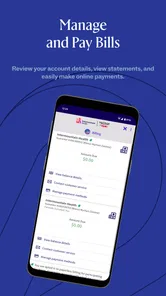
The Intermountain Health app is designed to help patients manage many parts of their healthcare in one place. After signing in, you can typically view medical information, review test results, request or manage appointments, communicate with care teams, check medications, and access billing details. Available features may vary depending on your location, provider, and the type of care you receive through Intermountain Health.
How do I sign in or create an Intermountain Health account?
You generally sign in using your Intermountain Health patient portal credentials, rather than creating a completely separate account only for the app. New users may be able to register with personal information and an activation process provided by Intermountain Health. Make sure your details match your medical records, and use the official password-recovery option if you cannot remember your login information.
Can I use the app to schedule appointments and contact my doctor?
In many cases, the app lets eligible patients search for available services, request or schedule appointments, and review upcoming visits. It may also provide secure messaging with a care team, although response times and messaging access can differ by department and provider. The app should not be used for emergencies; call emergency services or seek immediate medical attention when urgent symptoms occur.
Pros
- Easy access to appointments
- test results
- and medical records in one app.
- Secure messaging makes it convenient to contact participating care teams.
- Prescription refill requests and medication details are easy to manage.
- Digital billing tools help users review balances and payment information.
- Health reminders and notifications can support better care organization.
Cons
- Many features are limited to Intermountain Health patients and facilities.
- Some functions may require a verified account or additional identity checks.
- Appointment availability depends on location
- specialty
- and provider schedules.
- Notifications may become excessive if several health services are enabled.
- The app is less useful for users who receive care outside the network.











