

Instant Voice Translate
- 3.37K
- 4.8
- Installs
- 10.00M
- Price
- Free

Screenshots


Analysis by Reviewed
When I’m trying to ask a quick question in another language, a dependable connection can make the difference between an easy exchange and an awkward pause. Instant Voice Translate is built for face-to-face communication, with voice, image, and text translation in one app. I find that combination most useful when I treat it as a practical aid rather than a substitute for careful listening or a human interpreter.
Getting ready before the conversation
I’d make a small habit of opening the app while I still have a moment to spare, rather than waiting until I’m standing at a service desk with a queue behind me. Check that the phone is online, choose the likely way to communicate, and think through the essential question first. This preparation does not remove network delays, but it can keep a short exchange from turning into a scramble through menus.
It is also worth considering the other person’s comfort. In a quick interaction, I’d explain with a gesture that I’m using a translation app, then offer the phone only when showing text or an image is useful. That makes the device part of the conversation without letting it dominate. For longer exchanges, taking turns and pausing between thoughts gives the app a clearer chance to process each part.
When a quick translation is not enough
A translation tool is most useful when the goal is clear and the wording can be kept simple. Asking where a bus stop is, checking whether a shop is open, or confirming a basic preference are reasonable tasks. If a reply affects a payment, a medical decision, a legal obligation, or an important reservation, I’d use the app only to establish the rough meaning and then seek confirmation through a more dependable channel.
One practical trick is to separate a complicated request into smaller questions. Instead of asking about a route, a transfer, and the final destination all at once, I’d ask one thing, wait, and verify the answer before moving on. That takes a little longer, but it makes misunderstandings easier to spot and correct before they create a real problem.
Where the network becomes part of the conversation
Because translation happens as you interact with the app, connectivity is an important part of planning. I’d open it before approaching someone, check that the phone can get online, and avoid waiting until I’m already at a counter or in a hurry to discover that the connection is unreliable. A brief pause while a translation is processed can feel much longer when another person is waiting.
For a simple exchange—asking which direction to walk, confirming a meal choice, or explaining a basic need—the conversational format can be less cumbersome than passing a phone back and forth to type every sentence. But if a message matters, I would keep it short and ask the other person to confirm the key detail. Translation can smooth an interaction without guaranteeing that every nuance, name, or unfamiliar phrase comes through exactly as intended.
More From Our News Desk

 Prime Video
Switching to Prime Video: What Changes in Your Viewing Routine
Prime Video can make a compelling second home for streaming, but switching means learning a different catalog, rental layer, and route from browsing to playback.

 Universal TV Remote Control
Universal TV Remote Control Works Best as a Reliable Backup
A phone remote earns its place through quick setup and reliable habits. Here is how to get more from Universal TV Remote Control—and where its limits show.

 Weather - By Xiaomi
Weather by Xiaomi Review: Clear at a Glance, Less Clear Up Close
Xiaomi’s weather app makes everyday forecasts quick to scan, but its calm surface can leave useful details and recovery paths harder to find than they should be.

 X
XX Under Pressure: Can It Recover When Posting Goes Wrong?
A resilience-focused review of X, examining setup, mistaken posts, interruptions, weak connections, and the gaps that matter when recovery needs to be dependable.

 Clash of Clans
Clash of Clans Is Won Between the Battles
Its raids are quick; its community is a long-term project of coordination, teaching, rivalry, and shared responsibility—with all the friction that entails.

 Android Auto
Android Auto Makes the Case for Quieter Car Software
The car interface is no longer judged by how much it can do, but by how quietly it helps. Android Auto shows what drivers now expect—and what still gets in the way.
Latest News



Breaking the Language Barrier
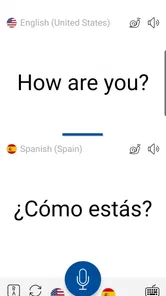
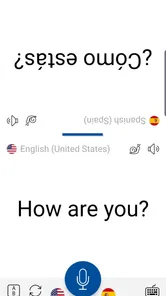
Stepping into a new country or even interacting with someone who speaks a different language can sometimes feel daunting. That's where Instant Voice Translate comes into play. This handy app allows you to translate conversations in real-time, making it a lifesaver when you're trying to communicate across languages. It's like having a personal translator in your pocket!
Features That Stand Out
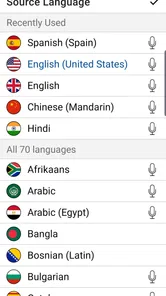
So, what makes this app special, you ask? First off, the real-time voice translation feature is incredibly smooth. During my test, I engaged in conversations in Spanish and Mandarin, and the app delivered translations swiftly and accurately. It supports a wide range of languages, which is a big plus if you’re a frequent traveler or someone who loves engaging with diverse cultures.
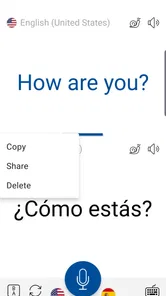
Another feature that caught my eye is the text translation capability. You can simply type or speak into the app, and it will translate the text for you. This is particularly useful for translating signs, menus, or any written material you encounter on your travels.
A useful travel workflow
On a travel day, I’d use voice translation for a quick conversation, then switch to text when I need to show a short, prepared question. That change of approach is a small but useful way to manage a noisy station or a busy shop: speaking is convenient when both people can take turns, while typed text gives the other person something visible to read. The image translation option also gives the app another role when I’m dealing with printed material, rather than trying to read every unfamiliar line aloud.
For anything involving a booking, an address, or a dietary restriction, I’d enter the essential wording as simply as possible and check the result before relying on it. I’d also keep important details—such as a destination name or reservation information—written somewhere separate. That is not a knock on the app; it is a sensible backup when a small translation error could send a trip in the wrong direction.
Using it on the move
One of the things I appreciated most about Instant Voice Translate is its intuitive design. The user interface is clean and easy to navigate, even for those who aren’t tech-savvy. The main screen features large icons and clear instructions, making it straightforward to switch between voice and text translation modes.
For someone moving between a hotel lobby, a taxi, and a restaurant, reducing the number of steps needed to choose a translation method matters. I would still get the app ready before starting a conversation, keep the phone close enough for clear speech, and take turns rather than letting several people talk over one another. That simple routine gives voice recognition a better chance than trying to translate a rapid group discussion.
What to do when a translation misses
While the app is pretty solid, I did notice a few quirks. Occasionally, the voice recognition can be a bit off, especially with strong accents or in noisy environments. However, this is something that can be improved with updates, and it didn’t detract significantly from the overall experience.
If a spoken phrase comes back strangely, I wouldn’t repeat it louder or faster. I’d slow down, use shorter wording, or switch to typing so the message is easier to inspect. If the other person looks uncertain, asking them to restate the important point in their own words is safer than assuming the translation was right. These small recovery steps are especially helpful when the surroundings are loud or the conversation includes unfamiliar place names.
Also, while the app supports a plethora of languages, some of the less common ones might not be as accurate. It's something to keep in mind if you’re venturing into more remote areas.
Handling a shaky connection in real time
If a translation stalls or the network drops at an inconvenient moment, I’d stop and reset the exchange rather than keep speaking into the phone and hope it catches up. The other person may not know whether the app is still working, so a brief explanation and a simpler fallback—gestures, a written phrase, or a map already open on the phone—can keep the interaction moving. I would not count on a previously translated phrase remaining available if the connection changes.
A realistic example is arriving at a station and needing to ask whether a particular platform serves the right destination. I’d get online before approaching staff, ask one concise question, and check that the place name is written or spoken as intended. If the answer is unclear, I’d show the destination name and ask a yes-or-no follow-up. This is more reliable than trying to translate a long itinerary in a noisy concourse.
Who will get the most from it
I’d recommend it to travelers who regularly need short, practical exchanges and want voice, image, and text tools together. It can also help someone hosting a visitor or communicating with a neighbor when neither person is comfortable in the other’s language. For a long, sensitive, legal, or medical discussion, though, I’d choose a qualified interpreter or another more deliberate option; convenience is not the same as certainty.
It may be less appealing if your routine depends on using a translator where mobile service is unreliable, or if you mainly want a careful word-by-word study tool. Someone who only needs to look up an occasional phrase may be happier with a dictionary, while a learner may prefer an app built around vocabulary practice and explanations. Instant Voice Translate is strongest when the immediate goal is to get two people through a practical exchange, not to teach the language or settle a complex question.
How it fits beside familiar alternatives
Compared with a basic dictionary, this app is better suited to back-and-forth communication and translating material you encounter, while a dictionary can be preferable when you want to check one word carefully or study how it is used. A general translation tool may be enough for occasional typed phrases, but the face-to-face focus here makes voice interaction a more natural starting point. I’d choose based on the task, not assume one tool is best for every situation.
There is also a trade-off between speed and control. Voice is convenient when both people are ready to speak, but typing lets me review the wording before showing it. Image translation can be helpful for a printed menu or sign, yet it is not a replacement for asking a person to clarify a handwritten note or an ambiguous instruction. Switching modes deliberately is more useful than insisting on voice for every situation.
Cost, access, and everyday practicality
The app is free to install, with in-app purchases ranging from $1.99 to $99.99 per item, so I’d check the options in the app before deciding whether any paid extras are worthwhile for my needs. Erudite is the developer. It sits in the travel and local category, has an Everyone age rating, and its 4.8 average from around 295,000 ratings suggests it has found a broad audience. It has passed 10 million installs.
It was released on February 21, 2020, and version 12.0.0 supports Android 6.0 and later. Those details make it accessible to many Android users, but my main practical advice is still to prepare before leaving reliable Wi-Fi: open the app, make sure the phone is connected, and decide whether voice, text, or image translation suits the next task. I would not plan around offline use; staying connected is the safer assumption.
Using data thoughtfully while traveling
If I’m watching mobile data, I’d reserve the app for exchanges where translation genuinely helps and use Wi-Fi to get set up when it is convenient. I’d also avoid leaving a live conversation running while deciding what to say next; preparing a short sentence first makes the interaction clearer and avoids unnecessary retries. Since connectivity is central to the experience, it is sensible to check my own plan and signal before depending on it abroad, rather than assuming every network will behave the same way.
That preparation has a second benefit: it gives me a chance to decide what information I am comfortable entering. For a routine question, a short phrase is usually enough; there is no need to include extra personal details just to make the request understandable. I’d keep sensitive information out of casual translation exchanges and use an appropriate, more secure channel when the subject calls for it.
My connectivity verdict
In conclusion, Instant Voice Translate is a powerful tool for anyone looking to break down language barriers with ease. Whether you’re traveling for business or pleasure, this app can help make your interactions seamless and enjoyable. Give it a try and see how it transforms your communication experience!
My recommendation comes with one practical condition: treat a stable connection as part of the setup, and keep a simpler fallback for urgent details. When the network is available and the conversation is short, having voice, text, and image translation together is genuinely handy. If you need guaranteed precision, expect to work without a connection, or are handling high-stakes communication, I’d use a different solution. For everyday travel questions and approachable face-to-face exchanges, it’s a useful companion to have ready.
Instant Voice Translate Frequently Asked Questions
Is Instant Voice Translate suitable for using while traveling abroad?
Instant Voice Translate is designed for face-to-face chat and belongs to the Travel & Local category, making it a natural option to consider for conversations during a trip. Its voice, image, and text translation tools are intended to help bridge language gaps in everyday situations. As with any translation app, review the translated message before relying on it for important details.
Can I use Instant Voice Translate for both spoken and written communication?
Yes. Instant Voice Translate is described as an AI-powered translator for voice, images, and text, so it is intended for more than spoken exchanges alone. That range can be useful when you want to communicate face to face or work with written content. The available modes make it worth considering if your translation needs vary from one situation to another.
Who develops Instant Voice Translate, and what kind of app is it?
Instant Voice Translate is developed by Erudite and is listed in the Travel & Local category. It is designed for practical conversations rather than just looking up isolated words: its description presents it as an AI-powered voice, image, and text translator for face-to-face chat. That makes it relevant to travelers and anyone who needs help communicating across languages while on the move.
Is Instant Voice Translate free to download, and are there purchases inside the app?
The app is free to download, so you can try it without paying an upfront price. It also offers in-app purchases, with listed items ranging from $1.99 to $99.99 each, so check the purchase details shown on your device before buying anything. The presence of optional purchases means the free download should not be taken to mean every feature or option is free.
What is Instant Voice Translate and how does it work?
Instant Voice Translate is a versatile translation app that allows users to translate spoken language in real-time. Utilizing advanced speech recognition technology, the app picks up spoken words, translates them to the desired language, and vocalizes the translation back to the user. This makes it ideal for travelers, business professionals, and language learners who need quick and accurate translations.
Pros
- Supports multiple languages
- Fast and accurate translation
- User-friendly interface
- Works offline
- Voice input available
Cons
- Limited free version
- Occasional ads
- Requires internet for updates
- May struggle with rare dialects
- Subscription needed for premium features











