

Instacart Shopper Rewards
- 141.00
- 4.2
- Installs
- 100.00K
- Price
- Free

Screenshots
Analysis by Reviewed
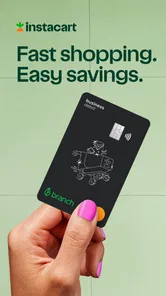
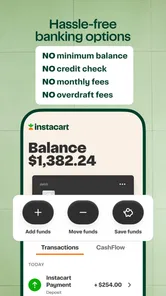
Instacart Shopper Rewards is a finance app built around the debit card experience for Instacart shoppers. I approached it less like a general banking app and more like a practical money tool for people who earn through shopping work and want a dedicated way to manage related spending. That distinction matters: its usefulness depends heavily on whether your income and expenses are connected to Instacart shopping.
The app is developed by Branch Messenger, is free to use, and carries an Everyone age rating. Its store summary points to a new debit card, while the short description identifies the Instacart Shopper focus directly. In everyday terms, this is not an all-purpose replacement for every financial service you already use. It is a focused companion for shoppers who want their work-related money handled in one place.
How I would use it during a normal shopping week
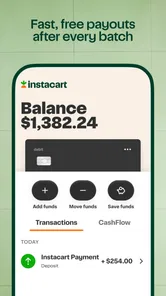
My baseline workflow would be simple. I would open the app when I need to check the card-related side of my shopper finances, review the available balance before heading out, and keep the app as the reference point for money connected with the work. I would not treat it as a budgeting solution for my entire household unless its account tools genuinely fit that purpose for me.
A realistic example is a shopper preparing for a busy weekend. Before leaving home, the app can serve as the place to check whether the funds associated with the card are ready for the day. After finishing work, I would review the activity and separate work spending from personal purchases in my own records. That habit is more valuable than repeatedly opening the app without a purpose, because it turns the card into part of a repeatable routine.
The important practical question is not simply whether the app is free. It is whether a dedicated shopper-oriented card makes your daily money flow easier. If you already use a bank account that handles incoming money, spending, alerts, and record keeping exactly as you like, adding another financial app may create extra work. If your current arrangement feels scattered, the focused design may be worthwhile.
I also like the fact that the product identity is clear. Many finance apps try to cover banking, investing, credit, budgeting, and payments at once. Instacart Shopper Rewards has a narrower purpose, which can make the first decision easier: shoppers can ask whether it improves their work routine instead of trying to learn an oversized financial dashboard.
What to check before making it part of your routine
Before relying on the app, I would confirm that my phone meets the minimum operating-system requirement and that the application is behaving correctly after installation. The current version is 2026.8.2, and the minimum OS is 10. That is useful to know before a workday, because a device that cannot install or update the app is a poor place to manage money in a hurry.
More From Our News Desk

 Instagram
Instagram’s Power Comes From Its Place in Your Phone
A close look at how Instagram turns Meta’s reach, recommendation systems and everyday camera habits into durable platform power—and what that costs users.

 Gmail
GmailGmail in a Busy Inbox: Who Benefits Most?
From first account to crowded workday, Gmail earns its place through dependable search and flexible sorting—but its best fit depends on how much inbox maintenance you can tolerate.

 Prime Video
Switching to Prime Video: What Changes in Your Viewing Routine
Prime Video can make a compelling second home for streaming, but switching means learning a different catalog, rental layer, and route from browsing to playback.

 Universal TV Remote Control
Universal TV Remote Control Works Best as a Reliable Backup
A phone remote earns its place through quick setup and reliable habits. Here is how to get more from Universal TV Remote Control—and where its limits show.

 Weather - By Xiaomi
Weather by Xiaomi Review: Clear at a Glance, Less Clear Up Close
Xiaomi’s weather app makes everyday forecasts quick to scan, but its calm surface can leave useful details and recovery paths harder to find than they should be.

 X
XX Under Pressure: Can It Recover When Posting Goes Wrong?
A resilience-focused review of X, examining setup, mistaken posts, interruptions, weak connections, and the gaps that matter when recovery needs to be dependable.
Latest News



I would also decide in advance what the card is for. My preferred approach would be to keep its use closely tied to shopper income or shopper-related spending, while leaving long-term savings and broader household bills in the account I already understand. This separation makes transactions easier to recognize and reduces the chance of confusing work activity with personal spending.
Another sensible preparation step is to establish a checking habit at a fixed point in the day. For example, I might review the app after finishing a batch of work rather than constantly checking it between tasks. That protects attention while shopping and still gives me a regular opportunity to notice activity that needs follow-up.
The strongest setup is a small, repeatable routine rather than constant monitoring. A finance app becomes useful when it reduces uncertainty at the moments that matter: before spending, after earning, and when reviewing the week. Opening it dozens of times without a clear reason does not automatically create better control.
Settings and habits worth checking
I would begin with the app’s available account and card settings, then make sure the contact details and device access I use for the account are current. Financial apps are especially sensitive to outdated information, so this is not the place to leave an old phone number or an email address I rarely open. Even when the interface is straightforward, accurate account details make recovery and routine use less stressful.
I would also look for notification controls and adjust them to match my working pattern. If transaction alerts are available, I would want them to be useful rather than noisy. A shopper who is making many legitimate purchases may need a different notification balance from someone who uses the card only occasionally. The goal is to notice activity that deserves attention without training myself to dismiss every alert.
One useful habit is to review the card activity at the same time as the shopper records I already keep. I would compare the app’s activity with my own notes, receipts, or work log rather than relying on memory. This does not require a complicated spreadsheet. A short daily note about the work period and a weekly review can make unfamiliar transactions much easier to identify.
I would avoid changing several account habits at once. If I started using the card, altered notification preferences, and moved all my financial activity into the app on the same day, it would be harder to tell what is helping. A gradual setup is safer: first learn the balance and activity view, then decide whether the card deserves a larger role in the routine.
For shoppers sharing a household budget, I would be especially careful about communication. A dedicated work card can clarify which money belongs to the shopper workflow, but it can also create another balance to remember. I would agree on a simple rule for transferring or recording money rather than assuming that a separate app automatically makes the household budget clearer.
Faster patterns for experienced shoppers
Experienced users usually gain speed from consistency, not from hidden tricks. My preferred shortcut would be to place the app where it is easy to reach but not so prominent that I open it accidentally throughout the day. A predictable location on the phone, combined with a fixed review time, removes small bits of friction that add up over a week.
I would also use a three-part check: balance before work, activity after work, and a weekly reconciliation. The first check answers whether I am ready to use the card. The second catches confusion while the day is still fresh. The third helps me see whether the card is genuinely simplifying my finances or merely adding another account to maintain.
That pattern is particularly helpful for shoppers whose schedules change. On a quiet day, the review may take only a moment. On a busy day, the activity check gives me a place to investigate anything that does not match my memory. The value is not in spending more time inside the app; it is in checking at moments when the information can still guide a decision.
Another advanced but realistic habit is to give every transaction a mental category before the week ends: work-related, personal, or needs review. The app may show the activity, but I would not expect it to replace my own judgment about taxes, mileage, household budgeting, or business records. Keeping those distinctions in my own system prevents the card from becoming a black box.
I would also keep a backup way to access important financial information. That does not mean duplicating every action. It means retaining the records or account details I need for planning, especially if I am away from my usual phone or cannot use the app temporarily. A focused finance app can be convenient without being the only place where I understand my money.
One trade-off deserves attention: a specialized workflow can be faster precisely because it is narrower. That is an advantage for Instacart shoppers, but it may feel restrictive if I want one app to manage unrelated accounts, investments, detailed spending categories, or a broader financial plan. In that situation, a conventional bank app or budgeting tool may remain the better main dashboard, with this app used only for its shopper-specific role.
Where the focused design reaches its limits
The biggest limitation is audience fit. Someone who does not shop for Instacart has little reason to choose an app whose store description is specifically aimed at Instacart shoppers. Even if the card interface looks familiar, the central value comes from the connection to that work. I would skip it if I wanted a general-purpose finance app with no shopper-related need.
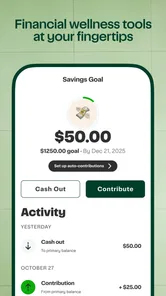
I would also avoid assuming that a debit card solves broader money problems. It can give spending a clearer home, but it does not automatically create an emergency fund, organize tax obligations, or explain whether a work expense is financially sensible. Those decisions still require a budget and personal records. The app can support a workflow; it should not be mistaken for the workflow itself.
Another limit is the risk of account fragmentation. Every additional financial service brings another balance, login, set of notifications, and review habit. For a shopper who already has a reliable bank account and rarely feels confused about work income, the benefit may not justify that extra layer. The right comparison is not “free versus paid”; it is “simpler routine versus another account to maintain.”
I would be cautious about making the card my only spending option during a demanding workday. A prudent shopper should know how to handle a temporary access problem, a phone issue, or a transaction that needs clarification. Keeping a modest alternative payment method and retaining essential records is a sensible resilience habit for any work-related finance setup.
The app’s public reception is encouraging without being a reason to stop evaluating it personally. It has a 4.3 average from around 549 ratings, with roughly 140 written reviews, and has passed the 100K-plus install mark. Those figures suggest that many people are willing to try it, but they cannot tell me whether the card fits my particular earnings pattern, phone, or record-keeping habits.
That is why I would test it during a normal work period before reorganizing my finances around it. I would watch how quickly I can find the information I need, whether the card fits my spending routine, and whether the separate account makes weekly reconciliation clearer. If those answers are positive, I would expand its role gradually rather than moving everything immediately.
Who should use it, and who should choose something else
I see the best match in an active Instacart shopper who wants a dedicated debit-card experience and prefers to keep shopper-related money separate from a main personal account. It can also suit someone who benefits from a simple daily check instead of a large banking platform filled with tools they never use.
I would recommend looking elsewhere if your priority is a complete financial command center. A traditional bank app is likely a better fit for someone who wants multiple account types, a long-established household banking relationship, or a single place for all personal bills. A dedicated budgeting app may be stronger for detailed category planning and long-term spending analysis. The choice depends on whether separation or consolidation is more useful to you.
I would also skip it if I am unwilling to maintain a second financial routine. The card is not a magic shortcut. It works best when I check activity, keep my records organized, and understand what money I am assigning to it. Without those habits, the app may simply make my finances look more organized while leaving the underlying confusion untouched.
My verdict after looking at the whole workflow
Instacart Shopper Rewards is most convincing as a focused work-money companion, not as a universal banking replacement. The free entry point, shopper-specific purpose, and debit-card emphasis make sense for people who want their Instacart activity handled separately and checked regularly. I appreciate that the concept is easy to understand: the app has a job, and shoppers can decide whether that job matches their needs.
My recommendation would be to start with a narrow routine. Check the available balance before work, review activity afterward, reconcile it with personal records once a week, and keep a backup plan for access or payment problems. That approach lets the app prove its value without forcing a complete financial overhaul.
The developer, Branch Messenger, positions this experience around the Instacart shopper rather than the general banking customer. For the right user, that specialization can remove distractions and make work-related money easier to follow. For everyone else, the same specialization is the reason to look at a conventional bank or budgeting alternative instead.
Overall, I would recommend trying it if you actively shop for Instacart and want a dedicated debit-card workflow. I would not recommend adopting it merely because it is free or because a separate finance app sounds tidy. Its real strength appears when it becomes part of a disciplined, repeatable shopping routine; outside that context, the extra account may offer less value than the banking tools you already use.
Instacart Shopper Rewards Frequently Asked Questions
Is Instacart Shopper Rewards a separate app from the Instacart Shopper app?
Instacart Shopper Rewards is a finance app from Branch Messenger, and its short description identifies it with Instacart Shopper. Before downloading, check that you are selecting the app you intend to use and that it is appropriate for your needs. The app is free, and its content rating is Everyone.
What should I check before installing Instacart Shopper Rewards?
Check your device’s operating system and the app’s current compatibility requirements before downloading. The app is intended for shoppers interested in Instacart-related rewards, so consider whether that matches what you need. Its store summary highlights a new debit card, which may help you decide whether to explore the app’s features and terms after installation.
What is Instacart Shopper Rewards?
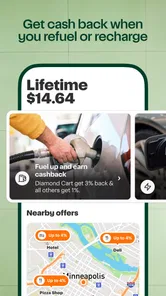
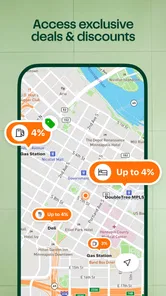
Instacart Shopper Rewards is a benefits program designed for eligible Instacart shoppers. Depending on the current offer and your location, it may provide rewards, discounts, cashback, or other perks for completing shopping and delivery activity. The exact benefits can change over time, so shoppers should review the terms shown in the app before relying on a particular reward or promotion.
Who can participate in Instacart Shopper Rewards?
Eligibility usually depends on factors such as your shopper account status, region, activity, and the specific promotion being offered. Some rewards may be available only to active shoppers, while others can require a minimum number of batches, deliveries, or earnings during a qualifying period. Open the Shopper app and check the Rewards or promotions section to confirm whether your account qualifies.
How do I earn rewards through the program?
The way rewards are earned depends on the current program rules. You may need to complete qualifying batches, meet delivery or activity requirements, or use a participating partner offer. Carefully read the promotion details, including the start and end dates, required actions, exclusions, and redemption instructions. Not every batch or order will necessarily count toward a specific reward.
Pros
- Rewards can add extra value to regular shopping activity.
- Useful for shoppers who already use Instacart frequently.
- Offers may help reduce costs on eligible purchases.
- Simple concept that is easy to understand and track.
- Can provide occasional perks beyond standard shopper earnings.
Cons
- Reward availability may vary by location and shopper eligibility.
- Some offers can include restrictions or minimum purchase requirements.
- Benefits may change without much notice.
- Not every order or activity necessarily qualifies for rewards.
- Rewards may have expiration dates or limited redemption options.












