

Inspired Minds: Activity Ideas
- 17.00
- 3.8
- Installs
- 50.00K
- Price
- Free

Screenshots
Analysis by Reviewed
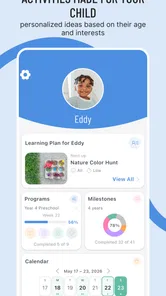
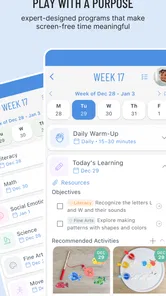
When I look for a parenting app, I am usually not searching for another catalog of things to buy or another screen that keeps a child busy. I want something that helps me turn an ordinary afternoon into a chance to make, imagine, and explore. That is the role Inspired Minds: Activity Ideas tries to fill. It is a free parenting app from I Teach Tiny Humans, LLC, built around educational inspiration for parents who want to encourage creativity in their children.
My overall impression is that its value depends less on constant use and more on what happens after I open it. The app is most useful as a prompt: it helps me move from “What can we do today?” to a practical starting point. That sounds simple, but it matters when a child is restless, the weather keeps everyone indoors, or I want an activity that feels more intentional than handing over a phone.
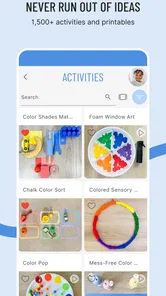
The central capability is the collection of activity ideas. Rather than treating creativity as a special event that requires a large preparation session, the app points parents toward ways to get children thinking and making. I found that approach more useful than a general parenting feed because it gives me a reason to open the app in a specific moment: I need an idea, I have limited time, and I want my child to participate rather than passively watch.
Turning a quick idea into a real creative activity
I focus this section on the small decisions that help an idea survive the jump from a phone screen to family time: choosing a prompt that fits the child’s mood, available materials, and the time you have. I also consider how a parent can keep the device from becoming the activity itself, which leads into a closer look at what the app is best at.
The app’s strongest capability is giving parents a starting point
The most important thing to understand is that this is an educational resource for parents, not a replacement for a parent-led activity. The child is not necessarily the main person navigating the app. I use it as a planning tool, then put the device aside and guide the experience in the real world.
That distinction changes how I judge it. A good idea is not automatically a good family activity. It has to fit the child’s mood, the available time, the space in the home, and the materials already nearby. The useful part of this app is the spark it provides. The parent still decides how far to take it, how much help to give, and when to stop.
I also appreciate the creative emphasis. Many children’s apps measure success by how long a child remains engaged with the screen. Here, the better outcome is often the opposite: the app should lead to drawing, building, pretending, talking, experimenting, or making something that did not exist before. That makes it a practical option for parents who want digital tools to support offline play instead of replacing it.
More From Our News Desk

 Gmail
GmailGmail in a Busy Inbox: Who Benefits Most?
From first account to crowded workday, Gmail earns its place through dependable search and flexible sorting—but its best fit depends on how much inbox maintenance you can tolerate.

 Prime Video
Switching to Prime Video: What Changes in Your Viewing Routine
Prime Video can make a compelling second home for streaming, but switching means learning a different catalog, rental layer, and route from browsing to playback.

 Universal TV Remote Control
Universal TV Remote Control Works Best as a Reliable Backup
A phone remote earns its place through quick setup and reliable habits. Here is how to get more from Universal TV Remote Control—and where its limits show.

 Weather - By Xiaomi
Weather by Xiaomi Review: Clear at a Glance, Less Clear Up Close
Xiaomi’s weather app makes everyday forecasts quick to scan, but its calm surface can leave useful details and recovery paths harder to find than they should be.

 X
XX Under Pressure: Can It Recover When Posting Goes Wrong?
A resilience-focused review of X, examining setup, mistaken posts, interruptions, weak connections, and the gaps that matter when recovery needs to be dependable.

 Clash of Clans
Clash of Clans Is Won Between the Battles
Its raids are quick; its community is a long-term project of coordination, teaching, rivalry, and shared responsibility—with all the friction that entails.
Latest News



In my experience, the best way to use it is not to browse endlessly. I open it with a small goal, choose an idea that matches the moment, and adapt it. If my child is tired, I simplify the activity. If the child is excited, I add a challenge or ask for a different version. This turns the app from a passive list into a flexible planning companion.
What happens during an ordinary afternoon
Imagine a rainy afternoon after school. My child is moving between toys without settling on anything, and I have about twenty minutes before dinner preparation starts. Instead of searching the wider internet and sorting through elaborate projects, I can use the app to find a creative direction. I might choose an idea that involves drawing, storytelling, constructing, or transforming familiar objects.
The first practical step is to check whether the activity fits the time available. If it looks too involved, I do not treat that as a failure. I reduce it to one small part. For example, a longer creative project can become a quick design challenge, a short story prompt, or a simple question such as “What else could this object become?” The app supplies the opening; I control the size of the activity.
The second step is to let the child influence the result. I avoid presenting the idea as an assignment with one correct answer. Instead, I ask the child to choose colors, characters, materials, or rules. This is where the creativity focus becomes meaningful. An activity can look educational on paper but feel restrictive if the adult dictates every detail.
The third step is to leave room for an unexpected outcome. If a drawing becomes a story, or a building project turns into pretend play, I follow that change rather than forcing the original plan. The app works best when I use its suggestions as invitations, not instructions carved in stone.
A useful habit is to prepare a small “activity shelf” at home. I keep basic materials together so that an idea can begin quickly instead of becoming a shopping project. The app becomes more effective when the barrier between reading an idea and trying it is low. This is one of the less obvious trade-offs: the quality of the experience depends partly on how ready the household is to act on a suggestion.
A workflow that prevents browsing from becoming the activity
One mistake I can easily make with any idea app is spending longer choosing than doing. To avoid that, I use a three-part routine. First, I select one idea that seems appropriate. Second, I give myself a short preparation limit and use only what is already available. Third, I begin before I feel that the setup is perfect.
This workflow is especially helpful with younger children, who may lose interest while an adult gathers supplies or reads through several options. It also keeps the app in its proper place. The purpose is not to create a flawless craft session. The purpose is to help a parent make a creative moment happen.
I also recommend saving mental notes about what your child actually enjoys. A child who avoids drawing may love inventing characters or building settings. Another child may prefer sorting, decorating, or explaining how something works. After using a few ideas, I can identify patterns and adapt future activities accordingly. The app is more valuable when it helps me understand my child’s interests instead of making me repeat activities that look appealing but do not connect.
For siblings, I would modify the same idea rather than searching for completely separate activities. One child can create the setting, another can invent the characters, and a younger child can choose colors or materials. This reduces competition and gives everyone a role. It is also a practical way to handle different abilities without making the activity feel like a lesson for one child and a distraction for another.
Where it fits better than usual alternatives
The usual alternative is a broad web search. That can produce more variety, but it also brings clutter: complicated projects, unclear suitability, commercial results, and ideas that require materials I do not have. A focused parenting app is easier to approach when I want inspiration without opening several browser tabs.
Another alternative is a video platform. Videos can demonstrate a project clearly, but they can also shift the child’s role from creator to viewer. I find an activity-focused resource better when my goal is participation and conversation. A video may be the stronger choice when I need to learn a precise technique, while this app is more appropriate when I need a flexible prompt that can be interpreted in different ways.
Printed activity books have their own advantage: they do not depend on a phone once the book is open, and they can become a familiar household reference. However, an app is easier to carry and update as part of my existing routine. I would choose a book for a child who enjoys browsing physical pages independently, and I would choose this app when I want quick inspiration while planning around the day we are actually having.
It also differs from early-learning apps that teach through quizzes, letters, numbers, or structured exercises. Those tools may be better when I have a specific academic goal. Inspired Minds is a better fit when I want to support open-ended thinking, imagination, and parent-child interaction. The trade-off is that the result is less measurable. I may not finish with a score or a completed lesson, but I may get a conversation, a new idea, or a child who feels proud of making something.
The most useful scenario is a low-preparation family moment
I think the app is at its best for families who want to make ordinary gaps in the day more creative. A weekend morning, a waiting period before an appointment, a quiet hour after school, or an indoor day can all benefit from one well-chosen prompt. The activity does not need to become a major project. In fact, the app is more realistic when I use it for small moments that are easy to repeat.
For a parent with limited energy, that matters. I do not always want to lead a complicated craft, clean a large workspace, or manage a long sequence of instructions. A simple idea can still be worthwhile if it gives my child a chance to make choices. I can ask the child to change one part, explain one decision, or invent an alternative ending. Those small additions often create more engagement than a polished project copied exactly from a model.
It is also useful during transitions. If my child resists moving from free play to dinner, I can introduce a short creative challenge with a clear stopping point. If bedtime is approaching, I can turn an idea into a quiet storytelling or imagination exercise rather than starting something messy. The key is to match the activity’s scale to the transition, not to force the most elaborate version of the suggestion.
For travel, I would be selective. The app can provide inspiration, but I would prepare the materials before leaving rather than assume I can improvise everything on the spot. A small notebook, pencils, and a few reusable objects can make many creative prompts portable. This is another practical insight: the app becomes much more travel-friendly when I treat it as a source of prompts, not as something the child must continuously use on the device.
Where the experience can feel limited
The biggest limitation is that inspiration is not the same as a complete plan. Some parents will want exact steps, preparation time, material lists, or a clearly defined learning objective before beginning. If that is what I need, a structured craft platform, printable curriculum, or teacher-created resource may serve me better.
There is also a parent-effort cost. The app can suggest an activity, but I still need to interpret it, gather what is practical, and provide encouragement. On a very busy day, even a good idea can feel like one more task. I would not install it expecting the app to occupy a child independently for a long period. Its strongest results come when an adult is willing to participate at least briefly.
Open-ended creativity can create a second kind of friction: children do not always respond to the first idea. If my child says no, I do not assume the app has failed. I change the entry point. I might let the child choose between two versions, make the activity sillier, or connect it to a current interest. Still, parents who prefer predictable engagement may find this less immediately satisfying than an interactive game with instant feedback.
The free price makes trying it easy, but in-app purchases range from around seven dollars to about fifty dollars per item. I would pay attention during the decision process and avoid assuming that every part of the experience is included simply because the app itself is free. For a family testing the concept, I would begin with the no-cost experience, see whether the ideas fit our routine, and only then consider whether an optional purchase offers enough added value.
The age rating is Everyone, which makes the app broadly approachable for families. That does not mean every idea will suit every child equally. A toddler, preschooler, and older child may need different levels of explanation and supervision. I would preview an activity before presenting it, especially when materials, movement, or a child’s individual needs are involved.
What the app’s store presence tells me about adoption
The app has passed fifty thousand installs and holds a 3.8 average from around eighty-six ratings, with about seventeen written reviews. I read that combination as a sign of a useful but not universally loved tool: enough families have tried it to make it visible, while the rating suggests that expectations and personal fit matter.
I would not use the rating alone to decide. For an app like this, satisfaction depends heavily on whether I want open-ended prompts or fully prepared lessons. A parent who enjoys adapting activities may find it genuinely helpful, while someone seeking a polished, guided experience may judge it more harshly. The written feedback is worth considering as a way to understand those different expectations, but my own routine would be the deciding factor.
Device compatibility and keeping the app practical
The current version is 5.9.0, and it supports Android 7.0 and later. That makes it accessible on many older Android devices, which is useful if I keep a previous phone or tablet for family tools. I would still use a device that is comfortable to handle and easy to put down, because the app’s purpose is to move attention away from the screen.
I would also avoid handing over the device as the default first step. I prefer to review the idea myself, explain it in my own words, and then invite the child to begin with physical materials. This keeps the parent in control of the pacing and reduces the chance that the activity turns into ordinary screen browsing.
Who gets the most from this parenting resource
I think it is a strong match for parents who regularly hear “I’m bored,” want alternatives to passive entertainment, and do not need every activity to have a fixed outcome. It is particularly suitable for adults who enjoy joining in, asking questions, and allowing a child’s version to look different from the original suggestion.
It can also help grandparents, babysitters, and caregivers who want a quick way to plan a shared activity without relying on a favorite television show or a complicated online search. The prompt-based approach gives them a starting point while leaving enough flexibility to fit the child and the setting.
On the other hand, I would skip it if I wanted a self-contained learning program, a detailed developmental curriculum, or a game that a child can operate independently for long stretches. I would also look elsewhere if I needed specialized guidance for a particular educational or therapeutic goal. In those situations, a professional resource or a more structured app would be the safer and more precise choice.
For families with several children, the app makes the most sense when the adult is prepared to adjust the same idea for different ages. It is not a magic solution for sibling disagreements, but it can provide a shared framework. Giving each child a different responsibility is often more effective than trying to make everyone produce the same result.
My final view after using it as a planning tool
Inspired Minds: Activity Ideas succeeds when I treat it as a creative nudge rather than a digital babysitter. Its real effect is not the time spent inside the app; it is the quality of the interaction that follows. A short prompt can lead to a drawing, a story, a construction, or a conversation, but only if the parent adapts it to the child and the moment.
I like that the app points toward creativity instead of rewarding passive consumption. I also like that the free entry point makes it simple to test whether this style of parenting resource fits my household. The friction is equally clear: I must bring energy, judgment, and sometimes materials, and optional in-app purchases mean I should check what I am choosing before spending.
My recommendation is therefore specific. Try it if you want a bank of ideas to break routine and you are happy to participate in the first few minutes. Use one suggestion at a time, keep preparation modest, and let your child change the direction. If you want automatic lessons, precise instructions, or independent screen play, choose a different category of app. For the right family, though, this is a practical way to turn “What should we do?” into a small creative experience that feels personal rather than prescribed.
Inspired Minds: Activity Ideas Frequently Asked Questions
Who is Inspired Minds: Activity Ideas designed for?
Inspired Minds: Activity Ideas is a parenting app from I Teach Tiny Humans, LLC, made for parents and other caregivers looking for ways to inspire creativity in children. Teachers and people who work with children may also find its activity suggestions useful. It is intended as an educational resource, so adults can use the ideas to add creative, hands-on options to a child’s day.
What is Inspired Minds: Activity Ideas?
Inspired Minds: Activity Ideas is an app designed to help parents, teachers, caregivers, and anyone working with children discover creative activities. It offers suggestions intended to encourage learning, imagination, movement, and hands-on play. The ideas can be useful when you need quick inspiration for home, classroom, holiday, or group activities without spending a long time planning from scratch.
What types of activities can I find in the app?
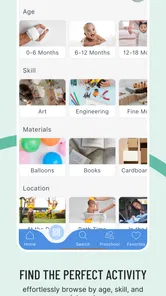
The app focuses on a variety of activity ideas rather than a single type of game or lesson. Depending on the available content, users may find crafts, educational exercises, sensory play, creative projects, indoor activities, outdoor suggestions, and ideas for developing different skills. It is worth browsing the categories and descriptions first to see whether they match your child’s age and interests.
Is Inspired Minds: Activity Ideas suitable for different age groups?
The app can be helpful for children at different developmental stages, but not every activity will be appropriate for every age. Some projects may require reading, fine-motor control, concentration, or adult supervision, while others are better suited to younger children. Always review the instructions, materials, and potential risks before beginning an activity with a child.
Does the app require an internet connection or additional materials?
Whether an internet connection is needed may depend on how the app stores its activity content and whether you are loading new ideas. Many suggested projects also require everyday supplies such as paper, coloring tools, glue, household objects, or outdoor materials. Check each activity in advance so you can gather everything needed and avoid interruptions during the project.
Pros
- Offers creative activity ideas for different ages and interests.
- Useful for parents
- teachers
- and caregivers seeking fresh inspiration.
- Encourages screen-free learning
- creativity
- and hands-on exploration.
- Ideas can be adapted to available materials and different skill levels.
- Simple format makes it easy to browse and choose an activity quickly.
Cons
- Some activities may require supplies that are not readily available.
- Instructions may feel too brief for more complex projects.
- The quality and usefulness of ideas can vary by activity.
- Limited appeal if you prefer structured courses or step-by-step lessons.
- Some suggestions may need adult supervision for younger children.











