Inky - Run Inkscape on Android
- 67.00
- 2.9
- Installs
- 10.00K
- Price
- $1.99
Screenshots
Analysis by Reviewed
I judge Inky - Run Inkscape on Android less as a typical phone drawing app and more as a way to bring a desktop-style vector workflow to an Android device. That distinction matters: if you want quick doodles, a simpler mobile editor may feel friendlier, but if you already think in SVGs and paths, the familiar approach can be useful. It is an Art & Design app from UserLAnd Technologies, and the key question for me is whether that desktop connection is worth the cost and the extra effort of working on a smaller screen.
What the one-time price means
Inky costs $1.99, so this is a paid app rather than a free way to try Inkscape on Android. I would treat that as a modest purchase for someone who expects to use vector editing regularly, not as an impulse download for a single quick graphic. The app is rated for Everyone, and it has an average rating of 2.9 from 492 ratings, which makes me cautious about recommending it blindly. Those figures do not tell me whether it will suit your device or workflow, so I would decide based on the kind of work you actually want to do.
Where the value comes from
The value is not simply having drawing tools on a phone. It is the possibility of working with SVG documents and continuing a project that belongs to an Inkscape workflow. That can save time when I need to inspect or adjust vector artwork away from a computer, especially if I want to preserve a document’s scalable format instead of flattening it into an image. Inky has passed 10,000 installs, but I would still approach it as a focused tool rather than a universal design suite.
For example, imagine I notice a small spacing issue in a logo while travelling. If the SVG is available on my Android device, I can use Inky to open the artwork and make a targeted edit rather than waiting until I am back at a desk. I would keep the change narrow: select the relevant object, adjust it at a comfortable zoom level, then inspect the whole page before exporting. On a touchscreen, that last check matters because a precise-looking close-up can conceal an awkward alignment in the overall composition.
Working with a desktop vector editor on a phone
First things first, downloading Inky - Run Inkscape on Android from the Play Store is a breeze. The installation process is straightforward, and you'll be ready to start creating in no time. Once you open the app, you’ll notice a familiar interface if you’ve ever used Inkscape on a PC. It’s like having your desktop on your phone, which is both exciting and a bit daunting at first. But don't worry, the app has a neat tutorial section to guide you through the basics if you're new to vector editing.
User Interface and Experience
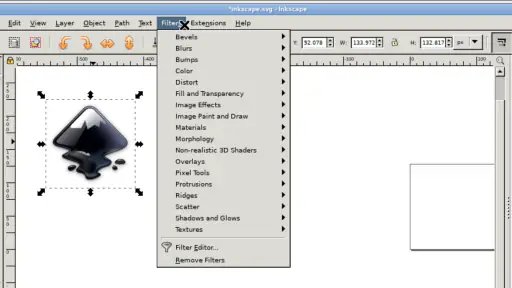
The user interface is pretty intuitive for an app that packs so much power. The toolbar is loaded with options, from basic shapes to complex path operations. You might find the small screen a bit cramped, especially if you're used to the expansive real estate of a desktop monitor. However, the developers have done a commendable job in making the tools accessible without overwhelming the user. A quick tip: using a stylus can greatly enhance your experience, making it easier to perform intricate tasks.
Navigating through the app is smooth, and the pinch-to-zoom feature works like a charm, allowing you to get up close and personal with your designs. It's impressive how responsive the app is, even when handling complex vector illustrations. There’s a slight learning curve, but once you get the hang of it, you’ll find yourself zipping through tasks with ease.
More From Our News Desk

Clash of Clans Is Won Between the Battles

Android Auto Makes the Case for Quieter Car Software

MobiOffice: Transforming Mobile Productivity with Seamless Integration

EA SPORTS FC™ Mobile Soccer: Redefining Mobile Sports Gaming

How Microsoft OneDrive Became a Mobile Productivity Giant

How Google Translate Breaks Language Barriers Effortlessly
Making SVG work portable
For a safer mobile workflow, I would keep a clean original SVG and edit a separate copy. That gives me a way back if a finger tap selects the wrong object or a small-screen adjustment changes more than intended. I would also name working copies clearly before moving between devices; that simple habit helps avoid the familiar problem of opening an older draft and assuming it is the latest one.
Inky makes most sense when the SVG itself is the important deliverable. If I only need to share a preview, exporting an image may be enough, but I would not confuse a preview with an editable source file. Keeping the vector version preserves the flexibility that makes SVG useful: objects can be revisited and scaled without treating the artwork as a fixed bitmap. For detailed finishing, though, I would still prefer a larger screen and a mouse or stylus where possible.
Features that Stand Out
One of the standout features of Inky is its capability to handle SVG files seamlessly. You can import and export them without losing any quality, which is crucial for any professional designer. The app also supports layers, enabling you to work on different components of your design individually. This feature is a lifesaver when dealing with complex illustrations, allowing for a more organized workflow.
Moreover, the compatibility with Inkscape is astounding. If you’ve started a project on your desktop, you can pick up right where you left off on your mobile device. That’s the beauty of Inky – it bridges the gap between mobile and desktop design work.
Keeping edits deliberate on touch
A useful habit with vector files is to zoom out between operations, not only at the end. At high magnification, it is easy to focus on one node or object and lose track of its relationship to the page. I would make a small change, check the silhouette or spacing at a broader view, and only then move on. This is especially valuable for logos and icons, where a tiny adjustment can affect balance even when the individual shape looks cleaner up close.
I would also avoid treating a phone session as the place to rebuild a complicated illustration from scratch. A more reliable use is to handle one clearly defined task: correct a misplaced element, adjust a simple shape, or check a document before handing it off. If an edit depends on selecting several overlapping objects precisely, a stylus and a larger display can reduce frustration; if those are not available, waiting for a computer may be the more efficient choice.
How it compares with simpler design apps
Compared with the usual quick-design and sketching apps, Inky is appealing when I need editable vector artwork rather than a fast composition built from mobile-friendly templates. A simpler app can be a better choice for adding text to a social post, arranging ready-made elements, or making a quick illustration without learning a desktop-style interface. Inky’s advantage is the Inkscape-oriented SVG workflow; its trade-off is that the interface and precision demands can feel heavier than the task calls for.
It is also not the choice I would make for every stage of a project. Brainstorming a rough idea with a finger is easier in a dedicated drawing app, while fine path adjustments and layout checks are more comfortable on a computer. I see the Android version as a useful companion for reviewing, continuing, or making contained edits—not a promise that every desktop task becomes equally pleasant on a phone.
A practical handoff between devices
For a small project that moves between a Chromebook and an Android phone, I would decide in advance which device owns the final version. After a mobile correction, I would save the revised SVG under a distinguishable name and reopen that copy on the larger workspace before making further changes. That workflow is less exciting than editing everything wherever I happen to be, but it makes it easier to spot a mistaken version and keeps a clear source to return to.
One question people often have is whether the app is useful without already knowing Inkscape. The tutorial section gives newcomers a way into the basics, but the desktop-style toolbar still asks you to learn what vector tools do. I would not expect it to feel like a guided template maker. Someone curious about paths and scalable artwork can learn gradually; someone who wants an immediate polished result with minimal setup will probably be happier with a simpler editor.
Who is likely to get their money’s worth
I would consider the purchase if I already use Inkscape, handle SVG files, and sometimes need to make a practical edit away from my computer. A hobbyist who enjoys learning vector tools may also find it worthwhile, particularly with a stylus and a tablet or Chromebook-sized workspace. The app’s current version is 25.09.05, and it requires Android 5.0 or later, so checking that your device meets the minimum requirement is a sensible first step.
I would skip it if I mainly want a polished, low-learning-curve app for casual drawing, if I rarely work with SVG, or if precise editing on a phone sounds frustrating. It is also a poor fit if I expect a mobile interface to feel as spacious as desktop software. Those users are better served by a simpler drawing or layout app for quick results, or by using Inkscape on a computer when the work depends on careful object selection and detailed alignment.
What to expect from a short session
In a realistic everyday scenario, I might be away from my desk when a colleague asks for a minor change to an existing icon. If I have the SVG on the device, I can make the adjustment in Inky, inspect the overall artwork, and send a preview so the change can be checked. I would reserve final polish for a larger screen if the request turns into a broader redesign. That distinction helps keep the app useful: it can shorten the wait for a simple correction without pretending that a phone is always the best place to finish detailed design work.
Another practical question is whether this replaces desktop Inkscape. I would not plan on that. Its appeal is access to an Inkscape-oriented vector workflow on Android, not a guarantee that a compact touchscreen is equally comfortable for every task. If your work regularly involves dense layouts, many precise selections, or long editing sessions, the computer remains the better main workspace. If you mostly need occasional continuity, the mobile option has a more convincing role.
Final Thoughts
Inky - Run Inkscape on Android is a powerful tool for anyone serious about vector graphics. While it may not completely replace the desktop version for all users, it certainly offers a handy solution for creating and editing on the go. Whether you're a professional designer or a hobbyist, having this kind of power in your pocket is a game-changer.
So, if you’re looking to enhance your mobile design capabilities, give Inky a try. It might just become your go-to app for vector editing. Who knew you could have so much design power at your fingertips?
My buy-or-skip verdict
At $1.99, I think Inky is easiest to justify when its specific SVG and Inkscape connection solves a recurring problem for you. The price is small, but the real cost is adapting to a dense desktop-oriented workflow on a touch screen. I would buy it for occasional, purposeful edits and file continuity; I would skip it for casual artwork or as a complete substitute for desktop design. That is the distinction that makes this app useful to the right person, rather than automatically right for everyone.
Inky - Run Inkscape on Android Frequently Asked Questions
Is Inky free to download, and what should I know about the app before installing it?
Inky is a paid Art & Design app that costs $1.99. It brings Inkscape to Android devices and Chromebooks, so it is aimed at people who want to work with vector graphics rather than use a general drawing app. Its age rating is Everyone, and its current version is 25.09.05. Check that your device runs Android 5.0 or later before downloading.
Can I use Inky on a Chromebook as well as an Android phone or tablet?
Yes. Inky is intended to run Inkscape on Android devices and Chromebooks, giving users another way to access the vector editor outside a traditional desktop setup. The experience may feel more comfortable on a larger screen, especially when working with detailed artwork, but suitability can still depend on the device and how you prefer to interact with the interface.
What is Inky and how does it work on Android?
Inky is an innovative app allowing users to run Inkscape, a popular vector graphic editor, directly on Android devices. It provides a user-friendly interface optimized for touchscreen interactions, making it convenient for artists and designers to create and edit vector graphics on-the-go. With Inky, you can enjoy the full functionality of Inkscape without needing a desktop environment.
Are there any limitations to using Inky on Android compared to the desktop version of Inkscape?
While Inky brings the powerful features of Inkscape to Android, there may be some limitations due to the hardware and software constraints of mobile devices. Users might experience reduced performance on older devices and certain desktop features may not be fully optimized for mobile use. However, Inky is continuously updated to enhance compatibility and performance on Android.
Is Inky compatible with all Android devices?
Inky aims to support a wide range of Android devices, but compatibility may vary depending on the device's specifications. It works best on devices with larger screens and higher processing power. Users are encouraged to check the app's requirements in the Google Play Store to ensure their device meets the necessary specifications before downloading.
Pros
- User-friendly interface for beginners
- Supports SVG file formats
- Offers layers and grouping
- Includes a wide range of tools
- Free to download and use
Cons
- Limited advanced features
- Performance issues on older devices
- Occasional crashes reported
- Requires a stylus for precision
- Limited community support

- Category
- Art & Design
- Version
- 25.09.05













